
Parameters
This section lets you define all the parameters that you require in your StyleBook to create a configuration. It describes the input that your StyleBook takes. Although this section is optional, most StyleBook might need one. You can consider the parameters section to define the fields for the users who use the StyleBook to create a configuration on a NetScaler instance.
When you import your StyleBook into NetScaler Console and use it to create a configuration, the GUI uses this section of the StyleBook to display a form. This form takes an input for the defined parameter values.
The following section describes the attributes that you need to specify for each parameter in this section:
Related information
'name'
The name of the parameter you want to define. You can specify an alphanumeric name.
The name must begin with an alphabet, and can include more alphabets, numbers, hyphen (-), or underscore (_).
When writing a StyleBook, you can use this
name attribute to refer to the parameter in other sections by using the notation $parameters.\<name>.
Mandatory? Yes
'label'
A string that is displayed in the NetScaler Console GUI as the name of this parameter.
Mandatory? No
'description'
A help string that describes what the parameter is used for. The NetScaler Console GUI displays this text when the user clicks the help icon for this parameter.
Mandatory? No
'type'
The type of value these parameters can take. Parameters can be of any of the following built-in types:
-
string: An array of characters. If a length is not specified, the string value can take any number of characters. However, you can limit the length of a string type by using the attributes min-length and max-length. -
number: An integer number. You can specify the minimum and maximum number that this type can take by using the attributes min-value and max-value. -
boolean: Can be either true or false. YAML considers all the literals as booleans (for example, Yes or No). -
ipaddress: A string that represents a valid IPv4 or IPv6 address. -
ipnetwork: It has two parts. First part is the IP address and second part is the netmask.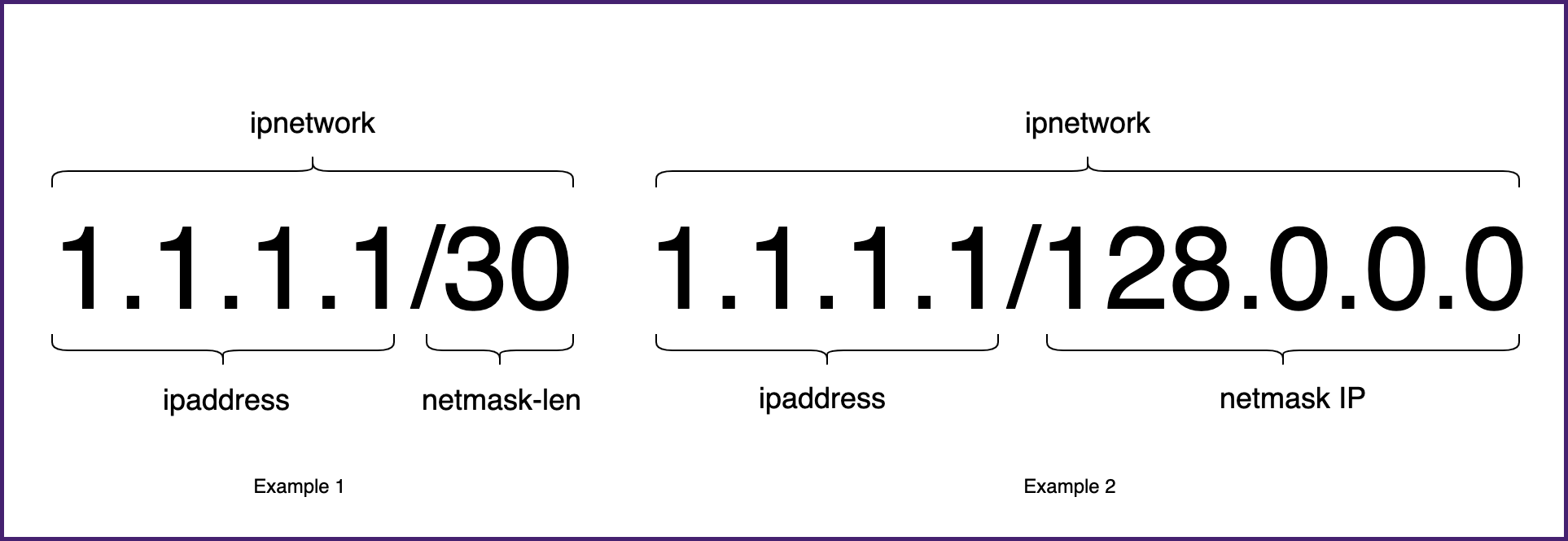 The netmask consists of netmask length (
netmask-len) or netmask IP address (netmask_ip). The netmask length is an integer between 0-32 and 0–128 for an IPv6 address. It is used to determine the IP addresses count in a network.When creating or updating a configuration pack from the NetScaler Console GUI, you can do one of the following actions:-
Enable Netmask Length and input the IP address and netmask length
-
Disable Netmask Length and input the IP address and netmask IP address
-
-
tcp-port: A number between 0 and 65535 that represents a TCP or UDP port. -
password: Represents an opaque/secret string value. When the NetScaler Console GUI displays a value for this parameter, it is shown as asterisks (*****). -
certfile: Represents a certificate file. This value allows you to upload the files directly from your local system when you are creating a StyleBook configuration using the NetScaler Console GUI. The uploaded certificate file is stored in the directory/var/mps/tenants/\<tenant_path>/ns_ssl_certsin NetScaler Console.The certificate file is added to the list of certificates managed by NetScaler Console. -
keyfile: Represents a certificate key file. This value allows you to upload the file directly from your local system when you are creating a StyleBook configuration using the NetScaler Console GUI. The uploaded certificate file is stored in the directory/var/mps/tenants/\<tenant_path>/ns_ssl_keysin NetScaler Console.The certificate key file is added to the list of certificate keys managed by NetScaler Console. -
certkey: This type is used to select SSL certificates from the NetScaler Console certificate store. This store lists the existing SSL certificates that are uploaded to your NetScaler Console server. So, you can store SSL certificates at one place that is the NetScaler Console certificate store and reuse them whenever required.When creating a configuration pack, a user can add or select SSL certificates from the certificate store. Also, the user can select the same certificate for multiple config packs. -
file: Represents a file. -
object: This type is used to group several related parameters under a parent element. Specify the parent parameter the type as "object". A parameter of type "object" can have a nested "parameters" section to describe the parameters it contains. -
another StyleBook: When you use this type of parameter, then this parameter expects its value to be in the form of the parameters defined in the StyleBook denoting its type.
A parameter can also have a
type that is the list of types. To do so, add [] at the end of the type. For example, if the type attribute is string[], this parameter takes a list of strings as input. You can provide one, two, or several strings for this parameter when creating a configuration from this StyleBook.
Mandatory? Yes
'network'
For
type: ipaddress, you can specify the network attribute to auto-allocate an IP address from an NetScaler Console IPAM network.
NetScaler Console auto-allocates an IP address from the
network attribute when you create a StyleBook configuration.
Example:
name: virtual-ip
 label: "Load Balancer IP Address"
 type: ipaddress
 network: "network-1"
 required: true
In this example, the
virtual-ip field auto-allocates an IP address from network-1. The IP address is released back to the network when the configuration is deleted.
'dynamic-allocation'
The
dynamic-allocation attribute is added in the parameter definition of type:ipaddress. Use this attribute to dynamically list the NetScaler Console IPAM networks. This attribute can take either true or false as an input. For type: ipaddress, specify the dynamic-allocation: true attribute to dynamically list the NetScaler Console IPAM networks that are in NetScaler Console. In the configuration pack creation form, you can do the following:
-
Select the required IPAM network from the list.
-
Specify an IP address that you want to allocate from the selected IPAM network.If no IP address is specified, the NetScaler Console auto-allocates an IP address from the selected IPAM network.
Example:
-
   name: virtual-ip
   label: "Load Balancer IP Address"
   type: ipaddress
   dynamic-allocation: true
   required: true
In this example, the
virtual-ip field lists the NetScaler Console IPAM networks that are in NetScaler Console. Select a network from the list to auto-allocate an IP address from the network. The IP address is released back to the network when the configuration is deleted.
'key'
Specify true or false to indicate if this parameter is a key parameter for the StyleBook.
A StyleBook can have one or more parameters defined as the "key" parameter. The Configuration > Config Packs page displays the parameter's value as a Display Key.
When you create different config packs from the same StyleBook, each configuration can have a different value for this parameter. This value appears as the display key on the GUI. With this key, you can sort or filter the configuration pack.
Example:
parameters:
   - name: example-appname
     type: string
     label: Application Name
     required: true
     key: true
When a StyleBook user creates a configuration pack, the value for the parameter
example-appname appears as the display key. The StyleBook user can use this key to identify this configuration pack.
Note
The Config Key of a configuration pack overwrites the key attribute set on any of its parameters. So, if a user enters a value for the Config Key, this value appears in the Display Key column.
Default value is false.
Mandatory? No
'required'
Specify true or false to indicate whether a parameter is mandatory or optional. If it is set to true, the parameter is mandatory and the user has to provide a value for this parameter when creating configurations.
The NetScaler Console GUI forces the user to provide a valid value for this parameter.
Default value is false.
Mandatory? No
'allowed-values'
Use this attribute to define a list of valid values for a parameter, when the type is set to "string."
When creating a configuration from the NetScaler Console GUI, the user is prompted to select a parameter value from this list. This list is static, the user can only select a value from the list. If you want to allow the user to add values to the list, use the
allow-new-values attribute.
Note
If you want to display the list values as radio options, set the
layout attribute.
Example 1:
-
       name: ipaddress
       type: string
       allowed-values:
             -  SOURCEIP
             -  DEST IP
             -  NONE
Example 2:
-
       name: TCP Port
       type: tcp-port
       allowed-values:
             -  80
             -  81
             -  8080
Example 3:
List of
tcp-ports, where each element of the list can only have values specified in allowed-values.
-
       name: tcpports
       type: tcp-port[]
       allowed-values:
             -  80
             -  81
             -  8080
             -  8081
Mandatory? No
'allow-new-values'
Use this attribute to add a dynamic list for a parameter. When creating or updating a configuration from the NetScaler Console GUI, the user can add values to the list.
Specify true if you want the user to add a value to the parameter list. You can use the
allow-new-values and allowed-values attributes in a combination. This combination allows you to define a list of suggested values for a parameter and also accept new values.
-
       name: port
       type: tcp-port
       allowed-values:
             -  80
             -  81
             -  8080
       allow-new-values: true
In this example, a user can either select from 80, 81, 8080, or enter a new value for the parameter
port while creating or updating a configuration pack.
'default'
Use this attribute to assign a default value to an optional parameter. When a user creates a configuration without specifying a value, the default value is used.
The parameter takes no value if the following conditions are met:
-
The parameter has no default value.
-
A user does not provide a value for the parameter.
Example 1:
-
       name: timeout
       type: number
       default: 20
Example 2:
To list the default values of the parameter:
-
       name: protocols
       type: string[]
       default:
             -  TCP
             -  UDP
             -  IP
Example 3:
-
       name: timeout
       type: number
       default: 20
Example 4:
-
       name: tcpport
       type: tcp-port
       default: 20
Mandatory? No
'pattern'
Use this attribute to define a pattern (regular expression) for the valid values of this parameter, when the type of the parameter is "string."
Example:
-
       name: appname
       type: string
       pattern: "[a-z]+"
Mandatory? No
'min-value'
Use this attribute to define the minimum value for parameters of type
number or tcp-port.
Example:
-
       name: audio-port
       type: tcp-port
       min-value: 5000
The
min-value of numbers can be negative. However, the min-value for tcp-port must be positive.
Mandatory? No
'max-value'
Use this attribute to define the maximum value for parameters of type
number or tcp-port.
Ensure the maximum value is greater than the minimum value, if defined.
Example:
-
       name: audio-port
       type: tcp-port
       min-value: 5000
       max-value: 15000
Mandatory? No
'min-length'
Use this attribute to define the minimum length of values accepted for a parameter of type "string."
Ensure the minimum length of the characters defined as values are greater or equal to zero.
Example:
-
       name: appname
       type: string
       min-length: 3
Mandatory? No
'max-length'
Use this attribute to define the maximum length of values accepted for a parameter of type "string."
Ensure the maximum length of the values are greater or equal to the length of the characters defined in
min-length.
Example:
-
       name: appname
       type: string
       max-length: 64
Mandatory? No
'min-items'
Use this attribute to define the minimum number of items in a parameter that is a list.
Ensure the minimum number of items are greater or equal to zero.
Example:
-
       name: server-ips
       type: ipaddress[]
       min-items: 2
Mandatory? No
'max-items'
Use this attribute to define the maximum number of items in a parameter that is a list.
Ensure the maximum number of items are greater than the minimum number of items if defined.
Example:
-
       name: server-ips
       type: ipaddress[]
       min-items: 2
       max-items: 250
Mandatory? No
'gui'
Use this attribute to customize the layout of the parameter in the NetScaler Console GUI.
Mandatory? No
'columns'
This attribute is a subattribute of the
gui attribute. Use this attribute to define the number of columns to display the type: object[] parameters in the NetScaler Console GUI.
Mandatory? No
'updatable'
This attribute is a subattribute of the
gui attribute. Use this attribute to specify whether the parameter can be updated after the configuration is created. Set this attribute only on simple parameter types such as string, boolean, or number.
If the value is set to
false, the parameter field is grayed out when you update the configuration.
Mandatory? No
'collapse_pane'
This attribute is a subattribute of the
gui attribute. Use this attribute to specify whether the pane defining the layout of this object parameter is collapsible.
If the value is set to true, the user can expand or collapse the child parameters under this parent parameter.
Example:
gui:

  collapse_pane: true

  columns: 2
Example of a complete parameters section:
 parameters:

    -

       name: name

       label: Name

       description: Name of the application

       type: string

       required: true

    -

       name: ip

       label: IP Address

       description: The virtual IP address used for this application

       type: ipaddress

       required: true

    -

       name: svc-servers

       label: Servers

       type: object\[\]

       required: true

       parameters:

         -

               name: svc-ip

               label: Server IP

               description: The IP address of the server

               type: ipaddress

               required: true

         -

               name: svc-port

               label: Server Port

               description: The TCP port of the server

               type: tcp-port

               default: 80

         -

               name: lb-alg

               label: LoadBalancing Algorithm

               type: string

               allowed-values:

                  - ROUNDROBIN

                  - LEASTCONNECTION

               default: ROUNDROBIN

         -

               name: enable-healthcheck

               label: Enable HealthCheck?

               type: boolean

               default: true
The following is an example that defines all the attributes of a list and the values explained in earlier sections:
         -
               name: features-list

               type: string[]

               min-length: 1

               max-length: 3

               min-items: 1

               max-items: 3

               pattern: "\[A-Z\]+"

               allowed-values:

                 - SP

                 - LB

                 - CS

               default:

                 - LB
'layout'
This attribute is a subattribute of the
gui attribute. Use this attribute to display the list values as radio buttons. Set the layout attribute to radio in the parameter section of a StyleBook definition. It applies to the parameter that has the allowed-values attribute. When you create a configuration pack, the NetScaler Console GUI displays the values in the allowed-values list as radio buttons.
Example:
-
     gui:
         layout: radio
     allowed-values:
         - One
         - Two
         - Three
The One, Two, and Three values appear as radio buttons in the NetScaler Console GUI.
'dependent-parameters'
This attribute is a subattribute of the
gui attribute. It dynamically controls the parameter’s appearance or its initial value in the StyleBook configuration form based on the value specified in another parameter.
Specify this attribute on a source parameter that controls the parameter’s behavior on the form. You can include multiple conditions that control other parameters. For example, a source parameter
protocol can have a dependent-parameter certificate, which only appears if the protocol parameter value is SSL.
Each condition can have the following attributes:
-
target-parameter: Specify the target parameter to which this condition applies.
-
matching-values: Specify the list of values of the source parameter that trigger the action.
-
action: Specify one of the following actions on the targeted parameter:
-
read-only: The parameter is made read-only. -
show: The parameter appears in the form if it is hidden. -
hide: The parameter is removed from the form. -
set-value: The parameter value is set to the value specified in the value attribute.
-
-
value: The value of the target parameter if the action is
set-value.
When a user input matches the specified values on the source parameter, the target parameter’s appearance or value changes according to the specified action.
Example:
 -
     name: lb-virtual-port
     label: "Load Balanced App Virtual Port"
     description: "TCP port representing the Load Balanced application"
     type: tcp-port
     gui:
       updatable: false
       dependent-parameters:
             -
               matching-values:
                 - 80
               target-parameter: $parameters.lb-service-type
               action: set-value
               allowed-values:
               - HTTP
               - TCP
               - UDP

     default: 80
In this example, the dependent parameter is specified under the
lb-virtual-port parameter (source parameter).
When the source parameter value is set to
80, the lb-service-type parameter triggers the set-value action. As a result, a user is allowed to select one of the following options:
-
HTTP
-
TCP
-
UDP
is_policy_expression
This attribute is a subattribute of the
gui attribute. Use this attribute to enable the policy expression editor to compose a policy expression. Set the is_policy_expression to true in the parameter definition. This attribute can be used only on parameters of type 'string'.
Example:
parameters:
   -

     name: expression
     type: string
     label: Expression
     required: true
     gui:
       is_policy_expression: true