
App-based provisioning in AWS
NetScaler Console service introduces "App based” provisioning, designed to streamline and simplify NetScaler deployments on cloud data centers and deliver applications from them.
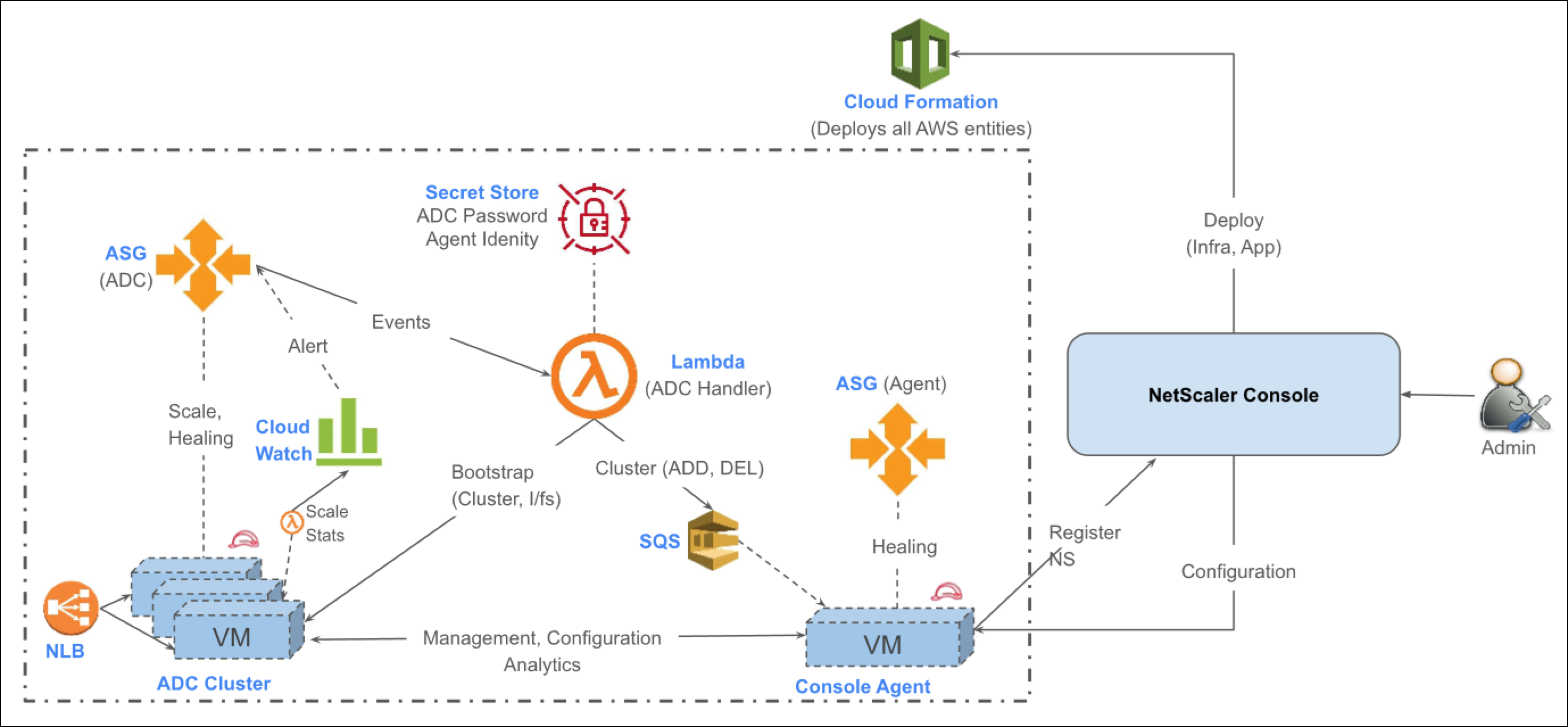
NetScaler Console service accepts the customer’s cloud credentials and sets up the infrastructure required for application delivery by orchestrating the launching of NetScaler, agents and the necessary cloud entities on AWS. NetScaler administrators can leverage both Flexed and Cloud marketplace licenses for their NetScaler, ensuring flexibility in licensing options.
Administrators can then deliver applications on their cloud by defining delivery settings in a straightforward, app centric manner from NetScaler Console service. It then takes care of configuring both ADCs and AWS infrastructure to deliver their applications. Once the applications are delivered, NetScaler administrators gain access to the rich analytics and monitoring features of the NetScaler Console service to effectively manage and monitor their applications.
Related information
Prerequisites
Subscribe to the following products in the AWS Marketplace.
-
NetScaler VPX - Subscribe to one of the following variants:
-
NetScaler VPX BYOL - Subscribe if you have purchased flexed licenses, and they are available in NetScaler Console service for licensing NetScaler instances.
-
NetScaler VPX Premium - 1000 Mbps Subscribe if you want a subscription based license from the AWS Marketplace.
-
-
Select a VPC - Select a VPC for setting up the infrastructure for application delivery. The VPC should have a CIDR of /22 or more. During the infrastructure deployment process dedicated subnets for ADC infrastructure are created consuming /24 address space for each Availability zone selected. Select a VPC from the list based on your deployment:
-
Dedicated VPC that is separate from the applications, if you want your deployment to be similar to a DMZ.
-
Same VPC where the applications are also present.
-
-
NAT Gateway - The delivery infrastructure, such as the Console agent, that is autoprovisioned must have access to NetScaler Console service over the internet. A NAT gateway can provide this access. If you already have a NAT gateway you can also reuse that for delivery infrastructure by selecting it during the deployment. If a NAT gateway is not selected, the deployment process creates one.
Cloud access profile
A cloud access profile is used to give permissions of the customer's AWS account to NetScaler Console service. While creating a cloud access profile the administrator must run a CloudFormationTemplate (CFT) in AWS. The CFT creates IAM roles and policies in the customer's AWS account.
-
Navigate to Infrastructure > Provisioning > App based > Cloud Access Profiles.
-
Follow the on-screen directions to create a cloud access profile for your subscription.
Note:
To create this profile, the NetScaler administrator must also be the AWS account administrator and must have the necessary permissions to create IAM entities.
App environment
App Environment represents the delivery infrastructure set up in a VPC for delivering the applications. When an administrator creates an App Environment in the NetScaler Console service, all the resources for delivering and monitoring applications, including gateways, security groups, subnets, NetScaler instances, and Console agents, are deployed as part of an App Environment. See the FAQ section for more information.
-
Navigate to InfraStructure > Provisioning > App based > Environments.
-
Follow the on-screen directions to create an App Environment.
Note:
The service does not make any changes to the resources created by the customer in their VPC. It only provisions the necessary infrastructure to deliver and monitor the applications.
Application delivery
Application delivery is the core component of the App based provisioning feature and contains the mandatory application delivery and security information. As part of application delivery configuration you define the following entities:
-
The endpoint representing how the application is accessed by the clients, such as protocol, port, certificates, and ciphers. For example, an SSL profile of an endpoint represents the set of SSL configurations that includes the supported ciphers and protocols. A predefined A+ SSL profile is available by default.
-
The services that represent an application’s component, which must be accessed based on the specific HTTP request. For example, a component for an ecommerce application could be an order service, a catalog service, or a payment service that are installed in different application servers and requests must be routed based on the URL accessed. The service profile of an application service represents how the delivery infrastructure can access and monitor the application service, such as load balancing, SSL, and health check settings.
-
The content policy that defines how the L7 content is inspected and modified when a request arrives for a specific service. It is used to take a predefined action on the HTTP requests based on headers, URLs, or IP addresses. Some of the actions could be header enrichment, redirecting requests, or dropping requests.
-
Navigate to InfraStructure > Provisioning > App based > App Delivery.
-
Follow the on-screen directions to create a new application.
FAQs
What entities are created by NetScaler Console service for delivering an application in the cloud?
NetScaler Console service creates the following entities in the customer’s VPC:
-
NetScaler VPX cluster in each Availability Zone.
-
The VPX instances are deployed as an EC2 Autoscale™ group.
-
A single node cluster is created during App Environment creation. This cluster can scale up to a maximum of 8 nodes.
-
-
Console agent in each Availability Zone.
-
Subnets: One subnet each for management, client, and server networks.
-
Security groups: One security group each for management, client, and server NICs.
-
Management security group: This security group is associated with the management NICs of the NetScaler instances and agents. It consists of rules to allow communication between NetScaler instances, agents, and any other control plane traffic.
-
Client security group: This security group is associated with the client NICs of the NetScaler instances and is used to allow the data traffic to the NetScaler virtual servers.
-
Server security group: This security group is associated with the server NICs of the NetScaler instances and does not contain any default rules.
-
-
Route tables
-
Client route table: This route table facilitates the internet-bound traffic. It includes a route directing traffic to the Internet Gateway associated with the VPC, which enables connectivity to the internet for resources within the VPC.
-
Management route table: This route table facilitates traffic originating from NetScaler and agents for Network Address Translation (NAT) by the NAT Gateway.
-
-
NAT gateway in each Availability Zone: A NAT gateway enables NetScaler and Console agents to access the internet.Note:A NAT gateway is not created if you want to reuse an existing NAT gateway in their VPC.
-
Secrets manager: A secret manager is used to:
-
Store the agent token and URL that is used for registering the agent with NetScaler Console service.
-
Store the ADC password for authentication.
-
-
Lambda functions
-
ClusterLambdaFunction: This lambda function is responsible for the creation and management of the NetScaler cluster.
-
StatsLambdaFunction: This lambda function is created for collecting metrics from NetScaler that are used for autoscaling.
-
What are the metrics used to Autoscale NetScaler?
The following metrics are used to Autoscale NetScaler:
-
The minimum number of instances in the Autoscale group is 1 and the maximum is 8.
-
Scale-Out by 1 capacity unit. That is, cpu_use > 70% or throughput > 70% for 5 consecutive periods of 60 seconds.
-
Scale-In by 1 capacity unit. That is, cpu_use =< 30% and throughput =< 30% for 5 consecutive periods of 60 seconds.
How can an administrator identify the resources created by NetScaler Console service in the cloud?
All AWS resources are created by default with the tag “UsedFor: AppDeliveryByNetScaler”. In addition, the resources are tagged using the tags specified during the App Environment creation workflow.
How can a NetScaler administrator upgrade NetScaler in an App Environment?
Perform the following steps to upgrade NetScaler:
-
From the AWS console, disable dynamic scaling for the Autoscale group created for the App Environment.Naming convention:
Adc-<App Environment Name>-<Availability Zone>-<random alphanumeric string>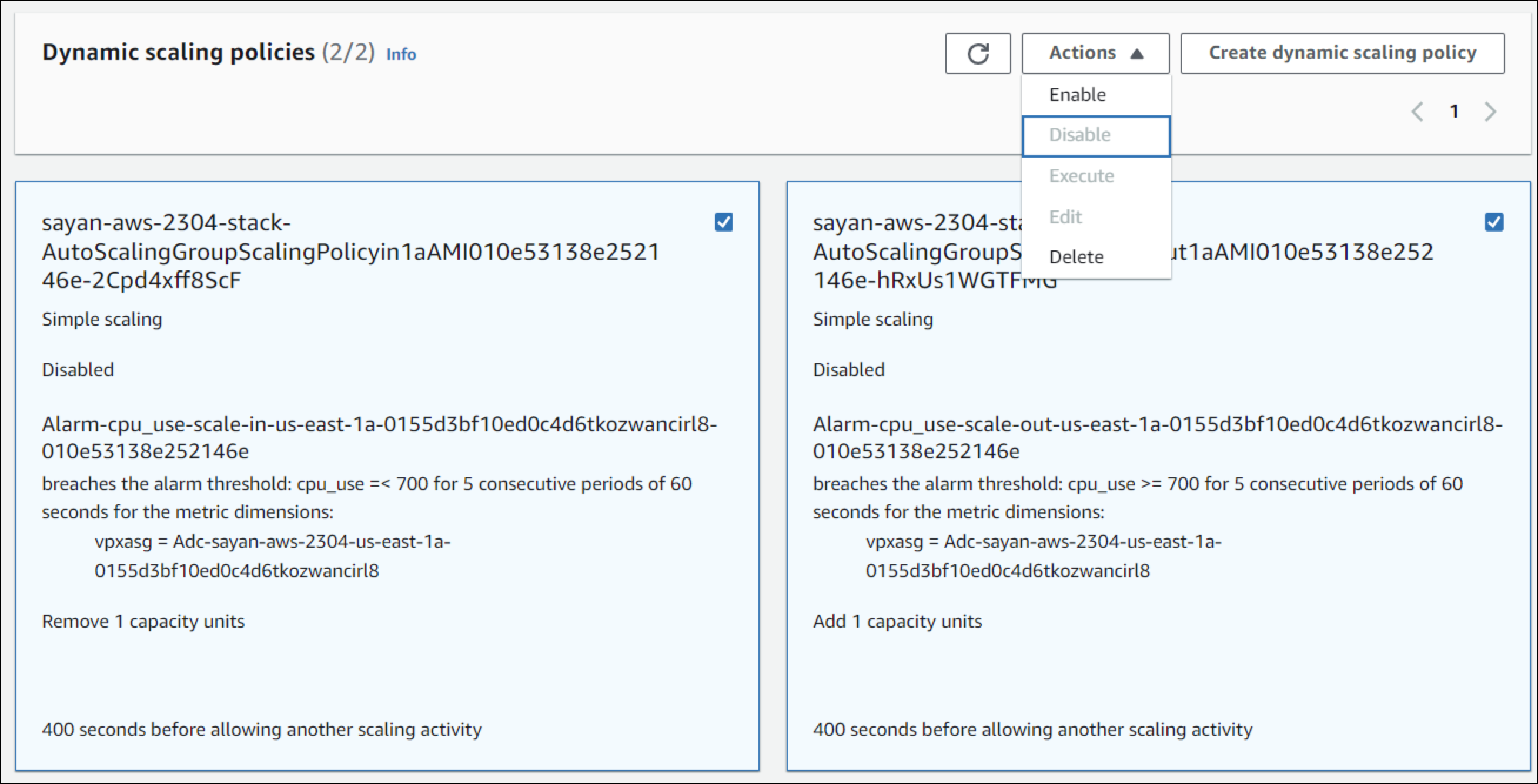
-
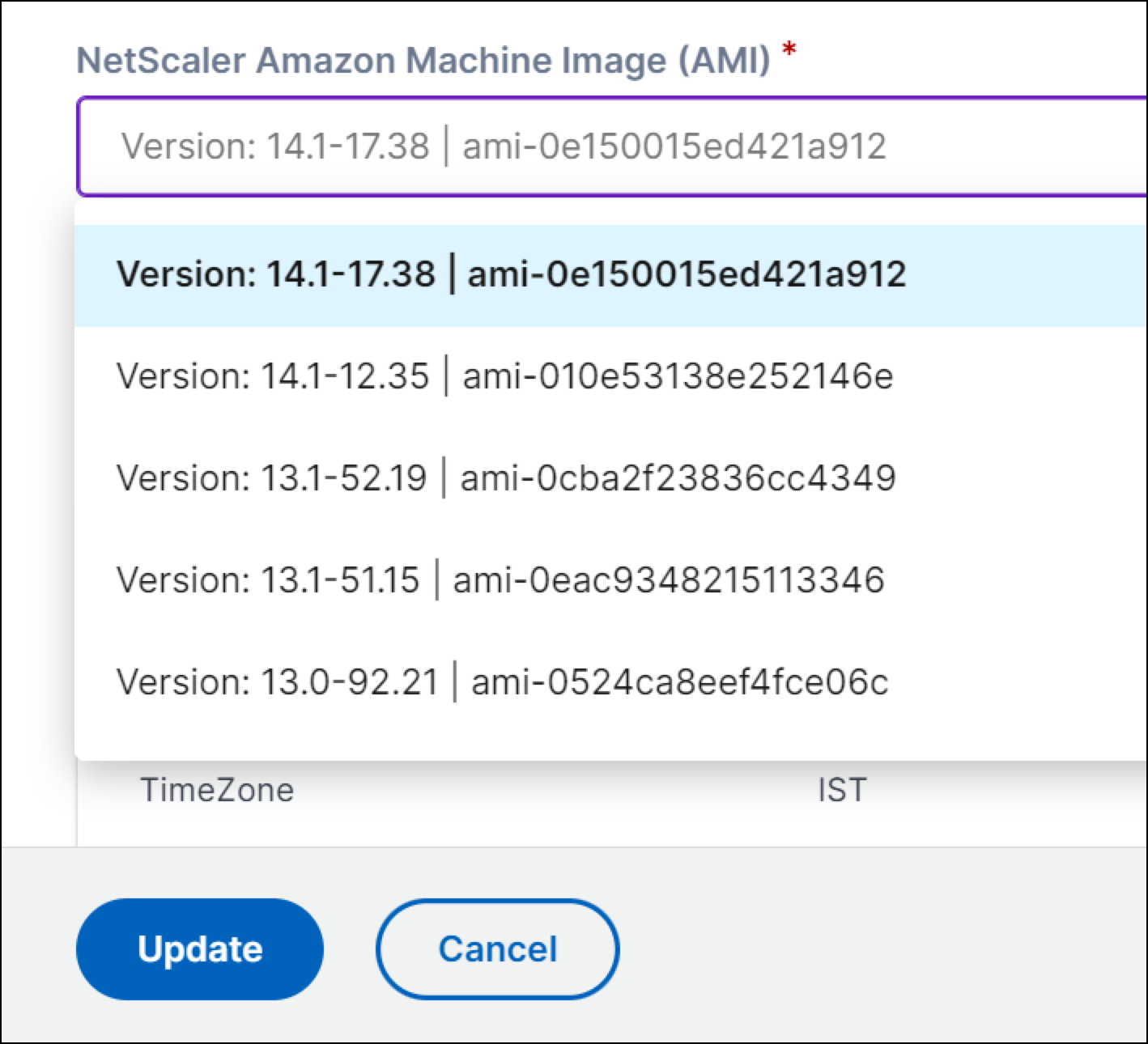
From the NetScaler Console service, update the AMI details to the ADC version to which the NetScaler is being upgraded to, using the Edit option for the App Environment.
-
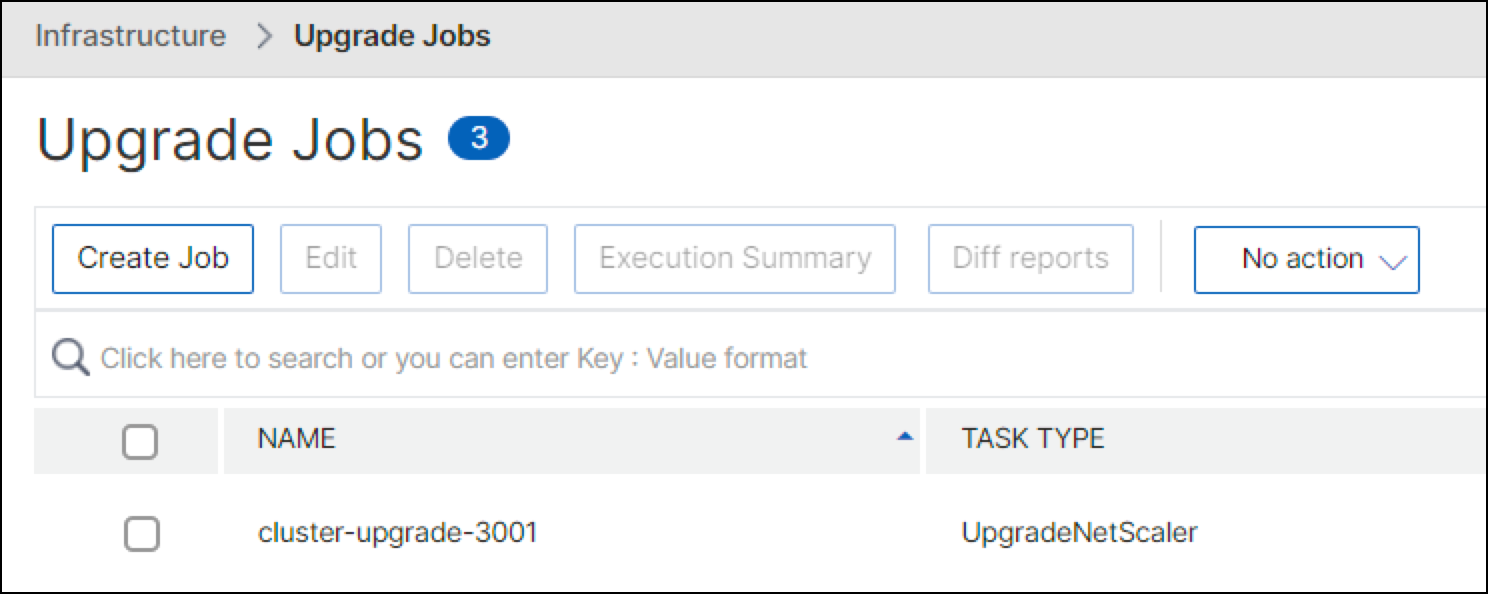
From NetScaler Console service, upgrade ADCs using the Upgrade Job feature.
-
From the AWS Console, re-enable dynamic scaling for the Autoscale group.