
Manage the Kubernetes cluster for Service Graph
Kubernetes (K8s) is an open source container orchestration platform that automates the deployment, scaling, and management of cloud-native applications.
Note
-
{{page.adm-product-name-short}} supports the visibility of clusters for Service graph with Kubernetes version 1.14–1.23.
You can specify the following aspects of Kubernetes integration in {{page.adm-product-name-short}}:
-
Cluster – You can register or unregister Kubernetes clusters for which {{page.adm-product-name-short}} monitors all microservices and populates the Service graph. When you register a cluster in {{page.adm-product-name-short}}, specify the Kubernetes API server information. Then, select an agent that can reach the Kubernetes cluster.
Before you begin
To monitor and visualize your microservices on Kubernetes clusters and get started on Service Graph, ensure you have:
-
Kubernetes cluster in place.
-
The agent installed and configured to enable communication between {{page.adm-product-name-short}} and Kubernetes cluster or managed instances. You can use the managed instances that are present in your data center or cloud.
-
Kubernetes cluster registered in {{page.adm-product-name-short}}.
Configure {{page.adm-ads-agent-short}} to register with Kubernetes cluster
To enable communication between Kubernetes cluster and {{page.adm-product-name-short}}, you must install and configure an agent. You can deploy an agent on the following platforms:
-
Hypervisor (ESX, XenServer®, KVM, Hyper-V)
-
Public Cloud Services (such as Microsoft Azure, AWS)
Follow the procedure to configure an agent.
Note
You can also use an existing agent if one is already deployed.
Configure the {{page.adm-product-name-short}} with a secret token to manage a Kubernetes cluster
For {{page.adm-product-name-short}} to be able to receive events from Kubernetes, you need to create a service account in Kubernetes for {{page.adm-product-name-short}}. And, configure the service account with the necessary RBAC permissions in the Cluster.
-
Create a service account for {{page.adm-product-name-short}}. For example, the service account name can be
citrixadm-sa. To create a service account, see Use Multiple Service Accounts. -
Use the
cluster-adminrole to bind the {{page.adm-product-name-short}} account. This binding grants aClusterRoleacross the cluster to a service account. The following is an example command to bind acluster-adminrole to the service account.kubectl create clusterrolebinding citrixadm-sa-admin --clusterrole=cluster-admin --serviceaccount=default:citrixadm-saAfter binding the {{page.adm-product-name-short}} account to thecluster-adminrole, the service account has the cluster-wide access. For more information, seekubectlcreateclusterrolebinding. -
Obtain the token from the created service account.For example, run the following command to view the token for the
citrixadm-saservice account:kubectl describe sa citrixadm-sa -
Run the following command to obtain the secret string of the token:
kubectl describe secret <token-name>
Add the Kubernetes cluster in
After you configure an agent and configure static routes, you must register the Kubernetes cluster in {{page.adm-product-name-short}}.
To register the Kubernetes cluster:
-
Log on to {{page.adm-product-name-short}} with administrator credentials.
-
Navigate to Orchestration > Kubernetes > Cluster. The Clusters page is displayed.
-
Click Add.
-
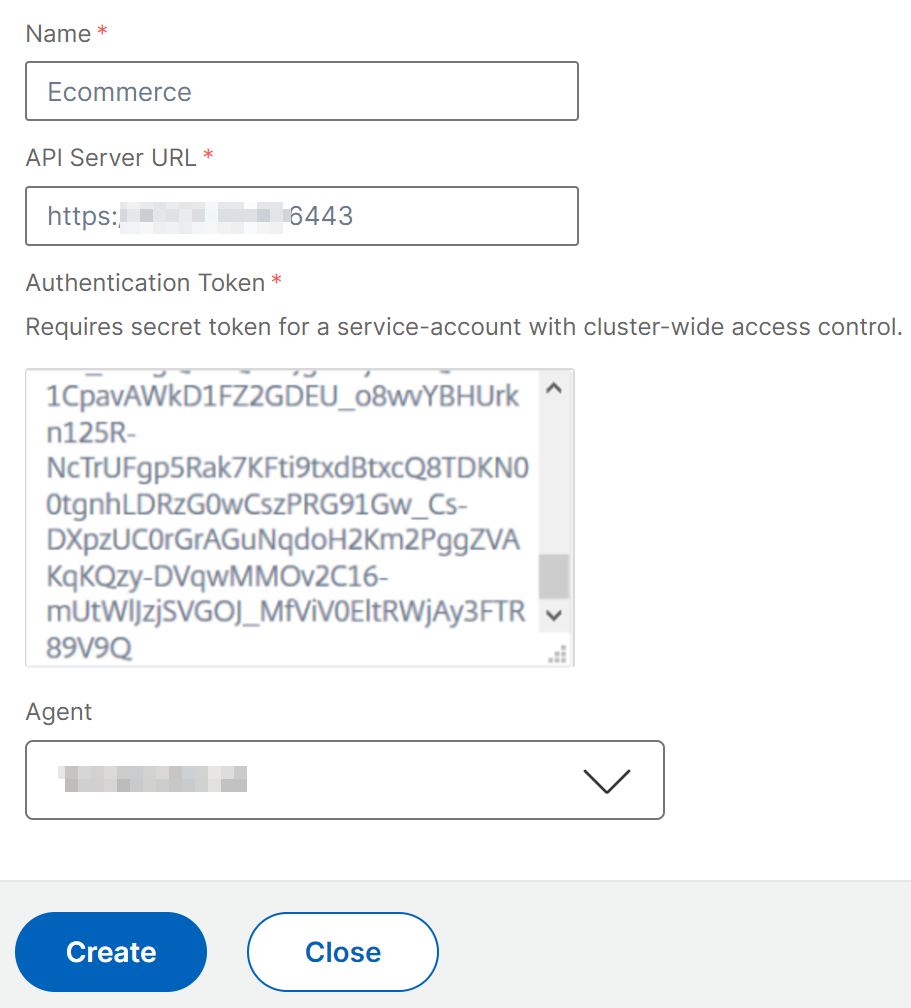
In the Add Cluster page, specify the following parameters:
-
Name - Specify a name of your choice.
-
API Server URL - You can get the API Server URL details from the Kubernetes Master node.
-
On the Kubernetes master node, run the command
kubectl cluster-info.
-
Enter the URL that displays for "Kubernetes master is running at."
-
-
Authentication Token - Specify the authentication token string obtained while you configure {{page.adm-product-name-short}} to manage a Kubernetes cluster. The authentication token is required to validate access for communication between Kubernetes cluster and {{page.adm-product-name-short}}. To generate an authentication token:
-
On the Kubernetes master node, run the following commands:
kubectl describe secret <token-name> -
Copy the token that is generated and paste it as the Authentication TokenFor more information, see Kubernetes documentation.
-
-
Select the agent from the list.
-
Click Create.
-