
NetScaler Global Load Balancing for Hybrid and Multi-Cloud Deployments
The NetScaler hybrid and multi-cloud global load balancing (GLB) solution enables you to distribute application traffic across multiple data centers in hybrid clouds, multiple clouds, and on-premises deployment. The NetScaler hybrid and multi-cloud GLB solution helps you to manage your load balancing setup in hybrid or multi-cloud without altering the existing setup. Also, if you have an on-premises setup, you can test some of your services in the cloud by using the NetScaler hybrid and multi-cloud GLB solution before completely migrating to the cloud. For example, you can route only a small percentage of your traffic to the cloud, and handle most of the traffic on-premises. The NetScaler hybrid and multi-cloud GLB solution also enables you to manage and monitor NetScaler instances across geographic locations from a single, unified console.
A hybrid and multi-cloud architecture can also improve the overall enterprise performance by avoiding "vendor lock-in" and using different infrastructure to meet the needs of your partners and customers. With multiple cloud architectures, you can manage your infrastructure costs better as you now have to pay only for what you use. Also scale your applications better as you now use the infrastructure on demand. It also provides the ability to quickly switch from one cloud to another to take advantage of the best offerings of each provider.
Architecture of the NetScaler Hybrid and Multi-Cloud GLB Solution
The following diagram illustrates the architecture of the NetScaler hybrid and multi-cloud GLB feature.
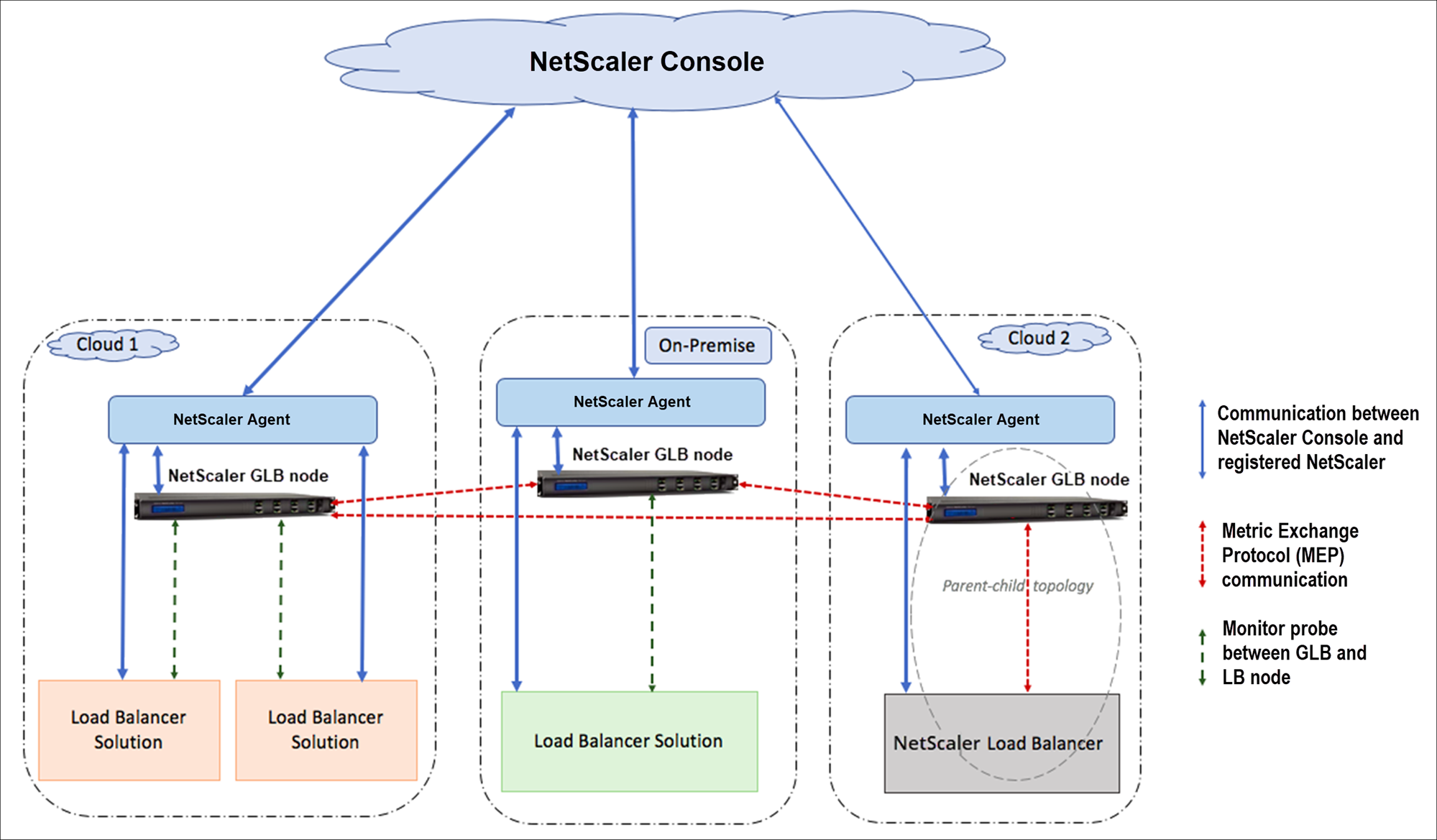
The NetScaler GLB nodes handle the DNS name resolution. Any of these GLB nodes can receive DNS requests from any client location. The GLB node that receives the DNS request returns the load balancer virtual server IP address as selected by the configured load balancing method. Metrics (site, network, and persistence metrics) are exchanged between the GLB nodes using the metrics exchange protocol (MEP), which is a proprietary Citrix protocol. For more information on the MEP protocol, see Configuring the Metrics Exchange Protocol.
The monitor configured in the GLB node monitors the health status of the load balancing virtual server in the same data center. In a parent-child topology, metrics between the GLB and NetScaler nodes are exchanged by using MEP. However, configuring monitor probes between a GLB and NetScaler LB node is optional in a parent-child topology.
The agent enables communication between the NetScaler Console and the managed instances in your data center. For more information on agents and how to install them, see Getting Started.
Note
This document makes the following assumptions:
-
If you have an existing load balancing setup, it is up and running.
-
A SNIP address or a GLB site IP address is configured on each of the NetScaler GLB nodes. This IP address is used as the data center source IP address when exchanging metrics with other data centers.
-
An ADNS or ADNS-TCP service is configured on each of the NetScaler GLB instances to receive the DNS traffic.
-
The required firewall and security groups are configured in the cloud service providers.
Security Groups Configuration
You must set up the required firewall/security groups configuration in the cloud service providers. For more information about AWS security features, see AWS documentation. For more information about Microsoft Azure Network Security Groups, see Microsoft Azure documentation.
In addition, on the GLB node, you must open port 53 for ADNS service/DNS server IP address and port 3009 for GSLB site IP address for MEP traffic exchange. On the load balancing node, you must open the appropriate ports to receive the application traffic. For example, you must open port 80 for receiving HTTP traffic and open port 443 for receiving HTTPS traffic. Open port 443 for NITRO communication between the agent and NetScaler Console.
For the dynamic round trip time GLB method, you must open port 53 to allow UDP and TCP probes depending on the configured LDNS probe type. The UDP or the TCP probes are initiated using one of the SNIPs and therefore this setting must be done for security groups bound to the server side subnet.
Capabilities of the NetScaler Hybrid and Multi-Cloud GLB Solution
Some of the capabilities of the NetScaler hybrid and multi-cloud GLB solution are described in this section:
Compatibility with other load balancing solutions
The NetScaler hybrid and multi-cloud GLB solution supports various load balancing solutions, such as the NetScaler load balancer, Nginx, and other third-party load balancers.
Note
Load balancing solutions other than NetScaler are supported only if proximity-based and non-metric based GLB methods are used and if parent-child topology is not configured.
GLB Methods
The NetScaler hybrid and multi-cloud GLB solution supports the following GLB methods.
-
Metric-based GLB methods. Metric-based GLB methods collect metrics from the other NetScaler nodes through the metrics exchange protocol.
-
Least Connection: The client request is routed to the load balancer that has the fewest active connections.
-
Least Bandwidth: The client request is routed to the load balancer that is currently serving the least amount of traffic.
-
Least Packets: The client request is routed to the load balancer that has received the fewest packets in the last 14 seconds.
-
-
Non-metric based GLB methods
-
Round Robin: The client request is routed to the IP address of the load balancer that is at the top of the list of load balancers. That load balancer then moves to the bottom of the list.
-
Source IP Hash: This method uses the hashed value of the client IP address to select a load balancer.
-
-
Proximity-based GLB methods
-
Static Proximity: The client request is routed to the load balancer that is closest to the client IP address.
-
Round-Trip Time (RTT): This method uses the RTT value (the time delay in the connection between the client's local DNS server and the data center) to select the IP address of the best performing load balancer.
-
For more information on the load balancing methods, see Load Balancing Algorithms.
GLB Topologies
The NetScaler hybrid and multi-cloud GLB solution supports the active-passive topology and parent-child topology.
-
Active-passive topology - Provides disaster recovery and ensures continuous availability of applications by protecting against points of failure. If the primary data center goes down, the passive data center becomes operational. For more information about GSLB active-passive topology, see Configuring GSLB for Disaster Recovery.
-
Parent-child topology – Can be used if you are using the metric-based GLB methods to configure GLB and LB nodes and if the LB nodes are deployed on a different NetScaler instance. In a parent-child topology, the LB node (child site) must be a NetScaler appliance because the exchange of metrics between the parent and child site is through the metrics exchange protocol (MEP).
For more information about parent-child topology, see Parent-Child Topology Deployment Using the MEP Protocol.
IPv6 Support
The NetScaler hybrid and multi-cloud GLB solution also supports IPv6.
Monitoring
The NetScaler hybrid and multi-cloud GLB solution supports built-in monitors with an option to enable the secure connection. However, if LB and GLB configurations are on the same NetScaler instance or if parent-child topology is used, configuring monitors is optional.
Persistence
The NetScaler hybrid and multi-cloud GLB solution supports the following:
-
Source IP based persistence sessions, so that multiple requests from the same client are directed to the same service if they arrive within the configured time-out window. If the time-out value expires before the client sends another request, the session is discarded, and the configured load balancing algorithm is used to select a new server for the client's next request.
-
Spillover persistence so that the backup virtual server continues to process the requests it receives, even after the load on the primary falls below the threshold. For more information, see Configuring Spillover.
-
Site persistence so that the GLB node selects a data center to process a client request and forwards the IP address of the selected data center for all subsequent DNS requests. If the configured persistence applies to a site that is DOWN, the GLB node uses a GLB method to select a new site, and the new site becomes persistent for subsequent requests from the client.
Configuration by using the NetScaler Console StyleBooks
You can use the default Multi-cloud GLB StyleBook on NetScaler Console to configure the NetScaler instances with hybrid and multi-cloud GLB configuration.
You can use the default Multi-cloud GLB StyleBook for LB Node StyleBook to configure the NetScaler load balancing nodes which are the child sites in a parent-child topology that handle the application traffic. Use this StyleBook only if you want to configure LB nodes in case of a parent-child topology. However, each LB node must be configured separately using this StyleBook.
Workflow of the NetScaler Hybrid and Multi-Cloud GLB Solution Configuration
You can use the shipped Multi-cloud GLB StyleBook on NetScaler Console to configure the NetScaler instances with hybrid and multi-cloud GLB configuration.
The following diagram shows the workflow for configuring the NetScaler hybrid and multi-cloud GLB solution. The steps in the workflow diagram are explained in more detail after the diagram.
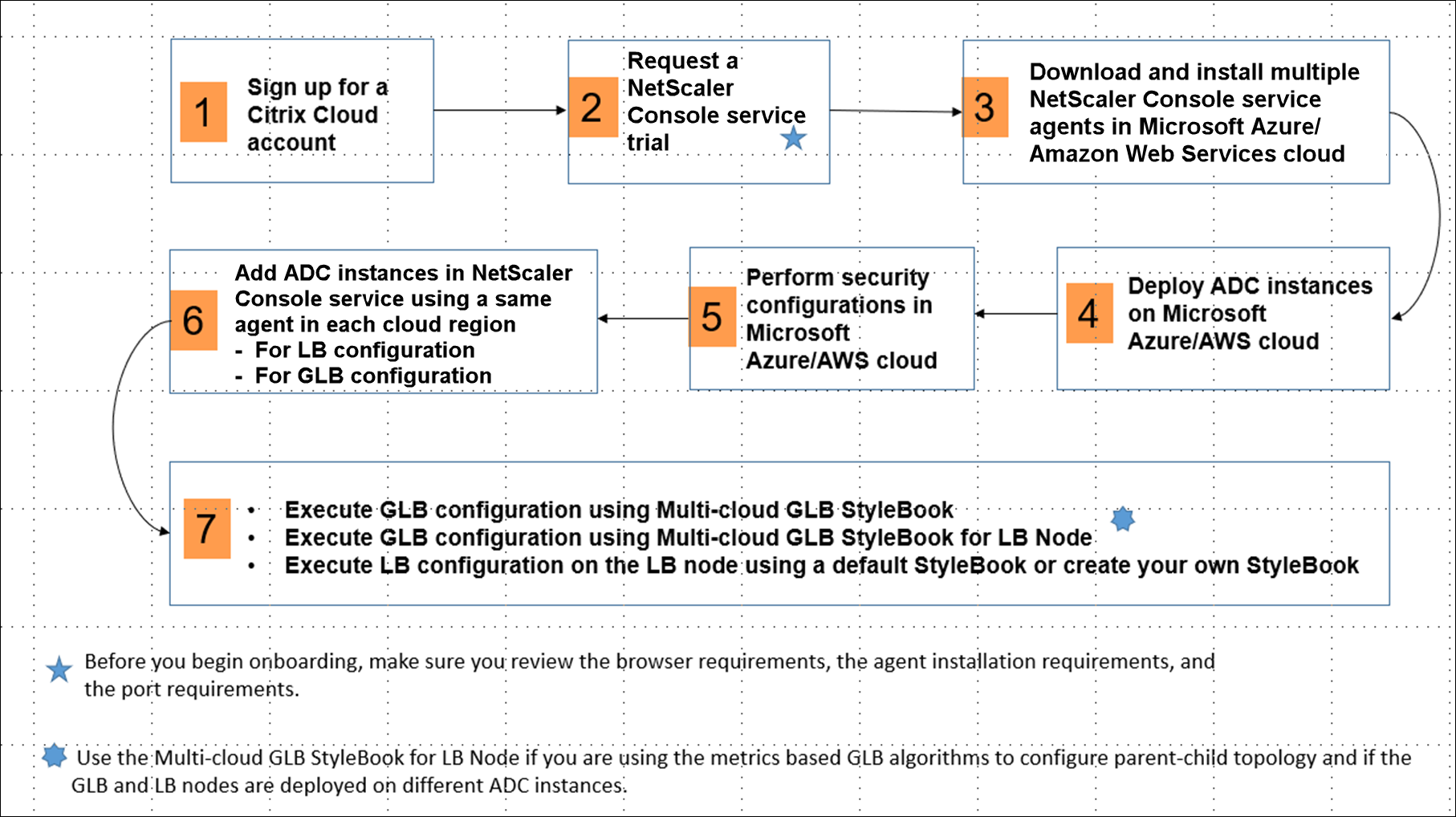
Perform the following tasks as a cloud administrator:
-
Sign up for a Citrix Cloud™ account.To start using NetScaler Console, create a Citrix Cloud company account or join an existing one that has been created by someone in your company.
-
After you log on to Citrix Cloud, click Manage on the NetScaler Console tile to set up the NetScaler Console for the first time.
-
Download and install multiple agents.You must install and configure the agent in your network environment to enable communication between the NetScaler Console and the managed instances in your data center or cloud. Install an agent in each region, so that you can configure LB and GLB configurations on the managed instances. The LB and GLB configurations can share a single agent. For more information on the above three tasks, see Getting Started.
-
Deploy load balancers on Microsoft Azure/AWS cloud/on-premises data centers.Depending on the type of load balancers that you are deploying on cloud and on-premises, provision them accordingly. For example, you can provision NetScaler VPX instances in a Microsoft Azure Resource Manager (ARM) portal, in an Amazon Web Services (AWS) virtual private cloud and in on-premises data centers. Configure NetScaler instances to function as LB or GLB nodes in standalone mode, by creating the virtual machines and configuring other resources. For more information on how to deploy NetScaler VPX instances, see the following documents:
-
Perform security configurations.Configure network security groups and network ACLs in ARM or AWS to control inbound and outbound traffic for your instances and subnets.
-
Add NetScaler instances in NetScaler Console.NetScaler instances are network appliances or virtual appliances that you want to discover, manage, and monitor from NetScaler Console. To manage and monitor these instances, you must add the instances to the service and register both LB (if you are using NetScaler for LB) and GLB instances. For more information on how to add NetScaler instances in the NetScaler Console, see Getting Started.
-
Implement the GLB and LB configurations using default NetScaler Console StyleBooks.
-
Use Multi-cloud GLB StyleBook to run the GLB configuration on the selected GLB NetScaler instances.
-
Implement the load balancing configuration. (You can skip this step if you already have LB configurations on the managed instances.)
You can configure load balancers on NetScaler instances in one of two ways:-
Manually configure the instances for load balancing the applications. For more information on how to manually configure the instances, see Setting Up Basic Load Balancing.
-
Use StyleBooks. You can use one of the NetScaler Console StyleBooks (HTTP/SSL LoadBalancing StyleBook or HTTP/SSL LoadBalancing (with Monitors) StyleBook) to create the load balancer configuration on the selected NetScaler instance. You can also create your own StyleBooks. For more information on StyleBooks, see StyleBooks.
-
-
Use Multi-cloud GLB StyleBook for LB Node to configure GLB parent-child topology in any of the following cases:
-
If you are using the metric-based GLB algorithms (Least Packets, Least Connections, Least Bandwidth) to configure GLB and LB nodes and if the LB nodes are deployed on a different NetScaler instance.
-
If site persistence is required.
-