
How to search instances using values of tags and properties
There might be a situation where NetScaler Console is managing many NetScaler instances. As an admin, you might want the flexibility to search on the instance inventory based on certain parameters. NetScaler Console now offers improved search capability to search a subset of NetScaler instances based on the parameters that you define in the search field. You can search for the instances based on two criteria - tags and properties.
-
Tags. Tags are terms or keywords that can be assigned by you to a NetScaler instance to add some additional description about the NetScaler instance. You can now associate your NetScaler instances with tags. These tags can be used to better identify and search on the NetScaler instances.
-
Properties. Each NetScaler instance added in NetScaler Console has a few default parameters or properties associated with that instance. For example, each instance has its own host name, IP address, version, host ID, hardware model ID and so on. You can search for instances by specifying values for any of these properties.
For example, consider a situation where you want to find out the list of NetScaler instances that are on version 12.0 and are in the UP state. Here, the version and the state of the instance are defined by the default properties.
Along with the 12.0 version and UP state of the instances, you can also search those instances owned by you. You can create an "Owner" tag and assign a value "David T" to that tag. For more information on how to create and assign tags, see How to create tags and assign to instances.
You can use a combination of tags and properties to create your own search criteria.
Related information
To search for NetScaler VPX instances
-
In NetScaler Console, navigate to Infrastructure > Instances > NetScaler.
-
Select the VPX tab.
-
Click the search field. You can create a search expression by using Tags or Properties or by combining both.The following examples show how you can use the search expression efficiently to search for the instance.
-
Select Tags option and select Owner. Select "David T".
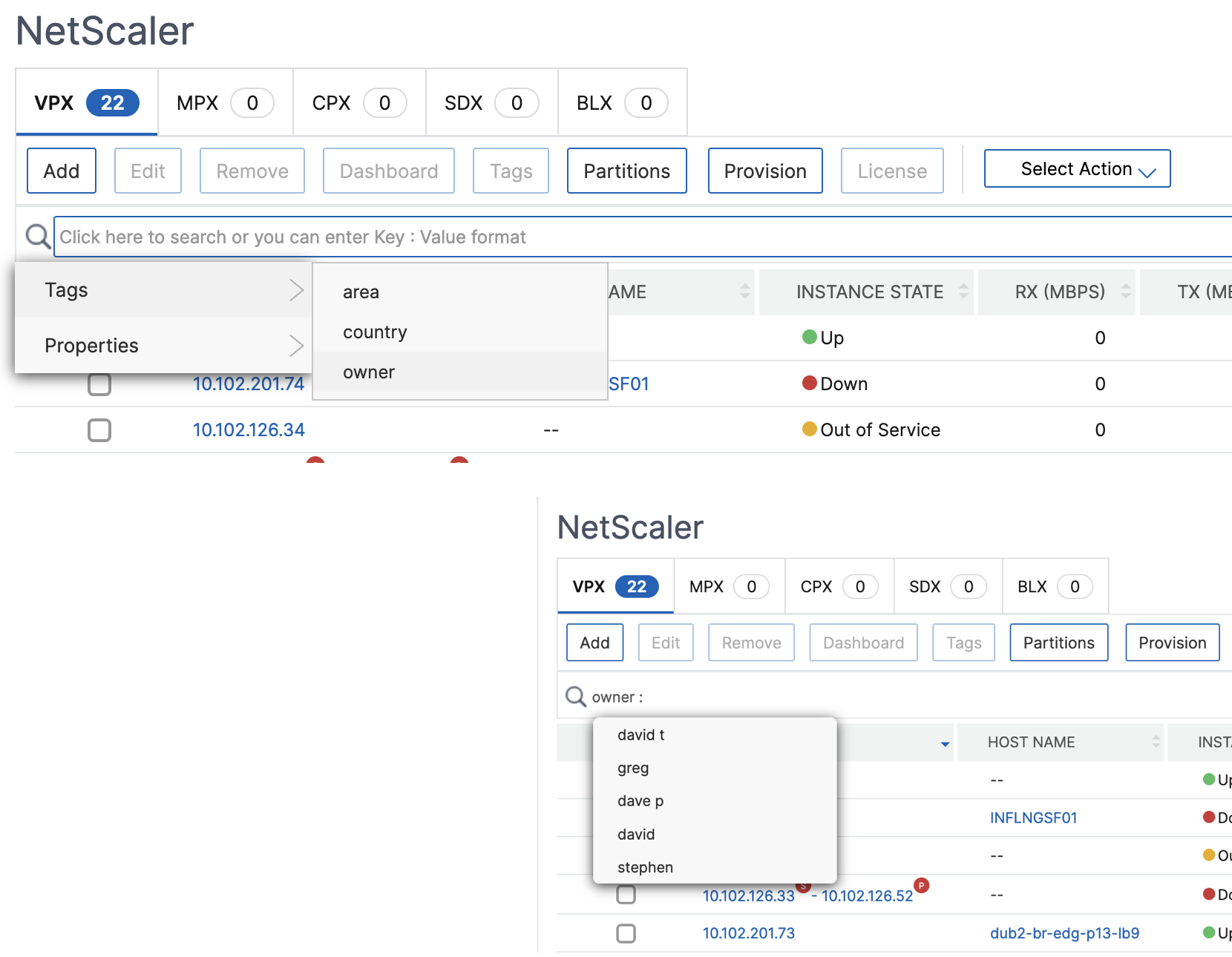
NetScaler Console supports regular expressions and wildcard characters in the search expressions.-
You can use regular expressions to further expand the search criteria. For example, you want to search instances owned by either David or Stephen. In such a case, you can type the values by separating the values with a "\|" expression.

-
You can also use wildcard characters to replace or represent one or more characters. For example, you can type
Dav*to search for all instances owned by "David" and "Dave P". Note:For more information on regular expressions and wildcard characters and how to use them, click the "information" icon in the search bar.
-