
Configure {{page.adm-product-name-long}} server only as the Flexed or Pooled license server
Important:
File-based licensing system (also referred to as manually managed entitlements), traditionally used for activating various on-premises components, will be End of Life (EOL) on April 15, 2026. License Activation Service (LAS) is the next generation technology for product activations across the suite of Citrix products. LAS will be the only way to activate and license NetScaler instances after April 15, 2026, supporting NetScaler Flexed licenses (Citrix Platform License/Universal Hybrid Multi-Cloud), legacy NetScaler Pooled licenses, and NetScaler Fixed term Bandwidth licenses. To remain supported, your NetScaler and NetScaler Console deployments must be on a LAS compatible version.
The minimum required NetScaler versions that are LAS compatible are:
-
NetScaler ADCs: 14.1-51.x, 13.1-60.x, 13.1-37.246 (FIPS), 14.1-66.68 (FIPS)
-
NetScaler SVM: 14.1-51.x, 13.1-60.x
-
NetScaler Console Service: Supported from early September 2025.
-
NetScaler Console on-prem: 14.1-51.xNote: LAS support for Console on-prem is from release 14.1-51.x onwards. However, file-based licensing is deprecated as of April 15 2026 from Console on-prem releases 14.1-51.x onwards and 13.1-60.x onwards. If you upgrade to Console on-prem release 14.1-51.x or release 13.1-60.x or later, you can continue using file-based licensing until 15th April 2026. However you must upgrade to Console on-prem release 14.1-51.x or later, and switch to LAS before 15th April 2026 because Console on-prem 13.1 does not support LAS.
All the other forms of legacy NetScaler licenses such as NetScaler virtual CPU licensing (Pooled vCPU), NetScaler VPX Check-In and Check-Out (CICO), perpetual will not be supported with LAS. NetScaler instances leveraging perpetual licenses without an active maintenance will become unlicensed upon upgrade to the above mentioned software versions.
LAS-based licenses may not be available to customers where prohibited by law or regulations.
If you have questions or concerns, contact Customer Care. Citrix may limit or suspend your Citrix Maintenance for non-compliance with these requirements without liability in addition to any other remedies Citrix may have at law or equity. These requirements don’t apply where prohibited by law or regulation.
As an administrator, you can configure the {{page.adm-product-name-short}} only for the Pooled licensing feature. With this configuration, the {{page.adm-product-name-short}} only receives licensing data from {{page.citrix-adc-generic}} instances.
Sometimes, you might have the regulatory mandate that requires restricting {{page.citrix-adc-generic}} instances’ data from leaving the regulatory zone. In such situations, you can deploy a local instance of an {{page.adm-product-name-short}} server in your regulatory zone to use management, monitoring, and analytics capabilities. When you take the same approach to use the Pooled licenses feature, you have to split Pooled licenses across various {{page.adm-product-name-short}} license servers. This approach does not provide you the flexibility to allocate Pooled licenses across your globally deployed {{page.citrix-adc-generic}} instances.
Therefore, configure the {{page.adm-product-name-short}} only for the Pooled licensing feature. The {{page.adm-product-name-short}} receives only licensing data from all {{page.citrix-adc-generic}} instances. So, you can adhere to the regulatory mandate and dynamically allocate Pooled capacity licenses across globally deployed {{page.citrix-adc-generic}} instances.
This document explains how to configure the {{page.adm-product-name-short}} only for the Pooled licensing feature.
Prerequisites
Before you configure the {{page.adm-product-name-short}} only for the Pooled licensing feature, complete the first time onboarding and setting up the {{page.adm-product-name-short}}. Ensure to review the agent specifications in System requirements.
Important
When you first time onboard or set up the {{page.adm-product-name-short}}, ensure the following:
-
The Custom Deployment option is selected.
-
{{page.citrix-adc-generic}} instances to be added after you complete step 4 in this configuration procedure

For more information about onboarding and setting up the {{page.adm-product-name-short}}, see Getting started.
After you complete the onboarding steps, configure the {{page.adm-product-name-short}} only for the Pooled licensing feature.
How to configure {{page.adm-product-name-short}} only as the Flexed or Pooled license server
Do the following to configure the {{page.adm-product-name-short}} only for the licensing feature:
-
Navigate to Settings > Global Settings > System Configurations > System Deployment.
-
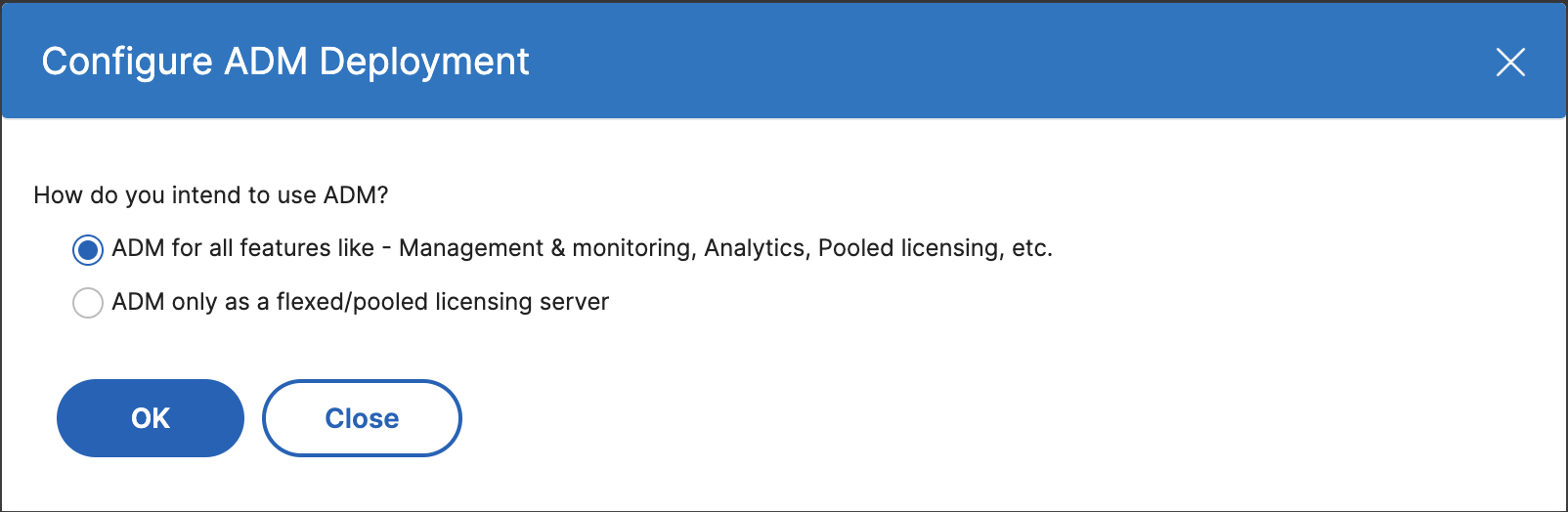
In {{page.adm-product-name-short}} Deployment, select {{page.adm-product-name-short}} only as a flexed/pooled licensing server.
-
Click OK.This action retains only the Pooled licensing feature and disables the following {{page.adm-product-name-short}} features:
-
{{page.adm-product-name-short}} backup
-
Event management
-
SSL certificate management
-
Network reporting
-
Network functions
-
Configuration audit
NoteBy default, the {{page.adm-product-name-short}} analytics feature is disabled. Make sure to disable this feature if you have enabled it.In the confirmation box, click Yes.The {{page.adm-product-name-short}} GUI now displays only the Pooled licensing feature. And, the remaining features do not appear. -
-
After you configure {{page.adm-product-name-short}} only for the licensing feature, add {{page.citrix-adc-generic}} instances in the Infrastructure > Instances page.
Note
-
You can add a {{page.citrix-adc-generic}} instance in the {{page.adm-product-name-short}} and other {{page.adm-product-name-short}} servers as well. When you change the password of such {{page.citrix-adc-generic}} instances, ensure to update the password on all {{page.adm-product-name-short}} servers where the instance is discovered. This note applies when the {{page.adm-product-name-short}} is configured only to use the pooled licensing feature.
-
A user can still do some operations of the disabled features in the {{page.adm-product-name-short}} GUI. For example, event polling and {{page.citrix-adc-generic}} backup. As a super administrator, If you want to restrict such operations, disable user accesses for other administrators using an appropriate access policy. For more information, see Configure Access Policies on {{page.adm-product-name-short}}.