
FAQs and other resources
Important:
File-based licensing system (also referred to as manually managed entitlements), traditionally used for activating various on-premises components, will be End of Life (EOL) on April 15, 2026. License Activation Service (LAS) is the next generation technology for product activations across the suite of Citrix products. LAS will be the only way to activate and license NetScaler instances after April 15, 2026, supporting NetScaler Flexed licenses (CPL/UHMC), legacy NetScaler Pooled licenses, and NetScaler Fixed term Bandwidth licenses. To remain supported, your NetScaler and NetScaler Console deployments must be on a LAS compatible version.
The minimum required NetScaler® versions that are LAS compatible are:
-
NetScaler ADCs: 14.1-51.x, 13.1-60.x, 13.1-37.246 (FIPS), 14.1-66.68 (FIPS)
-
NetScaler SVM: 14.1-51.x, 13.1-60.x
-
NetScaler Console Service: Supported from early September 2025.
-
NetScaler Console on-prem: 14.1-51.xNote: LAS support for Console on-prem is from release 14.1-51.x onwards. However, file-based licensing is deprecated as of April 15 2026 from Console on-prem releases 14.1-51.x onwards and 13.1-60.x onwards. If you upgrade to Console on-prem release 14.1-51.x or release 13.1-60.x or later, you can continue using file-based licensing until 15th April 2026. However you must upgrade to Console on-prem release 14.1-51.x or later, and switch to LAS before 15th April 2026 because Console on-prem 13.1 does not support LAS.
All the other forms of legacy NetScaler licenses such as Pooled vCPU, CICO, perpetual will not be supported with LAS. NetScaler instances leveraging perpetual licenses without an active maintenance will become unlicensed upon upgrade to the above mentioned software versions.
LAS based licenses may not be available to customers where prohibited by law or regulations.
If you have questions or concerns, contact Customer Care. Citrix may limit or suspend your Citrix Maintenance for non-compliance with these requirements without liability in addition to any other remedies Citrix may have at law or equity. These requirements don’t apply where prohibited by law or regulation.
This section lists the reference documentations on configuring and operating Pooled licensing. You can refer to these documents for assistance related to configuration and operation issues.
Configuration
-
Where do I find information about the overview and features of Pooled capacity?Answer: See Configure Pooled capacity.
-
How do I convert or migrate perpetual to Pooled licenses and the opposite way?Answer: Conversion from a perpetual license to a Pooled capacity license is a one-way license entitlement process. You cannot revert the Pooled capacity license back to perpetual.
-
How do I deploy the {{page.adm-product-name-short}} server?Answer: Follow the Getting started document.
-
How do I add a license to an existing Pooled license and allocate it?Answer: Follow the License Management document.
-
How do I allocate/increase capacity and bandwidth on instances?Answer: Follow the License Management document.
License Server Agent
-
How do I assign the LSA role to a specific agent?Answer: The first agent deployed is assigned with the LSA role. If the LSA agent goes down, all the NetScaler instances connected to NetScaler Console for pooled licensing enter into a grace period for one day. The next day, NetScaler Console selects a new agent as the LSA. This behavior is enabled by default.Admins can manually select a NetScaler agent as an LSA within 24 hours, instead of waiting for the NetScaler Console service to auto-select an agent after 24 hours of the LSA being down.Note:During this transition, NetScaler functionality is not impacted.
-
How can we determine which agent hosts the License Server role?Answer: To know which agent is hosting the LSA role, you can run the following command in the shell:
cat /mpsconfig/.lmp/agentIf the output value for “role” is lsa, then that agent is hosting the license server role. In the {{page.adm-product-name-long}} GUI, you see LSA written next to the IP address of the designated agent.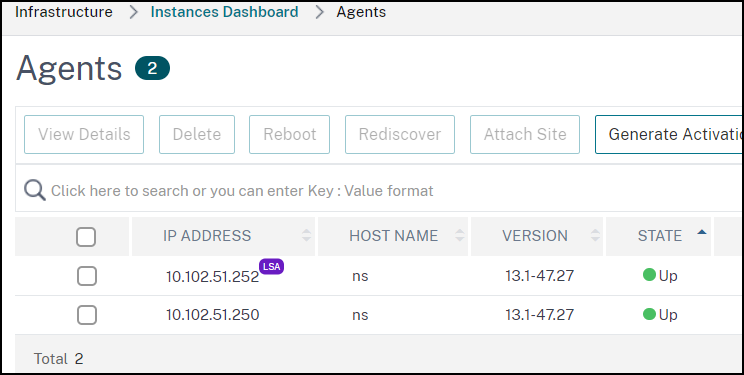
-
What happens when the agent hosting the LSA role goes down?Answer: If the agent hosting the LSA role is offline, all the deployed {{page.citrix-adc-generic}} devices configured for pooled capacity licensing go into grace period. The grace period lasts for 30 days and the resources allocated to the {{page.citrix-adc-generic}} devices persist through this period. {{page.citrix-adc-generic}} instances in this state cannot allocate or modify license allocation until the agent hosting the LSA role comes online again or a new agent with the LSA role is designated.
-
If the agent hosting the LSA role goes offline for an extended period, will there be a re-election?Answer: If the admin does not select a new LSA within 24 hours, the {{page.adm-product-name-short}} service automatically selects the next agent that is UP as the new LSA after 24 hours of the LSA agent being down. The grace period of the {{page.citrix-adc-generic}} devices ends after the new LSA is elected.
Common issues
-
Instances running in grace mode due to connectivity failure, upgrade, split brain, and others.Answer: See the {{page.adm-product-name-short}} license server behavior documented in Configuring {{page.citrix-adc-generic}} Pooled capacity.
-
Licenses not applying or reflecting on instances.Answer: See Troubleshoot Pooled capacity license issues.
-
License allocation is stuck in “sync in progress.”Answer: See Troubleshoot Pooled capacity license issues.
-
Error due to wrong host ID on license file.Answer: To identify a {{page.adm-product-name-short}} server, you can assign the server a host name. The host name is displayed on the Universal license for {{page.adm-product-name-short}}. For more information, see Assign a host name to a {{page.adm-product-name-short}} server.
Migration
-
Is reallocation of bandwidth and instances required for VPX on SDX if migrating from one Console tenant to another Console tenant while using pooled or flexed licenses?Answer: If the licensing edition is the same on both the tenants and SDX can get earlier allocated capacity, then reallocation of bandwidth and instances is not required for VPX on SDX.