
Configure an action policy to receive application event notifications
Apart from the existing analytics view of application events, you can configure an action policy to get application event notifications through Slack, Email, PagerDuty, or ServiceNow. The application events include performance issues, bot and WAF violations, and service graph violations. As an administrator, using the action policy, you can get event notifications in real time.
Using the action policy, you can:
-
Predefine certain conditions for the application events.
-
Get notified for the following events through Slack, Email, PagerDuty, and ServiceNow:
Event Categories Event sub categories Events Security Violations All Security Violations All Bot Violations (For more information on the list of bot violations, see violation categories). All WAF Violations (WAF SQL Violations, WAF XSS Violations, and WAF Infer XML Violations) All Security Violations per Client Bot Violations per Client WAF Violations per Client Note: To receive the WAF violation notification, the minimum violation transactions must be 20%. For example, out of 100 transactions, minimum 20 must be violation transactions. Application Performance App score violation Client network latency Server network latency Server processing time Response time Requests Bandwidth Service graph violation Application Usage Requests per second Throughput Data Volume
Configure an action policy
-
Navigate to Settings > Action > Action Policies.
-
Click Add.
-
In the Create Action Policy page:
-
Policy Name – Provide a policy name of your choice.
-
Enabled – This option is selected by default.
-
If the Following Event Occurs – From the list, select an event.
-
And the Following Condition is Met – From the list, select to define a condition for which you want to get notified. You can click + to add more conditions. To remove a condition, click –.You can configure the action policy using the following operators. The operators appear based on the conditions you select.
Operator Description Equal to Equals to a defined value Not Equal to Not equals to a defined value Greater than Greater than a defined value Greater than or Equal to Greater than or equal to a defined value Less than Lesser than a defined value Less than or Equal to Lesser than or equal to a defined value Contains Contains the defined term or value Starts with Starts with a defined term or value Ends with Ends with a defined term or value IN Allows you to select multiple values -
Then Do the Following – Select Notify. After you select Notify, the Notification Type option is displayed.
-
Notification Type – Select the notification type Email, Slack, PagerDuty, or ServiceNow. Depending upon the notification type you select, the corresponding option (Distribution list, Slack Profile, PagerDuty Profile, or ServiceNow profile) appears. Select a profile from the list.If you want to create a new profile, click Add.
-
Click Create Policy.The policy is configured. You can view the configured policy details.
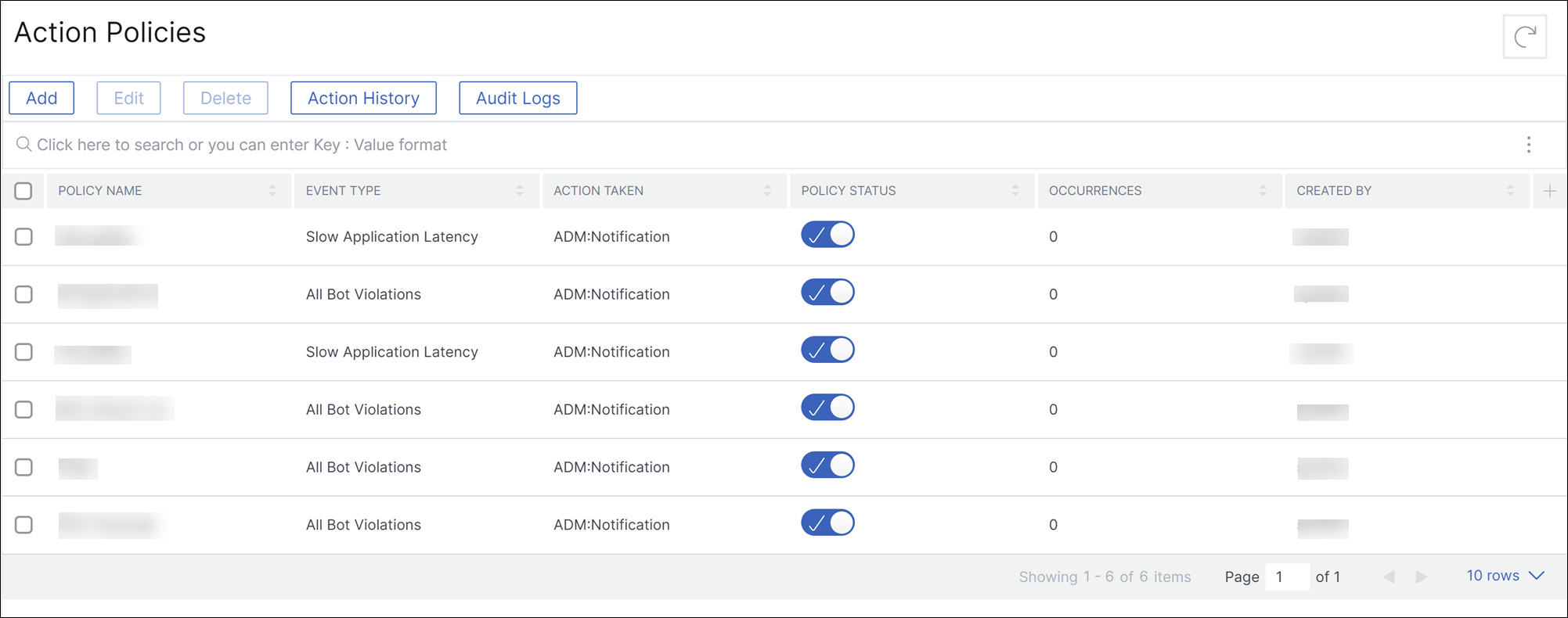 After you configure the policy, you can select the policy and click:
-
Edit to update or change the action policy. After you update, click Update Policy.
-
Delete to remove the action policy. You can select multiple policies and click Delete to remove them.
-
Action History to view details such as time, action taken, policy name, alert type, and alert message.
-
-
The following table describes the details of action policy configuration.
| Violation name | Condition | Description |
|---|---|---|
| All Security Violations | Instance IP | IP address of the {{page.citrix-adc-generic}} instance. Select the IP address from the list. |
| Violation Count | The violation count for which you want to get notified. For example, if you configure violation count as less or equal to 10, you will get notified if 10 or less bot violation transactions are received. | |
| Violation Ratio | This value indicates the total violations from specific transactions and the value must be between 0 and 1. For example, out of 100 transactions, 20 are violations and if you wanted to get notified for such a scenario, you must enter 0.2. | |
| All Bot violations | Bot profile | The bot profile name that is used for configuring bot management on the {{page.citrix-adc-generic}} instance. |
| Instance IP | IP address of the {{page.citrix-adc-generic}} instance. Select the IP address from the list. | |
| Violation Count | The violation count for which you want to get notified. For example, if you configure violation count as less or equal to 10, you will get notified if 10 or less bot violation transactions are received. | |
| Violation Ratio | This value indicates the total violations from specific transactions and the value must be between 0 and 1. For example, out of 100 transactions, 20 are violations and if you wanted to get notified for such a scenario, you must enter 0.2. | |
| All WAF Violations, WAF SQL Violation, WAF XSS Violation, WAF Infer XML Violation | WAF Profile | The WAF profile name that is used for configuring WAF security settings on the {{page.citrix-adc-generic}} instance. |
| Instance IP | IP address of the {{page.citrix-adc-generic}} instance. Select the IP address from the list. | |
| Violation Count | The violation count for which you want to get notified. The minimum requirement for the WAF violations to get notified is 20%. | |
| Violation Ratio | This value indicates the total violations from specific transactions and the value must be between 0 and 1. For example, out of 100 transactions, 20 are WAF SQL violation transactions and if you want to get notified for such a scenario, you must enter 0.2. | |
| All Security Violations per Client | Application Name | The custom application name. Select the application from the list. If you do not add this condition, then all applications from the {{page.citrix-adc-generic}} instance are considered. |
| Instance IP | IP address of the {{page.citrix-adc-generic}} instance. Select the IP address from the list. | |
| Client IP | The source from where the Bot originates. Specify the IP address. | |
| Total Attacks | The total attacks for which you want to get notified. | |
| Request URL | The URL that you want to configure to block. Specify the URL. | |
| Vserver name | The associated applications configured for custom applications. Select the application from the list. If you do not add this condition, then all applications from the {{page.citrix-adc-generic}} instance are considered. | |
| Bot Violations per Client | Application Name | The custom application name. Select the application from the list. If you do not add this condition, then all applications from the {{page.citrix-adc-generic}} instance are considered. |
| Instance IP | IP address of the {{page.citrix-adc-generic}} instance. Select the IP address from the list. | |
| Client IP | The source from where the Bot originates. Specify the IP address. | |
| Total Attacks | The total attacks for which you want to get notified. | |
| Violation Type | Select the bot violation from the list. | |
| Request URL | The URL that you want to configure to block. Specify the URL. | |
| Vserver name | The associated applications configured for custom applications. Select the application from the list. If you do not add this condition, then all applications from the {{page.citrix-adc-generic}} instance are considered. | |
| WAF Violations per Client | Application Name | The custom application name. Select the application from the list. If you do not add this condition, then all applications from the {{page.citrix-adc-generic}} instance are considered. |
| Instance IP | IP address of the {{page.citrix-adc-generic}} instance. Select the IP address from the list. | |
| Client IP | The source from where the Bot originates. Specify the IP address. | |
| Total Attacks | The total attacks for which you want to get notified. | |
| Violation Type | Select the WAF violation from the list. | |
| Request URL | The URL that you want to configure to block. Specify the URL. | |
| Vserver name | The associated applications configured for custom applications. Select the application from the list. If you do not add this condition, then all applications from the {{page.citrix-adc-generic}} instance are considered. | |
| App Score Violation | Performance Indicator | The app score components and their threshold values. Select the app score component from the list. For more information, see Select App Score components and set thresholds. |
| Breach Count | The breach count for which you want to get notified. For example, if you configure breach count Equal to 5 for response time, you will get notified when the response time threshold is breached 5 times. | |
| Application Name | Click Select Applications to select the applications that you want to get the violation notified. | |
| Client Network Latency | Client Network Average Latency | Specify the client latency (client to {{page.citrix-adc-generic}}) value in milliseconds for which you want to get notified. |
| Client Network Latency Anomalies | Specify the anomaly count for the network latency that you want to get notified. | |
| Application Name | Click Select Applications to select the applications that you want to get the violation notified. | |
| Server Network Latency | Server Network Average Latency | Specify the server latency (server to {{page.citrix-adc-generic}}) value in milliseconds for which you want to get notified. |
| Server Network Latency Anomalies | Specify the anomaly count for the network latency that you want to get notified. | |
| Application Name | Click Select Applications to select the applications that you want to get the violation notified. | |
| Response Time | Response Avg Time | Specify the value (in milliseconds) for which you want to get notified. |
| Response Avg Time Anomalies | Specify the anomaly counts for which you want to get notified. | |
| Application Name | Click Select Applications to select the applications that you want to get notified. If you do not select any application, then it is applied in all applications. | |
| Requests | Total Requests | Specify the total requests for which you want to get notified. |
| Application Name | Click Select Applications to select the applications that you want to get notified. If you do not select any application, then it is applied in all applications. | |
| Bandwidth | Total Bandwidth | Specify the bandwidth (MB) for which you want to get notified. |
| Application Name | Click Select Applications to select the applications that you want to get notified. If you do not select any application, then it is applied in all applications. | |
| Server Processing Time | Server Processing Average Time | Specify the server processing (server to {{page.citrix-adc-generic}}) value in milliseconds for which you want to get notified. |
| Server Processing Time Anomalies | Specify the anomaly count for the server processing time that you want to get notified. | |
| Application Name | Click Select Applications to select the applications that you want to get the violation notified. | |
| Service Graph Violation | Microservices that breach the configured thresholds. For more information, see Configure thresholds in service graph. | |
| Requests per second | Requests per second avg | The number of requests received by the application per second. Specify the average value to get notified. |
| Requests per second avg anomalies | Specify the average anomaly count for which you want to get notified. | |
| Note: If you are using AND condition for this event, you can configure either Requests per second avg and Application Name or Requests per second anomaly average and Application Name. | ||
| Application Name | Click Select Applications to select the applications that you want to get the violation notified. | |
| Throughput | Throughput avg | The total data transmitted for a specific period. Specify the average value (in MB) to get notified. |
| Throughput avg anomalies | Specify the average anomaly count for which you want to get notified. | |
| Note: If you are using AND condition for this event, you can configure either Throughput avg and Application Name or Throughput avg anomaly and Application Name. | ||
| Application Name | Click Select Applications to select the applications that you want to get the violation notified. | |
| Data Volume | Total Data Volume | The total data that is to be transferred in a specific duration. Specify the value (in MB) to get notified. |
| Data Volume Anomalies | Specify the anomaly count for which you want to get notified. | |
| Note: If you are using AND condition for this event, you can configure either Total Data Volume and Application Name or Data Volume Anomalies and Application Name. | ||
| Application Name | Click Select Applications to select the applications that you want to get the violation notified. |
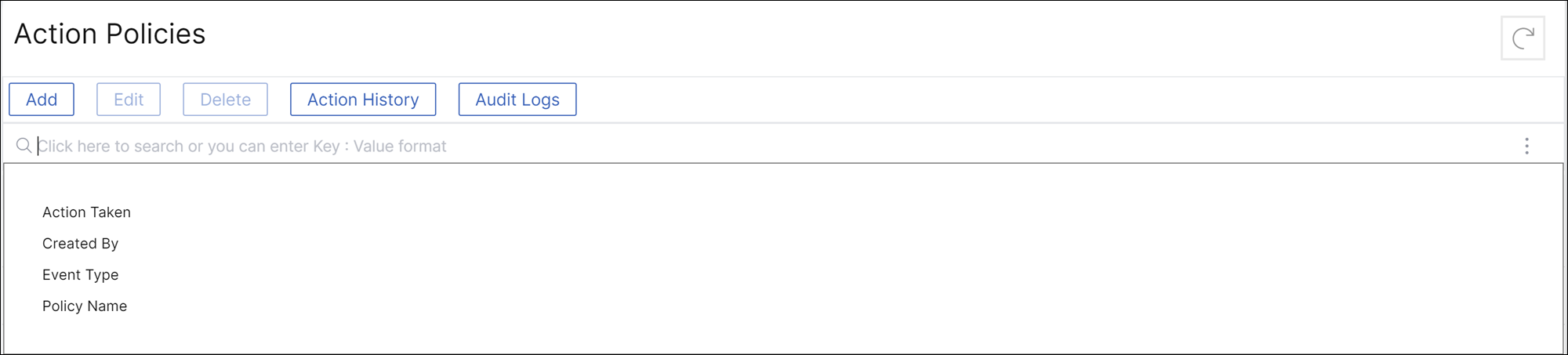
Use the search bar
The search bar enables you to filter results. When you click the search bar, it gives you a list of search suggestions. You can select the component and filter the results based on your requirements.
Use the audit logs option
Click Audit Logs and select the duration from the list to view the action policies that are created, modified, and deleted for the selected duration and click Search.
Note
The data storage policies are expected to change in the upcoming releases. With these changes, you cannot store historical data after it exceeds the storage limit. For now, it is recommended to add more storage or keep the storage within the license entitlement limits.