
Support for DTLS protocol
Notes
-
DTLS 1.2 protocol is supported on the front-end of following appliances:
-
NetScaler containing Intel Coleto and Intel Lewisburg SSL chips.
-
NetScaler VPX.
-
NetScaler containing Intel Coleto SSL chips. For more information about the platforms containing Intel Coleto SSL chips, see Support for Intel Coleto SSL chip-based platforms.
-
NetScaler MPX/SDX (N3 based) except the MPX/SDX 14000 FIPS appliances.
-
-
Starting from NetScaler release 14.1 build 47.x, DTLS 1.2 protocol is supported on the back end of the following appliance:
-
NetScaler VPX
-
NetScaler MPX/SDX (Intel Coleto-based)
-
NetScaler MPX/SDX (N3 based) with software-only support (excluding MPX/SDX 14000 appliances).
-
-
Service groups of type DTLS are not supported.
-
For information about Enlightened Data Transport (EDT) support for NetScaler Gateway, see HDX enlightened data transport support.
-
For information about the platforms and builds supported, see NetScaler MPX hardware-software compatibility matrix
-
Starting from release 14.1-72.x, NetScaler supports multiple Datagram Transport Layer Security (DTLS) handshake messages contained within a single DTLS record received in one datagram. This capability applies to both client-side and server-side operations, enabling the system to parse and process bundled handshake messages that arrive within a single UDP datagram.
The SSL and TLS protocols have traditionally been used to secure streaming traffic. Both of these protocols are based on TCP, which is slow. Also, TLS cannot handle lost or reordered packets.
UDP is the preferred protocol for audio and video applications, such as Lync, Skype, iTunes, YouTube, training videos, and flash. However, UDP is not secure or reliable. The DTLS protocol is designed to secure data over UDP and is used for applications such as media streaming, VOIP, and online gaming for communication. In DTLS, each handshake message is assigned a specific sequence number within that handshake. When a peer receives a handshake message, it can quickly determine whether that message is the next one expected. If it is, the peer processes the message. If not, the message is queued for handling after all the previous messages have been received.
Create a DTLS virtual server and a service of type UDP. By default, a DTLS profile (nsdtls_default_profile) is bound to the virtual server. Optionally, you can create and bind a user-defined DTLS profile to the virtual server.
Notes:
-
RC4 ciphers are not supported on a DTLS virtual server.
-
DTLS 1.2 protocol is not supported on external HSMs
Related information
DTLS monitor support for DTLS service
Starting from NetScaler release 14.1 build 29.x, you can bind a DTLS-type monitor to DTLS services. This enhancement addresses the limitation of the ping-default monitor, which only checks the reachability of the server using PING and does not check the DTLS service provided by the server. With the DLTS-type monitor, NetScaler marks the service UP only if the DTLS handshake is successful. For more information on how to configure the monitor, see Configuring Monitors in a Load Balancing Setup.
DTLS configuration
You can use the command line (CLI) or the configuration utility (GUI) to configure DTLS on your NetScaler.
Note:
-
The DTLS 1.2 protocol is supported on the front end and back end (starting from release 14.1 build 47.x) of a NetScaler VPX. While configuring a DTLS 1.2 service, specify either DTLS1 or DTLS12. The default value is DTLS1.
-
The monitor of type DTLS is supported from NetScaler release 14.1 build 29.x.
Enable the DTLS protocol on DTLS virtual server by using the CLI
At the command prompt, type:
set ssl vserver DTLS [-dtls1 ( ENABLED | DISABLED )] [-dtls12 ( ENABLED | DISABLED )]
add lb vserver <vserver_name> DTLS <IPAddress>  <port>
 add service  <service_name>  <IPAddress> DTLS 443
 add lb monitor <monitorName> DTLS
 bind service <servicename> -monitorName <monitor-name>
 bind lb vserver  <vserver_name>  <dtls_service_name>
The following steps are optional:
add dtlsProfile dtls-profile -maxretryTime <positive_integer>
 set ssl vserver <vserver_name> -dtlsProfileName <dtls_profile_name>
Enable a DTLS protocol on DTLS virtual server by using the GUI
-
Navigate to Traffic Management > Load Balancing > Virtual Servers.
-
Create a virtual server of type DTLS, and bind a DTLS service to the virtual server.
-
A default DTLS profile is bound to the DTLS virtual server. To bind a different profile, in SSL Parameters, select a different DTLS profile. To create a profile, click the plus (+) next to DTLS Profile.
-
Perform the following to create a monitor and bind to a DTLS service
-
Navigate to Traffic Management> Load Balancing> Monitors.
-
Click Add and create a monitor of type DTLS.
-
Navigate to Configuration > Traffic Management > Load Balancing > Services and click Add.
-
Create a service of type DTLS and then click OK.
-
Open the service, and add a monitor.
-
Enable the DTLS v1.2 protocol on service by using the CLI
At the command prompt, type:
set ssl service <name> -dtls12 <ENABLED|DISABLED>
Enable the DTLS v1.2 protocol on service by using the GUI
-
Navigate to Traffic Management > Load Balancing > Services.
-
Select the service of type DTLS and click Edit.
-
In SSL Parameter, click the edit icon.
-
Select DTLS1.2.
-
Click OK.
Support for SNI on a DTLS virtual server
For information about SNI, see Configure an SNI virtual server for secure hosting of multiple sites.
Configure SNI on a DTLS virtual server by using the CLI
At the command prompt, type:
set ssl vserver <vServerName> -SNIEnable ENABLED
 bind ssl vserver <vServerName> -certkeyName <string> -SNICert
 show ssl vserver <vServerName>
Example:
set ssl vserver v1 -sniEnable ENABLED
 bind ssl vserver  v1 -certkeyName san2 -sniCert
 bind ssl vserver  v1 -certkeyName san13 –sniCert
 bind ssl vserver  v1 -certkeyName san17 –sniCert
sh ssl vserver v1
Advanced SSL configuration for VServer v1:
DH: DISABLED
DH Private-Key Exponent Size Limit: DISABLED
Ephemeral RSA: ENABLED
Refresh Count: 0
Session Reuse: ENABLED
Timeout: 1800 seconds
Cipher Redirect: DISABLED
ClearText Port: 0
Client Auth: DISABLED
SSL Redirect: DISABLED
Non FIPS Ciphers: DISABLED
SNI: ENABLED
OCSP Stapling: DISABLED
HSTS: DISABLED
HSTS IncludeSubDomains: NO
HSTS Max-Age: 0
DTLSv1: ENABLED
Send Close-Notify: YES
Strict Sig-Digest Check: DISABLED
Zero RTT Early Data: DISABLED
DHE Key Exchange With PSK: NO
Tickets Per Authentication Context: 1
DTLS profile name: nsdtls_default_profile
ECC Curve: P_256, P_384, P_224, P_521
1) CertKey Name: ca
CA Certificate OCSPCheck: OptionalCA_Name Sent
2) CertKey Name: san2 Server Certificate for SNI
3) CertKey Name: san17 Server Certificate for SNI
4) CertKey Name: san13 Server Certificate for SNI
1) Cipher Name: DEFAULT
Description: Default cipher list with encryption strength >= 128bit
Done
Configure SNI on a DTLS virtual server by using the GUI
-
Navigate to Traffic Management > Load Balancing > Virtual Servers.
-
Open a DTLS virtual server and, in Certificates, click Server Certificate.
-
Add a certificate or select a certificate from the list and select Server Certificate for SNI.
-
In Advanced Settings, click SSL Parameters.
-
Select SNI Enable.
Features not supported by a DTLS virtual server
The following options cannot be enabled on a DTLS virtual server:
-
SSLv2
-
SSLv3
-
TLS 1.0
-
TLS 1.1
-
TLS 1.2
-
Push encrypt trigger
-
SSLv2Redirect
-
SSLv2URL
Parameters not used by a DTLS virtual server
A DTLS virtual server ignores the following SSL parameters, even if set:
-
Encryption trigger packet count
-
PUSH encryption trigger timeout
-
SSL quantum size
-
Encryption trigger timeout
-
Subject/Issuer Name Insertion Format
Features not supported by a DTLS service
The following options cannot be enabled on a DTLS service:
-
SSLv2
-
SSLv3
-
TLS 1.0
-
TLS 1.1
-
TLS 1.2
-
Push encrypt trigger
-
SSLv2Redirect
-
SSLv2URL
-
SNI
-
Renegotiation
Parameters not used by a DTLS service
A DTLS service ignores the following SSL parameters, even if set:
-
Encryption trigger packet count
-
PUSH encryption trigger timeout
-
SSL quantum size
-
Encryption trigger timeout
-
Subject/Issuer Name Insertion Format
Note:
The NetScaler VPX platform supports SSL session reuse handshake. For DTLS service, SSL session reuse handshake is not supported on the DTLS hardware platform, causing the SSL session reuse handshake to fail.
Workaround: Manually disable session reuse on a DTLS service. At the CLI, type:
set ssl service <dtls-service-name> -sessReuse DISABLED
DTLS profile
A DTLS profile with the default settings is automatically bound to a DTLS virtual server. However, you can create a DTLS profile with specific settings to suit your requirement.
Use a DTLS profile with a DTLS virtual server or a VPN DTLS virtual server. You cannot use an SSL profile with a DTLS virtual server.
Note:
Change the maximum record size setting in the DTLS profile based on the changes in the MTU and packet size. For example, the default max record size of 1459 bytes is calculated based on an IPv4 address header size. With IPv6 records, the header size is larger and therefore the maximum record size must be reduced to meet the following criteria.
max record size + UDP header(8bytes) + IP header size < MTU
Example:
Default DTLS profile
     1) Name: nsdtls_default_profile
     PMTU Discovery: DISABLED
     Max Record Size: 1459 bytes
     Max Retry Time: 3 sec
     Hello Verify Request: ENABLED
     Terminate Session: DISABLED
     Max Packet Count: 120 bytes

 Custom DTLS profile
     1) Name: ns_dtls_profile_ipv6_1
     PMTU Discovery: DISABLED
     Max Record Size: 1450 bytes
     Max Retry Time: 3 sec
     Hello Verify Request: ENABLED
     Terminate Session: DISABLED
     Max Packet Count: 120 bytes
Create a DTLS profile by using the CLI
Notes:
-
The
helloverifyrequestparameter is enabled by default. Enabling this parameter helps mitigate the risk of an attacker or bots overwhelming the network throughput, potentially leading to outbound bandwidth exhaustion. That is, it helps mitigate the DTLS DDoS amplification attack. -
The
maxHoldQlenparameter is added. This parameter defines the number of datagrams that can be queued at the DTLS layer for processing. A high value of themaxHoldQlenparameter can cause memory buildup at the DTLS layer if UDP multiplexing is transmitting high UDP traffic. Therefore, configuring a lower value is recommended. The minimum value is 32, maximum value is 65535, and the default value is 32.
A new parameter
maxBadmacIgnorecount is introduced in the DTLS profile to ignore bad MAC records received in a DTLS session. Using this parameter, bad records up to the value set in the parameter are ignored. The appliance terminates the session only after the limit is reached and sends an alert.
This parameter setting is effective only when the
terminateSession parameter is enabled.
add ssl dtlsProfile <name> -maxRetryTime <positive_integer> -helloVerifyRequest ( ENABLED | DISABLED ) -terminateSession (ENABLED | DISABLED ) -maxHoldQLen <positive_integer> -maxBadmacIgnorecount <positive_integer>

 helloVerifyRequest
               Send a Hello Verify request to validate the client.
               Possible values: ENABLED, DISABLED
               Default value: ENABLED

 terminateSession
               Terminate the session if the message authentication code (MAC)
               of the client and server do not match.
               Possible values: ENABLED, DISABLED
               Default value: DISABLED

 maxHoldQLen
               Maximum number of datagrams that can be queued at DTLS layer for
               processing
               Default value: 32
               Minimum value: 32
               Maximum value: 65535

 maxBadmacIgnorecount
               Maximum number of bad MAC errors to ignore for a connection prior disconnect. Disabling parameter terminateSession
 terminates session immediately when bad MAC is detected in the connection.
               Default value: 100
               Minimum value: 1
               Maximum value: 65535
Example:
> add ssl dtlsprofile dtls_profile -maxRetryTime 4 -helloVerifyRequest ENABLED -terminateSession ENABLED -maxHoldQLen 40 -maxBadmacIgnorecount 150
  Done
 > sh dtlsprofile dtls_profile
 1)  Name: dtls_profile
     PMTU Discovery: DISABLED
     Max Record Size: 1459 bytes
     Max Retry Time: 4 sec
     Hello Verify Request: ENABLED
     Terminate Session: ENABLED
     Max Packet Count: 120 bytes
     Max HoldQ Size: 40 datagrams
     Max bad-MAC Ignore Count: 150

  Done
Configure DTLS time-out to retransmit the last packet from NetScaler®
Note:
This feature is available in build 17.x and later.
In a DTLS deployment, you can configure the initial time-out value to retransmit the last packet from NetScaler. You can select between one second to three seconds with the default value set to three seconds. The initial timeout value cannot be greater than the max retry value.
Earlier, three seconds were hardcoded while the RFC recommended one second.
set ssl dtlsProfile <name> -initialRetryTimeout <positive_integer> -maxRetryTime <positive_integer>
Examples:
> set dtlsProfile nsdtls_default_profile -initialRetryTimeout 2 -maxretryTime 3
 Done
 > set dtlsProfile nsdtls_default_profile -initialRetryTimeout 1 -maxretryTime 3
 Done
 > set dtlsProfile nsdtls_default_profile -initialRetryTimeout 2 -maxretryTime 1
 ERROR: Invalid value [The initial timeout value for retransmission cannot be greater than max retry value]
 >
Create a DTLS profile by using the GUI
-
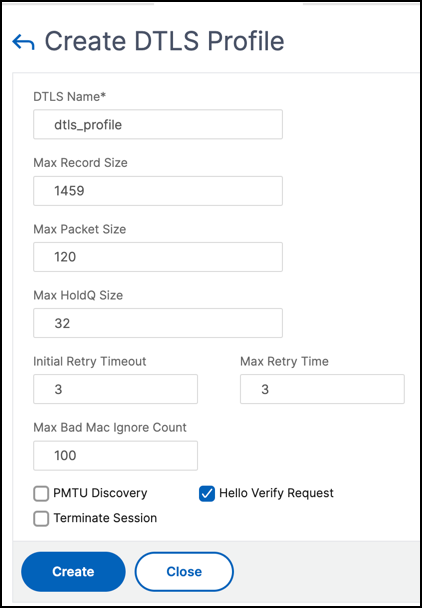
Navigate to System > Profiles > DTLS Profiles and click Add.
-
In the Create DTLS Profile page, type the values for the different parameters.
-
Click Create.
Example for an end-to-end DTLS configuration
enable ns feature SSL LB

 add server s1 198.51.100.2

 en ns mode usnip

 add service svc_dtls s1 DTLS 443

 add lb vserver v1 DTLS 10.102.59.244 443

 bind ssl vserver v1 -ciphername ALL

 add ssl certkey servercert -cert servercert_aia_valid.pem -key serverkey_aia.pem

 bind ssl vserver v1 -certkeyname servercert

 bind lb vserver lb1 svc_dtls

 sh lb vserver v1

                     v1 (10.102.59.244:4433) - DTLS     Type: ADDRESS
                     State: UP
                     Last state change was at Fri Apr 27 07:00:27 2018
                     Time since last state change: 0 days, 00:00:04.810
                     Effective State: UP
                     Client Idle Timeout: 120 sec
                     Down state flush: ENABLED
                     Disable Primary Vserver On Down : DISABLED
                     Appflow logging: ENABLED
                     No. of Bound Services :  1 (Total) 0 (Active)
                     Configured Method: LEASTCONNECTION
                     Current Method: Round Robin, Reason: A new service is bound         BackupMethod: ROUNDROBIN
                     Mode: IP
                     Persistence: NONE
                     L2Conn: OFF
                     Skip Persistency: None
                     Listen Policy: NONE
                     IcmpResponse: PASSIVE
                     RHIstate: PASSIVE
                     New Service Startup Request Rate: 0 PER_SECOND, Increment Interval: 0
                     Mac mode Retain Vlan: DISABLED
                     DBS_LB: DISABLED
                     Process Local: DISABLED
                     Traffic Domain: 0
                     TROFS Persistence honored: ENABLED
                     Retain Connections on Cluster: NO

     1) svc_dtls (10.102.59.190: 4433) - DTLS State: UP  Weight: 1
 Done


 sh ssl vserver v1

                     Advanced SSL configuration for VServer v1:
                     DH: DISABLED
                     DH Private-Key Exponent Size Limit: DISABLED        Ephemeral RSA: ENABLED                               Refresh Count: 0
                     Session Reuse: ENABLED                 Timeout: 1800 seconds
                     Cipher Redirect: DISABLED
                     ClearText Port: 0
                     Client Auth: DISABLED
                     SSL Redirect: DISABLED
                     Non FIPS Ciphers: DISABLED
                     SNI: DISABLED
                     OCSP Stapling: DISABLED
                     HSTS: DISABLED
                     HSTS IncludeSubDomains: NO
                     HSTS Max-Age: 0
                     DTLSv1: ENABLED
                     Send Close-Notify: YES
                     Strict Sig-Digest Check: DISABLED
                     Zero RTT Early Data: DISABLED
                     DHE Key Exchange With PSK: NO
                     Tickets Per Authentication Context: 1
                     DTLS profile name: nsdtls_default_profile

                     ECC Curve: P_256, P_384, P_224, P_521

     1)            CertKey Name: servercert               Server Certificate

     1)            Cipher Name: DEFAULT
                     Description: Default cipher list with encryption strength >= 128bit

     2)            Cipher Name: ALL
                     Description: All ciphers supported by NetScaler, excluding NULL ciphers
      Done

 sh service svc_dtls

                     svc_dtls (10.102.59.190:4433) - DTLS
                     State: UP
                     Last state change was at Fri Apr 27 07:00:26 2018
                     Time since last state change: 0 days, 00:00:22.790
                     Server Name: s1
                     Server ID : None                 Monitor Threshold : 0
                     Max Conn: 0        Max Req: 0           Max Bandwidth: 0 kbits
                     Use Source IP: NO
                     Client Keepalive(CKA): NO
                     Access Down Service: NO
                     TCP Buffering(TCPB): NO
                     HTTP Compression(CMP): NO
                     Idle timeout: Client: 120 sec           Server: 120 sec
                     Client IP: DISABLED
                     Cacheable: NO
                     SC: OFF
                     SP: OFF
                     Down state flush: ENABLED
                     Monitor Connection Close : NONE
                     Appflow logging: ENABLED
                     Process Local: DISABLED
                     Traffic Domain: 0

     1)            Monitor Name: ping-default
                                     State: UP               Weight: 1              Passive: 0
                                    Probes: 5              Failed [Total: 0 Current: 0]
                                     Last response: Success - ICMP echo reply received.
                        Response Time: 2.77 millisec
      Done

 sh ssl service svc_dtls

                     Advanced SSL configuration for Back-end SSL Service svc_dtls:
                     DH: DISABLED
                     DH Private-Key Exponent Size Limit: DISABLED        Ephemeral RSA: DISABLED
                     Session Reuse: ENABLED                 Timeout: 1800 seconds
                     Cipher Redirect: DISABLED
                     ClearText Port: 0
                     Server Auth: DISABLED
                     SSL Redirect: DISABLED
                     Non FIPS Ciphers: DISABLED
                     SNI: DISABLED
                     OCSP Stapling: DISABLED
                     DTLSv1: ENABLED
                     Send Close-Notify: YES
                     Strict Sig-Digest Check: DISABLED
                     Zero RTT Early Data: ???
                     DHE Key Exchange With PSK: ???
                     Tickets Per Authentication Context: ???
                     DTLS profile name: nsdtls_default_profile
                     ECC Curve: P_256, P_384, P_224, P_521
     1)            Cipher Name: DEFAULT_BACKEND
                     Description: Default cipher list for Backend SSL session
      Done


 > sh dtlsProfile nsdtls_default_profile
 1)  Name: nsdtls_default_profile
     PMTU Discovery: DISABLED
     Max Record Size: 1459 bytes
     Max Retry Time: 3 sec
     Hello Verify Request: DISABLED
     Terminate Session: ENABLED
     Max Packet Count: 120 bytes
     Max HoldQ Size: 32 datagrams
     Max bad-MAC Ignore Count: 10

  Done
DTLS support for IPv6 address
DTLS is supported with IPv6 addresses also. However, to use DTLS with IPv6 addresses the maximum record size must be adjusted in the DTLS profile.
If the default value is used for the maximum record size, the initial DTLS connection might fail. Adjust the maximum record size using a DTLS profile.
DTLS cipher support
By default, a DTLS cipher group is bound when you create a DTLS virtual server or service. DEFAULT_DTLS contains the ciphers that a front-end DTLS entity supports. This group is bound by default when you create a DTLS virtual server. DEFAULT_DTLS_BACKEND contains the ciphers that are supported to a back-end DTLS entity. This group is bound by default to a DTLS back-end service. DTLS_FIPS contains the ciphers that are supported on the NetScaler FIPS platform. This group is bound by default to a DTLS virtual server or service created on a FIPS platform.
DTLS cipher support on NetScaler VPX, MPX/SDX (N2 and N3 based)
How to read the tables:
Unless a build number is specified, a cipher suite is supported for all builds in a release.
Example:
-
11.1, 12.1, 13.0, 13.1, 14.1: All builds of 11.1, 12.1, 13.0, 13.1,14.1 releases.
-
-NA-: not applicable.
DTLS cipher support on NetScaler VPX, MPX/SDX (N2, N3 and Coleto based)
| Cipher Suite Name | Hex Code | Wireshark Cipher Suite Name | Builds Supported (front end) | Builds Supported (back end) |
|---|---|---|---|---|
| TLS1-AES-256-CBC-SHA | 0x0035 | TLS_RSA_WITH_AES_256_CBC_SHA | 11.1, 12.1, 13.0, 13.1, 14.1 | 12.1, 13.0, 13.1, 14.1 |
| TLS1-AES-128-CBC-SHA | 0x002f | TLS_RSA_WITH_AES_128_CBC_SHA | 11.1, 12.1, 13.0, 13.1, 14.1 | 12.1, 13.0, 13.1, 14.1 |
| SSL3-DES-CBC-SHA | 0x0009 | TLS_RSA_WITH_DES_CBC_SHA | 11.1, 12.1, 13.0, 13.1, 14.1 | -NA- |
| SSL3-DES-CBC3-SHA | 0x000a | TLS_RSA_WITH_3DES_EDE_CBC_SHA | 11.1, 12.1, 13.0, 13.1, 14.1 | 12.1, 13.0, 13.1, 14.1 |
| SSL3-EDH-RSA-DES-CBC3-SHA | 0x0016 | TLS_DHE_RSA_WITH_3DES_EDE_CBC_S | 11.1, 12.1, 13.0, 13.1, 14.1 | -NA- |
| SSL3-EDH-RSA-DES-CBC-SHA | 0x0015 | TLS_DHE_RSA_WITH_DES_CBC_SHA | 11.1, 12.1, 13.0, 13.1, 14.1 | -NA- |
| TLS1-ECDHE-RSA-AES256-SHA | 0xc014 | TLS_ECDHE_RSA_WITH_AES_256_CBC_SHA | 12.1, 13.0, 13.1, 14.1 | 12.1, 13.0, 13.1, 14.1 |
| TLS1-ECDHE-RSA-AES128-SHA | 0xc013 | TLS_ECDHE_RSA_WITH_AES_128_CBC_SHA | 12.1, 13.0, 13.1, 14.1 | 12.1, 13.0, 13.1, 14.1 |
| TLS1-ECDHE-RSA-DES-CBC3-SHA | 0xc012 | TLS_ECDHE_RSA_WITH_3DES_EDE_CBC_SHA | 12.1, 13.0, 13.1, 14.1 | -NA- |
| TLS1-DHE-RSA-AES-128-CBC-SHA | 0x0033 | TLS_DHE_RSA_WITH_AES_128_CBC_SHA | 12.1, 13.0, 13.1, 14.1 | 12.1, 13.0, 13.1, 14.1 |
| TLS1-DHE-RSA-AES-256-CBC-SHA | 0x0039 | TLS_DHE_RSA_WITH_AES_256_CBC_SHA | 12.1, 13.0, 13.1, 14.1 | 12.1, 13.0, 13.1, 14.1 |
| TLS1-ECDHE-ECDSA-AES128-SHA | 0xc009 | TLS_ECDHE_ECDSA_WITH_AES_128_CBC_SHA | 13.1–21.x, 14.1 | 13.1–21.x, 14.1 |
| TLS1-ECDHE-ECDSA-AES256-SHA | 0xc00a | TLS_ECDHE_ECDSA_WITH_AES_256_CBC_SHA | 13.1–21.x, 14.1 | 13.1–21.x, 14.1 |
| TLS1-ECDHE-ECDSA-DES-CBC3-SHA | 0xc008 | TLS_ECDHE_ECDSA_WITH_3DES_CBC_SHA | 13.1–21.x, 14.1 | 13.1–21.x, 14.1 |
To view the list of default ciphers supported on the front end, at the command prompt, type:
show ssl cipher DEFAULT_DTLS
 1)    Cipher Name: TLS1-AES-256-CBC-SHA    Priority : 1
     Description: SSLv3 Kx=RSA      Au=RSA  Enc=AES(256)  Mac=SHA1   HexCode=0x0035
 2)    Cipher Name: TLS1-AES-128-CBC-SHA    Priority : 2
     Description: SSLv3 Kx=RSA      Au=RSA  Enc=AES(128)  Mac=SHA1   HexCode=0x002f
 3)    Cipher Name: TLS1-ECDHE-RSA-AES256-SHA    Priority : 3
     Description: SSLv3 Kx=ECC-DHE  Au=RSA  Enc=AES(256)  Mac=SHA1   HexCode=0xc014
 4)    Cipher Name: TLS1-ECDHE-RSA-AES128-SHA    Priority : 4
     Description: SSLv3 Kx=ECC-DHE  Au=RSA  Enc=AES(128)  Mac=SHA1   HexCode=0xc013
 5)    Cipher Name: TLS1-DHE-RSA-AES-256-CBC-SHA    Priority : 5
     Description: SSLv3 Kx=DH       Au=RSA  Enc=AES(256)  Mac=SHA1   HexCode=0x0039
 6)    Cipher Name: TLS1-DHE-RSA-AES-128-CBC-SHA    Priority : 6
     Description: SSLv3 Kx=DH       Au=RSA  Enc=AES(128)  Mac=SHA1   HexCode=0x0033
 7)    Cipher Name: TLS1-ECDHE-RSA-DES-CBC3-SHA Priority : 7
     Description: SSLv3 Kx=ECC-DHE  Au=RSA  Enc=3DES(168) Mac=SHA1   HexCode=0xc012
 8)    Cipher Name: SSL3-DES-CBC3-SHA    Priority : 8
     Description: SSLv3 Kx=RSA      Au=RSA  Enc=3DES(168) Mac=SHA1   HexCode=0x000a
To view the list of default ciphers supported on the back end, at the command prompt, type:
show ssl cipher DEFAULT_DTLS_BACKEND
 1)  Cipher Name: TLS1-AES-256-CBC-SHA    Priority : 1
     Description: SSLv3 Kx=RSA      Au=RSA  Enc=AES(256)  Mac=SHA1   HexCode=0x0035
 2)    Cipher Name: TLS1-AES-128-CBC-SHA    Priority : 2
     Description: SSLv3 Kx=RSA      Au=RSA  Enc=AES(128)  Mac=SHA1   HexCode=0x002f
 3)    Cipher Name: TLS1-ECDHE-RSA-AES256-SHA    Priority : 3
     Description: SSLv3 Kx=ECC-DHE  Au=RSA  Enc=AES(256)  Mac=SHA1   HexCode=0xc014
 4)    Cipher Name: TLS1-ECDHE-RSA-AES128-SHA    Priority : 4
     Description: SSLv3 Kx=ECC-DHE  Au=RSA  Enc=AES(128)  Mac=SHA1   HexCode=0xc013
 5)    Cipher Name: TLS1-DHE-RSA-AES-256-CBC-SHA    Priority : 5
     Description: SSLv3 Kx=DH       Au=RSA  Enc=AES(256)  Mac=SHA1   HexCode=0x0039
 6)    Cipher Name: TLS1-DHE-RSA-AES-128-CBC-SHA    Priority : 6
     Description: SSLv3 Kx=DH       Au=RSA  Enc=AES(128)  Mac=SHA1   HexCode=0x0033
 7)    Cipher Name: TLS1-ECDHE-RSA-DES-CBC3-SHA Priority : 7
     Description: SSLv3 Kx=ECC-DHE  Au=RSA  Enc=3DES(168) Mac=SHA1   HexCode=0xc012
 8)    Cipher Name: SSL3-DES-CBC3-SHA    Priority : 8
     Description: SSLv3 Kx=RSA      Au=RSA  Enc=3DES(168) Mac=SHA1   HexCode=0x000a
DTLS cipher support on the NetScaler MPX 14000 FIPS platform
Note: Enlightened Data Support (EDT) is supported on the FIPS platform if the following conditions are met:
-
The UDT MSS value set on StoreFront™ is 900.
-
Windows client version is 4.12 or later.
-
DTLS enabled VDA version is 7.17 or later.
-
Non-DTLS VDA version is 7.15 LTSR CU3 or later.
How to read the tables:
Unless a build number is specified, a cipher suite is supported for all builds in a release.
Example:
-
11.1, 12.1, 13.0, 13.1, 14.1: All builds of 11.1, 12.1, 13.0, 13.1, 14.1 releases.
-
-NA-: not applicable.
| Cipher suite Name | Hex Code | Wireshark Cipher suite Name | Builds Supported (front end) | Builds Supported (back end) |
|---|---|---|---|---|
| TLS1-AES-256-CBC-SHA | 0x0035 | TLS_RSA_WITH_AES_256_CBC_SHA | 11.1, 12.1–49.x, 13.0, 13.1, 14.1 | 12.1–49.x, 13.0, 13.1, 14.1 |
| TLS1-AES-128-CBC-SHA | 0x002f | TLS_RSA_WITH_AES_128_CBC_SHA | 11.1, 12.1–49.x, 13.0, 13.1, 14.1 | 12.1–49.x, 13.0, 13.1, 14.1 |
| SSL3-DES-CBC-SHA | 0x0009 | TLS_RSA_WITH_DES_CBC_SHA | 11.1, 12.1–49.x, 13.0, 13.1, 14.1 | -NA- |
| SSL3-DES-CBC3-SHA | 0x000a | TLS_RSA_WITH_3DES_EDE_CBC_SHA | 11.1, 12.1–49.x, 13.0, 13.1, 14.1 | 12.1–49.x, 13.0, 13.1, 14.1 |
| SSL3-EDH-RSA-DES-CBC3-SHA | 0x0016 | TLS_DHE_RSA_WITH_3DES_EDE_CBC_S | 11.1, 12.1–49.x, 13.0, 13.1, 14.1 | -NA- |
| SSL3-EDH-RSA-DES-CBC-SHA | 0x0015 | TLS_DHE_RSA_WITH_DES_CBC_SHA | 11.1, 12.1–49.x, 13.0, 13.1, 14.1 | -NA- |
| TLS1-ECDHE-RSA-AES256-SHA | 0xc014 | TLS_ECDHE_RSA_WITH_AES_256_CBC_SHA | 12.1–49.x, 13.0, 13.1, 14.1 | 12.1–49.x, 13.0, 13.1, 14.1 |
| TLS1-ECDHE-RSA-AES128-SHA | 0xc013 | TLS_ECDHE_RSA_WITH_AES_128_CBC_SHA | 12.1–49.x, 13.0, 13.1, 14.1 | 12.1–49.x, 13.0, 13.1, 14.1 |
| TLS1-ECDHE-RSA-DES-CBC3-SHA | 0xc012 | TLS_ECDHE_RSA_WITH_3DES_EDE_CBC_SHA | 12.1–49.x, 13.0, 13.1, 14.1 | -NA- |
| TLS1-DHE-RSA-AES-128-CBC-SHA | 0x0033 | TLS_DHE_RSA_WITH_AES_128_CBC_SHA | 12.1–49.x, 13.0, 13.1, 14.1 | 12.1–49.x, 13.0, 13.1, 14.1 |
| TLS1-DHE-RSA-AES-256-CBC-SHA | 0x0039 | TLS_DHE_RSA_WITH_AES_256_CBC_SHA | 12.1–49.x, 13.0, 13.1, 14.1 | 12.1–49.x, 13.0, 13.1, 14.1 |
| TLS1-ECDHE-ECDSA-AES128-SHA | 0xc009 | TLS_ECDHE_ECDSA_WITH_AES_128_CBC_SHA | 13.1–21.x, 14.1 | 13.1–21.x, 14.1 |
| TLS1-ECDHE-ECDSA-AES256-SHA | 0xc00a | TLS_ECDHE_ECDSA_WITH_AES_256_CBC_SHA | 13.1–21.x, 14.1 | 13.1–21.x, 14.1 |
| TLS1-ECDHE-ECDSA-DES-CBC3-SHA | 0xc008 | TLS_ECDHE_ECDSA_WITH_3DES_CBC_SHA | 13.1–21.x, 14.1 | 13.1–21.x, 14.1 |
To view the list of default ciphers supported on a NetScaler FIPS appliance, at the command prompt, type:
show ssl cipher DTLS_FIPS
 1)    Cipher Name: TLS1-AES-256-CBC-SHA    Priority : 1
     Description: SSLv3 Kx=RSA      Au=RSA  Enc=AES(256)  Mac=SHA1   HexCode=0x0035
 2)    Cipher Name: TLS1-AES-128-CBC-SHA    Priority : 2
     Description: SSLv3 Kx=RSA      Au=RSA  Enc=AES(128)  Mac=SHA1   HexCode=0x002f
 3)    Cipher Name: TLS1-ECDHE-RSA-AES256-SHA    Priority : 3
     Description: SSLv3 Kx=ECC-DHE  Au=RSA  Enc=AES(256)  Mac=SHA1   HexCode=0xc014
 4)    Cipher Name: TLS1-ECDHE-RSA-AES128-SHA    Priority : 4
     Description: SSLv3 Kx=ECC-DHE  Au=RSA  Enc=AES(128)  Mac=SHA1   HexCode=0xc013
 5)    Cipher Name: TLS1-ECDHE-RSA-DES-CBC3-SHA  Priority : 5
     Description: SSLv3 Kx=ECC-DHE  Au=RSA  Enc=3DES(168) Mac=SHA1   HexCode=0xc012
 6)    Cipher Name: SSL3-DES-CBC3-SHA    Priority : 6
     Description: SSLv3 Kx=RSA      Au=RSA  Enc=3DES(168) Mac=SHA1   HexCode=0x000a
DTLS 1.2 cipher support on the front-end and back-end of VPX, MPX/SDX (Coleto and N3 based)
The following table lists the additional ciphers supported for the DTLS 1.2 protocol.
| Cipher suite Name | Hex Code | Wireshark Cipher suite Name | Builds Supported (VPX front end) | Builds Supported (Coleto based front end) | Builds Supported (N3 based front end) | Builds Supported for back end of VPX MDX/SDX(N3 based & Coleto based) |
|---|---|---|---|---|---|---|
| TLS1.2-AES256-GCM-SHA384 | 0x009d | TLS_RSA_WITH_AES_256_GCM_SHA384 | 13.0–47.x, 13.1, 14.1 | 13.0–52.x, 13.1, 14.1 | 13.0–58.x, 13.1, 14.1 | 14.1-47.x |
| TLS1.2-AES128-GCM-SHA256 | 0x009c | TLS_RSA_WITH_AES_128_GCM_SHA256 | 13.0–47.x, 13.1, 14.1 | 13.0–52.x, 13.1, 14.1 | 13.0–58.x, 13.1, 14.1 | 14.1-47.x |
| TLS1.2-ECDHE-RSA-AES256-GCM-SHA384 | 0xc030 | TLS_ECDHE_RSA_WITH_AES_256_GCM_SHA384 | 13.0–47.x, 13.1, 14.1 | 13.0–52.x, 13.1, 14.1 | 13.0–58.x, 13.1, 14.1 | 14.1-47.x |
| TLS1.2-ECDHE-RSA-AES128-GCM-SHA256 | 0xc02f | TLS_ECDHE_RSA_WITH_AES_128_GCM_SHA256 | 13.0–47.x, 13.1, 14.1 | 13.0–52.x, 13.1, 14.1 | 13.0–58.x, 13.1, 14.1 | 14.1-47.x |
| TLS1.2-DHE-RSA-AES256-GCM-SHA384 | 0x009f | TLS_DHE_RSA_WITH_AES_256_GCM_SHA384 | 13.0–47.x, 13.1, 14.1 | 13.0–52.x, 13.1, 14.1 | 13.0–58.x, 13.1, 14.1 | 14.1-47.x |
| TLS1.2-DHE-RSA-AES128-GCM-SHA256 | 0x009e | TLS_DHE_RSA_WITH_AES_128_GCM_SHA256 | 13.0–47.x, 13.1, 14.1 | 13.0–52.x, 13.1, 14.1 | 13.0–58.x, 13.1, 14.1 | 14.1-47.x |
| TLS1.2-AES-256-SHA256 | 0x003d | TLS_RSA_WITH_AES_256_CBC_SHA256 | 13.0–47.x, 13.1, 14.1 | 13.0–52.x, 13.1, 14.1 | 13.0–58.x, 13.1, 14.1 | 14.1-47.x |
| TLS1.2-AES-128-SHA256 | 0x003c | TLS_RSA_WITH_AES_128_CBC_SHA256 | 13.0–47.x, 13.1, 14.1 | 13.0–52.x, 13.1, 14.1 | 13.0–58.x, 13.1, 14.1 | 14.1-47.x |
| TLS1.2-ECDHE-RSA-AES-256-SHA384 | 0xc028 | TLS_ECDHE_RSA_WITH_AES_256_CBC_SHA384 | 13.0–47.x, 13.1, 14.1 | 13.0–52.x, 13.1, 14.1 | 13.0–58.x, 13.1, 14.1 | 14.1-47.x |
| TLS1.2-ECDHE-RSA-AES-128-SHA256 | 0xc027 | TLS_ECDHE_RSA_WITH_AES_128_CBC_SHA256 | 13.0–47.x, 13.1, 14.1 | 13.0–52.x, 13.1, 14.1 | 13.0–58.x, 13.1, 14.1 | 14.1-47.x |
| TLS1.2-DHE-RSA-AES-256-SHA256 | 0x006b | TLS_DHE_RSA_WITH_AES_256_CBC_SHA256 | 13.0–47.x, 13.1, 14.1 | 13.0–52.x, 13.1, 14.1 | 13.0–58.x, 13.1, 14.1 | 14.1-47.x |
| TLS1.2-DHE-RSA-AES-128-SHA256 | 0x0067 | TLS_DHE_RSA_WITH_AES_128_CBC_SHA256 | 13.0–47.x, 13.1, 14.1 | 13.0–52.x, 13.1, 14.1 | 13.0–58.x, 13.1, 14.1 | 14.1-47.x |
| TLS1-ECDHE-ECDSA-AES128-SHA | 0xc009 | TLS_ECDHE_ECDSA_WITH_AES_128_CBC_SHA | 13.1–21.x, 14.1 | 13.1-21.x, 14.1 | 13.1-21.x, 14.1 | 14.1-47.x |
| TLS1-ECDHE-ECDSA-AES256-SHA | 0xc00a | TLS_ECDHE_ECDSA_WITH_AES_256_CBC_SHA | 13.1–21.x, 14.1 | 13.1-21.x, 14.1 | 13.1-21.x, 14.1 | 14.1-47.x |
| TLS1-ECDHE-ECDSA-DES-CBC3-SHA | 0xc008 | TLS_ECDHE_ECDSA_WITH_3DES_CBC_SHA | 13.1–21.x, 14.1 | 13.1-21.x, 14.1 | 13.1-21.x, 14.1 | 14.1-47.x |
| TLS1.2-ECDHE-ECDSA-AES128-GCM-SHA256 | 0xc02b | TLS_ECDHE_ECDSA_WITH_AES_128_GCM_SHA256 | 13.1–21.x, 14.1 | 13.1-21.x, 14.1 | 13.1-21.x, 14.1 | 14.1-47.x |
| TLS1.2-ECDHE-ECDSA-AES256-GCM-SHA384 | 0xc02c | TLS_ECDHE_ECDSA_WITH_AES_256_GCM_SHA384 | 13.1–21.x, 14.1 | 13.1-21.x, 14.1 | 13.1-21.x, 14.1 | 14.1-47.x |
| TLS1.2-ECDHE-ECDSA-AES128-SHA256 | 0xc023 | TLS_ECDHE_ECDSA_WITH_AES_128_CBC_SHA256 | 13.1–21.x, 14.1 | 13.1-21.x, 14.1 | 13.1-21.x, 14.1 | 14.1-47.x |
| TLS1.2-ECDHE-ECDSA-AES256-SHA384 | 0xc024 | TLS_ECDHE_ECDSA_WITH_AES_256_CBC_SHA384 | 13.1–21.x, 14.1 | 13.1-21.x, 14.1 | 13.1-21.x, 14.1 | 14.1-47.x |