Manage a load balancing virtual server
Virtual servers are enabled by default when you create them. You can disable and enable virtual servers manually. If you disable a virtual server, the virtual service’s state appears as OUT OF SERVICE. When this happens, the virtual server terminates all connections, either immediately or after allowing existing connections to complete, depending on the setting of the downStateFLush parameter. If downStateFLush is ENABLED (default), all the connections are flushed. If DISABLED, the virtual server continues to serve requests on existing connections.
You remove a virtual server only when you no longer require the virtual server. Before you remove it, you must unbind all services from it.
Related information
To enable or disable a virtual server by using the CLI
At the command prompt, type:
enable lb vserver <name>disable lb vserver <name>
Examples:
enable lb vserver Vserver-LB-1
 disable lb vserver Vserver-LB-1
To enable or disable a virtual server by using the GUI
-
Navigate to Traffic Management > Load Balancing > Virtual Servers.
-
Select a virtual server, and in the Action list, select Enable or Disable.
To unbind a service from a virtual server by using the CLI
At the command prompt, type:
unbind lb vserver <name> <serviceName>
Example:
unbind lb vserver Vserver-LB-1 Service-HTTP-1
To unbind a service from a virtual server by using the GUI
-
Navigate to Traffic Management > Load Balancing > Virtual Servers.
-
Open a virtual server, and click in the Services section.
-
Select a service and click Unbind.
Identify the cause for the virtual server state marked DOWN by using the GUI
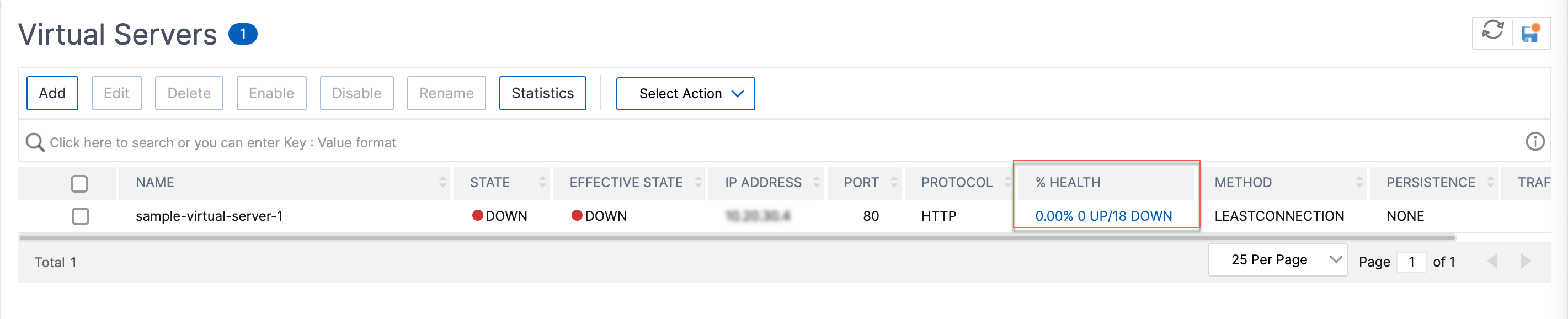
Starting from NetScaler version 13.0 build 41.20, you can view the monitor probe information on the GUI for the virtual servers that are DOWN without navigating to the monitor binding interface. The value in the % HEALTH column of the Virtual Server page is clickable. You can click the value in the % HEALTH column to identify the root cause because of which the virtual server is marked DOWN.
-
Navigate to Traffic Management > Load Balancing > Virtual Servers.
-
Click the value in the % HEALTH column corresponding to the virtual server that is down.
The Service and Service Group Monitor page appears. The services and service groups bound to this virtual server are displayed in the respective tabs.
If you are using services bound to load balancing virtual, perform the following:
In the Services tab, click DOWN corresponding to the service that is down.
The Last Response column in the Service to Load Balancing Monitor Binding page displays the reason because of which the virtual server is marked down.


If you are using service groups bound to load balancing virtual, perform the following:
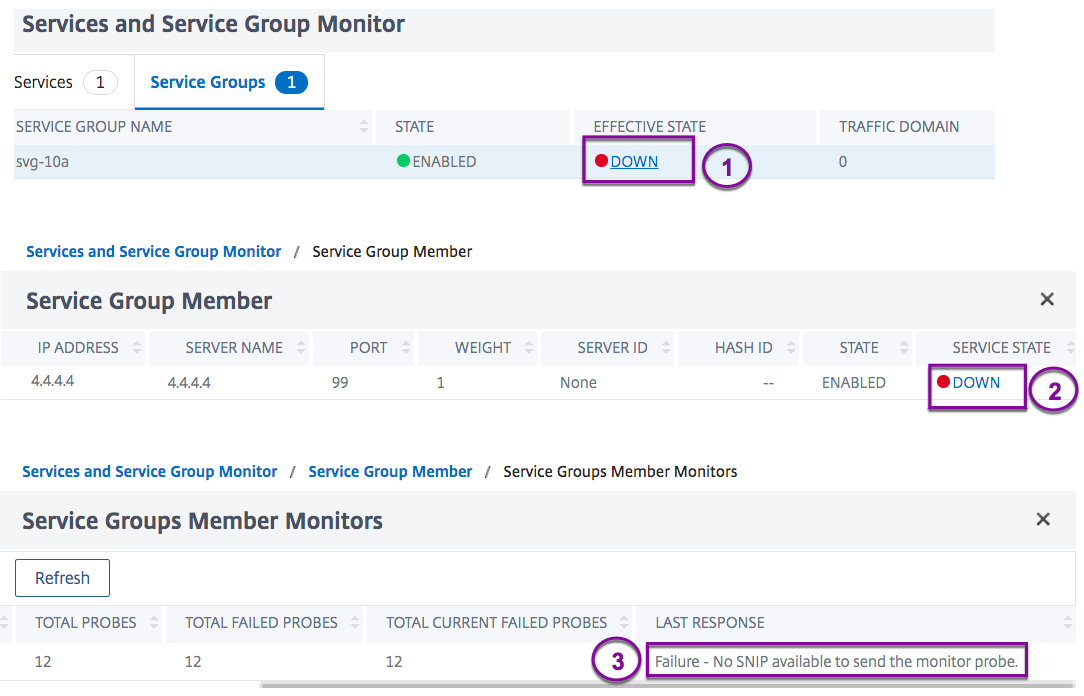
In the Service Groups tab, Click DOWN in the Services and Service Group Monitor page and then click DOWN in the Service Group Member page.
The Last Response column in the Service Groups Member Monitors page displays the reason because of which the virtual server is marked down.