
Configuring a CloudBridge Connector tunnel between a NetScaler appliance and Cisco IOS device
You can configure a CloudBridge Connector tunnel between a NetScaler appliance and a Cisco device to connect two datacenters or extend your network to a Cloud provider. The NetScaler appliance and the Cisco IOS device form the end points of the CloudBridge Connector tunnel and are called peers.
Related information
Example of CloudBridge® Connector tunnel configuration and data flow
As an illustration of the traffic flow in a CloudBridge Connector tunnel, consider an example in which a CloudBridge Connector tunnel is set up between the following devices:
-
NetScaler appliance NS_Appliance-1 in a datacenter designated as Datacenter-1
-
Cisco IOS device Cisco-IOS-Device-1 in a datacenter designated as Datacenter-2
NS_Appliance-1 and Cisco-IOS-Device-1 enable communication between private networks in Datacenter-1 and Datacenter-2 through the CloudBridge Connector tunnel. In the example, NS_Appliance-1 and Cisco-IOS-Device-1 enable communication between client CL1 in Datacenter-1 and server S1 in Datacenter-2 through the CloudBridge Connector tunnel. Client CL1 and server S1 are on different private networks.
On NS_Appliance-1, the CloudBridge Connector tunnel configuration includes IPSec profile entity NS_Cisco_IPSec_Profile, CloudBridge Connector tunnel entity NS_Cisco_Tunnel, and policy based routing (PBR) entity NS_Cisco_Pbr.
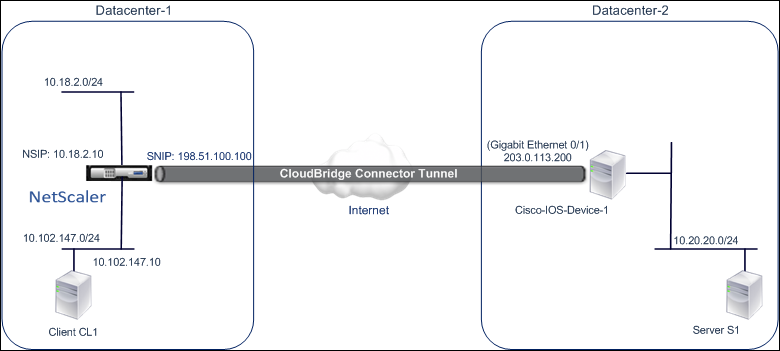
For more information, refer to the CloudBridge Connector tunnel between a NetScaler appliance and Cisco IOS device settings pdf.
Points to Consider for a CloudBridge Connector tunnel configuration
Before configuring a CloudBridge Connector tunnel between a NetScaler appliance and a Cisco IOS device, consider the following points:
-
The following IPSec settings are supported for a CloudBridge Connector tunnel between a NetScaler appliance and a Cisco IOS device.|IPSec Properties|Setting| |--|--| |IPSec mode|Tunnel mode| |IKE version|Version 1| |IKE DH group| DH group 2 (1024 bits MODP algorithm)| |IKE authentication method|Pre-Shared Key| |IKE encryption algorithm|AES, 3DES| |IKE hash algorithm|HMAC SHA1, HMAC SHA256, HMAC SHA384, HMAC SHA512, HMAC MD5| |ESP encryption algorithm|AES, 3DES| |ESP hash algorithm|HMAC SHA1, HMAC SHA256, HMAC SHA256, HMAC SHA256, HMAC MD5|
-
You must specify the same IPSec settings on the NetScaler appliance and the Cisco IOS device at the two ends of the CloudBridge Connector.
-
NetScaler provides a common parameter (in IPSec profiles) for specifying an IKE hash algorithm and an ESP hash algorithm. It also provides another, and a common parameter for specifying an IKE encryption algorithm and an ESP encryption algorithm. Therefore on the Cisco device, you must specify the same hash algorithm and same encryption algorithm for IKE (while creating IKE policy) and ESP (while creating IPSec transform set).
-
You must configure the firewall at the NetScaler end and Cisco device end to allow the following.
-
Any UDP packets for port 500
-
Any UDP packets for port 4500
-
Any ESP (IP protocol number 50) packets
-
Configuring the Cisco IOS device for the CloudBridge Connector tunnel
To configure a CloudBridge Connector tunnel on a Cisco IOS device, use the Cisco IOS command line interface, which is the primary user interface for configuring, monitoring, and maintaining Cisco devices.
Before you begin the CloudBridge Connector tunnel configuration on a Cisco IOS device, make sure that:
-
You have a user account with administrator credentials on the Cisco IOS device.
-
You are familiar with the Cisco IOS command line interface.
-
The Cisco IOS device is UP and running, is connected to the Internet, and is also connected to the private subnets whose traffic is to be protected over the CloudBridge Connector tunnel.
Note:
The procedures for configuring CloudBridge Connector tunnel on a Cisco IOS device might change over time, depending on the Cisco release cycle. Citrix recommends that you follow the official Cisco product documention for more information, see Configuring IPSec VPN tunnels topic.
To configure a CloudBridge connector tunnel between a NetScaler appliance and a Cisco IOS device, perform the following tasks on the Cisco device’s IOS command line:
-
Create an IKE Policy.
-
Configure a Pre-shared key for IKE authentication.
-
Define a transform set and configure IPSec in tunnel mode.
-
Create a crypto access List
-
Create a crypto map
-
Apply the crypto Map to an interface
The examples in the following procedures create settings in
Cisco IOS device Cisco-IOS-Device-1 mentioned in section "Example of CloudBridge Connector Configuration and Data Flow."
To create an IKE policy, refer to the IKE policy pdf.
To configure a pre-shared key by using the Cisco IOS command line:
At the Cisco IOS device’s command prompt, type the following commands, starting in global configuration mode, in the order shown:
| Command | Example | Command Description |
|---|---|---|
| crypto isakmp identity address | Cisco-ios-device-1(config)# crypto isakmp identity address | Specify the ISAKMP identity (address) for the Cisco IOS device to use when communicating with the peer (NetScaler appliance) during IKE negotiations. This example specifies the address keyword, which uses IP address 203.0.113.200 (Gigabit Ethernet interface 0/1 of Cisco-IOS-Device-1) as the identity for the device. |
| crypto isakmp key keystringaddress peer-address | Cisco-ios-device-1 (config)# crypto isakmp key examplepresharedkey address 198.51.100.100 | Specify a pre-shared key for the IKE authentication. This example configures shared key examplepresharedkey to be used with the NetScaler appliance NS_Appliance-1 (198.51.100.100). The same pre-shared key must be configured on the NetScaler appliance for IKE authentication to be successful between the Cisco IOS device and the NetScaler appliance. |
To create a crypto access list by using the Cisco IOS command line:
At the Cisco IOS device’s command prompt, type the following command in global configuration mode, in the order shown:
| Command | Example | Command Description |
|---|---|---|
| access-listaccess-list-number permit IPsource source-wildcard destination destination-wildcard | Cisco-ios-device-1(config)# access-list 111 permit ip 10.20.20.0 0.0.0.255 10.102.147.0 0.0.0.255 | Specify conditions to determine the subnets whose IP traffic is to be protected over the CloudBridge Connector tunnel. This example configures access list 111 to protect traffic from subnets 10.20.20.0/24 (at the Cisco-IOS-Device-1 side) and 10.102.147.0/24 (at the NS_Appliance-1 side). |
To define a transform and configure IPSec tunnel mode by using the Cisco IOS command line:
At the Cisco IOS device’s command prompt, type the following commands, starting in global configuration mode, in the order shown:
| Command | Example | Command Description |
|---|---|---|
| crypto ipsec transform-setname ESP_Authentication_Transform ESP_Encryption_Transform Note: ESP_Authentication_Transform can take the following values: esp-sha-hmac, esp-sha256-hmac, esp-sha384-hmac, esp-sha512-hmac, esp-md5-hmac. ESP_Encryption_Transform can take the following values: esp-aes or esp-3des | Cisco-ios-device-1(config)# crypto ipsec transform-set NS-CISCO-TS esp-sha256-hmac esp-3des | Define a transform set and specify the ESP hash algorithm (for authentication) and the ESP encryption algorithm to be used during exchange of data between the CloudBridge Connector tunnel peers. This example defines transform set NS-CISCO-TS and specifies ESP authentication algorithm as esp-sha256-hmac, and ESP encryption algorithm as esp-3des. |
| mode tunnel | Cisco-ios-device-1 (config-crypto-trans)# mode tunnel | Set IPSec in tunnel mode. |
| exit | Cisco-ios-device-1 (config-crypto-trans)# exit, Cisco-ios-device-1 (config)# | Exit back to global configuration mode. |
To create a crypto map by using the Cisco IOS command line:
At the Cisco IOS device’s command prompt, type the following commands starting in global configuration mode, in the order shown:
| Command | Example | Command Description |
|---|---|---|
| crypto mapmap-name seq-num ipsec-isakmp | Cisco-ios-device-1 (config)# crypto map NS-CISCO-CM 2 ipsec-isakmp | Enter crypto map configuration mode, specify a sequence number for the crypto map, and configure the crypto map to use IKE to establish security associations (SAs). This example configures sequence number 2 and IKE for crypto map NS-CISCO-CM. |
| set peer ip-address | Cisco-ios-device-1 (config-crypto-map)# set peer 172.23.2.7 | Specify the peer (NetScaler appliance) by its IP address. This example specifies 198.51.100.100, which is the CloudBridge Connector endpoint IP address on the NetScaler appliance. |
| match addressaccess-list-id | Cisco-ios-device-1 (config-crypto-map)# match address 111 | Specify an extended access list. This access list specifies conditions to determine the subnets whose IP traffic is to be protected over the CloudBridge Connector tunnel. This example specifies access list 111. |
| set transform-set transform-set-name | Cisco-ios-device-1 (config-crypto-map)# set transform-set NS-CISCO-TS | Specify which transform sets are allowed for this crypto map entry. This example specifies transform set NS-CISCO-TS. |
| exit | Cisco-ios-device-1 (config-crypto-map)# exit |
To apply a crypto map to an interface by using the Cisco IOS command line:
At the Cisco IOS device’s command prompt, type the following commands starting in global configuration mode, in the order shown:
| Command | Example | Command Description |
|---|---|---|
| interfaceinterface-ID | Cisco-ios-device-1(config)# interface GigabitEthernet 0/1 | Specify a physical interface to which to apply the crypto map and enter interface configuration mode. This example specifies Gigabit Ethernet interface 0/1 of the Cisco device Cisco-IOS-Device-1. IP address 203.0.113.200 is already set to this interface. |
| crypto mapmap-name | Cisco-ios-device-1 (config-if)# crypto map NS-CISCO-CM | Apply the crypto map to the physical interface. This example applies crypto map NS-CISCO-CM. |
| exit | Cisco-ios-device-1 (config-if)# exit, Cisco-ios-device-1 (config)# | Exit back to global configuration mode. |
Configuring the NetScaler appliance for the CloudBridge Connector tunnel
To configure a CloudBridge Connector tunnel between a NetScaler appliance and a Cisco IOS device, perform the following tasks on the NetScaler appliance. You can use either the NetScaler command line or the NetScaler graphical user interface (GUI):
-
Create an IPSec profile.
-
Create an IP tunnel that uses IPSec protocol, and associate the IPSec profile with it.
-
Create a PBR rule and associate it with the IP tunnel.
To create an IPSEC profile by using the NetScaler command line:
At the Command prompt, type:
-
add ipsec profile <name> -psk <string> -ikeVersion v1 -
show ipsec profile <name>
To create an IPSEC tunnel and bind the IPSEC profile to it by using the NetScaler command line:
At the Command prompt, type:
-
add ipTunnel <name> <remote> <remoteSubnetMask> <local> -protocol IPSEC –ipsecProfileName <string> -
add ipTunnel <name>
To create a PBR rule and bind the IPSEC tunnel to it by using the NetScaler command line:
At the Command prompt, type:
-
add pbr <pbrName> ALLOW –srcIP <subnet-range> -destIP <subnet-range> -ipTunnel <tunnelName> -
apply pbrs -
show pbrs <pbrName>
The following commands create settings in
NetScaler appliance NS_Appliance-1 mentioned in section Example of CloudBridge Connector Configuration and Data Flow.
    >  add ipsec profile NS_Cisco_IPSec_Profile -psk  examplepresharedkey -ikeVersion v1 –lifetime 315360 –encAlgo 3DES
     Done
     >  add iptunnel NS_Cisco_Tunnel 203.0.113.200 255.255.255.255 198.51.100.100 –protocol IPSEC –ipsecProfileName NS_Cisco_IPSec_Profile

     Done
     > add pbr NS_Cisco_Pbr -srcIP 10.102.147.0-10.102.147.255 –destIP 10.20.0.0-10.20.255.255 –ipTunnel NS_Cisco_Tunnel

     Done
     > apply pbrs

     Done
To create an IPSEC profile by using the GUI:
-
Navigate to System > CloudBridge Connector > IPSec Profile.
-
In the details pane, click Add.
-
In the Add IPSec Profile dialog box, set the following parameters:
-
Name
-
Encryption Algorithm
-
Hash Algorithm
-
IKE Protocol Version
-
-
Configure the IPSec authentication method to be used by the two CloudBridge Connector tunnel peers to mutually authenticate: Select the Pre-shared key authentication method and set the Pre-Shared Key Exists parameter.
-
Click Create, and then click Close.
To create an IP tunnel and bind the IPSEC profile to it by using the GUI:
-
Navigate to System > CloudBridge Connector > IP Tunnels.
-
On the IPv4 Tunnels tab, click Add.
-
In the Add IP Tunnel dialog box, set the following parameters:
-
Name
-
Remote IP
-
Remote Mask
-
Local IP Type (In the Local IP Type drop down list, select Subnet IP).
-
Local IP (All the configured IPs of the selected IP type are in the Local IP drop down list. Select the desired IP from the list.)
-
Protocol
-
IPSec Profile
-
-
Click Create, and then click Close.
To create a PBR rule and bind the IPSEC tunnel to it by using the GUI
-
Navigate to System > Network > PBR.
-
On the PBR tab, click Add.
-
In the Create PBR dialog box, set the following parameters:
-
Name
-
Action
-
Next Hop Type (Select IP Tunnel)
-
IP Tunnel Name
-
Source IP Low
-
Source IP High
-
Destination IP Low
-
Destination IP High
-
-
Click Create, and then click Close.
To apply a PBR by using the GUI:
-
Navigate to System > Network > PBRs.
-
On the PBRs tab, select the PBR, in the Action list, select Apply.
The corresponding new CloudBridge Connector tunnel configuration on the NetScaler appliance appears in the GUI. The current status of the CloudBridge connector tunnel is shown in the Configured CloudBridge Connector pane. A green dot indicates that the tunnel is up. A red dot indicates that the tunnel is down.
Monitoring the CloudBridge Connector Tunnel
You can monitor the performance of CloudBridge Connector tunnels on a NetScaler appliance by using CloudBridge Connector tunnel statistical counters. For more information about displaying CloudBridge Connector tunnel statistics on a NetScaler appliance, see Monitoring CloudBridge Connector Tunnels.