
Configure NetScaler as a DNS proxy server
As a DNS proxy server, NetScaler can function as a proxy for either a single DNS server or a group of DNS servers. The flow of requests and responses is illustrated in the following sample topology diagram.
Figure 1. NetScaler as DNS proxy
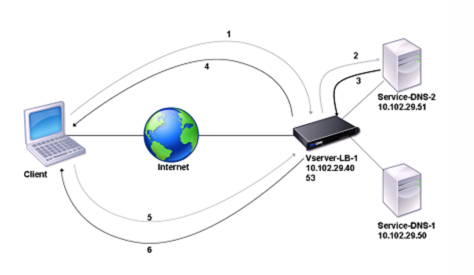
By default, NetScaler caches responses from DNS name servers. When the appliance receives a DNS query, it checks for the queried domain in its cache. If the address for the queried domain is present in its cache, the NetScaler returns the corresponding address to the client. Otherwise, it forwards the query to a DNS name server that checks for the availability of the address and returns it to the NetScaler. The NetScaler then returns the address to the client.
For requests for a domain that has been cached earlier, the NetScaler serves the Address record of the domain from the cache without querying the configured DNS server.
For the DOT request for a domain, if the cached information is not encrypted, NetScaler® forwards the query to a DNS name server that checks for the availability of the address and returns it to NetScaler. NetScaler encrypts the address and response to the client. It also caches the records with a secure option. For the UDP or TCP request for a domain that has a secure option enabled, NetScaler serves the address record of the domain from the cache without querying the configured DNS server.
The appliance discards a record stored in its cache when the time-to-live (TTL) value of the record reaches the configured value. A client that requests an expired record has to wait until the NetScaler retrieves the record from the server and updates its cache. To avoid this delay, the NetScaler proactively updates the cache by retrieving the record from the server before the record expires.
The following table lists sample names and the values of the entities that need to be configured on the NetScaler.
Table 1. Example of DNS Proxy Entity Configuration
| Entity type | Name | IP address | Type | Port |
|---|---|---|---|---|
| LB virtual server | Vserver-DNS-1 | 10.102.29.40 | DNS | 53 |
| Services | Service-DNS-1 | 10.102.29.50 | DNS | 53 |
| Services | Service-DNS-2 | 10.102.29.51 | DNS | 53 |
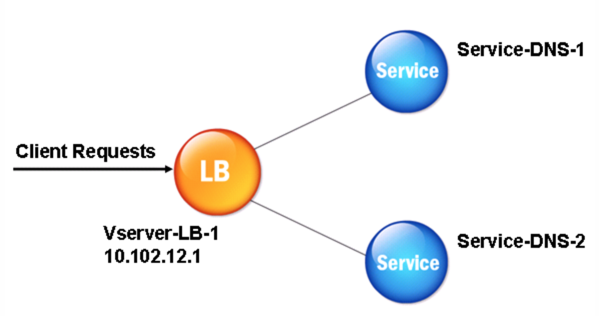
The following diagram shows the entities of a DNS Proxy and the values of the parameters to be configured on the NetScaler.
Figure 2. DNS Proxy Entity Model
Note
To configure the DNS proxy feature, you need to know how to configure load balancing services and virtual servers.
Related information
Create a load balancing virtual server
To configure a DNS Proxy on the NetScaler, configure a load balancing virtual server of type DNS. To configure a DNS virtual server to load balance a set of DNS servers that support recursive queries, you must set the Recursion Available option. With this option, the RA bit is set to ON in the DNS replies from the DNS virtual server.
For instructions on creating a load balancing virtual server, see Load Balancing.
Create DNS services
After creating a load balancing virtual server of type DNS, you must create DNS services. You can add, modify, enable, disable, and remove a DNS service. For instructions on creating a DNS service, see Load Balancing.
Bind a load balancing virtual server to DNS services
To complete the DNS Proxy configuration, you must bind the DNS services to the load balancing virtual server. For instructions on binding a service to a load balancing virtual server, see Load Balancing.
Configure the DNS proxy setup to use TCP
Some clients use the User Datagram Protocol (UDP) for DNS communications. However, UDP specifies a maximum packet size of 512 bytes. When payload lengths exceed 512 bytes, the client must use TCP. When a client sends NetScaler a DNS query, the appliance forwards the query to one of the name servers. If the response is too large for a UDP packet, the name server sets the truncation bit in its response to the NetScaler. The truncation bit indicates that the response is too large for UDP and that the client must send the query over a TCP connection. NetScaler relays the response to the client with the truncation bit intact. It waits for the client to initiate a TCP connection with the IP address of the DNS load balancing virtual server, on port 53. The client sends the request over a TCP connection. NetScaler then forwards the request to the name server and relays the response to the client.
To configure the NetScaler to use the TCP protocol for DNS, you must configure a load balancing virtual server and services, both of type DNS_TCP. You can configure monitors of type DNS_TCP to check the state of the services. For instructions on creating DNS_TCP virtual servers, services, and monitors, see Load Balancing.
For updating the records proactively, the NetScaler uses a TCP connection to the server to retrieve the records.
Important
To configure the NetScaler to use UDP for DNS and use TCP only when the payload length of UDP exceeds 512 bytes, you need to configure both DNS and DNS_TCP services. The IP address of the DNS_TCP service must be the same as the IP address of the DNS service.
Configure time-to-live values for DNS entries
The TTL is the same for all DNS records with the same domain name and record type. If the TTL value is changed for one of the records, the new value is reflected in all records of the same domain name and type. The default TTL value is 3600 seconds. The minimum is 0, and the maximum is 604800. If a DNS entry has a TTL value less than the minimum or greater than the maximum, it is saved as the minimum or maximum TTL value, respectively.
Specify the minimum and maximum TTL by using the CLI
At the NetScaler command prompt, type the following commands to specify the minimum and maximum TTL and verify the configuration:
-  set dns parameter [-minTTL <secs>] [-maxTTL <secs>]
 -  show dns parameter
Example:
> set dns parameter -minTTL 1200 -maxTTL 1800
  Done
 > show dns parameter
         DNS parameters:
         DNS retries: 5
         Minimum TTL: 1200               Maximum TTL: 1800
             .
             .
             .
  Done
 >
Specify the minimum and maximum TTL by using the GUI
-
Navigate to Traffic Management > DNS.
-
In the details pane, under Settings, click Change DNS settings.
-
In the Configure DNS Parameters dialog box, in TTL, in the Minimum and Maximum text boxes, type the minimum and maximum time to live (in seconds), respectively, and then click OK.
Note: When the TTL expires, the record is deleted from the cache. The NetScaler proactively contacts the servers and obtains the DNS record just before the DNS record expires.
Flush DNS records
You can delete all DNS records present in the cache. For example, you might want to flush DNS records when a server is restarted after modifications are made.
Delete all proxy records by using the CLI
At the NetScaler command prompt, type:
flush dns proxyRecords
Delete all proxy records by using the GUI
-
Navigate to Traffic Management > DNS > Records.
-
In the details pane, click Flush Proxy Records.
Add DNS resource records
You can add DNS records to a domain for which NetScaler is configured as a DNS proxy server. For information about adding DNS records, see Configuring DNS Resource Records.
Remove a load balancing DNS virtual server
For information about removing a load balancing virtual server, see Load Balancing.
Limit the number of concurrent DNS requests on a client connection
You can limit the number of concurrent DNS requests on a single client connection, which is identified by the
<clientip:port>-<vserver ip:port> tuple. Concurrent DNS requests are those requests that NetScaler has forwarded to the name servers and for which the appliance is awaiting responses. Limiting the number of concurrent requests on a client connection enables you to protect the name servers when a hostile client attempts a Distributed Denial of Service (DDoS) attack by sending a flood of DNS requests. When the limit for a client connection is reached, subsequent DNS requests on the connection are dropped until the outstanding request count goes below the limit. This limit does not apply to the requests that NetScaler serves out of its cache.
The default value for this parameter is 255. This default value is sufficient in most scenarios. If the name servers serve many concurrent DNS requests under normal operating conditions, you can specify either a large value or a value of zero (0). A value of 0 disables this feature and specifies that there is no limit to the number of DNS requests that are allowed on a single client connection. This parameter is a global parameter and applies to all the DNS virtual servers that are configured on NetScaler.
Specify the maximum number of concurrent DNS requests allowed on a single client connection by using the CLI
At the command prompt, type the following commands to specify the maximum number of concurrent DNS requests allowed on a single client connection and verify the configuration:
-  set dns parameter -maxPipeline <positive_integer>
 -  show dns parameter
Example:
> set dns parameter -maxPipeline 1000
  Done
 > show dns parameter
         DNS parameters:
         DNS retries: 5
         .
         .
         .
         Max DNS Pipeline Requests: 1000
  Done
Specify the maximum number of concurrent DNS requests allowed on a single client connection by using the GUI
-
Navigate to Traffic Management > DNS.
-
In the details pane, click Change DNS settings.
-
In the Configure DNS Parameters dialog box, specify a value for Max DNS Pipeline Requests.
-
Click OK.
DNS ECS Insertion Support
The DNS server response time can be improved by including the ECS in the DNS query. This enables the DNS server to redirect requests to the appropriate geographical location. Depending on the client IP address and a subnet mask, you can include an Extended Client Subnet (ECS) option in proxied DNS queries.
Configure the ECS parameter using CLI
At the command prompt, type:
add dns profile <profilename> -insertECS <ENABLED|DISABLED> -replaceECS <ENABLED|DISABLED> -maxCacheableECSPrefixLength <0-32> -maxCacheableECSPrefixLength6 <0-128>
-
insertECS- When enabled, DNS requests proxied through a load balancing virtual server with the DNS profile will have an ECS option based on the client IP address. By default, this parameter is DISABLED. -
replaceECS– when enabled, DNS requests proxied through a load balancing virtual server with the DNS profile ECS option is replaced with a new ECS based on the client IP address. By default, this parameter is DISABLED. -
maxCacheableECSPrefixLength- Specifies the maximum prefix length of the network mask used for the ECS option for IPv4 addresses. Valid values: 0-32 Default value: 32 -
maxCacheableECSPrefixLength6- Specifies the maximum prefix length of the network mask used for the ECS option for IPv6 addresses. Valid values: 0-128 Default value: 128.
Configure the ECS parameter using GUI
-
Navigate to System > Profiles> DNS Profile,and create the DNS profile.
-
Enable Insert ECS or Replace ECS.
-
Enter the prefix length for IPv4 and IPv6.
-
Click OK.