
Use Case 2: Configure the token method of load balancing for DataStream
You can configure the token method of load balancing for DataStream to base the selection of database servers on the value of the token extracted from the client (application or web server) requests. These tokens are defined by using SQL expressions. For subsequent requests with the same token, the NetScaler appliance sends the requests to the same database server that handled the initial request. Requests with the same token are sent to the same database server until the maximum connection limit is reached or the session entry has aged out.
You can use the following sample SQL expressions to define tokens:
| MySQL | MS SQL |
|---|---|
| MYSQL.REQ.QUERY.TEXT | MSSQL.REQ.QUERY.TEXT |
| MYSQL.REQ.QUERY.TEXT(n) | MSSQL. REQ.QUERY.TEXT(n) |
| MYSQL.REQ.QUERY.COMMAND | MSSQL.REQ.QUERY.COMMAND |
| MYSQL.CLIENT.USER | MSSQL.CLIENT.USER |
| MYSQL.CLIENT.DATABASE | MSSQL.CLIENT.DATABASE |
| MYSQL.CLIENT.CAPABILITIES |
The following example shows how the NetScaler DataStream feature works when you configure the token method of load balancing.
Figure 1. DataStream and the Token Method of Load Balancing
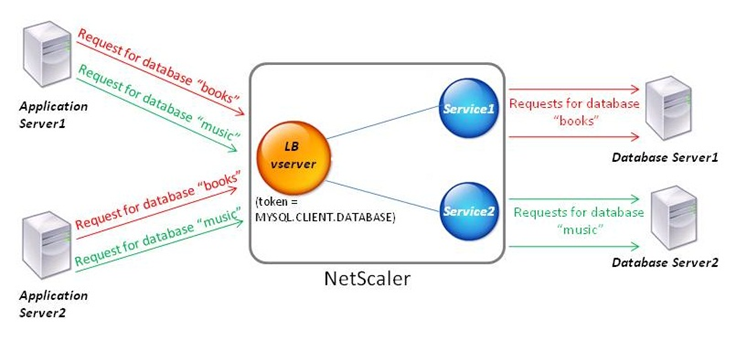
In this example, the token is the name of the database. A request with token books is sent to Database Server1 and a request with token music is sent to Database Server2. All subsequent requests with token books are sent to Database Server1 and requests with token music are sent to Database Server2. This configuration provides pseudo persistence with the database servers.
Related information
Configure this example by using the CLI
At the command prompt, type:
add service Service1 192.0.2.9 MYSQL 3306

 add service Service2 192.0.2.11 MYSQL 3306

 add lb vserver token_lb_vserver MYSQL 192.0.2.15 3306 -lbmethod token -rule MYSQL.CLIENT.DATABASE

 bind lb vserver token_lb_vserver Service1

 bind lb vserver token_lb_vserver Service2
Configure this example by using the GUI
-
Navigate to Traffic Management > Load Balancing > Virtual Servers, configure a virtual server, and specify the protocol as MYSQL.
-
Click in the Service section, and configure two services specifying the protocol as MYSQL. Bind these services to the virtual server.
-
In Advanced Settings, click Method and, in the Load Balancing Method list, select TOKEN and specify the expression as MYSQL.CLIENT.DATABASE.