
Priority Load Balancing
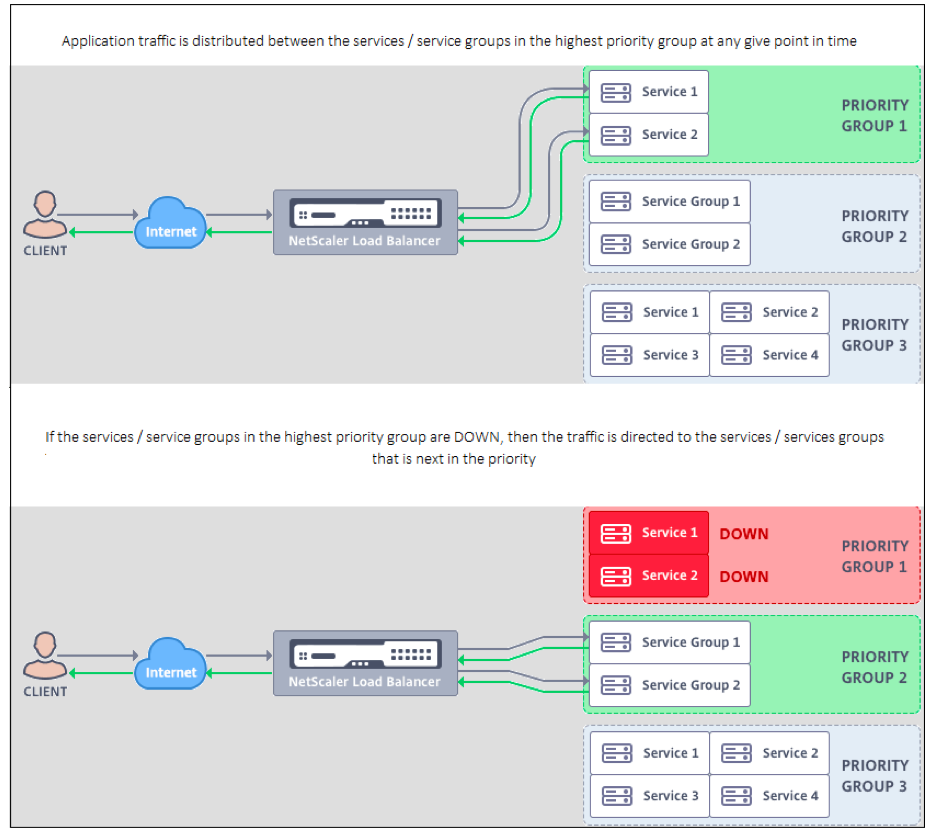
The priority load balancing feature enables you to assign a priority number for each of the services or service groups that are bound to a priority load balancing virtual server. A service or a service group with the lowest number has the highest priority. The application traffic is distributed only to this service or a service group as long as this service or the service group is UP. The service or the service group that is assigned the next priority number becomes operational only when all the services or members in the service group with the highest priority are DOWN. However, when any of the services or a member in the service group with the highest priority becomes available again, the traffic is redirected to that service or the service group.
For example, consider the service groups SVG1, SVG2, and SVG3 that is bound to a priority load balancing virtual server. The maximum number of priority groups is set to three. You assign the priority for each group as follows:
-
SVG1 – priority 1
-
SVG2 – priority 2
-
SVG3 – priority 3
In this scenario, the application traffic is directed to service group SVG1 because this group is assigned the lowest priority number. If all the members in SVG1 are DOWN, the traffic is distributed to service group SVG2 as this group is assigned the next lower priority number. If all the members in SVG2 are also DOWN, the traffic is distributed to SVG3. However, when any of the members in SVG1 is UP, the traffic is redirected to SVG1 because SVG1 is assigned the lowest number and has the highest priority.
You can assign a priority to a service or a service group to upgrade the specific service or service group that has the highest priority, whenever required with minimal or no impact to the production traffic.
Also, if the upgrade is not successful, you can safely switch to the service or the service group that is next in the priority, with minimal or no impact to the production traffic.
The following figure illustrates the priority load balancing feature.
Configure priority load balancing
Note
The NetScaler priority load balancing configuration is supported only through the GUI. You cannot configure priority load balancing by using the CLI.
-
Navigate to Traffic Management > Priority Load Balancing> *Virtual Servers and specify the protocol for the virtual server, the IP address, and the port number of the virtual server.
-
In the Maximum Priority Groups box, enter the number of priority services or the service groups that can be bound to this virtual server. Default value is 2, and the maximum priority that can be set is 10. This parameter is noneditable after it is configured.Note:After you specify the maximum number of priority groups and click OK, a content switching virtual server and "n" number of backup load balancing virtual servers are created. The alphabet "n" represents the maximum number of priority groups.For example, if you have entered the virtual server name as vs1, and have set the maximum priority group as 5, then a content switching virtual server with the name
_Pri.LB#vs1#MaxPri=5and the following 5 load balancing virtual servers are created.-
_Pri.LB#vs1#MaxPri=5_LB1 -
_Pri.LB#vs1#MaxPri=5_LB2 -
_Pri.LB#vs1#MaxPri=5_LB3 -
_Pri.LB#vs1#MaxPri=5_LB4 -
_Pri.LB#vs1#MaxPri=5_LB5
-
-
After you specify the maximum number of priority groups and click OK, you are prompted to choose the services or service groups that must be bound to this content switching virtual server.
-
To bind services to the virtual server, click Insert in the Services section. Next, either select an existing service or create a service and set the priority for this service. Also, set the priority number at which this service must be bound.
-
To bind service groups to the virtual server, click Insert in the Service Groups section. Next, either select an existing service group or create a service group and set the priority for this service group. Also, set the priority number at which this service group must be bound.
Repeat step 3, depending on the maximum number of priority groups that you have entered.Note:-
The service or the service group with the highest priority is bound to the load balancing virtual server that represents the highest priority.
For example, if you have assigned priority 1 and 2 to service groupsSG_App1 and SG_App2respectively, thenSG_App1is bound tovirtual server _Pri.LB#vs1#MaxPri=5_LB1 and SG_App2is bound tovirtual server _Pri.LB#vs1#MaxPri=5_LB2created in step 2.-
To change the priority of the service group or service, click the edit icon in the Priority Load Balancing Virtual Server page and change the priority as required.
-
You cannot set the load balancing methods and persistence for each virtual server explicitly, because the configuration of all load balancing virtual servers is identical.
-
-
From the Advanced Setting sections, complete the other configuration that meets your requirement.
Important:
The entities created during the priority load balancing configuration must not be modified from other tabs in the GUI and also from the CLI. It is recommended that you modify the priority load balancing entities from the Priority Load Balancing tab only.