
Use case 7: Configure load balancing in DSR mode by using IP Over IP
You can configure a NetScaler appliance to use direct server return (DSR) mode across Layer 3 networks by using IP tunneling, also called IP over IP configuration. As with standard load balancing configurations for DSR mode, this allows servers to respond to clients directly instead of using a return path through the NetScaler appliance. This improves response time and throughput. As with standard DSR mode, the NetScaler appliance monitors the servers and performs health checks on the application ports.
With IP over IP configuration, the NetScaler appliance and the servers do not need to be on the same Layer 2 subnet. Instead, the NetScaler appliance encapsulates the packets before sending them to the destination server. After the destination server receives the packets, it decapsulates the packets, and then sends its responses directly to the client. This is often referred to as L3DSR.
To configure L3-DSR mode on your NetScaler appliance:
-
Create a load balancing virtual server. Set the mode to IPTUNNEL and enable sessionless tracking.
-
Create services. Create a service for each back-end application and bind the services to the virtual server.
-
Configure for decapsulation. Configure either a NetScaler appliance or a back-end server to act as a decapsulator.Note:When you use a NetScaler appliance, the decapsulation setup is an IP tunnel between the ADC appliances with the back end doing L2DSR to the real servers.
Related information
Configure a load balancing virtual server
Configure a virtual server to handle requests to your applications. Assign the service type that matches the service, or use a type of ANY for multiple services. Set the forwarding method to IPTUNNEL and enable the virtual server to operate in sessionless mode. Configure any load balancing method that you want to use.
To create and configure a load balancing virtual server for IP over IP DSR by using the command line interface
At the command prompt type the following command to configure a load balancing virtual server for IP over IP DSR and verify the configuration:
add lb vserver <name> serviceType <serviceType> IPAddress <ip> Port <port> -lbMethod <method> -m <ipTunnelTag> -sessionless [ENABLED | DISABLED]

 show lb vserver <name>
Example:
In the following example, we have selected the load balancing method as sourceIPhash and configured sessionless load balancing.
add lb vserver Vserver-LB-1 ANY 1.1.1.80 * -lbMethod SourceIPHash -m IPTUNNEL -sessionless ENABLED
To create and configure a load balancing virtual server for IP over IP DSR by using the GUI
-
Navigate to Traffic Management > Load Balancing > Virtual Servers.
-
Create a virtual server, and specify Redirection Mode as IP Tunnel Based.
Configure services for IP over IP DSR
After creating your load-balanced server, configure one service for each of your applications. The service handles traffic from the NetScaler appliance to those applications, and allows the NetScaler appliance to monitor the health of each application.
Assign the services to use USIP mode and bind a monitor of type IPTUNNEL to the service for tunnel-based monitoring.
To create and configure a service for IP over IP DSR by using the command line interface
At the command prompt, type the following commands to create a service and optionally, create a monitor and bind it to the service:
add service <serviceName> <serverName> <serviceType> <port> -usip <usip>

 add monitor <monitorName> <monitorType> -destip <ip> -iptunnel <iptunnel>

 bind service <serviceName> -monitorName <monitorName>
Example:
In the following example, a monitor of type IPTUNNEL is created.
add monitor mon_DSR PING -destip 1.1.1.80 -iptunnel yes
 add service svc_DSR01 2.2.2.100 ANY * -usip yes
 bind service svc_DSR01 -monitorName mon_DSR
An alternative approach to simplify the routing at both the server and the ADC appliance is to setup both the ADC and server to use an IP from the same subnet. Doing so ensures that any traffic with a destination of a tunnel endpoint is sent over the tunnel. In the example, 10.0.1.0/30 is used.
Note:
The purpose of the monitor is to ensure that the tunnel is active by reaching the loopback of each server through the IP tunnel. If the service is not up, verify whether the outer IP routing between ADC and server is good. Also verify whether the inner IP addresses are reachable through the IP tunnel. Routes might be required on the server, or PBR is added to ADC depending on the chosen implementation.
Example:
add ns ip 10.0.1.2 255.255.255.252 -vServer DISABLED
 add netProfile netProfile_DSR -srcIP 10.0.1.2
 add lb monitor mon_DSR PING -LRTM DISABLED -destIP 1.1.1.80 -ipTunnel YES -netProfile netProfile_DSR
To configure a monitor by using the GUI
-
Navigate to Traffic Management > Load Balancing > Monitors.
-
Create a monitor, and select IP Tunnel.
To create and configure a service for IP over IP DSR by using the GUI
-
Navigate to Traffic Management > Load Balancing > Services.
-
Create a service and, in Settings tab, select Use Source IP Address.
To bind a service to a load balancing virtual server by using the command line interface
At the command prompt type the following command:
bind lb vserver <name> <serviceName>
Example:
bind lb vserver Vserver-LB-1 Service-DSR-1
To bind a service to a load balancing virtual server by using the GUI
-
Navigate to Traffic Management > Load Balancing > Virtual Servers.
-
Open a virtual server, and click in the Services section to bind a service to the virtual server.
Using the client IP address in the Outer header of tunnel packets
The NetScaler supports using the client-source IP address as the source IP address in the outer header of tunnel packets related to direct server return mode using IP tunneling. This feature is supported for DSR with IPv4 and DSR with IPv6 tunneling modes. For enabling this feature, enable the use client source IP address parameter for IPv4 or IPv6. This setting is applied globally to all the DSR configurations that use IP tunneling.
To use a client-source IP address as the source IP address by using the CLI
At the command prompt, type:
-
set iptunnelparam -useclientsourceip [YES | NO] -
show iptunnelparam
To use client source IP address as the source IP address by using the GUI
-
Navigate to System > Network.
-
In Settings tab, click IPv4 Tunnel Global Settings.
-
In the Configure IPv4 Tunnel Global Parameters page, select Use Client Source IP check box.
-
Click OK.
To use client source IP address as the source IP address by using the CLI
At the command prompt, type:
-
set ip6tunnelparam -useclientsourceip [YES | NO] -
show ip6tunnelparam
To use client source IP address as the source IP address by using the GUI
-
Navigate to System > Network.
-
In Settings tab, click IPv6 Tunnel Global Settings.
-
In the Configure IPv6 Tunnel Global Parameters page, select Use Client Source IP check box.
-
Click OK.
Decapsulation configuration
You can configure either a NetScaler appliance or a back-end server as a decapsulation.
NetScaler decapsulation
When a NetScaler appliance is used as a decapsulation, an IP tunnel must be created in the NetScaler appliance. For more details, see Configuring IP Tunnels.
The NetScaler decapsulation setup consists of the following two virtual servers:
-
The first virtual server receives the encapsulated packet and removes the outer IP encapsulation.
-
The second virtual server has the IP of the original service on the front-end ADC and uses MAC translation to forward the packet towards the back end by using the MAC address of the bound services. This setup is typically known as L2DSR. Ensure to disable ARP on this virtual server.
Example setup:
The following illustration shows a decapsulation setup using the ADC appliances.
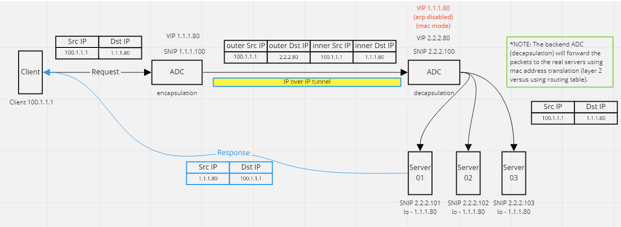
The complete configuration required for the setup is as follows.
Front-end ADC configuration:
add service svc_DSR01 2.2.2.80 ANY * -usip YES -useproxyport NO
 add lb vserver vip_DSR_ENCAP ANY 1.1.1.80 * -lbMethod SOURCEIPHASH -m IPTUNNEL -sessionless ENABLED
 bind lb vserver vip_DSR_ENCAP svc_DSR01
Back-end ADC configuration:
add ipTunnel DSR-IPIP 1.1.1.100 255.255.255.255 *

 add service svc_DSR01_01 2.2.2.101 ANY * -usip YES -useproxyport NO
 add service svc_DSR01_02 2.2.2.102 ANY * -usip YES -useproxyport NO
 add service svc_DSR01_03 2.2.2.103 ANY * -usip YES -useproxyport NO

 add lb vserver vs_DSR_DECAP ANY 2.2.2.80 * -lbMethod SOURCEIPHASH -m IPTUNNEL -sessionless ENABLED -netProfile netProf_DSR_MBF_noIP

 add ns ip 1.1.1.80 255.255.255.255 -type VIP -arp DISABLED -snmp DISABLED
 add lb vserver vs_DSR_Relay ANY 1.1.1.80 * -lbMethod SOURCEIPHASH -m MAC -sessionless ENABLED

 bind lb vserver vs_DSR_DECAP svc_DSR01_01
 bind lb vserver vs_DSR_DECAP svc_DSR01_02
 bind lb vserver vs_DSR_DECAP svc_DSR01_03

 bind lb vserver vip_DSR_Relay svc_DSR01_01
 bind lb vserver vip_DSR_Relay svc_DSR01_02
 bind lb vserver vip_DSR_Relay svc_DSR01_03

 add netProfile netProf_DSR_MBF_noIP -MBF ENABLED
 add lb monitor mon_DSR_MAC PING -netProfile netProf_DSR_MBF_noIP
 bind service svc_DSR01_01 -monitorName mon_DSR_MAC
 bind service svc_DSR01_02 -monitorName mon_DSR_MAC
 bind service svc_DSR01_03 -monitorName mon_DSR_MAC
The following example shows a testing setup using Ubuntu and Red Hat servers running apache2. These commands are set up on each back-end server.
sudo ip addr add 1.1.1.80 255.255.255.255 dev lo
 sudo sysctl net.ipv4.conf.all.arp_ignore=1
 sudo sysctl net.ipv4.conf.all.arp_announce=2
 sudo sysctl net.ipv4.conf.eth4.rp_filter=2 (The interface has the external IP with route towards the ADC)
 sudo sysctl net.ipv4.conf.all.forwarding=1
 sudo ip link set dev lo arp on
Back-end server decapsulation
When you use the back-end servers as a decapsulation, the back-end configuration varies depending upon the server OS type. You can configure a back-end server as a decapsulation by following these steps:
-
Configure a loop back interface with IP for service IP.
-
Create a tunnel interface.
-
Add a route through tunnel interface.
-
Configure interface settings as required for traffic.
Note:
Windows OS servers cannot do IP tunneling natively, so the commands are provided as examples for Linux based systems. Third-party plug-ins are available for Windows OS servers, however, that is outside the scope of this example.
The following illustration shows a decapsulation setup using the back-end servers.
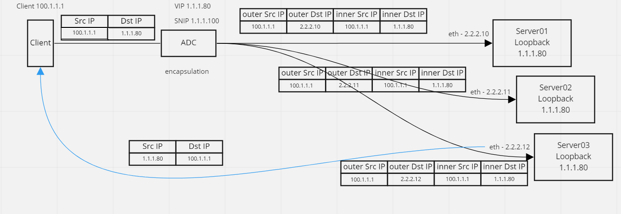
Example configuration:
In this example, 1.1.1.80 is the NetScaler virtual IP (VIP) address and 2.2.2.10-2.2.2.12 are the back-end server IP addresses. The VIP address is configured in the loopback interface, and a route is added through the tunnel interface. The monitors use the server IP, and tunnel the monitor packets over the IP tunnel using the tunnel endpoints.
The complete configuration required for the setup is as follows.
Front-end ADC configuration:
The following configuration creates a monitor that uses the tunnel endpoint as source. Then, send pings over tunnel to service IP address.
add ns ip 10.0.1.2 255.255.255.252 -vServer DISABLED
 add netProfile netProfile_DSR -srcIP 10.0.1.2
 add lb monitor mon_DSR PING -LRTM DISABLED -destIP 1.1.1.80 -ipTunnel YES -netProfile netProfile_DSR
The following configuration creates a VIP for service that uses the original source IP address. Then, forwards traffic over IP tunnel to back-end servers.
add service svc_DSR01 2.2.2.10 ANY * -usip YES -useproxyport NO
 bind service svc_DSR01 -monitorName mon_DSR

 add service svc_DSR02 2.2.2.11 ANY * -usip YES -useproxyport NO
 bind service svc_DSR02 -monitorName mon_DSR

 add service svc_DSR03 2.2.2.12 ANY * -usip YES -useproxyport NO
 bind service svc_DSR03 -monitorName mon_DSR

 add lb vserver vip_DSR_ENCAP ANY 1.1.1.80 * -lbMethod SOURCEIPHASH -m IPTUNNEL -sessionless ENABLED
 bind lb vserver vip_DSR_ENCAP svc_DSR01
 bind lb vserver vip_DSR_ENCAP svc_DSR02
 bind lb vserver vip_DSR_ENCAP svc_DSR03
Back-end server configuration of each server:
The following commands are required for the back-end server to receive the IPIP packet, remove the outer encapsulation, then respond from the loopback to the original client IP. Doing so ensures the IP addresses in the packet received by the client match the IP addresses in the original request.
modprobe ipip
 sudo ip addr add 1.1.1.80 255.255.255.255 dev lo
 nmcli connection add type ip-tunnel ip-tunnel.mode ipip con-name tun0
 ifname tun0 remote 198.51.100.5 local 203.0.113.10
 nmcli connection modify tun0 ipv4.addresses '10.0.1.1/30'
 nmcli connection up tun0
 sudo sysctl net.ipv4.conf.all.arp_ignore=1
 sudo sysctl net.ipv4.conf.all.arp_announce=2
 sudo sysctl net.ipv4.conf.tun0.rp_filter=2
 sudo sysctl net.ipv4.conf.all.forwarding=1
 sudo ip link set dev lo arp off