
How to redirect HTTP request to HTTPS using responder
This article explains how to configure the responder feature with a load balancing virtual server IP addresses and redirect client requests from HTTP to HTTPS.
Consider a scenario where a user might attempt to access a secure website by sending an HTTP request. Instead of dropping the request, you might want to redirect the request to a secure website. You can use the responder feature to redirect the request to the secure website without changing the path and the URL query, which the user attempts to access.
Related information
How NetScaler responder redirects a request from HTTP to HTTPS
The following illustration shows a step by step flow of how the appliance redirects a request.
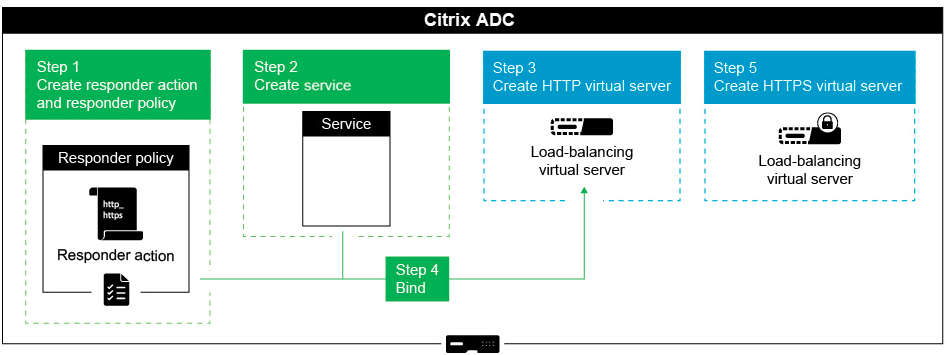
To configure the Responder feature with the Load Balancing VIP addresses of a NetScaler® appliance, follow these steps. This setup redirects client requests from HTTP to HTTPS.
Enable the responder feature on the appliance
To enable the responder feature on the appliance, navigate to System > Settings > Configure Advanced Features and select Responder.
Create a responder action
To create a responder action, perform the following steps:
-
Navigate to AppExpert > Responder > Actions and click Add.
-
Specify an appropriate name, such as http_to_https_actn, in the Name field.
-
Select Redirect as Type.
-
In the Expression field, type the following expression:
"https://" + HTTP.REQ.HOSTNAME.HTTP_URL_SAFE + HTTP.REQ.URL.PATH_AND_QUERY.HTTP_URL_SAFE. -
Click Create.
Create responder policy
To create a responder policy, perform the following steps:
-
Navigate to AppExpert > Responder > Policies and click Add.
-
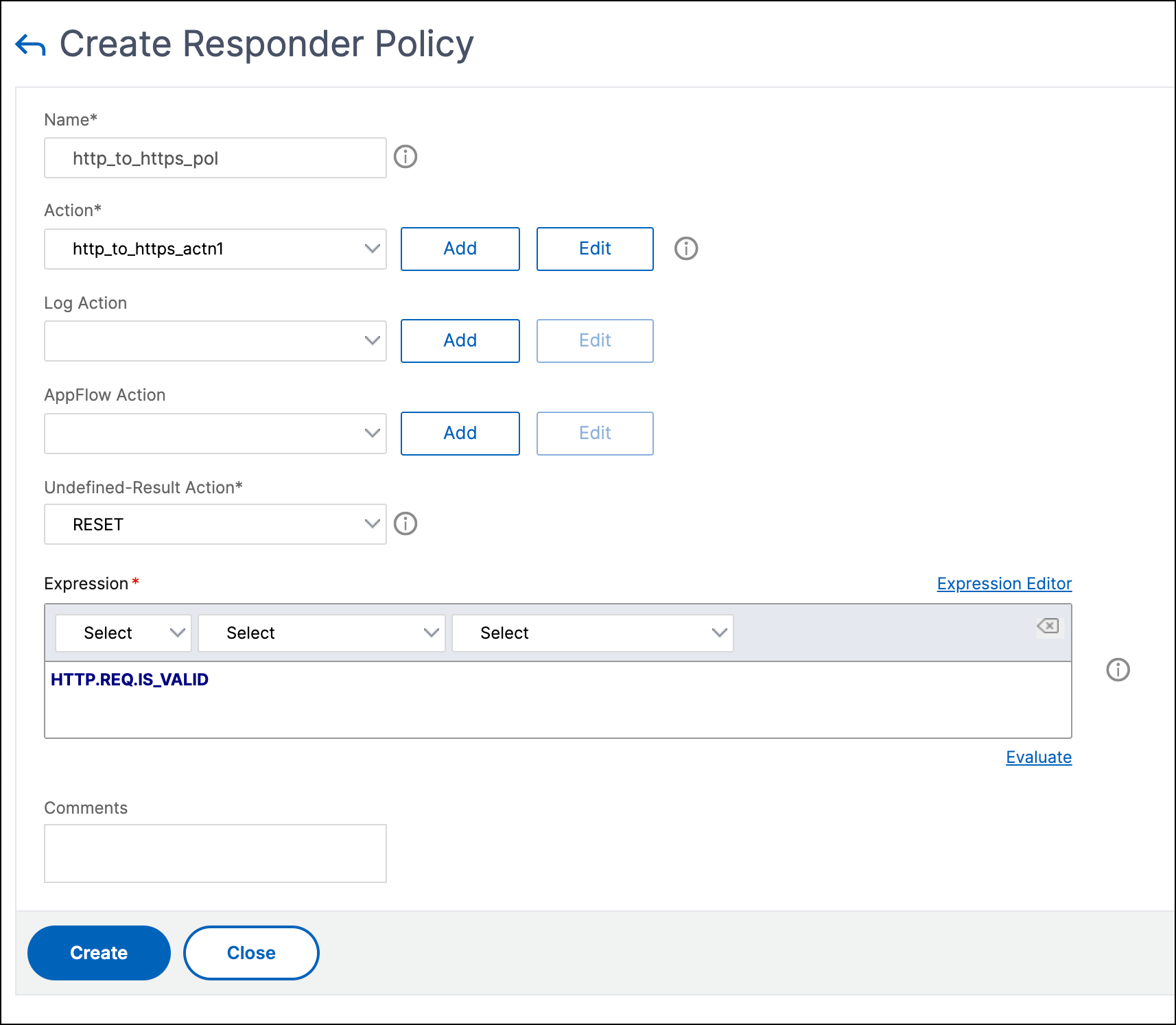
Specify an appropriate name, such as http_to_https_pol, in the Name field.
-
From the Action list, select the action name that you have created.
-
From the Undefined Action list, select RESET.
-
Type the HTTP.REQ.IS_VALID expression in the Expression field as shown in the following screenshot.
Create a service
To create a service, perform the following steps:
-
Navigate to Load Balancing > Services and click Add.
-
Specify an appropriate name, such as Always_UP_service, in the Name field.
-
Specify a non-existent IP address in the Server field.
-
Specify 80 in the Port field.
Create a load balancing virtual server
-
Navigate to Load Balancing > Services and then click Add.
-
Specify an appropriate name in the Name field.
-
Specify the IP address of the website in the IP Address field.
-
Select HTTP from the Protocol list.
-
Type 80 in the Port field.
-
Click the Policies tab.
-
Bind the Responder policy that you created to the HTTP Load Balancing VIP address of the website.
-
Create a secure Load Balancing virtual server that has the IP address of the website and port as 443.
To create a configuration similar to the preceding procedure from the command line interface of the appliance, run the following commands:
enable ns feature responder
 add responder action http_to_https_actn redirect "\"https://\" + http.req.hostname.HTTP_URL_SAFE + http.REQ.URL.PATH_AND_QUERY.HTTP_URL_SAFE"
 add responder policy http_to_https_pol HTTP.REQ.IS_VALID http_to_https_actn RESET
 add service Always_UP_service 1.2.3.4 HTTP 80 -gslb NONE -maxClient 0 -maxReq 0 -cip ENABLED dummy -usip NO -sp OFF -cltTimeout 180 -svrTimeout 360 -CKA NO -TCPB NO -CMP YES -healthMonitor NO
 add lb vserver http_site.com HTTP 10.217.96.238 80 -persistenceType COOKIEINSERT -timeout 0 -cltTimeout 180
 bind lb vserver http_site.com Always_UP_service
 bind lb vserver http_site.com -policyName http_to_https_pol -priority 1 -gotoPriorityExpression END
Notes:
-
The status of the port 80 Load Balancing Redirect virtual server must be UP for the redirect to work.
-
Web browsers might not redirect correctly if the HTTPS virtual server is not active.
-
This redirect setup allows for situations where multiple domains are bound to the same IP address.
-
If the client sends an invalid HTTP request to the redirect virtual server, then the appliance sends a RESET message code.