
Citrix® StoreFront™ stores monitoring
You can configure a user monitor for a Citrix StoreFront store. The monitor determines the state of the StoreFront store by successively probing the account service, discovery service, and authentication endpoint (if the Citrix StoreFront Store is an authenticated store). If any of those services do not respond to the probe, the monitor probe fails, and the StoreFront store is marked as DOWN. The monitor sends probes to the IP address and port of the bound service. For more information, see Citrix StoreFront Store Services API.
Note: Monitor probes originate from the NSIP address. However, if the subnet of a StoreFront server is different from that of the appliance, then the subnet IP (SNIP) address is used.
You can also bind a StoreFront monitor to a service group. A monitor is bound to each member of the service group and probes are sent to the IP address and port of the bound member (service). Also, because each member of a service group is now monitored by using the member's IP address, you can now use the StoreFront monitor to monitor StoreFront cluster nodes that are added as members of the service group.
In earlier releases, the StoreFront monitor tried to authenticate anonymous stores. As a result, a service can be marked as DOWN and you cannot launch Citrix Virtual Apps and Citrix Virtual Desktops™ by using the URL of the load balancing virtual server.
The probe order has changed. The monitor now determines the state of the StoreFront store by successively probing the account service, the discovery document, and then the authentication service, and skips authentication for anonymous stores.
The host name parameter for StoreFront monitors is deprecated. The secure parameter is now used to determine whether to use HTTP (the default) or HTTPS to send monitor probes.
To use HTTPS, set the secure option to Yes.
Related information
Create a StoreFront monitor by using the CLI
At the command prompt, type the following commands to configure a StoreFront monitor and verify the configuration:
add lb monitor <monitorName> STOREFRONT <string> -storeName <string> [-storefrontacctservice ( YES | NO )] -secure ( YES | NO )

 show lb monitor <monitorName>
Example
add lb monitor storefront_ssl STOREFRONT -storename myStore -storefrontacctservice YES -secure YES
Note:
The monitor is marked as down if the expected 200 OK status code is not returned.
Create a StoreFront monitor by using the GUI
Navigate to Traffic Management > Load Balancing > Monitors, and create a monitor of type STOREFRONT.
Basic parameter settings:
-
Interval: The time interval between two successive probes. The default time interval is 5 seconds.
-
Response Time-out: The duration for which NetScaler waits before it marks a probe as FAILED. The default duration is 2 seconds.
-
Store Name: The StoreFront store that must be monitored. By default, the user monitor uses the /Citrix/StoreWeb store for monitoring.
-
StoreFront Account Service: Enable or disable probing for the StoreFront account service.
-
Check Backend Services: This option enables the monitoring of services running on the StoreFront server.
-
Secure: Enable this option if you are using HTTPS.
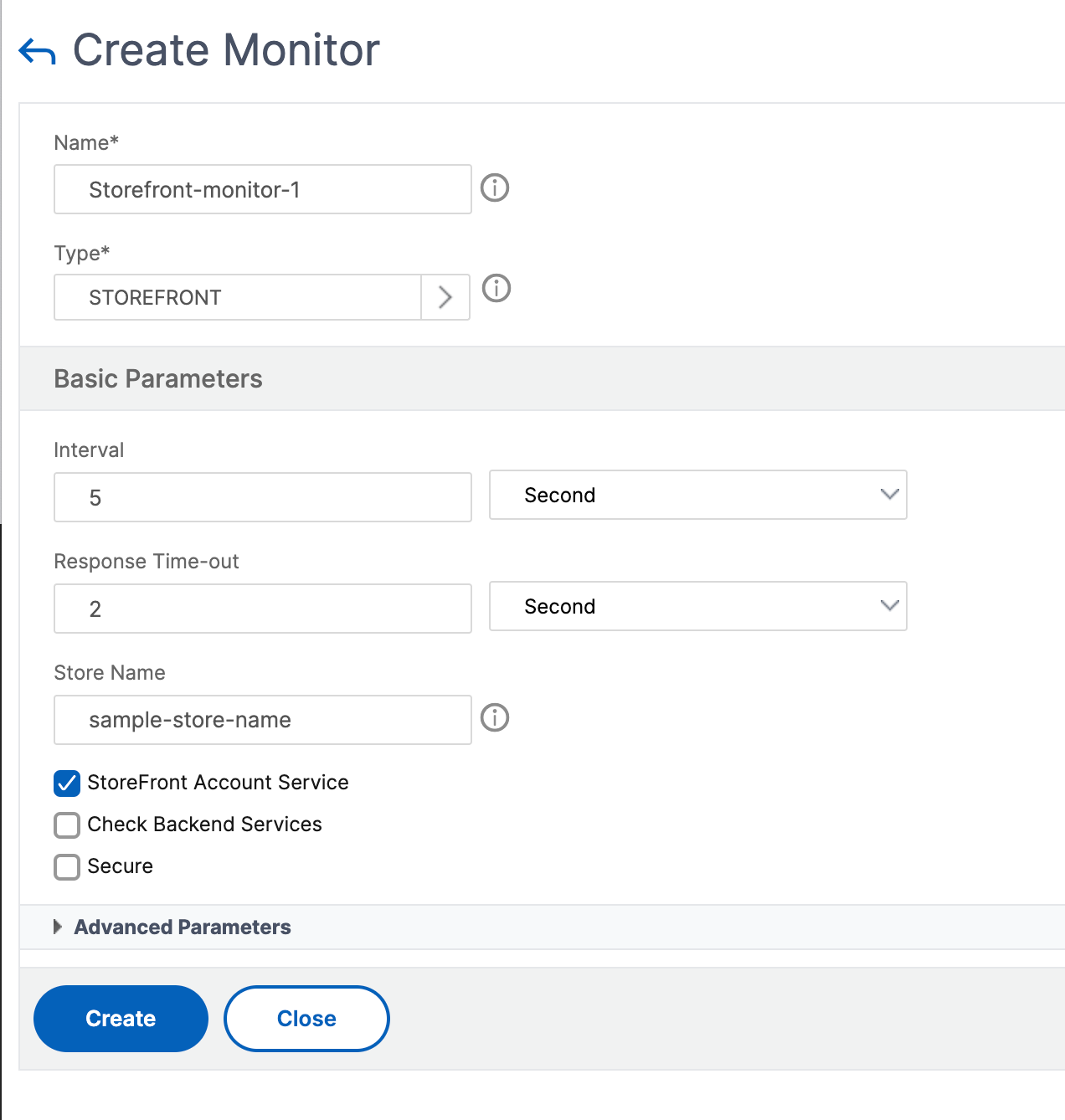
Note
For more information about the StoreFront monitors, see StoreFront documentation.
Extended StoreFront monitor
NetScaler introduces an extended StoreFront monitor that can simulate the authentication and app enumeration on the Citrix StoreFront store on behalf of a test user account. You must pre-configure and enable the test user account on StoreFront for monitoring. Provide the test user credentials, store name, and the nssf_extend.pl script to use the functionalities of this monitor.
If the StoreFront monitor is bound to a service group, it uses the user credentials to monitor all the members of the service group. Therefore, we recommend that you provide the test user credentials in the Active Directory of all the service group members. Ensure that the test user credentials do not expire if the monitor is active and that at least one app is authorized for the test user.
Configure the extended StoreFront monitor by using the GUI
-
Navigate to Traffic Management > Load Balancing > Monitors and click Add.
-
Select the type as USER.
-
In the Basic Parameters section, provide the following details:
-
Secure Arguments: Provide the username, password, and the store name in this field. The details must be in the format
user=<DomainName\username>;password=<password>;store=/Citrix/StoreWeb. If the store name is not provided, the default store/Citrix/StoreWebis used for monitoring. -
Script name: Select the nssf_extend.pl script.
-
Interval and Response Time-Out: Set the time interval and response to greater values, preferably in minutes. This ensures the completion of the monitor probe as the StoreFront monitor makes multiple HTTP/HTTPS calls.
-
Configure the extended StoreFront monitor by using the CLI
Use the following command to configure the extended StoreFront monitor on the CLI:
add lb monitor <monitorName> USER -scriptName nssf_extend.pl -secureArgs “user=<DomainName\username>;password=<password>;store=/Citrix/StoreWeb;” -interval 2 Min -resptimeout 1 Min
Note:
For authentication, use the Secure Arguments parameter instead of the Script Arguments parameter. The Secure Arguments parameter saves the user credentials in an encrypted format.
Error messages
The following table describes the error messages that are displayed when the monitor probing fails. Refer to the Description column for details about the error.
| Error | Description |
|---|---|
| Insufficient number of arguments | The admin must provide the user name and password in the Secure Arguments parameter. |
| Invalid argument format | The admin must provide the secure arguments in the correct format - “user=<DomainName><username>;password=<password>;store=/Citrix/Storeweb or user=<DomainName><username>;password=<password> |
| ASP.NET_SessionId or CsrfToken are not generated | The CSRF token or ASP.NET_SessionId cookies were not found in the response from StoreFront. |
| Unable to get client configuration | The monitor is unable to fetch the client configuration settings from StoreFront. |
| CtxsDeviceId cookie is missing | The CtxsDeviceId cookie was not found in the response from StoreFront. |
| Unable to fetch API endpoint for authentication methods | The StoreFront monitor is unable to fetch the API endpoint to get the list of the configured authentication methods. |
| Login with username/password is not supported | The username and password method is disabled on StoreFront. It must be enabled on StoreFront. |
| Unable to fetch Authentication endpoint | The endpoint for authentication is not reachable from the monitor. |
| Incorrect username or password | The test user credentials configured for the StoreFront monitor are invalid. |
| Incorrect Domain name Configured | The domain name configured for the StoreFront monitor is incorrect. |
| Authentication unsuccessful | Authentication has failed on StoreFront. |
| Authorization cookie is not generated | The authorization cookie was not found in response from StoreFront. |
| Enumeration doesn't have all the required fields | No apps were enumerated or the app enumeration was incomplete. |
| App Enumeration Failure | The enumeration of apps from StoreFront has failed. |
| Logout Unsuccessful | The logoff of the session is unsuccessful. It might result in a build-up of unexpired sessions on StoreFront. |
In the outputs of the
show service <name> and show servicegroup <name> commands, you can view the status of the monitor probing on the Last response field.
Example 1:
show service svc
 State: UP
 Last state change was at Wed Aug  2 08:53:37 2023
 Time since last state change: 0 days, 00:00:21.900

 ...

 Monitor Name: extended_monitor
 State: DOWN    Weight: 1    Passive: 0
 Probes: 3    Failed [Total: 3 Current: 3]
 Last response: Failure - Authorization cookie is not generated
 Response Time: 5000.000 millisec
Example 2:
show servicegroup sg_ext_monitor
 sg_ext_monitor - HTTP
 State: ENABLED Effective State: PARTIAL-UP Monitor Threshold : 0
 Max Conn: 0 Max Req: 0 Max Bandwidth: 0 kbits

 ...

 1) Monitor Name: extended_monitor State: ENABLED Weight: 1 Passive: 0
 1)   10.106.44.33:80 State: UP Server Name: 10.106.44.33 Server ID: None Weight: 1 Order: Default

 ...

 Monitor Name: extended_monitor State: UP Passive: 0
 Probes: 4 Failed [Total: 0 Current: 0]
 Last response: Success - Probe succeeded.
 Response Time: 1.039 millisec
 2)    10.106.44.34:80 State: DOWN Server Name: 10.106.44.34 Server ID: None Weight: 1 Order: Default

 ...

 Monitor Name: extended_monitor State: DOWN Passive: 0
 Probes: 4 Failed [Total: 4 Current: 4]
 Last response: Failure - Authorization cookie is not generated