
Configure spillover route request to a different language model
When the total aggregate token quota of all services configured for a virtual server is exhausted, new incoming requests (spillover) can be redirected to a designated backup virtual server. The backup virtual server might be configured with a lower-cost model to ensure service continuity. In this scenario, users are not denied access to the service. They might experience a slight reduction in performance or quality due to the use of the lower-cost model.
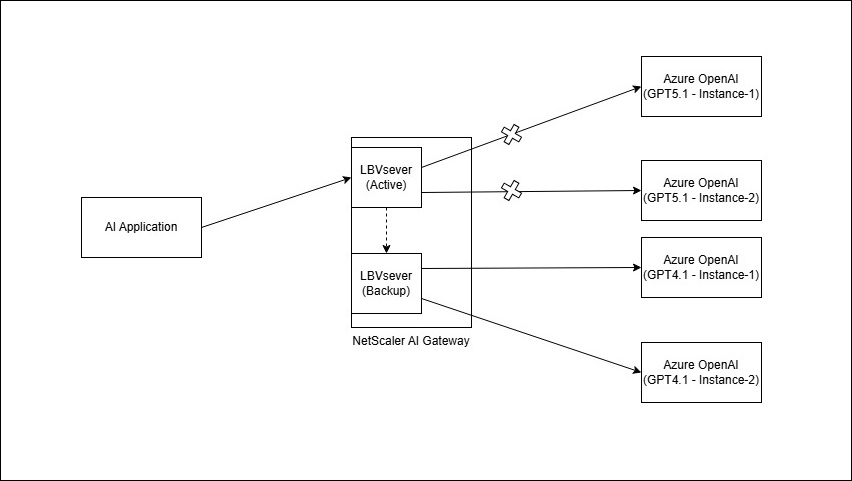
-
Add a backup load balancer, which is using
Gpt4.1, for example,AzureOpenAIGpt4.1as the backup model. For example, an AI application, which is using GPT 5.1 (such as, AzureOpenAIGpt5.1) as a primary model, the spillover to another model (such asgpt-4.1) can be configured as follows:Example:add lb vserver AzureOpenAIGpt4.1 SSL 0.0.0.0 0 -aigwProfileName azureoai_frontend_profile -lbmethod leastllmtokenlatency
set lb vserver AzureOpenAIGpt5.1 -lbMethod LEASTLLMTOKENLATENCY -soMethod LLMQUOTA -backupVServer AzureOpenAIGpt4.1 -
A rewrite policy must be created to change the model's name, which must be used for spillover.
-
Add a rewrite action to replace the model name.
add rewrite action <Rewrite Action Name> <Type> <Target>Example:add rewrite action rw_model_name_action replace "http.REQ.URL.PATH.GET(3)" "\"gpt-4.1\"" -
Add rewrite policy with rule True to invoke the action for every backup virtual server hit.
add rewrite policy <name> <rule> <action>Example:add rewrite policy rw_model_name_policy true rw_model_name_action -
Bind the rewrite policy to the
backup_lbvirtual server.bind lb vserver <Vserver Name> -policyName <Policy Name> -Priority <int> -gotoPriorityExpression <ENUM> -type <ENUM>Example:bind lb vserver AzureOpenAIGpt4.1 -policyName rw_model_name_policy -priority 10 -gotoPriorityExpression END -type REQUEST
-
Related information