
Rewrite
Warning:
Filter features using classic policies are deprecated and as an alternative Citrix® recommends you to use the rewrite and responder features with advanced policy infrastructure.
Rewrite refers to the rewriting of some information in the requests or responses handled by the NetScaler appliance. Rewriting can help in providing access to the requested content without exposing unnecessary details about the website's actual configuration. A few situations in which the rewrite feature is useful are as follows:
-
To improve security, the NetScaler can rewrite all the
http://linkstohttps://in the response body. -
In the SSL offload deployment, the insecure links in the response have to be converted into secure links. Using the rewrite option, you can rewrite all the
http://linkstohttps://for making sure that the outgoing responses from NetScaler to the client have the secured links. -
If a website has to show an error page, you can show a custom error page instead of the default 404 Error page. For example, if you show the home page or site map of the website instead of an error page, the visitor remains on the site instead of moving away from the website.
-
If you want to launch a new website, but use the old URL, you can use the Rewrite option.
-
When a topic in a site has a complicated URL, you can rewrite it with a simple, easy-to-remember URL (also referred to as 'cool URL').
-
You can append the default page name to the URL of a website. For example, if the default page of a company's website is
http://www.abc.com/index.php, when the user types 'abc.com' in the address bar of the browser, you can rewrite the URL to 'abc.com/index.php'.
When you enable the rewrite feature, NetScaler can modify the headers and body of HTTP requests and responses.
To rewrite HTTP requests and responses, you can use protocol-aware NetScaler policy expressions in the rewrite policies you configure. The virtual servers that manage the HTTP requests and responses must be of type HTTP or SSL. In HTTP traffic, you can take the following actions:
-
Modify the URL of a request
-
Add, modify, or delete headers
-
Add, replace, or delete any specific string within the body or headers.
To rewrite TCP payloads, consider the payload as a raw stream of bytes. Each of the virtual servers that managing the TCP connections must be of type TCP or SSL\_TCP. The term TCP rewrite is used to refer to the rewrite of TCP payloads that are not HTTP data. In TCP traffic, you can add, modify, or delete any part of the TCP payload.
For examples to use the rewrite feature, see Rewrite Action and Policy Examples.
Comparison between Rewrite and Responder options
The main difference between the rewrite feature and the responder feature is as follows:
Responder cannot be used for response or server-based expressions. Responder can be used only for the following scenarios depending on client parameters:
-
Redirecting an HTTP request to new websites or webpages
-
Responding with some custom response
-
Dropping or resetting a connection at request level
If there is a responder policy, the NetScaler examines the request from the client, takes action according to the applicable policies, sends the response to the client, and closes the connection with the client.
If there is a rewrite policy, the NetScaler examines the request from the client or response from the server, takes action according to the applicable policies, and forwards the traffic to the client or the server.
In general, it is recommended to use a responder if you want the NetScaler to reset or drop a connection based on a client or request-based parameter. Use the responder to redirect traffic, or respond with custom messages. Use rewrite for manipulating data on HTTP requests and responses.
How rewrite works
A rewrite policy consists of a rule and action. The rule determines the traffic on which rewrite is applied and the action determines the action to be taken by the NetScaler. You can define multiple rewrite policies. For each policy, specify the bind point and priority.
A bind point refers to a point in the traffic flow at which the NetScaler examines the traffic to verify whether any rewrite policy can be applied to it. You can bind a policy to a specific load balancing or content switching virtual server, or make the policy global if you want the policy to be applied to the entire traffic handled by the NetScaler. These policies are referred to as global policies.
In addition to the user-defined policies, the NetScaler has some default policies. You cannot modify or delete a default policy.
For evaluating the policies, NetScaler follow these order:
-
Global policies
-
Policies bound to specific virtual servers
-
Default policies
Note:
NetScaler can apply a rewrite policy only when it is bound to a point.
NetScaler implements the rewrite feature in the following steps:
-
The NetScaler appliance checks for global policies and then checks for policies at individual bind points.
-
If multiple policies are bound to a bind point, the NetScaler evaluates the policies in the order of their priority. The policy with the highest priority is evaluated first. After evaluating each policy, if the policy is evaluated to TRUE, it adds the action associated with the policy the associated action is performed. A match occurs when the characteristics specified in the policy rule match the characteristics of the request or response being evaluated.
-
For any policy, in addition to the action, you can specify the policy that must be evaluated after the current policy is evaluated. This policy is referred to as the 'Go to Expression'. For any policy, if a Go to Expression (gotoPriorityExpr) is specified, the NetScaler evaluates the Go to Expression policy. It ignores the policy with the next highest priority.You can specify the priority of the policy to indicate the Go to Expression policy; you cannot use the name of the policy. If you want the NetScaler to stop evaluating other policies after evaluating a particular policy, you can set the Go to Expression to 'END'.
-
After all the policies are evaluated or when a policy has the Go to Expression set as END, the NetScaler starts performing the actions according to the list of actions.
For more information about configuring rewrite policies, see Configuring a Rewrite Policy and about binding rewrite policies, see Binding a Rewrite Policy.
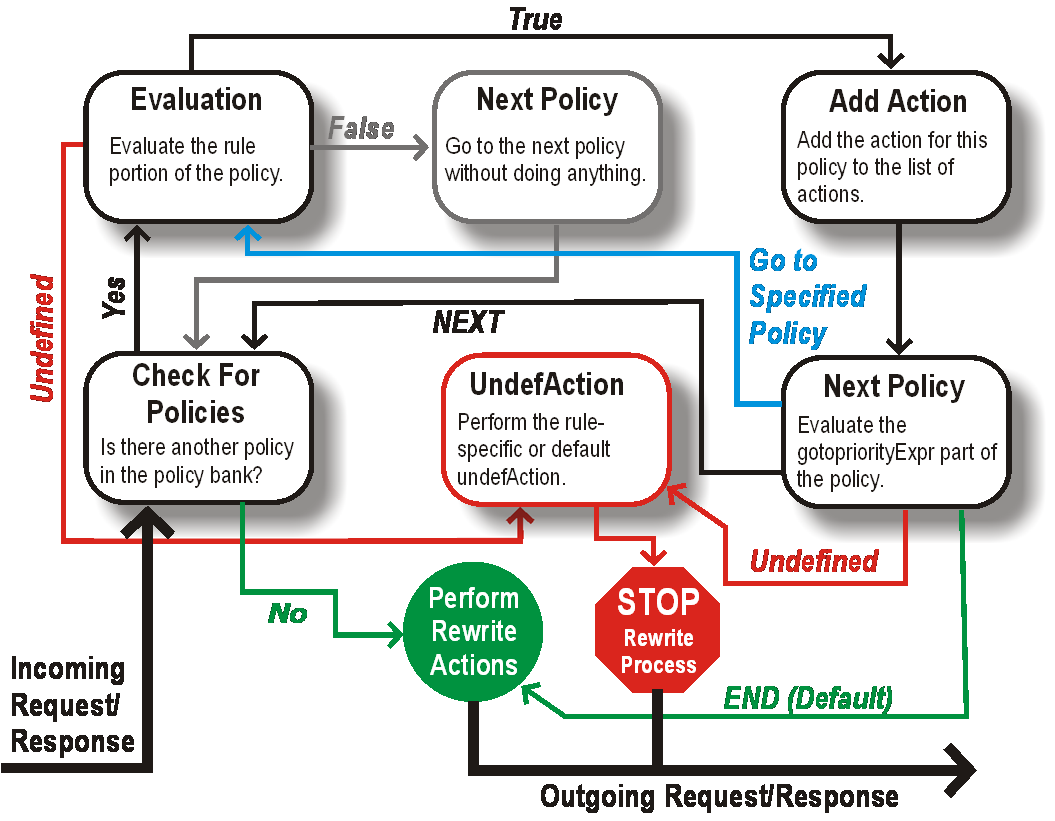
The following figure illustrates how NetScaler processes a request or response when the rewrite feature is used.
Figure 1. The Rewrite Process
Policy Evaluation
The policy with the highest priority is evaluated first. NetScaler does not stop the evaluation of rewrite policies when it finds a match. It evaluates all the rewrite policies configured on the NetScaler.
-
If a policy evaluates to TRUE, the NetScaler follows the procedure below:
-
If the policy has the Go to Expression set to END, the NetScaler stops evaluating all the other policies and starts performing the rewrite.
-
The gotoPriorityExpression can be set to 'NEXT', 'END', some integer or 'INVOCATION_LIST'. The value determines the policy with the next priority. The following table shows the action taken by NetScaler for each value of the expression.| Value of the expression | Action | |---|--| | NEXT | The policy with the next priority gets evaluated.| | END | Evaluation of policies stops.| |
<an integer>| Policy with specified priority gets evaluated.| | INVOCATION_LIST| Goto NEXT or END is applied based on the result of the invocation list. |
-
-
If a policy evaluates to FALSE, the NetScaler continues the evaluation in the order of priority.
-
If a policy evaluates to UNDEFINED (cannot be evaluated on the received traffic due to an error), the NetScaler performs the action assigned to the UNDEFINED condition (referred to as undefAction) and stops further evaluation of policies.
The NetScaler starts the actual rewriting only after the evaluation is complete. It refers to the list of actions identified by policies that are evaluated to TRUE, and starts the rewriting. After implementing all the actions in the list, the NetScaler forwards the traffic as required.
Note:
Ensure that the policies do not specify conflicting or overlapping actions on the same part of the HTTP header or body, or TCP payload. When such a conflict occurs, the NetScaler encounters an undefined situation and aborts the rewrite.
Rewrite Actions
On the NetScaler appliance, specify the actions to be taken such as adding, replacing, or deleting text within the body, or adding, modifying, or deleting headers, or any changes in the TCP payload as rewrite actions. For more information about rewrite actions, see Configuring a Rewrite Action.
The following table describes the steps the NetScaler can take when a policy evaluates to TRUE.
| Action | Result |
|---|---|
| Insert | The rewrite action specified for the policy is carried out. |
| NOREWRITE | The request or response is not rewritten. NetScaler forwards the traffic without rewriting any part of the message. |
| RESET | The connection is aborted at the TCP level. |
| DROP | The message is dropped. |
Note:
For any policy, you can configure the underaction (action to be taken when the policy evaluates to UNDEFINED) as NOREWRITE, RESET, or DROP.
To use the Rewrite feature, take the following steps:
-
Enable the feature on the NetScaler.
-
Define rewrite actions.
-
Define rewrite policies.
-
Bind the policies to a bind point to bring a policy into effect.
Enable rewrite
Enable the rewrite feature on the NetScaler appliance if you want to rewrite the HTTP or TCP requests or responses. If the feature is enabled, NetScaler takes rewrite action according to the specified policies. For more information, see How rewrite works.
To enable the rewrite feature by using the command line interface
At the command prompt, type the following commands to enable the rewrite feature and verify the configuration:
-
enable ns feature REWRITE
-
show ns feature
Example:
> enable ns feature REWRITE
  Done
 > show ns feature

         Feature                        Acronym              Status
         -------                        -------              ------
  1)     Web Logging                    WL                   OFF
  2)     Surge Protection               SP                   ON
  .
  .
  .
  1)     Rewrite                        REWRITE              ON
  .
  .
  1)     NetScaler Push                 push                 OFF
  Done
To enable the rewrite feature by using the GUI
-
In the navigation pane, click System, and then click Settings.
-
In the details pane, under Modes and Features, click Configure basic features.
-
In the Configure Basic Features dialog box, select the Rewrite check box, and then click OK.
-
In the Enable/Disable Feature(s) dialog box, click Yes. A message appears in the status bar, stating that the selected feature was enabled.
Configuring a Rewrite Action
Warning
The Pattern function in a rewrite action is deprecated from NetScaler 12.0 build 56.20 onwards and as an alternative, Citrix recommends you to use the Search rewrite action parameter.
A rewrite action indicates changes made to a request or response prior to sending it to a server or client.
Expressions define the following:
-
Rewrite action type.
-
Location of the rewrite action.
-
Rewrite action configuration type.
For Example, a DELETE action only uses a target expression. A REPLACE action uses a target expression and an expression to configure the replacement text.
After enabling the rewrite feature, you need to configure one or more actions unless a built-in rewrite action is sufficient. All of the built-in actions have names beginning with the string ns\_cvpn, followed by a string of letters and underscore characters. Built-in actions perform useful and complex tasks such as decoding parts of a clientless VPN request or response or modifying JavaScript or XML data. The built-in actions can be viewed, enabled, and disabled, but cannot be modified or deleted.
Note:
Action types that can be used only for HTTP rewrite are identified in the Rewrite Action Type column.
For more information, see Type parameter.
Create a rewrite action by using the command line interface
At the command prompt, type the following commands to create a rewrite action and verify the configuration:
-
add rewrite action <name> <type> <target> [<stringBuilderExpr>] [-search <expression>] [refineSearch <expression>] [-comment<string>] -
show rewrite action <name>
For more information, see the Rewrite Action Types and their Arguments table.
The rewrite feature has the following built-in actions:
-
NOREWRITE-Sends the request or response to the user without rewriting it.
-
RESET - Resets the connection and notifies the user's browser, so that the user can resend the request.
-
DROP - Drops the connection without sending a response to the user.
One of the following flow types is implicitly associated with every action:
-
Request - Action applies to the request.
-
Response - Action applies to the response.
-
Neutral - Action applies to both requests and responses.
Name
Name for the user-defined rewrite action. Must begin with a letter, number, or the underscore character (_), and must contain only letters, numbers, and the hyphen (-), period (.) hash (#), space ( ), at (@), equals (=), colon (:), and underscore characters. Can be changed after the rewrite policy is added.
Type parameter
The Type parameter shows the type of user-defined rewrite action.
Following are the values of the Type parameter:
-
REPLACE <target> <string_builder_expr>. Replaces the target string with the string-builder expression.
Example:
> add rewrite action replace_http_act replace http.res.body(100) '"new_replaced_data"'
 Done
 > sh rewrite action replace_http_act
 Name: replace_http_act
 Operation: replace
 Target:http.res.body(100)
 Value:"new_replaced_data"
 Hits: 0
 Undef Hits: 0
 Action Reference Count: 0
 Done
-
REPLACE_ALL <target> <string_builder_expr1> -(search) <s>- In the request or response specified by<target>, replaces all occurrences of the string defined by<pattern_to_search>with the string defined by<string_builder_expr>. You can use the search option to find the strings to be replaced.
Example:
> add policy patset pat_list_2
 Done
 > bind policy patset pat_list_2 "www.abc.com"
 Done
 > bind policy patset pat_list_2 "www.def.com"
 Done
 > add rewrite action refineSearch_act_31 replace_all "HTTP.RES.BODY(100000)" "\"https://\""-search "patset(\"pat_list_2\")" -refineSearch "EXTEND(7,0).REGEX_SELECT(re#http://#)"
 Done

 > sh rewrite action refineSearch_act_31
 Name: refineSearch_act_31
 Operation: replace_all
 Target:HTTP.RES.BODY(100000)
 Refine Search:EXTEND(7,0).REGEX_SELECT(re#http://#)
 Value:"https://"
 Search: patset("pat_list_2")
 Hits: 0
 Undef Hits: 0
 Action Reference Count: 0
 Done
-
REPLACE_HTTP_RES <string_builder_expr>. Replaces the complete HTTP response with the string defined by the string-builder expression.
Example:
> add rewrite action replace_http_res_act replace_http_res '"HTTP/1.1 200 OK\r\n\r\nSending from ADC"'
  Done
 > sh rewrite action replace_http_res_act
 Name: replace_http_res_act
 Operation: replace_http_res
 Target:"HTTP/1.1 200 OK
 Sending from ADC"
 Hits: 0
 Undef Hits: 0
 Action Reference Count: 0
 Done
-
REPLACE_SIP_RES <target>. Replaces the complete SIP response with the string specified by<target>.
Example:
> add rewrite action replace_sip_res_act replace_sip_res '"HTTP/1.1 200 OK\r\n\r\nSending from ADC"'
 Done
 > sh rewrite action replace_sip_res_act
 Name: replace_sip_res_act
 Operation: replace_sip_res
 Target:"HTTP/1.1 200 OK
 Sending from ADC"
 Hits: 0
 Undef Hits: 0
 Action Reference Count: 0
 Done
-
INSERT_HTTP_HEADER <header_string> <contents_string_builder_expr>. Inserts the HTTP header specified byheader_stringand header contents specified bycontents_string_builder_expr.
Example:
> add rewrite action ins_cip_header insert_http_header "CIP" "CLIENT.IP.SRC"
 Done
 > sh rewrite action ins_cip_header
 Name: ins_cip_header
 Operation: insert_http_header
 Target:CIP
 Value:CLIENT.IP.SRC
 Hits: 0
 Undef Hits: 0
 Action Reference Count: 0
 Done
-
DELETE_HTTP_HEADER <target>. Deletes the HTTP header specified by<target>
Example:
> add rewrite action del_true_client_ip_header delete_http_header "True-Client-IP"
 Done
 > sh rewrite action del_true_client_ip_header
 Name: del_true_client_ip_header
 Operation: delete_http_header
 Target:True-Client-IP
 Hits: 0
 Undef Hits: 0
 Action Reference Count: 0
 Done
-
CORRUPT_HTTP_HEADER <target>. Replaces the header name of all occurrences of the HTTP header specified by<target>with a corrupted name, so that it will not be recognized by the receiver Example: MY_HEADER is changed to MHEY_ADER.
Example:
 > add rewrite action corrupt_content_length_hdr corrupt_http_header "Content-Length"
 Done
 > sh rewrite action corrupt_content_length_hdr
 Name: corrupt_content_length_hdr
 Operation: corrupt_http_header
 Target:Content-Length
 Hits: 0
 Undef Hits: 0
 Action Reference Count: 0
 Done
-
INSERT_BEFORE <string_builder_expr1> <string_builder_expr1>. Finds the string specified in<string_builder_expr1>and inserts the string in<string_builder_expr2>before it.
> add rewrite action insert_before_ex_act insert_before http.res.body(100) '"Add this string in the starting"'
 Done
 > sh rewrite action insert_before_ex_act
 Name: insert_before_ex_act
 Operation: insert_before
 Target:http.res.body(100)
 Value:"Add this string in the starting"
 Hits: 0
 Undef Hits: 0
 Action Reference Count: 0
 Done
-
INSERT_BEFORE_ALL <target> <string_builder_expr1> -(search) <string_builder_expr2>. In the request or response specified by<target>, locates all occurrences of the string specified in <string_builder_expr2> and inserts the string specified in <string_builder_expr1> before it. You can use the search option to find the strings.
Example:
 > add policy patset pat
  Done
 > bind policy patset pat abcd
  Done
 > add rewrite action refineSearch_act_1 insert_before_all http.res.body(10) 'target.prefix(10) + "refineSearch_testing"' -search patset("pat") -refineSearch extend(10,10)
  Done
 > sh rewrite action refineSearch_act_1
 Name: refineSearch_act_1
 Operation: insert_before_all
 Target:http.res.body(10)
 Refine Search:extend(10,10)
 Value:target.prefix(10) + "refineSearch_testing"
 Search: patset("pat")
 Hits: 0
 Undef Hits: 0
 Action Reference Count: 0
 Done
-
INSERT_AFTER <string_builder_expr1> <string_builder_expr2>. Inserts the string specified bystring_builder_expr2after the stringstring_builder_expr1.
Example:
> add rewrite action insert_after_act insert_after http.req.body(100) '"add this string after 100 bytes"'
 Done
 > sh rewrite action insert_after_act
 Name: insert_after_act
 Operation: insert_after
 Target:http.req.body(100)
 Value:"add this string after 100 bytes"
 Hits: 0
 Undef Hits: 0
 Action Reference Count: 0
 Done
-
INSERT_AFTER_ALL <target> <string_builder_expr1> -(search) <string_builder_expr2>. In the request or response specified by<target>, locates all occurrences of the string specified by<string_builder_expr2>and inserts the string specified by<string_builder_expr1>after it. You can use the search facility to find the strings.
Example:
 > add rewrite action refineSearch_act_2 insert_after_all http.res.body(100) '"refineSearch_testing"' -search text("abc") -refineSearch extend(0, 10)
 Done
 > sh rewrite action refineSearch_act_2
 Name: refineSearch_act_2
 Operation: insert_after_all
 Target:http.res.body(100)
 Refine Search:extend(0, 10)
 Value:"refineSearch_testing"
 Search: text("abc")
 Hits: 0
 Undef Hits: 0
 Action Reference Count: 0
 Done
-
DELETE <target>. Deletes the string specified by target.
Example:
> add rewrite action delete_ex_act delete http.req.header("HDR")
 Done
 > sh rewrite action delete_ex_act
 Name: delete_ex_act
 Operation: delete
 Target:http.req.header("HDR")
 Hits: 0
 Undef Hits: 0
 Action Reference Count: 0
 Done
-
DELETE_ALL <target> -(search) <string_builder_expr>. In the request or response specified by<target>, locates and deletes all occurrences of the string specified by<string_builder_expr>. You can use the search facility to find the strings.
Example:
 >add rewrite action refineSearch_act_4 delete_all "HTTP.RES.BODY(50000)" -search text("Windows Desktops") -refineSearch "EXTEND(40,40).REGEX_SELECT(re#\\s`*`<AppData>.`*`\\s`*`<\\/AppData>#)"
 Done
 > show REWRITE action refineSearch_act_4
 Name: refineSearch_act_4
 Operation: delete_all
 Target:HTTP.RES.BODY(50000)
 Refine Search:EXTEND(40,40).REGEX_SELECT(re#\s`*`<AppData>.`*`\s`*`<\/AppData>#)
 Search: text("Windows Desktops")
 Hits: 0
 Undef Hits: 0
 Action Reference Count: 0
 Done
-
REPLACE_DIAMETER_HEADER_FIELD <target> <field value>. In the request or responses modify the header field specified by<target>. UseDiameter.req.flags.SET(<flag>)orDiameter.req.flags.UNSET<flag>asstringbuilderexpressionto set or unset flags.
Example:
 > add rewrite action replace_diameter_field_ex_act  replace_diameter_header_field diameter.req.flags diameter.req.flags.set(PROXIABLE)
 Done
 > sh rewrite action replace_diameter_field_ex_act
 Name: replace_diameter_field_ex_act
 Operation: replace_diameter_header_field
 Target:diameter.req.flags
 Value:diameter.req.flags.set(PROXIABLE)
 Hits: 0
 Undef Hits: 0
 Action Reference Count: 0
 Done
-
REPLACE_DNS_HEADER_FIELD <target>. In the request or response modifies the header field specified by<target>.
Example:
 > add rewrite action replace_dns_hdr_act replace_dns_header_field dns.req.header.flags.set(AA)
 Done
 > sh rewrite action replace_dns_hdr_act
 Name: replace_dns_hdr_act
 Operation: replace_dns_header_field
 Target:dns.req.header.flags.set(AA)
 Hits: 0
 Undef Hits: 0
 Action Reference Count: 0
 Done
-
REPLACE_DNS_ANSWER_SECTION <target>. Replace the DNS answer section in the response. This is applicable for A and AAAA records only. UseDNS.NEW_RRSET_AandNS.NEW_RRSET_AAAAexpressions to configure the new answer section.
Example:
 > add rewrite action replace_dns_ans_act replace_dns_answer_section  DNS.NEW_RRSET_A("1.1.1.1", 10)
 Done
 > sh rewrite action replace_dns_ans_act
 Name: replace_dns_ans_act
 Operation: replace_dns_answer_section
 Target:DNS.NEW_RRSET_A("1.1.1.1", 10)
 Hits: 0
 Undef Hits: 0
 Action Reference Count: 0
 Done
-
CLIENTLESS_VPN_DECODE<target>. Decodes the pattern specified by the target In clientless VPN format.
Example:
 > add rewrite action cvpn_decode_act_1 clientless_vpn_decode http.req.body(100)
 Done
 > sh rewrite action cvpn_decode_act_1
 Name: cvpn_decode_act_1
 Operation: clientless_vpn_decode
 Target:http.req.body(100)
 Hits: 0
 Undef Hits: 0
 Action Reference Count: 0
 Done
-
CLIENTLESS_VPN_DECODE_ALL<target>-search<expression>. Decodes ALL the patterns specified by search parameter In clientless VPN format.
Example:
 > add rewrite action act1 clientless_vpn_decode_all http.req.body(100) -search text("abcd")
 Done
 > sh rewrite action act1
 Name: act1
 Operation: clientless_vpn_decode_all
 Target:http.req.body(100)
 Search: text("abcd")
 Hits: 0
 Undef Hits: 0
 Action Reference Count: 0
 Done
-
CLIENTLESS_VPN_ENCODE<target>. Encodes the pattern specified by target in clientless VPN format.
Example:
 > add rewrite action cvpn_encode_act_1 clientless_vpn_encode http.req.body(100)
 Done
 > sh rewrite action cvpn_encode_act_1
 Name: cvpn_encode_act_1
 Operation: clientless_vpn_encode
 Target:http.req.body(100)
 Hits: 0
 Undef Hits: 0
 Action Reference Count: 0
 Done
-
CLIENTLESS_VPN_ENCODE_ALL<target>-search<expression>. Encodes ALL the patterns specified search parameter in clientless VPN format.
Example:
 > add rewrite action act2 clientless_vpn_encode_all http.req.body(100) -search text("abcd")
 Done
 > sh rewrite action act2
 Name: act1
 Operation: clientless_vpn_encode_all
 Target:http.req.body(100)
 Search: text("abcd")
 Hits: 0
 Undef Hits: 0
 Action Reference Count: 0
 Done
-
CORRUPT_SIP_HEADER<target>. Replaces the header name of all occurrences of the SIP header specified by<target>with a corrupted name, so that the receiver doesn't recognize it.
Example:
 > add rewrite action corrupt_sip_hdr_act corrupt_sip_header SIP_HDR
 Done
 > sh rewrite action corrupt_sip_hdr_act
 Name: corrupt_sip_hdr_act
 Operation: corrupt_sip_header
 Target:SIP_HDR
 Hits: 0
 Undef Hits: 0
 Action Reference Count: 0
 Done
-
INSERT_SIP_HEADER <header_string_builder_expr> <contents_string_builder_expr>. Inserts the SIP header specified by<header_string_builder_expr>and header contents specified by<contents_string_builder_expr>.
Example:
 > add rewrite action insert_sip_hdr_act insert_sip_header SIP_HDR '"inserting_sip_header"'
  Done
 >sh rewrite action insert_sip_hdr_act
 Name: insert_sip_hdr_act
 Operation: insert_sip_header
 Target:SIP_HDR
 Value:"inserting_sip_header"
 Hits: 0
 Undef Hits: 0
 Action Reference Count: 0
 Done
-
DELETE_SIP_HEADER<target>. Deletes the SIP header specified by<target>
Example:
 > add rewrite action delete_sip_hdr delete_sip_header  SIP_HDR
 Done
 > sh rewrite action delete_sip_hdr
 Name: delete_sip_hdr
 Operation: delete_sip_header
 Target:SIP_HDR
 Hits: 0
 Undef Hits: 0
 Action Reference Count: 0
 Done
Target parameter
The Target parameter Is an expression that specifies which part of the request or response to rewrite.
StringBuilderExpr
The StringBuilderExpr Is an expression that specifies the content that Is to be Inserted into the request or response at the specified location. This expression replaces a specified string.
Example 1. Inserting an HTTP Header With the Client IP:
 > add rewrite action insertact INSERT_HTTP_HEADER "client-IP" CLIENT.IP.SRC
 Done
 > show rewrite action insertact
 Name: insertact
 Operation: insert_http_header
 Target:Client-IP
 Value:CLIENT.IP.SRC
 BypassSafetyCheck : NO
 Hits: 0
 Undef Hits: 0
 Action Reference Count: 0
 Done
Example 2. Replacing Strings in a TCP Payload (TCP Rewrite):
 > add rewrite action client_tcp_payload_replace_all REPLACE_ALL
   'client.tcp.payload(1000)' '"new-string"' -search text("old-string")
 Done
 > show rewrite action client_tcp_payload_replace_all
 Name: client_tcp_payload_replace_all
 Operation: replace_all
 Target:client.tcp.payload(1000)
 Value:"new-string"
 Search: text("old-string")
 BypassSafetyCheck : NO
 Hits: 0
 Undef Hits: 0
 Action Reference Count: 0
 Done
 >
Search a part of the request or response to rewrite
The Search functionality helps to find all the Instances of the required pattern in the request or response.
The Search functionality is required to be used in the following Action types:
-
INSERT_BEFORE_ALL
-
INSERT_AFTER_ALL
-
REPLACE_ALL
-
DELETE_ALL
-
CLIENTLESS_VPN_ENCODE_ALL
-
CLIENTLESS_VPN_DECODE_ALL
The Search functionality cannot be used with the following Action types:
-
INSERT_HTTP_HEADER
-
INSERT_BEFORE
-
INSERT_AFTER
-
REPLACE
-
DELETE
-
DELETE_HTTP_HEADER
-
CORRUPT_HTTP_HEADER
-
REPLACE_HTTP_RES
-
CLIENTLESS_VPN_ENCODE
-
CLIENTLESS_VPN_DECODE
-
INSERT_SIP_HEADER
-
DELETE_SIP_HEADER
-
CORRUPT_SIP_HEADER
-
REPLACE_DIAMETER_HEADER_FIELD
-
REPLACE_DNS_ANSWER_SECTION
-
REPLACE_DNS_HEADER_FIELD
-
REPLACE_SIP_RES
The following Search types are supported:
-
Text - a literal string Example: -search text ("hello")
-
Regular Expression - pattern that is used to match multiple strings in the request or response Example: -search regex(re~\^hello*~)
-
XPATH - An XPATH expression to search XML. Example: -search xpath(xp%/a/b%)
-
JSON - An XPATH expression to search JSON. Example: -search xpath_json(xp%/a/b%) HTML - An XPATH expression to search HTML Example: -search xpath_html(xp%/html/body%) Patset - This searches all the patterns bound to the patset entity. Example: -search patset("patset1")
-
Datset - This searches all the patterns bound to the datset entity. Example: -search dataset("dataset1")
-
AVP - AVP number that is used to match multiple AVPs in a Diameter/Radius Message Example: -search avp(999)
Refine the search results
You can use the Refine Search functionality to specify the additional criteria to refine the search results. Refine Search functionality can only be used if Search functionality is used. The Refine search parameter always starts with the "extend(m,n)" operation, where 'm' specifies some bytes to the left of the search result and 'n' specifies several bytes to the right of the search result to extend the selected area.
If the configured rewrite action is:
 > add rewrite action test_refine_search replace_all http.res.body(10) '”testing_refine_search”' -search text("abc") -refineSearch extend(1,1)
 And the HTTP response body is abcxxxx456.
Then, the search parameter finds pattern "abc" and since the refineSearch parameter is also configured to check an extra 1 byte to the left and an extra one byte to the right of the matched pattern. The resultant replaced text is: abcx. So, the output of this action is
testing_refine_searchxxx456.
Example 1:Using the Refine search functionality in INSERT_BEFORE_ALL action type.
 > add policy patset pat
 Done
 > bind policy patset pat abcd
 Done
 > add rewrite action refineSearch_act_1 insert_before_all http.res.body(10) 'target.prefix(10) + "refineSearch_testing"' -search patset("pat") -refineSearch extend(10,10)
 Done
 > sh rewrite action refineSearch_act_1
 Name: refineSearch_act_1
 Operation: insert_before_all
 Target:http.res.body(10)
 Refine Search:extend(10,10)
 Value:target.prefix(10) + "refineSearch_testing"
 Search: patset("pat")
 Hits: 0
 Undef Hits: 0
 Action Reference Count: 0
 Done
Example 2: Using the Refine search functionality in INSERT_AFTER_ALL action type.
 > add rewrite action refineSearch_act_2 insert_after_all http.res.body(100) '"refineSearch_testing"' -search text("abc") -refineSearch extend(0, 10)
 Done
 > sh rewrite action refineSearch_act_2
 Name: refineSearch_act_2
 Operation: insert_after_all
 Target:http.res.body(100)
 Refine Search:extend(0, 10)
 Value:"refineSearch_testing"
 Search: text("abc")
 Hits: 0
 Undef Hits: 0
 Action Reference Count: 0
 Done
Example 3: Using the Refine search functionality in REPLACE_ALL action type.
 > add policy patset pat_list_2
 Done
 > bind policy patset pat_list_2 "www.abc.com"
 Done
 > bind policy patset pat_list_2 "www.def.com"
 Done
 > add rewrite action refineSearch_act_31 replace_all "HTTP.RES.BODY(100000)" "\"https://\"" -search "patset(\"pat_list_2\")" -refineSearch "EXTEND(7,0).REGEX_SELECT(re#http://#)"
 Done
 > sh rewrite action refineSearch_act_31
 Name: refineSearch_act_31
 Operation: replace_all
 Target:HTTP.RES.BODY(100000)
 Refine Search:EXTEND(7,0).REGEX_SELECT(re#http://#)
 Value:"https://"
 Search: patset("pat_list_2")
 Hits: 0
 Undef Hits: 0
 Action Reference Count: 0
 Done
Example 4: Using the Refine search functionality in DELETE_ALL action type.
 >add rewrite action refineSearch_act_4 delete_all "HTTP.RES.BODY(50000)" -search text("Windows Desktops") -refineSearch "EXTEND(40,40).REGEX_SELECT(re#\\s*<AppData>.*\\s*<\\/AppData>#)"
 > show REWRITE action refineSearch_act_4
 Name: refineSearch_act_4
 Operation: delete_all
 Target:HTTP.RES.BODY(50000)
 Refine Search:EXTEND(40,40).REGEX_SELECT(re#\s*<AppData>.*\s*<\/AppData>#)
 Search: text("Windows Desktops")
 Hits: 0
 Undef Hits: 0
 Action Reference Count: 0
 Done
 >
Example 5: Using the Refine Search functionality in CLIENTLESS_VPN_ENCODE_ALL action type.
'''
add rewrite action act2 clientless_vpn_encode_all http.req.body(100) -search text("abcd") Done sh rewrite action act2 Name: act1 Operation: clientless_vpn_encode_all Target:http.req.body(100) Search: text("abcd") Hits: 0 Undef Hits: 0 Action Reference Count: 0 Done
'''
Example 6: Using the Refine Search functionality in CLIENTLESS_VPN_DECODE_ALL action type.
 > add rewrite action act1 clientless_vpn_decode_all http.req.body(100) -search text("abcd")
 Done
 > sh rewrite action act1
 Name: act1
 Operation: clientless_vpn_decode_all
 Target:http.req.body(100)
 Search: text("abcd")
 Hits: 0
 Undef Hits: 0
 Action Reference Count: 0
 Done
 >
Modify an existing rewrite action by using the command line interface
At the command prompt, type the following commands to modify an existing rewrite action and verify the configuration:
-
set rewrite action <name> [-target <expression>] [-stringBuilderExpr <expression>] [-search <expression>] [-refineSearch <expression>] [-comment <string>]
At the command prompt, type the following commands to verify the modified configuration
-
show rewrite action <name>
Example:
 > set rewrite action insertact -target "Client-IP"
  Done
 > show rewrite action insertact

 Name: insertact
 Operation: insert_http_header   Target:Client-IP
 Value:CLIENT.IP.SRC
 Hits: 0
 Undef Hits: 0
 Action Reference Count: 0
 Done
Remove a rewrite action by using the command line interface
At the command prompt, type the following commands to remove a rewrite action:
rm rewrite action <name>
Example:
 > rm rewrite action insertact
 Done
Configure a rewrite action by using the configuration utility
-
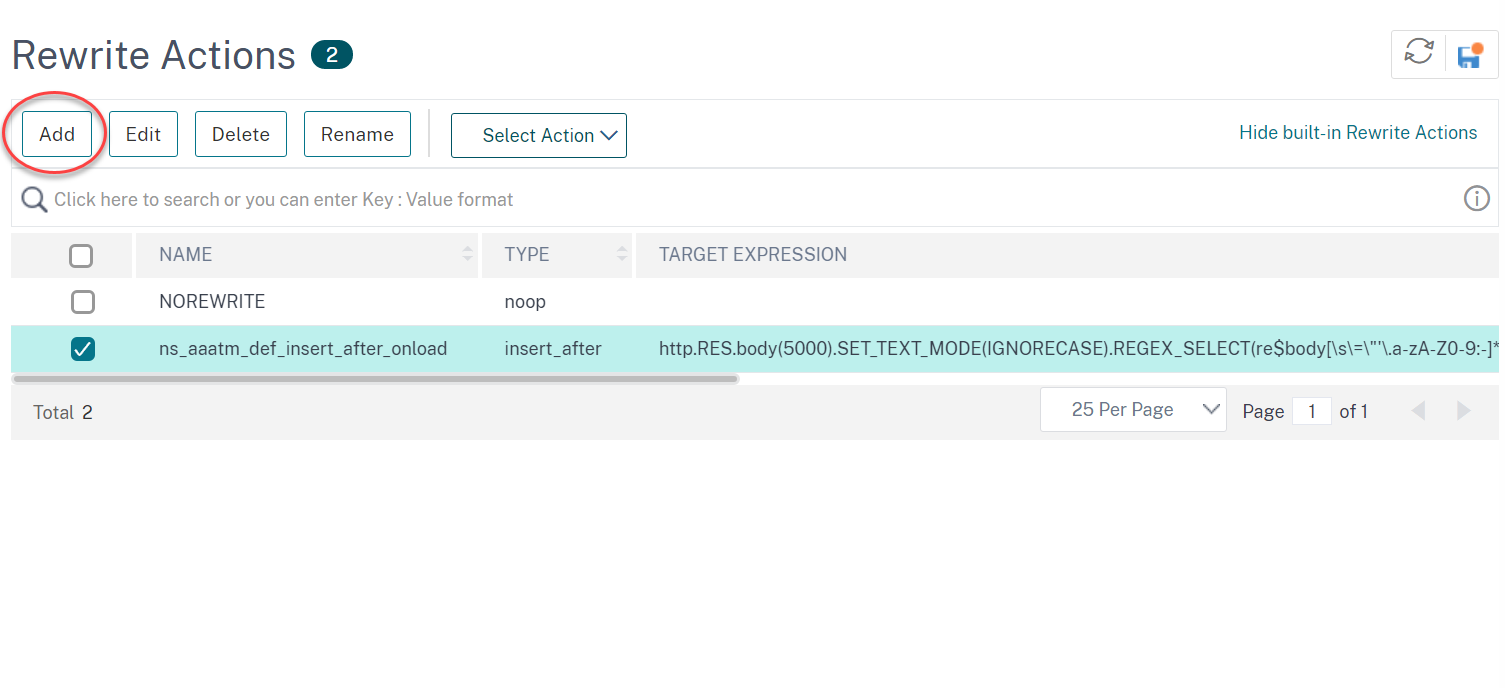
Navigate to AppExpert > Rewrite > Actions.
-
In the details pane, do one of the following:
-
To create an action, click Add.
-
To modify an existing action, select the action, and then click Edit.
-
-
Click Create or OK. A message appears in the status bar, stating that the Action has been configured successfully.
-
Repeat steps 2 through 4 to create or modify as many rewrite actions as you want.
-
Click Close.
Add an expression by using the Add Expression dialog box
-
In the Create Rewrite Action or Configure Rewrite Action dialog box, under the text area for the type argument you want to enter, click Add.
-
In the Add Expression dialog box, in the first list box choose the first term for your expression.
-
HTTP. The HTTP protocol. Choose this if you want to examine some aspect of the request that pertains to the HTTP protocol.
-
SYS. The protected websites. Choose this if you want to examine some aspect of the request that pertains to the recipient of the request.
-
CLIENT. The computer that sent the request. Choose this if you want to examine some aspect of the sender of the request.
-
When you make your choice, the rightmost list box lists appropriate terms for the next part of your expression.
-
In the second list box, choose the second term for your expression. The choices depend upon which choice you made in the previous step, and are appropriate to the context. After you make your second choice, the Help window below the Construct Expression window (which was blank) displays help describing the purpose and use of the term you just chose.
-
Continue choosing terms from the list boxes that appear to the right of the previous list box, or typing strings or numbers in the text boxes that appear to prompt you to enter a value, until your expression is finished. For more information about the PI expressions language and creating expressions for responder policies, see "Policies and Expressions."
If you want to test the effect of a rewrite action when used on sample HTTP data, you can use the Rewrite Expression Evaluator.
Rewrite TCP payloads
Target expressions in actions for TCP rewrite must begin with one of the following expression prefixes:
-
CLIENT.TCP.PAYLOAD. For rewriting TCP payloads in client requests. For example, CLIENT.TCP.PAYLOAD(10000).AFTER_STR("string1").
-
SERVER.TCP.PAYLOAD. For rewriting TCP payloads in server responses. For example, SERVER.TCP.PAYLOAD(1000).B64DECODE.BETWEEN("string1","string2").
Evaluate a rewrite action by using the Rewrite Action Evaluator dialog box
-
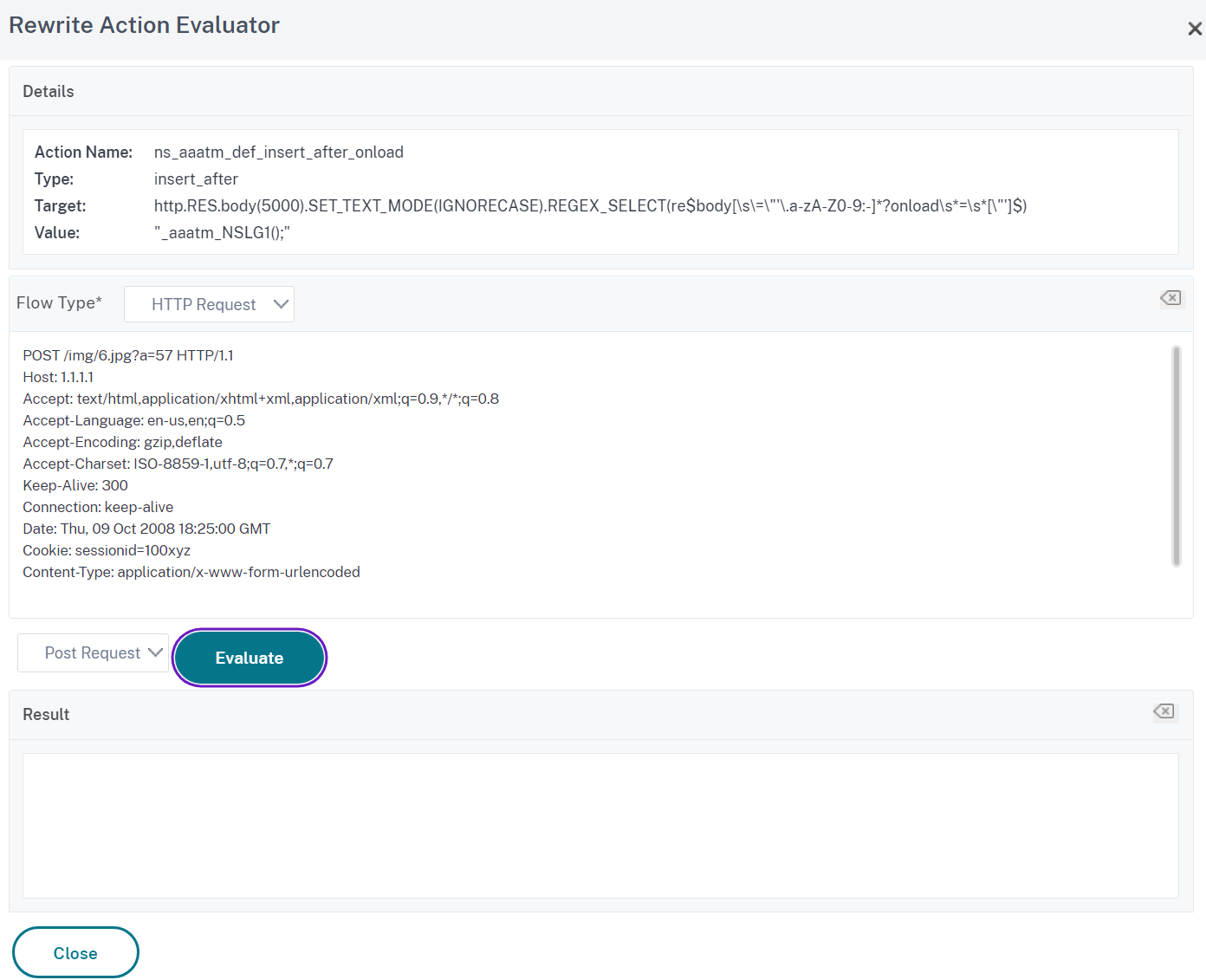
In the Rewrite Actions details pane, select the rewrite action that you want to evaluate, and then click Evaluate.
-
In the Rewrite Expression Evaluator dialog box, specify values for the following parameters. (An asterisk indicates a required parameter.)Rewrite Action—If the rewrite action you want to evaluate is not already selected, select it from the drop-down list. After you select a Rewrite action, the Details section displays the details of the selected Rewrite action. New—Select New to open the Create Rewrite Action dialog box and create a rewrite action. Modify—Select Modify to open the Configure Rewrite Action dialog box and modify the selected rewrite action. Flow Type—Specifies whether to test the selected rewrite action with HTTP Request data or HTTP Response data. The default is Request. If you want to test with Response data, select Response. HTTP Request/Response Data*—Provides a space for you to provide the HTTP data that the Rewrite Action Evaluator is used for testing. You can paste the data directly into the window, or click Sample to insert some sample HTTP headers. Show end-of-line—Specifies whether to show UNIX-style end-of-line characters (\\n) at the end of each line of sample HTTP data. Sample—Inserts sample HTTP data into the HTTP Request/Response Data window. You can choose either GET or POST data. Browse—Opens a local browse window so that you can choose a file containing sample HTTP data from a local or network location. Clear—Clears the current sample HTTP data from the HTTP Request/Response Data window.
-
Click Evaluate. The Rewrite Action Evaluator evaluates the effect of the Rewrite action on the sample data that you chose, and displays the results as modified by the selected Rewrite action in the Results window. Additions and deletions are highlighted as indicated in the legend in the lower left-hand corner of the dialog box.
-
Continue evaluating Rewrite actions until you have determined that all of your actions have the effect that you wanted.
-
You can modify the selected rewrite action and test the modified version by clicking Modify to open the Configure Rewrite Action dialog box, making and saving your changes, and then clicking Evaluate again.
-
You can evaluate a different rewrite action using the same request or response data by selecting it from the Rewrite Action drop-down list, and then clicking Evaluate again.
-
-
Click Close to close the Rewrite Expression Evaluator and return to the Rewrite Actions pane.
-
To delete a rewrite action, select the rewrite action you want to delete, then click Remove and, when prompted, confirm your choice by clicking OK.
Configure rewrite policy
After you create any needed rewrite actions, you must create at least one rewrite policy to select the requests that you want the NetScaler appliance to rewrite.
A rewrite policy consists of a rule, which itself consists of one or more expressions, and an associated action that is performed if a request or response matches the rule. Policy rules for evaluating HTTP requests and responses can be based on almost any part of a request or response.
Even though you cannot use TCP rewrite actions to rewrite data other than the TCP payload, you can base the policy rules for TCP rewrite policies on the information in the transport layer and the layers below the transport layer.
If a configured rule matches a request or response, the corresponding policy is triggered and the action associated with it is carried out.
Note:
You can use either the command line interface or the GUI to create and configure rewrite policies. Users who are not thoroughly familiar with the command line interface and the NetScaler Policy expression language will usually find using the GUI much easier.
To add a new rewrite policy by using the command line interface
At the command prompt, type the following commands to add a new rewrite policy and verify the configuration:
-
<add rewrite policy <name> <expression> <action> [<undefaction>] -
<show rewrite policy <name>
Example 1. Rewriting HTTP Content
 > add rewrite policyNew "HTTP.RES.IS_VALID" insertact NOREWRITE
  Done
 > show rewrite policyNew
         Name: policyNew
         Rule: HTTP.RES.IS_VALID
         RewriteAction: insertact
         UndefAction: NOREWRITE
         Hits: 0
         Undef Hits: 0

  Done
Example 2. Rewriting a TCP Payload (TCP Rewrite):
> add rewrite policy client_tcp_payload_policy CLIENT.IP.SRC.EQ(172.168.12.232) client_tcp_payload_replace_all
  Done
 > show rewrite policy client_tcp_payload_policy
         Name: client_tcp_payload_policy
         Rule: CLIENT.IP.SRC.EQ(172.168.12.232)
         RewriteAction: client_tcp_payload_replace_all
         UndefAction: Use Global
         LogAction: Use Global
         Hits: 0
         Undef Hits: 0

  Done
 >
To modify an existing rewrite policy by using the command line interface
At the command prompt, type the following commands to modify an existing rewrite policy and verify the configuration:
-
<set rewrite policy <name> -rule <expression> -action <action> [<undefaction>] -
<show rewrite policy <name>
Example:
 > set rewrite policyNew -rule "HTTP.RES.IS_VALID" -action insertaction
  Done

 > show rewrite policyNew
         Name: policyNew
         Rule: HTTP.RES.IS_VALID
         RewriteAction: insertaction
         UndefAction: NOREWRITE
         Hits: 0
         Undef Hits: 0

  Done
To remove a rewrite policy by using the command line interface
At the command prompt, type the following command to remove a rewrite policy:
rm rewrite policy <name>
Example:
 > rm rewrite policyNew
 Done
To configure a rewrite policy by using the GUI
-
Navigate to AppExpert > Rewrite > Policies.
-
In the details pane, do one of the following:
-
To create a policy, click Add.
-
To modify an existing policy, select the policy, and then click Open.
-
-
Click Create or OK. A message appears in the status bar, stating that the Policy has been configured successfully.
-
Repeat steps 2 through 4 to create or modify as many rewrite actions as you want.
-
Click Close. To delete a rewrite policy, select the rewrite policy you want to delete, then click Remove and, when prompted, confirm your choice by clicking OK.
Bind rewrite policy
After creating a rewrite policy, you must bind it to put it into effect. You can bind your policy to Global if you want to apply it to all traffic that passes through your NetScaler, or you can bind your policy to a specific virtual server or bind point to direct only that virtual server or bind the point's incoming traffic to that policy. If an incoming request matches a rewrite policy, the action associated with that policy is carried out.
Rewrite policies for evaluating HTTP requests and responses can be bound to virtual servers of type HTTP or SSL, or they can be bound to the REQ_OVERRIDE, REQ_DEFAULT, RES_OVERRIDE, and RES_DEFAULT bind points. Rewrite policies for TCP rewrite can be bound only to virtual servers of type TCP or SSL_TCP, or to the OTHERTCP_REQ_OVERRIDE, OTHERTCP_REQ_DEFAULT, OTHERTCP_RES_OVERRIDE, and OTHERTCP_RES_DEFAULT bind points.
Note:
The term OTHERTCP is used in the context of the NetScaler appliance to refer to all TCP or SSL_TCP requests and responses that you want to treat as a raw stream of bytes regardless of the protocols that the TCP packets encapsulate.
When you bind a policy, you assign it a priority. The priority determines the order in which the policies you define are evaluated. You can set the priority to any positive integer.
In the NetScaler operating system, policy priorities work in reverse order - the higher the number, the lower the priority. For example, if you have three policies with priorities of 10, 100, and 1000, the policy assigned a priority of 10 is applied first, then the policy assigned a priority of 100, and finally the policy assigned an order of 1000.
Unlike most other features in the NetScaler operating system, the rewrite feature continues to evaluate and implement policies after a request matches a policy. However, the effect of a particular action policy on a request or response will often be different depending on whether it is performed before or after another action. Priority is important to get the results you intended.
You can leave yourself plenty of room to add other policies in any order, and still set them to evaluate in the order you want, by setting priorities with intervals of 50 or 100 between each policy when you bind it. If you do this, you can add more policies at any time without having to reassign the priority of an existing policy.
When binding a rewrite policy, you also have the option of assigning a goto expression (gotoPriorityExpression) to the policy. A goto expression can be any positive integer that matches the priority assigned to a different policy that has a higher priority than the policy that contains the goto expression. If you assign a goto expression to a policy, and a request or response matches the policy, the NetScaler will immediately go to the policy whose priority matches the goto expression. It skips over any policies with priority numbers that are lower than that of the current policy, but higher than the priority number of the goto expression, and not evaluate those policies.
To globally bind a rewrite policy by using the command line interface
At the command prompt, type the following commands to globally bind a rewrite policy and verify the configuration:
-
bind rewrite global <policyName> <priority> [<gotoPriorityExpression>] [-type <type>] [-invoke (<labelType> <labelName>)] -
show rewrite global
Example:
 >bind rewrite global policyNew 10
  Done

 > show rewrite global
 1)      Global bindpoint: RES_DEFAULT
         Number of bound policies: 1

 2)      Global bindpoint: REQ_OVERRIDE
         Number of bound policies: 1

  Done
To bind rewrite policy to a specific virtual server by using the command line interface
At the command prompt, type the following commands to bind the rewrite policy to a specific virtual server and verify the configuration:
-
bind lb vserver <name>@ (<serviceName>@ [-weight <positive_integer>]) | <serviceGroupName>@ | (-policyName <string>@ [-priority <positive_integer>] [-gotoPriorityExpression <expression>] [-type ( REQUEST | RESPONSE )] [-invoke (<labelType> <labelName>)] ) -
show lb vserver <name>
Example:
> bind lb vserver lbvip -policyName ns_cmp_msapp -priority 50
  Done
 >
 > show lb vserver lbvip
         lbvip (8.7.6.6:80) - HTTP       Type: ADDRESS
         State: DOWN
         Last state change was at Wed Jul 15 05:54:24 2009 (+226 ms)
         Time since last state change: 28 days, 01:57:26.350
         Effective State: DOWN
         Client Idle Timeout: 180 sec
         Down state flush: ENABLED
         Disable Primary Vserver On Down : DISABLED
         Port Rewrite : DISABLED
         No. of Bound Services :  0 (Total)       0 (Active)
         Configured Method: LEASTCONNECTION
         Mode: IP
         Persistence: NONE
         Vserver IP and Port insertion: OFF
         Push: DISABLED  Push VServer:
         Push Multi Clients: NO
         Push Label Rule: none

 1)      Policy : ns_cmp_msapp Priority:50
 2)      Policy : cf-pol Priority:1      Inherited
  Done
To bind a rewrite policy to a bind point by using the GUI
-
Navigate to AppExpert >Rewrite > Policies.
-
In the details pane, select the rewrite policy you want to globally bind, and then click Policy Manager.
-
In the Rewrite Policy Manager dialog box, in the Bind Points menu, do one of the following:
-
If you want to configure bindings for HTTP rewrite policies, click HTTP, and then click either Request or Response, depending on whether you want to configure request-based rewrite policies or response-based rewrite policies.
-
If you want to configure bindings for TCP rewrite policies, click TCP, and then click either Client or Server, depending on whether you want to configure client-side TCP rewrite policies or server-side TCP rewrite policies.
-
-
Click the bind point to which you want to bind the rewrite policy. The Rewrite Policy Manager dialog box displays all the rewrite policies that are bound to the selected bind point.
-
Click Insert Policy to insert a new row and display a drop-down list with all available, unbound rewrite policies.
-
Click the policy you want to bind to the bind point. The policy is inserted into the list of rewrite policies bound to the bind point.
-
In the Priority column, you can change the priority to any positive integer. For more information about this parameter, see priority in "Parameters for binding a rewrite policy."
-
If you want to skip over policies and go directly to a specific policy if the current policy is matched, change the value in the Goto Expression column to equal the priority of the next policy to be applied.. For more information about this parameter, see gotoPriorityExpression in "Parameters for binding a rewrite policy."
-
To modify a policy, click the policy, and then click Modify Policy.
-
To unbind a policy, click the policy, and then click Unbind Policy.
-
To modify an action, in the Action column, click the action you want to modify, and then click Modify Action.
-
To modify an invoke label, in the Invoke column, click the invoke label you want to modify, and then click Modify Invoke Label.
-
To regenerate the priorities of all the policies that are bound to the bind point you are currently configuring, click Regenerate Priorities. The policies retain their existing priorities relative to the other policies, but the priorities are renumbered in multiples of 10.
-
Click Apply Changes.
-
Click Close. A message appears in the status bar, stating that the Policy has been configured successfully.
To bind a rewrite policy to a specific virtual server by using the GUI
-
Navigate to Traffic Management > Load Balancing > Virtual Servers.
-
In the details pane list of virtual servers, select the virtual server to which you want to bind the rewrite policy, and then click Open.
-
In the Configure Virtual Server (Load Balancing) dialog box, select the Policies tab. All policies configured on your NetScaler appear on the list.
-
Select the check box next to the name of the policy you want to bind to this virtual server.
-
Click OK. A message appears in the status bar, stating that the Policy has been configured successfully.
Configure rewrite policy labels
If you want to build a more complex policy structure than is supported by single policies, you can create policy labels and then bind them as you would policies. A policy label is a user-defined point to which policies are bound. When a policy label is invoked, all the policies bound to it are evaluated in the order of the priority you configured. A policy label can include one or multiple policies, each of which can be assigned its own result. A match on one policy in the policy label can result in proceeding to the next policy, invoking a different policy label or appropriate resource, or an immediate end to policy evaluation and the return of control to the policy that invoked the policy label.
A rewrite policy label consists of a name, a transform name that describes the type of policy included in the policy label, and a list of policies bound to the policy label. Each policy that is bound to the policy label contains all of the elements described in Configuring a Rewrite Policy.
Note: You can use either the command line interface or the GUI to create and configure rewrite policy labels. Users who are not thoroughly familiar with the command line interface and the NetScaler Policy Infrastructure (PI) language usually find using the GUI much easier.
To configure a rewrite policy label by using the command line interface
To add a rewrite policy label, at the command prompt, type the following command:
add rewrite policylabel <labelName> <transform>
For example, to add a rewrite policy label named polLabelHTTPResponses to group all policies that work on HTTP responses, you would type the following:
add rewrite policy label polLabelHTTPResponses http_res
To modify an existing rewrite policy label, at the NetScaler command prompt, type the following command:
set rewrite policy <name> <transform>
Note:
The set rewrite policy command takes the same options as the add rewrite policy command.
To remove a rewrite policy label, at the NetScaler command prompt, type the following command:
rm rewrite policy<name>
For example, to remove a rewrite policy label named polLabelHTTPResponses, you would type the following:
rm rewrite policy polLabelHTTPResponses
To configure a rewrite policy label by using the GUI
-
Navigate to AppExpert > Rewrite > Policy Labels.
-
In the details pane, do one of the following:
-
To create a policy label, click Add.
-
To modify an existing policy label, select the policy, and then click Open.
-
-
Add or remove policies from the list that is bound to the policy label.
-
To add a policy to the list, click Insert Policy, and choose a policy from the drop-down list. You can create a policy and add it to the list by choosing New Policy in the list, and following the instructions in Configuring a Rewrite Policy.
-
To remove a policy from the list, select that policy, and then click Unbind Policy.
-
-
Modify the priority of each policy by editing the number in the Priority column. You can also automatically renumber policies by clicking Regenerate Priorities.
-
Click Create or OK, and then click Close. To remove a policy label, select it, and then click Remove. To rename a policy label, select it and then click Rename. Edit the name of the policy, and then click OK to save your changes.