
SSL interception
A NetScaler appliance configured for SSL interception acts as a proxy. It can intercept and decrypt SSL/TLS traffic, inspect the unencrypted request, and enable an admin to enforce compliance rules and security checks. SSL interception uses a policy that specifies which traffic to intercept, block, or allow. For example, traffic to and from financial websites, such as banks, must not be intercepted, but other traffic can be intercepted, and blacklisted sites can be identified and blocked. Citrix recommends that you configure one generic policy to intercept traffic and more specific policies to bypass some traffic.
The client and the proxy establish an HTTPS/TLS handshake. The proxy establishes another HTTPS/TLS handshake with the server and receives the server certificate. The proxy verifies the server certificate on behalf of the client, and also checks the validity of the server certificate by using the Online Certificate Status Protocol (OCSP). It regenerates the server certificate, signs it by using the key of the CA certificate installed on the appliance, and presents it to the client. Therefore, one certificate is used between the client and the NetScaler appliance, and another certificate between the appliance and the back-end server.
Notes:
-
The CA certificate that is used to sign the server certificate must be preinstalled on all the client devices, so that the regenerated server certificate is trusted by the client.
-
When a front-end client certificate uses MD5 or SHA1 signatures, the copied client certificate is generated with SHA256 signatures. For more information about the copied client certificate signatures for the corresponding front-end client certificates, see Dynamic client certificate generation.
For intercepted HTTPS traffic, the proxy server decrypts the outbound traffic, accesses the clear text HTTP request, and can use any Layer 7 application to process the traffic, such as by looking into the plain text URL and allowing or blocking access based on the corporate policy and URL reputation. If the policy decision is to allow access to the origin server, the proxy server forwards the re-encrypted request to the destination service (on the origin server). The proxy decrypts the response from the origin server, accesses the clear text HTTP response, and optionally applies any policies to the response. The proxy then reencrypts the response and forwards it to the client. If the policy decision is to block the request to the origin server, the proxy can send an error response, such as HTTP 403, to the client.
To perform SSL interception, in addition to the proxy server configured earlier, you must configure the following on the ADC appliance:
-
SSL profile
-
SSL policy
-
CA certificate store
-
SSL-error autolearning and caching
Note:
HTTP/2 traffic is not intercepted by the SSL Interception feature.
Related information
SSL interception certificate store
An SSL certificate, which is a part of any SSL transaction, is a digital data form (X509) that identifies a company (domain) or an individual. An SSL certificate is issued by a certificate authority (CA). A CA can be private or public. Certificates issued by public CAs, such as Verisign, are trusted by applications that conduct SSL transactions. These applications maintain a list of CAs that they trust.
As a forward proxy, the ADC appliance performs encryption and decryption of traffic between a client and a server. It acts as a server to the client (user) and as a client to the server. Before an appliance can process HTTPS traffic, it must validate the identity of a server to prevent any fraudulent transactions. Therefore, as a client to the origin server, the appliance must verify the origin server certificate before accepting it. To verify a server certificate, all the certificates (for example, root and intermediate certificates) that are used to sign and issue the server certificate must be present on the appliance. A default set of CA certificates is preinstalled on an appliance. The appliance can use these certificates to verify almost all the common origin-server certificates. This default set cannot be modified. However, if your deployment requires more CA certificates, you can create a bundle of such certificates and import the bundle to the appliance. A bundle can also contain a single certificate.
When you import a certificate bundle to the appliance, the appliance downloads the bundle from the remote location and, after verifying that the bundle contains only certificates, installs it on the appliance. You must apply a certificate bundle before you can use it to validate a server certificate. You can also export a certificate bundle for editing or to store it in an offline location as a backup.
Import and apply a CA certificate bundle on the appliance by using the CLI
At the command prompt, type:
import ssl certBundle <name> <src>
 apply ssl certBundle <name>
show ssl certBundle
ARGUMENTS:
Name:
Name to assign to the imported certificate bundle. Must begin with an ASCII alphanumeric or underscore (\_) character, and must contain only ASCII alphanumeric, underscore, hash (#), period (.), space, colon (:), at (@), equals (=), and hyphen (-) characters. The following requirement applies only to the CLI:
If the name includes one or more spaces, enclose the name in double or single quotation marks (for example, "my file" or 'my file').
Maximum Length: 31
src:
URL specifying the protocol, host, and path, including file name, to the certificate bundle to be imported or exported. For example,
http://www.example.com/cert_bundle_file.
NOTE: The import fails if the object to be imported is on an HTTPS server that requires client certificate authentication for access.
Maximum Length: 2047
Example:
import ssl certbundle swg-certbundle http://www.example.com/cert_bundle
 apply ssl certBundle swg-certbundle
show ssl certbundle
Name : swg-certbundle(Inuse)
URL : http://www.example.com/cert_bundle
Done
Import and apply a CA certificate bundle on the appliance by using the GUI
-
Navigate to Security > SSL Forward Proxy > Getting Started > Certificate Bundles.
-
Do one of the following:
-
Select a certificate bundle from the list.
-
To add a certificate bundle, click "+" and specify a name and source URL. Click OK.
-
-
Click OK.
Remove a CA certificate bundle from the appliance by using the CLI
At the command prompt, type:
remove certBundle <cert bundle name>
Example:
remove certBundle mytest-cacert
Export a CA certificate bundle from the appliance by using the CLI
At the command prompt, type:
export certBundle <cert bundle name> <Path to export>
ARGUMENTS:
Name:
Name to assign to the imported certificate bundle. Must begin with an ASCII alphanumeric or underscore (_) character, and must contain only ASCII alphanumeric, underscore, hash (#), period (.), space, colon (:), at (@), equals (=), and hyphen (-) characters. The following requirement applies only to the CLI:
If the name includes one or more spaces, enclose the name in double or single quotation marks (for example, "my file" or 'my file').
Maximum Length: 31
src:
URL specifying the protocol, host, and path, including file name, to the certificate bundle to be imported or exported. For example,
http://www.example.com/cert_bundle_file.
NOTE: The import fails if the object to be imported is on an HTTPS server that requires client certificate authentication for access.
Maximum Length: 2047
Example:
export certBundle mytest-cacert http://192.0.2.20/
Import, apply, and verify a CA certificate bundle from the Mozilla CA certificate store
At the command prompt, type:
> import certbundle mozilla_public_ca https://curl.haxx.se/ca/cacert.pem
 Done
To apply the bundle, type:
> apply certbundle mozilla_public_ca
 Done
To verify the certificate bundle in use, type:
> sh certbundle | grep mozilla
                 Name : mozilla_public_ca (Inuse)
Limitations
-
Certificate bundles are not supported in a cluster setup, or on a partitioned appliance.
-
TLSv1.3 protocol is not supported with SSL Forward Proxy.
SSL policy infrastructure for SSL interception
A policy acts like a filter on incoming traffic. Policies on the ADC appliance help define how to manage proxied connections and requests. The processing is based on the actions that are configured for that policy. That is, data in connection requests is compared to a rule specified in the policy, and the action is applied to connections that match the rule (expression). After defining an action to assign to the policy and create the policy, you must bind it to a proxy server, so that it applies to traffic flowing through that proxy server.
An SSL policy for SSL interception evaluates incoming traffic and applies a predefined action to requests that match a rule (expression). A decision to intercept, bypass, or reset a connection is made based on the defined SSL policy. You can configure one of three actions for a policy—INTERCEPT, BYPASS, or RESET. You must specify an action when you create a policy. To put a policy into effect, you must bind it to a proxy server on the appliance. To specify that a policy is intended for SSL interception, you must specify the type (bind point) as INTERCEPT_REQ when you bind the policy to a proxy server. When unbinding a policy, you must specify the type as INTERCEPT_REQ.
Note:
The proxy server cannot make a decision to intercept unless you specify a policy.
Traffic interception can be based on any SSL handshake attribute. The most commonly used is the SSL domain. The SSL domain is usually indicated by the attributes of the SSL handshake. It can be the Server Name Indicator value extracted from the SSL Client Hello message, if present, or the Server Alternate Name (SAN) value extracted from the origin server certificate. The SSL interception policy presents a special attribute, DETECTED_DOMAIN. This attribute makes it easier for the customers to author interception policies based on the SSL domain from the origin server certificate. The customer can match the domain name against a string, URL list (URL set or
patset), or a URL category derived from the domain.
Create an SSL policy by using the CLI
At the command prompt, type:
add ssl policy <name> -rule <expression> -action <string>
Examples:
The following examples are for policies with expressions that use the
detected_domain attribute to check for a domain name.
Do not intercept traffic to a financial institution, such as XYZBANK
add ssl policy pol1 -rule client.ssl.detected_domain.contains("XYZBANK") -action BYPASS
Do not allow a user to connect to YouTube from the corporate network
add ssl policy pol2 -rule client.ssl.client.ssl.detected_domain.url_categorize(0,0).category.eq ("YouTube") -action RESET
Intercept all user traffic
add ssl policy pol3 –rule true –action INTERCEPT
If the customer doesn't want to use the detected_domain, they can use any of the SSL handshake attributes to extract and infer the domain.
For example, a domain name is not found in the SNI extension of the client hello message. The domain name must be taken from the origin server certificate. The following examples are for policies with expressions that check for a domain name in the subject name of the origin server certificate.
Intercept all user traffic to any Yahoo domain
add ssl policy pol4 -rule client.ssl.origin_server_cert.subject.contains("yahoo") –action INTERCEPT
Intercept all user traffic for the category "Shopping/Retail"
add ssl policy pol_url_category -rule client.ssl.origin_server_cert.subject.URL_CATEGORIZE(0,0).CATEGORY.eq("Shopping/Retail") -action INTERCEPT
Intercept all user traffic to an uncategorized URL
add ssl policy pol_url_category -rule client.ssl.origin_server_cert.subject.url_categorize(0,0).category.eq("Uncategorized") -action INTERCEPT
The following examples are for policies that match the domain against an entry in a URL set.
Intercept all user traffic if the domain name in SNI matches an entry in the URL set "top100"
add ssl policy pol_url_set -rule client.ssl.client_hello.SNI.URLSET_MATCHES_ANY("top100") -action INTERCEPT
Intercept all user traffic of the domain name if the origin server certificate matches an entry in the URL set "top100"
add ssl policy pol_url_set -rule client.ssl.origin_server_cert.subject.URLSET_MATCHES_ANY("top100") -action INTERCEPT
Create an SSL policy to a proxy server by using the GUI
-
Navigate to Traffic Management > SSL > Policies.
-
On the SSL Policies tab, click Add and specify the following parameters:
-
Policy name
-
Policy action – Select from intercept, bypass, or reset.
-
Expression
-
-
Click Create.
Bind an SSL policy to a proxy server by using the CLI
At the command prompt, type:
bind ssl vserver <vServerName> -policyName <string> -priority <positive_integer> -type INTERCEPT_REQ
Example:
bind ssl vserver <name> -policyName pol1 -priority 10 -type INTERCEPT_REQ
Bind an SSL policy to a proxy server by using the GUI
-
Navigate to Security > SSL Forward Proxy > Proxy Virtual Servers.
-
Select a virtual server and click Edit.
-
In Advanced Settings, click SSL Policies.
-
Click inside the SSL Policy box.
-
In Select Policy, select a policy to bind.
-
In Type, select INTERCEPT_REQ.
-
Click Bind and then click OK.
Unbind an SSL policy to a proxy server by using the CLI
At the command prompt, type:
unbind ssl vserver <vServerName> -policyName <string> -type INTERCEPT_REQ
SSL expressions used in SSL policies
| Expression | Description |
|---|---|
CLIENT.SSL.CLIENT_HELLO.SNI.* |
Returns the SNI extension in a string format. Evaluate the string to see if it contains the specified text. Example: client.ssl.client_hello.sni.contains(“xyz.com”) |
CLIENT.SSL.ORIGIN_SERVER_CERT.* |
Returns a certificate, received from a back-end server, in a string format. Evaluate the string to see if it contains the specified text. Example: client.ssl.origin_server_cert.subject.contains(“xyz.com”) |
CLIENT.SSL.DETECTED_DOMAIN.* |
Returns a domain, either from the SNI extension or from the origin server certificate, in a string format. Evaluate the string to see if it contains the specified text. Example: client.ssl.detected_domain.contains(“xyz.com”) |
SSL error autolearning
The appliance adds a domain to the SSL bypass list if learning mode is on. The learning mode is based on the SSL alert message received from either a client or an origin server. That is, learning depends the client or server sending an alert message. There is no learning if an alert message is not sent. The appliance learns if any of the following conditions are met:
-
A request for a client certificate is received from the server.
-
Any one of the following alerts is received as part of the handshake:
-
BAD_CERTIFICATE
-
UNSUPPORTED_CERTIFICATE
-
CERTIFICATE_REVOKED
-
CERTIFICATE_EXPIRED
-
CERTIFICATE_UNKNOWN
-
UNKNOWN_CA (If a client uses pinning, it sends this alert message if it receives a server certificate.)
-
HANDSHAKE_FAILURE
-
To enable learning, you must enable the error cache and specify the memory reserved for learning.
Enable learning by using the GUI
-
Navigate to Traffic Management > SSL.
-
In Settings, click Change advanced SSL settings.
-
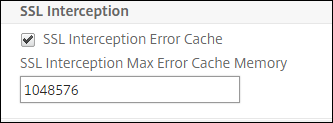
In SSL Interception, select SSL Interception Error Cache.
-
In SSL Interception Max Error Cache Memory, specify the memory (in bytes) to reserve.
-
Click OK.
Enable learning by using the CLI
At the command prompt type:
set ssl parameter -ssliErrorCache ( ENABLED | DISABLED ) -ssliMaxErrorCacheMem <positive_integer>
Arguments:
ssliErrorCache:
Enable or disable dynamic learning, and cache the learned information to make subsequent decisions to intercept or bypass requests. When enabled, the appliance performs a cache lookup to decide whether to bypass the request.
Possible values: ENABLED, DISABLED
Default value: DISABLED
ssliMaxErrorCacheMem:
Specify the maximum memory, in bytes, that can be used to cache the learned data. This memory is used as an LRU cache so that the old entries are replaced with new entries after the set memory limit is exhausted. A value of 0 decides the limit automatically.
Default value: 0
Minimum value: 0
Maximum value: 4294967294
SSL profile
An SSL profile is a collection of SSL settings, such as ciphers and protocols. A profile is helpful if you have common settings for different servers. Instead of specifying the same settings for each server, you can create a profile, specify the settings in the profile, and then bind the profile to different servers. If a custom front-end SSL profile is not created, the default front-end profile is bound to client-side entities. This profile enables you to configure settings for managing the client-side connections.
For SSL interception, you must create an SSL profile and enable SSL interception in the profile. A default cipher group is bound to this profile, but you can configure more ciphers to suit your deployment. Bind an SSL interception CA certificate to this profile and then bind the profile to a proxy server. For SSL interception, the essential parameters in a profile are the ones used for the following actions:
-
Check the OCSP status of the origin server certificate.
-
Trigger client renegotiation if the origin server requests renegotiation.
-
Verify the origin server certificate before reusing the front-end SSL session.
Use the default back-end profile when communicating with the origin servers. Set any server-side parameters, such as cipher suites, in the default back-end profile. A custom back-end profile is not supported.
For examples of the most commonly used SSL settings, see "Sample Profile" at the end of this section.
Cipher/protocol support differs on the internal and external network. In the following tables, the connection between the users and an ADC appliance is the internal network. The external network is between the appliance and the internet.

Table 1: Cipher/protocol support matrix for the internal network
See Table 1-Support on virtual server/frontend service/internal service in Ciphers available on the NetScaler appliances.
Table 2: Cipher/protocol support matrix for the external network
See Table 2-Support on back-end services in Ciphers available on the NetScaler appliances.
Add an SSL profile and enable SSL interception by using the CLI
At the command prompt, type:
add ssl profile <name> -sslinterception ENABLED -ssliReneg ( ENABLED | DISABLED ) -ssliOCSPCheck ( ENABLED | DISABLED ) -ssliMaxSessPerServer <positive_integer>
Arguments:
sslInterception:
Enable or disable interception of SSL sessions.
Possible values: ENABLED, DISABLED
Default value: DISABLED
ssliReneg:
Enable or disable triggering client renegotiation when a renegotiation request is received from the origin server.
Possible values: ENABLED, DISABLED
Default value: ENABLED
ssliOCSPCheck:
Enable or disable OCSP check for an origin-server certificate.
Possible values: ENABLED, DISABLED
Default value: ENABLED
ssliMaxSessPerServer:
Maximum number of SSL sessions to be cached per dynamic origin server. A unique SSL session is created for each SNI extension received from the client in a client hello message. The matching session is used for server-session reuse.
Default value: 10
Minimum value: 1
Maximum value: 1000
Example:
add ssl profile swg_ssl_profile  -sslinterception ENABLED

 Done

 sh ssl profile swg_ssl_profile

 1)    Name: swg_ssl_profile (Front-End)

                 SSLv3: DISABLED               TLSv1.0: ENABLED  TLSv1.1: ENABLED  TLSv1.2: ENABLED

                 Client Auth: DISABLED

                 Use only bound CA certificates: DISABLED

                 Strict CA checks:                               NO

                 Session Reuse: ENABLED                              Timeout: 120 seconds

                 DH: DISABLED

                 DH Private-Key Exponent Size Limit: DISABLED   Ephemeral RSA: ENABLED                            Refresh Count: 0

                 Deny SSL Renegotiation                                ALL

                 Non FIPS Ciphers: DISABLED

                 Cipher Redirect: DISABLED

                 SSL Redirect: DISABLED

                 Send Close-Notify: YES

                 Strict Sig-Digest Check: DISABLED

                 Push Encryption Trigger: Always

                 PUSH encryption trigger timeout:             1 ms

                 SNI: DISABLED

                 OCSP Stapling: DISABLED

                 Strict Host Header check for SNI enabled SSL sessions:                   NO

                 Push flag:            0x0 (Auto)

                 SSL quantum size:                            8 kB

                 Encryption trigger timeout           100 mS

                 Encryption trigger packet count:               45

                 Subject/Issuer Name Insertion Format: Unicode

                 SSL Interception: ENABLED

                 SSL Interception OCSP Check: ENABLED

                 SSL Interception End to End Renegotiation: ENABLED

                 SSL Interception Server Cert Verification for Client Reuse: ENABLED

                 SSL Interception Maximum Reuse Sessions per Server:  10

                 Session Ticket: DISABLED              Session Ticket Lifetime: 300 (secs)

                 HSTS: DISABLED

                 HSTS IncludeSubDomains: NO

                 HSTS Max-Age: 0

                 ECC Curve: P_256, P_384, P_224, P_521

 1)            Cipher Name: DEFAULT Priority :1

                 Description: Predefined Cipher Alias

 Done
Bind an SSL interception CA certificate to an SSL profile by using the CLI
At the command prompt, type:
bind ssl profile <name> -ssliCACertkey <ssli-ca-cert>
Example:
bind ssl profile swg_ssl_profile -ssliCACertkey swg_ca_cert

 Done

 sh ssl profile swg_ssl_profile

 1)            Name: swg_ssl_profile (Front-End)

                 SSLv3: DISABLED               TLSv1.0: ENABLED  TLSv1.1: ENABLED  TLSv1.2: ENABLED

                 Client Auth: DISABLED

                 Use only bound CA certificates: DISABLED

                 Strict CA checks:                               NO

                 Session Reuse: ENABLED                              Timeout: 120 seconds

                 DH: DISABLED

                 DH Private-Key Exponent Size Limit: DISABLED   Ephemeral RSA: ENABLED                            Refresh Count: 0

                 Deny SSL Renegotiation                                ALL

                 Non FIPS Ciphers: DISABLED

                 Cipher Redirect: DISABLED

                 SSL Redirect: DISABLED

                 Send Close-Notify: YES

                 Strict Sig-Digest Check: DISABLED

                 Push Encryption Trigger: Always

                 PUSH encryption trigger timeout:             1 ms

                 SNI: DISABLED

                 OCSP Stapling: DISABLED

                 Strict Host Header check for SNI enabled SSL sessions:                   NO

                 Push flag:            0x0 (Auto)

                 SSL quantum size:                            8 kB

                 Encryption trigger timeout           100 mS

                 Encryption trigger packet count:               45

                 Subject/Issuer Name Insertion Format: Unicode

                 SSL Interception: ENABLED

                 SSL Interception OCSP Check: ENABLED

                 SSL Interception End to End Renegotiation: ENABLED

                 SSL Interception Server Cert Verification for Client Reuse: ENABLED

                 SSL Interception Maximum Reuse Sessions per Server:  10

                 Session Ticket: DISABLED              Session Ticket Lifetime: 300 (secs)

                 HSTS: DISABLED

                 HSTS IncludeSubDomains: NO

                 HSTS Max-Age: 0

                 ECC Curve: P_256, P_384, P_224, P_521

 1)            Cipher Name: DEFAULT Priority :1

                 Description: Predefined Cipher Alias

 1)            SSL Interception CA CertKey Name: swg_ca_cert

 Done
Bind an SSL interception CA certificate to an SSL profile by using the GUI
-
Navigate to System > Profiles > SSL Profile.
-
Click Add.
-
Specify a name for the profile.
-
Enable SSL Sessions Interception.
-
Click OK.
-
In Advanced Settings, click Certificate Key.
-
Specify an SSL interception CA certificate key to bind to the profile.
-
Click Select and then click Bind.
-
Optionally, configure ciphers to suit your deployment.
-
Click the edit icon, and then click Add.
-
Select one or more cipher groups, and click the right arrow.
-
Click OK.
-
-
Click Done.
Bind an SSL profile to a proxy server by using the GUI
-
Navigate to Security >SSL Forward Proxy > Proxy Virtual Servers, and add a server or select a server to modify.
-
In SSL Profile, click the edit icon.
-
In the SSL Profile list, select the SSL profile that you created earlier.
-
Click OK.
-
Click Done.
Sample Profile:
Name: swg_ssl_profile (Front-End)

                 SSLv3: DISABLED               TLSv1.0: ENABLED  TLSv1.1: ENABLED  TLSv1.2: ENABLED

                 Client Auth: DISABLED

                 Use only bound CA certificates: DISABLED

                 Strict CA checks:                               NO

                 Session Reuse: ENABLED                              Timeout: 120 seconds

                 DH: DISABLED

                 DH Private-Key Exponent Size Limit: DISABLED   Ephemeral RSA: ENABLED                            Refresh Count: 0

                 Deny SSL Renegotiation                                ALL

                 Non FIPS Ciphers: DISABLED

                 Cipher Redirect: DISABLED

                 SSL Redirect: DISABLED

                 Send Close-Notify: YES

                 Strict Sig-Digest Check: DISABLED

                 Push Encryption Trigger: Always

                 PUSH encryption trigger timeout:             1 ms

                 SNI: DISABLED

                 OCSP Stapling: DISABLED

                 Strict Host Header check for SNI enabled SSL sessions:                   NO

                 Push flag:            0x0 (Auto)

                 SSL quantum size:                            8 kB

                 Encryption trigger timeout           100 mS

                 Encryption trigger packet count:               45

                 Subject/Issuer Name Insertion Format: Unicode

                 SSL Interception: ENABLED

                 SSL Interception OCSP Check: ENABLED

                 SSL Interception End to End Renegotiation: ENABLED

                 SSL Interception Maximum Reuse Sessions per Server:  10

                 Session Ticket: DISABLED              Session Ticket Lifetime: 300 (secs)

                 HSTS: DISABLED

                 HSTS IncludeSubDomains: NO

                 HSTS Max-Age: 0

                 ECC Curve: P_256, P_384, P_224, P_521

 1)            Cipher Name: DEFAULT Priority :1

                 Description: Predefined Cipher Alias

 1)            SSL Interception CA CertKey Name: swg_ca_cert