
Admin partition
A NetScaler appliance can be partitioned into logical entities called admin partitions. Each partition can be configured and used as a separate NetScaler appliance. The following figure shows the partitions of a NetScaler being used by different customers and departments:
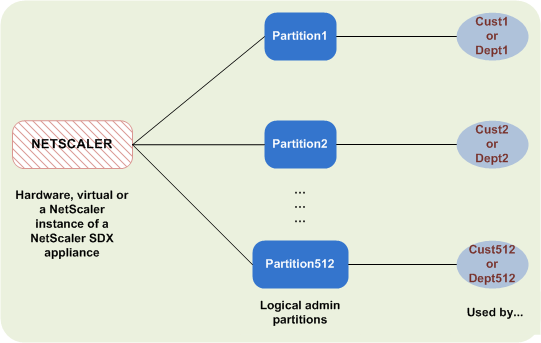
A partitioned NetScaler appliance has a single default partition and one or more admin partitions. The following table provides further details on the two partition types:
Note
In a partitioned appliance, the mode BridgeBPDUs can be enabled only in the default partition and not in the administrative partitions.
Availability:
The NetScaler appliance ships with a single partition, which is called a default partition. The default partition is retained even after the NetScaler appliance is partitioned.
Must be explicitly created as described in Configure admin partitions.
Number of Partitions:
One
A NetScaler appliance can have one or more (maximum of 512) admin partitions.
User Access and Roles:
All NetScaler users, who are not associated with a partition-specific command policy, can access and configure the default partition. As always, the associated command policy restricts the operations that a user can perform.
The user access and roles are created by NetScaler superusers who also specify the users for that partition. Only superusers and associated users of the partition can access and configure the admin partition.
Note
Partition users do not have shell access.
File Structure:
All files in a default partition are stored in the default NetScaler file structure.
For example, the /nsconfig directory stores the NetScaler configuration file and the /var/log/ directory stores the NetScaler logs.
All files in an admin partition are stored in directory paths that have the name of the admin partition.
For example, the NetScaler configuration file (ns.conf) is stored in the
/nsconfig/partitions/<partitionName> directory. Other partition-specific files are stored in the /var/partitions/<partitionName> directories.
Some other paths in an admin partition:
-
Downloaded files:
/var/partitions/<partitionName>/download/ -
Log files:
/var/partitions/<partitionName>/log/
Note
Currently, logging is not supported at partition-level. Therefore, this directory is empty and all logs are stored in the
/var/log/ directory.
-
SSL CRL certificate related files:
/var/partitions/<partitionName>/netscaler/ssl
Resources Available:
All NetScaler resources.
NetScaler resources that are explicitly assigned to the admin partition.
Related information
User access and roles
In authenticating and authorizing a partitioned NetScaler appliance, a root administrator can assign a partition administrator to one or more partitions. The partition administrator can authorize users to that partition without affecting other partitions. The partition users are authorized to access only that partition using the SNIP address. Both the root administrator and the partition administrator can configure role based access (RBA by authorizing users to access different applications.
Administrators and user roles can be described as follows:
Root Administrator. Accesses the partitioned appliance through its NSIP address and can grant user access to one or more partitions. The administrator can also assign partition administrators to one or more partitions. The administrator can create a partition administrator from the default partition using an NSIP address or switch to a partition and then create a user and assign partition admin access using a SNIP address.
Partition Administrator. Accesses the specified partition through an NSIP address assigned by the root administrator. The administrator can assign role-based access to partition user access to that partition and also configure external server authentication using partition specific configuration.
System User. Accesses partitions through the NSIP address. Has access to the partitions and resources specified by the root administrator.
Partition User. Accesses a partition through a SNIP address. The user account is created by the partition administrator and the user has access to resources, only within the partition.
Points to remember
Following are some points to remember when providing role-based access in a partition.
-
NetScaler users accessing the GUI through the NSIP address uses the default partition authentication configuration to log on to the appliance.
-
Partition system users accessing the GUI through a partition SNIP address uses partition specific authentication configuration to log on to the appliance.
-
Partition user created in a partition cannot log in using the NSIP address.
-
The NetScaler user bound to a partition cannot log in using the partition SNIP address.
-
System users authenticating through an external authentication server ( for example, LDAP, RADIUS, TACACS) must access a partition through a SNIP address.
Use case for managing role based access in a partitioned setup
Consider a scenario where an enterprise organization, www.example.com has multiple business units and a centralized administrator who manages all instances in their network. However, they want to provide exclusive user privileges and environment for each business unit.
Following are the administrators and users managed by default partition authentication configuration and partition specific configuration in a partitioned appliance.
John: Root Administrator
George: Partition Administrator
Adam: System User
Jane: Partition User
John, is the root administrator of a partitioned NetScaler appliance. John manages all user accounts and administrative user accounts across partitions (for example, P1, P2, P3, P4, and P5) within the appliance. John provides granular role-based access to entities from the default partition of the appliance. John creates user accounts and assigns partition access to each account. George being a network engineer within the organization prefers to have a role based access to few applications running on partition P2. Based on user management, John creates a partition administrator role for George and associates his user account with a partition-admin command policy in the P2 partition. Adam being another network engineer prefers to access an application running on P2. John creates a system user account for Adam and associates his user account to a P2 partition. Once the account is created, Adam can log into the appliance to access the NetScaler management interface through the NSIP address and can switch to partition P2 based on user/group binding.
Suppose, Jane who is another network engineer wants to directly access an application running only on partition P2, George (partition administrator) can create a partition user account for her and associate her account with command policies for authorization privileges. Jane’s user account created within the partition is now directly associated with P2. Now Jane can access the NetScaler management interface through the SNIP address and cannot switch to any other partition.
Note
If Jane’s user account is created by a partition administrator in partition P2, the admin can access the NetScaler management interface only through the SNIP address (created within the partition). The admin is not permitted to access the interface through the NSIP address. Similarly, if Adam’s user account is created by a root administrator in the default partition and is bound to a P2 partition. The admin can access the NetScaler management interface only through the NSIP address or SNIP address created in the default partition (with management access enabled). And not permitted to access the partition interface through the SNIP address created in the administrative partition.
Configure roles and responsibilities for partition administrators
Following are the configurations performed by a root administrator in a default partition.
Creating administrative partitions and system users – A root administrator creates administrative partitions and system users in the default partition of the appliance. The administrator then associates the users to different partitions. If you are bound to one or more partitions, you can switch from one partition to another based on user bindings. Also, your access to one or more bound partitions is authorized only by the root administrator.
Authorizing the system user as partition administrator for a specific partition – Once a user account is created, the root administrator switches to a specific partition and authorizes the user as the partition administrator. It is done by assigning partition-admin command policy to the user account. Now, the user can access the partition as partition administrator and manage entities within the partition.
Following are the configurations perform by a partition administrator in an administrative partition.
Configuring the SNIP address in an administrative partition- The partition administrator logs on to the partition and creates a SNIP address and provides management access to the address.
Creating and Binding a Partition System User with Partition Command Policy - The partition administrator creates partition users and defines the scope of user access. It is done by binding the user account to partition command policies.
Creating and Binding a Partition System User Groups with Partition Command Policy -The partition administrator creates partition user groups and defines the scope of user group access. It is done by binding the user group account to partition command policies.
Configuring External Server authentication for external users (optional)-This configuration is done for authenticating external TACACS users accessing the partition using the SNIP address.
Following are the tasks performed in configuring role-based access for partition users in an Administrative Partition.
-
Creating an Administrative Partition – Before you create partition users in an administrative partition, you must first create the partition. As a root administrator, you can create a partition from the default partition using the configuration utility or a command line interface.
-
Switching user access from default partition to partition P2 – If you are partition administrator accessing the appliance from the default partition, you can switch from default partition to a specific partition. For example, partition P2 based on user binding.
-
Adding a SNIP address to the partition user account with management access enabled-Once you have switched your access to an administration partition. You create a SNIP address and provide management access to the address.
-
Creating and binding a partition System User with Partition Command Policy-If you are a partition administrator, you can create partition users and define the scope of user access. It is done by binding the user account to partition command policies.
-
Creating and binding partition user group with partition command policy - If you are a partition administrator, you can create partition user groups and define the scope of user access control. It is done by binding the user group account to partition command policies.
Configuring External Server authentication for external users (optional)-This configuration is done for authenticating external TACACS users accessing the partition using a SNIP address.
Benefits of using admin partitions
You can avail the following benefits by using admin partitions for your deployment:
-
Allows delegation of administrative ownership of an application to the customer.
-
Reduces the cost of ADC ownership without compromising on performance and ease-of-use.
-
Safeguards from unwarranted configuration changes. In a non-partitioned NetScaler appliance, authorized users of the other application can intentionally or unintentionally change configurations that are required for your application. It can lead to undesirable behavior. This possibility is reduced in a partitioned NetScaler appliance.
-
Isolates traffic between different applications by the use of dedicated VLANs for each partition.
-
Accelerates and allows application deployments to scale.
-
Allows application-level or localized management and reporting.
Let us analyze a couple of cases to understand the scenarios in which you can use admin partitions.
User case 1: How admin partition is used in an enterprise network
Let us consider a scenario faced by a company named Foo.com.
-
Foo.com has a single NetScaler.
-
There are five departments and each department has one application that requires to be deployed with the NetScaler.
-
Each application must be managed independently by a different set of users or administrators.
-
Other users must be restricted from accessing the configurations.
-
The application or back-end must be able to share resources like IP addresses.
-
The global IT department must be able to control NetScaler-level settings which must be common to all partitions.
-
Applications must be independent of one another. An error in the configuration of one application must not affect the other.
A non-partitioned NetScaler would not be able to satisfy these requirements. However, you can achieve all these requirements by partitioning a NetScaler.
Simply create a partition for each of the applications, assign the required users to the partitions, specify a VLAN for each partition, and define global settings on the default partition.
Use case 2: How an admin partition is used by a service provider
Let us consider a scenario faced by a service provider named BigProvider:
-
BigProvider has 5 customers: 3 small enterprises and 2 large enterprises.
-
SmallBiz, SmallerBiz, and StartupBiz need only the most basic NetScaler functionality.
-
BigBiz and LargeBiz are larger enterprises and have applications that attract heavy traffic. They would like to use some of the more complex NetScaler functionality.
In a non-partitioned approach, the NetScaler administrator would typically use a NetScaler SDX appliance and provision a NetScaler instance for each customer.
The solution suits BigBiz and LargeBiz because their applications need the undiminished power of the entire non-partitioned NetScaler appliance. However, this solution might not be as cost effective for servicing SmallBiz, SmallerBiz, and StartupBiz.
Therefore, BigProvider decides on the following solution:
-
Using a NetScaler SDX appliance to bring up dedicated NetScaler instances for BigBiz and LargeBiz.
-
Using a single NetScaler which is partitioned into three partitions, one each for SmallBiz, SmallerBiz, and StartupBiz.
The NetScaler administrator (superuser) creates an admin partition for each of these customers, and specifies the users for the partitions. And also specifies the NetScaler resources for the partitions, and specifies the VLAN to be used by the traffic that is destined for each of the partitions.