
Configuring Health Tracking based on Interface State
To ensure that a backup VIP address takes over as the master VIP before the node of the current master VIP address goes down completely, you can configure a node to change the priority of a VIP address when the state of an interface on the node changes. For example, the node reduces the priority of a VIP address when the state of an interface changes to DOWN, and increases the priority when the state of the interface changes to UP. This feature is a per node configuration for each VIP address.
Related information
Example
Consider an active-active deployment consisting of NetScalers NS1, NS2, and NS3. Virtual IP addresses VIP1, VIP2, VIP3, and VIP4 are configured on each of these ADCs. Because of their priorities, VIP1 and VIP4 are active on NS1, VIP2 is active on NS2, and VIP3 is active on NS3.
To ensure that the active VIP addresses on NS1 are taken over by either NS2 or NS3 before NS1 goes down completely, interface-based health tracking is configured for the VIP1 and VIP4 addresses on NS1. Configuring interface-based health tracking for a VIP address includes associating the desired interfaces and setting the reduced priority (trackifNumPriority) parameter for the associated VRID of the VIP address. For example, on NS1, interfaces 1/2, 1/3, and 1/5 are associated to the VRID of VIP1, and reduced priority is set to 20.
Preemption is enabled for these VIP addresses in all three nodes.
The following table lists the settings used in this example: Health tracking example settings.
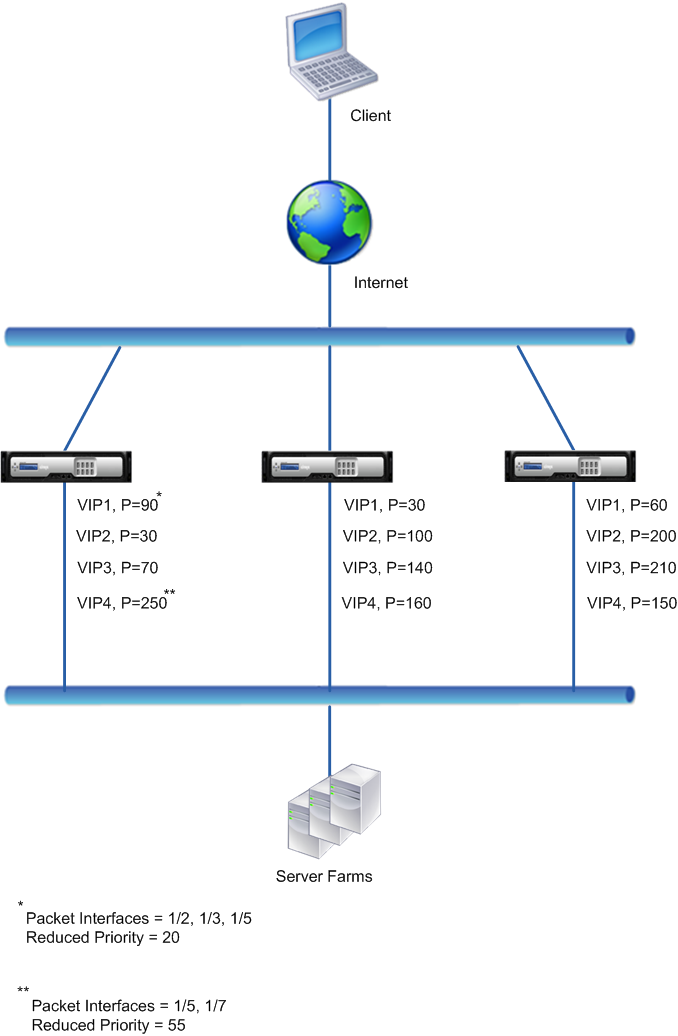
The execution flow is as follows on NS1 when multiple interface on NS1 goes down:
-
If interface 1/3 goes down, the priority of address VIP1 is reduced by 20 (VIP1’s reduced priority value), because interface 1/3 is associated with VIP1:
-
Effective priority of VIP1 = (Current priority - reduced priority) = (90-20) = 70
-
-
Similarly, if interface 1/5 goes down, the priority of address VIP1 is further reduced:
-
Effective priority of VIP1 = (Current priority - reduced priority) = (70-20) = 50
-
-
At this point, the effective priority of VIP1 on NS1 is less than the priority of VIP1 on NS3. NS3 preempts NS1 for VIP1. VIP1 on NS3 takes over and becomes active (master).
-
Also, because interface 1/5 is also associated with VIP4, the priority of VIP4 is reduced by the VIP4’s reduced priority value (55).
-
Effective priority of VIP4 = (250 - 55) = 195
-
-
If interface 1/7 goes down, the priority of VIP4 is further reduced:
-
Effective priority of VIP4 = (Current priority - reduced priority) = (195-55) = 145
-
-
At this point, the effective priority of VIP4 on NS1 is less than the priority of VIP4 on NS2. NS2 preempts NS1 for VIP4. VIP4 on NS3 takes over and becomes active (master). This configuration ensures that none of the four VIP addresses are active on NS1 before it completely goes down.
Configuration Steps for IPv4 Active-Active Mode
To configure this feature on a node for a VIP address, you set the Reduced Priority (trackifNumPriority) parameter, and then associate the interfaces whose state is to be tracked for changing the priority of the VIP address. When any of the associated interface's state changes to DOWN or UP, the node reduces or increases the priority of the VIP address by the configured Reduced Priority (trackifNumPriority) value.
To set reduced priority and bind interfaces to the virtual router ID by using the CLI:
At the command prompt, type:
-
bind vrID \<id> -trackifNum \<interface_name>
-
show vrID \<id>
Example:
    > set vrID 125 -trackifNumPriority 10
     Done

     > bind vrID 125 -trackifNum 1/4 1/5
     Done
To set reduced priority and bind interfaces to the virtual router ID by using the GUI:
-
Navigate to System > Network > VMAC.
-
On the VMACs tab, select a virtual router ID, and click Edit.
-
Under Configure virtual MAC, set the Reduced Priority parameter.
-
Select the Interfaces tracked for the VRID option and, under Associate Interfaces, add interfaces to the virtual router ID.
Configuration Steps for IPv6 Active-Active Mode
To configure this feature on a node for a VIP6 address, you set the Reduced Priority (trackifNumPriority) parameter, and then associate the interfaces whose state is to be tracked for changing the priority of the VIP6 address. When any of the associated interface's state changes to DOWN or UP, the node reduces or increases the priority of the VIP6 address by the configured Reduced Priority (trackifNumPriority) value.
To change the priority of a VIP address automatically by using the CLI:
At the command prompt, type one of the following sets of commands.
-
If adding a new virtual MAC6:
-
bind vrID6 \<id> -trackifNum \<interface_name>
-
show vrID6 \<id>
-
If reconfiguring an existing virtual MAC6:
-
bind vrID6 \<id> -trackifNum \<interface_name>
-
show vrID6 \<id>
Example:
    > set vrID6 130 -trackifNumPriority 10
     Done

     > bind vrID6 130 -trackifNum 1/4 1/5
     Done