
Set up basic load balancing
Before configuring your initial load balancing setup, enable the load balancing feature. Then begin by creating at least one service for each server in the load balancing group. With the services configured, you are ready to create a load balancing virtual server, and bind each service to the virtual server. That completes the initial setup. Before proceeding with further configuration, verify your configuration to make sure that each element was configured properly and is operating as expected.
Related information
Enable load balancing
You can configure load balancing entities such as services and virtual servers when the load balancing feature is disabled, but they will not function until you enable the feature.
To enable load balancing by using the CLI
At the command prompt, type the following command to enable load balancing and verify the configuration:
-
enable ns feature LB
-
show ns feature
Example
    > enable ns feature LoadBalancing

      Done

     > show ns feature


             Feature                        Acronym              Status

             -------                        -------              ------

      1)     Web Logging                    WL                   OFF

      2)     Surge Protection               SP                   ON

      3) Load Balancing LB ON

      .

      .

      .

      24)    NetScaler Push                 push                 OFF

      Done
To enable load balancing by using the GUI
Navigate to System > Settings and, in Configure Basic Features, select Load Balancing.
Configure a server object
Create an entry for your server on the NetScaler appliance. The NetScaler appliance supports IP address based servers and domain-based servers. If you create an IP address based server, you can specify the name of the server instead of its IP address when you create a service. For information about setting up DNS for a domain-based server, see Domain Name System.
To create a server object by using the CLI
At the command prompt, type:
add server `<name>`@ `<IPAddress>`@ | `<domain>`
Example for adding IP address-based name server:
add server web_serv 10.102.27.150
Example for adding domain-based server:
add server web_serv test.com
To create a server object by using the GUI
Navigate to Traffic Management > Load Balancing > Servers, and add a server object.
Configure services
After you enable the load balancing feature, you must create at least one service for each application server that is to be included in your load balancing setup. The services that you configure provide the connections between the NetScaler appliance and the load balanced servers. Each service has a name and specifies an IP address, a port, and the type of data that is served.
If you create a service without first creating a server object, the IP address of the service is also the name of the server that hosts the service. If you prefer to identify servers by name rather than IP address, you can create server objects and then specify a server's name instead of its IP address when you create a service.
When you create a service that uses UDP as the transport layer protocol, a ping monitor is automatically bound to the service. A ping monitor is the most basic of the built-in monitors. When you create a service that uses TCP as the transport layer protocol, a TCP_default monitor is automatically bound to the service. When you develop a strategy for managing your load balancing setup, you might decide to bind a different type of monitor, or multiple monitors, to the service.
Create a Service
Before you create a service, you need to understand the different service types and how each is used. The following list describes the types of services supported on the NetScaler appliance.
-
HTTPUsed for load-balanced servers that accept HTTP traffic, such as standard websites and web applications. The HTTP service type enables the NetScaler appliance to provide compression, content filtering, caching, and client keep-alive support for your Layer 7 web servers. This service type also supports virtual server IP port insertion, redirect port rewriting, Web 2.0 Push, and URL redirection support.Because HTTP is a TCP-based application protocol, you can also use the TCP service type for web servers. If you do so, however, the NetScaler appliance is able to perform only Layer 4 load balancing. It cannot provide any of the Layer 7 supports described earlier.
-
SSLUsed for servers that accept HTTPS traffic, such as ecommerce websites and shopping cart applications. The SSL service type enables the NetScaler appliance to encrypt and decrypt SSL traffic (perform SSL offloading) for your secure web applications. It also supports HTTP persistence, content switching, rewrite, virtual server IP port insertion, Web 2.0 Push, and URL redirection.You can also use the SSL_BRIDGE, SSL_TCP, or TCP service types. If you do so, however, the appliance performs only Layer 4 load balancing. It cannot provide SSL offloading or any of the Layer 7 supports described.
-
FTPUsed for servers that accept FTP traffic. The FTP service type enables the NetScaler appliance to support specific details of the FTP protocol.You can also use TCP or ANY service type for FTP servers.
-
TCPUsed for servers that accept many different types of TCP traffic, or that accept a type of TCP traffic for which a more specific type of service is not available.You can also use the ANY service type for these servers.
-
SSL_TCPUsed for servers that accept non-HTTP-based SSL traffic, to support SSL offloading.You can also use the TCP service type for these services. If you do so, the NetScaler appliance performs both the Layer 4 load balancing and SSL offloading.
-
UDPUsed for servers that accept UDP traffic. You can also use the ANY service type.
-
SSL_BRIDGEUsed for servers that accept SSL traffic when you do not want the NetScaler appliance to perform SSL offloading. Alternatively, you can use the SSL_TCP service type.
-
NNTPUsed for servers that accept Network News Transfer Protocol (NNTP) traffic, typically Usenet sites.
-
DNSUsed for servers that accept DNS traffic, typically nameservers. With the DNS service type, the NetScaler appliance validates the packet format of each DNS request and response. It can also cache DNS responses. You can apply DNS policies to DNS services.You can also use the UDP service type for these services. If you do, however, the NetScaler appliance can only perform Layer 4 load balancing. It cannot provide support for DNS-specific features.
-
ANYUsed for servers that accept any type of TCP, UDP, or ICMP traffic. The ANY parameter is used primarily with firewall load balancing and link load balancing.
-
SIP-UDPUsed for servers that accept UDP-based Session Initiation Protocol (SIP) traffic. SIP initiates, manages, and terminates multimedia communications sessions, and has emerged as the standard for Internet telephony (VoIP).You can also use the UDP service type for these services. If you do, however, the NetScaler appliance performs only Layer 4 load balancing. It cannot provide support for SIP-specific features.
-
DNS-TCPUsed for servers that accept DNS traffic, where the NetScaler appliance acts as a proxy for TCP traffic sent to DNS servers. With services of the DNS-TCP service type, the NetScaler appliance validates the packet format of each DNS request and response and can cache DNS responses, as with the DNS service type.You can also use the TCP service type for these services. If you do, however, the NetScaler appliance only performs Layer 4 load balancing of external DNS name servers. It cannot provide support for any DNS-specific features.
-
RTSPUsed for servers that accept Real Time Streaming Protocol (RTSP) traffic. RTSP provides delivery of multimedia and other streaming data. Select this type to support audio, video, and other types of streamed media.You can also use the TCP service type for these services. If you do, however, the NetScaler appliance performs only Layer 4 load balancing. It cannot parse the RTSP stream or provide support for RTSPID persistence or RTSP NAT.
-
DHCPRAUsed for servers that accept DHCP traffic. The DHCPRA service type can be used to relay DHCP requests and responses between VLANs.
-
DIAMETERUsed for load balancing Diameter traffic among multiple Diameter servers. Diameter uses message-based load balancing.
-
SSL_DIAMETERUsed for load balancing Diameter traffic over SSL.Services are designated as DISABLED until the NetScaler appliance connects to the associated load-balanced server and verifies that it is operational. At that point, the service is designated as ENABLED. Thereafter, the NetScaler appliance periodically monitors the status of the servers, and places any that fail to respond to monitoring probes (called health checks) back in the DISABLED state until they respond.Note:You can create a range of services from a single CLI command or the same dialog box. The names in the range vary by a number used as a suffix/prefix. For example, service1, service2, and so on. From the GUI, you can specify a range only in the last octet of the IP address, which is the fourth in case of an IPv4 address and the eighth in an IPv6 address. From the command line, you can specify the range in any octet of the IP address.
-
QUICUsed by load balancing servers that accept UDP based QUIC video traffic. The service enables NetScaler to optimize encrypted ABR video traffic over the UDP protocol.
-
DNS over TLS (DOT)Used for the servers that accept DNS traffic. With the DOT service type, NetScaler validates the packet format of each DNS request, encrypts it, and responds to the client. It can also cache the encrypted DNS responses.
-
DNS over HTTPS (DoH)Used for servers that accept SSL traffic. Once DoH is enabled, NetScaler understand and process DNS over HTTPS (DoH) traffic that is directed to its designated virtual server. DoH is transmitted using the HTTPS protocol, which operates over HTTP/2. This method uses Transport Layer Security (TLS) encryption to protect data during transmission, ensuring that DNS queries and responses remain private and secure. This functionality allows you to use existing DNS policies, load balancing, and other features with DoH traffic.To enable or disable the DoH feature, use the
dnsOverHttpsparameter in theadd lb vservercommand.Prerequisistes:-
The virtual server must be of type SSL.
-
The SSL virtual server must be configured with an HTTP profile that has HTTP/2 enabled. You can use an existing HTTP profile or create a new one using the
add httpprofile myprofile -http2 ENABLEDcommand. -
When binding a service to the virtual server, the service must also be configured with HTTP/2.
-
Enable the global HTTP parameter for server-side HTTP/2. To enable, use the
set httpparam -http2ServerSide oncommand. -
If you have configured a content switching virtual server, ensure that DoH is enabled on all the associated load balancing virtual servers. Inconsistency in DoH configuration across linked virtual servers will lead to issues.
-
To create a service by using the CLI
At the command prompt, type:
add service <name> <serverName> <serviceType> <port>

 add service Service-HTTP-1 192.0.2.5 HTTP 80
To create a service by using the GUI
-
Navigate to Traffic Management> Load Balancing > Services.
-
In the details pane, click Add.
-
In the Create Service dialog box, specify values for the following parameters:
-
Service Name—name
-
Server—serverName
-
Protocol—serviceType
-
Port—port
-
-
Click Create, and then click Close. The service you created appears in the Services pane.
Create a virtual Server
After you create your services, you must create a virtual server to accept traffic for the load balanced websites, applications, or servers. Once load balancing is configured, users connect to the load-balanced website, application, or server through the virtual server’s IP address or FQDN.
Notes:
-
Virtual server names prefixed with “app_” do not appear in the GUI though they are present in the ns.conf file and are displayed when you run the show command. However, virtual server names prefixed with “app” are displayed in the GUI.
-
The virtual server is designated as DOWN until you bind the services that you created to it, and until the NetScaler connects to those services and verifies that they are operational. After the verification, the virtual server is designated as UP.
-
If you want the virtual server to listen to all the ports, use a wildcard (*) character instead of the specific port.Example:
add lb vserver v1 TCP 1.11.1.1 *.
To create a virtual server by using the CLI
At the command prompt, type:
add lb vserver <name> <serviceType> <ip> <port>

 add lb vserver Vserver-LB-1 HTTP 10.102.29.60 80
To create a virtual server by using the GUI
Navigate to Traffic Management > Load Balancing > Virtual Servers, and then create a virtual server.
Bind services to the virtual server
Note:
A service can be bound to a maximum of 500 virtual servers.
After you have created services and a virtual server, you must bind the services to the virtual server. Usually, services are bound to virtual servers of the same type, but you can bind certain types of services to certain different types of virtual servers, as shown below.
| Virtual Server Type | Service Type | Comment |
|---|---|---|
| HTTP | SSL | You would normally bind an SSL service to an HTTP virtual server to do encryption. |
| SSL | HTTP | You would normally bind an HTTP service to an SSL virtual server to do SSL offloading. |
| SSL_TCP | TCP | You would normally bind a TCP service to an SSL_TCP virtual server to do SSL offloading for other TCP (SSL decryption without content awareness). |
The state of the services bound to a virtual server determines the state of the virtual server: if all of the bound services are DOWN, the virtual server is marked DOWN, and if any of the bound services is UP or OUT OF SERVICE, the state of the virtual server is UP.
To bind a service to a load balancing virtual server by using the CLI
At the command prompt, type:
bind lb vserver <name> <serviceName>

 bind lb vserver Vserver-LB-1 Service-HTTP-1
To bind a service to a load balancing virtual server by using the GUI
-
Navigate to Traffic Management> Load Balancing > Virtual Servers, and select a virtual server.
-
Click in the Service section, and select a service to bind.
Note: You can bind a service to multiple virtual servers.
Verify the configuration
After finishing your basic configuration, you can view the properties of each service and load balancing virtual server in your load balancing setup to verify that each is configured correctly. After the configuration is up and running, you can view the statistics for each service and load balancing virtual server to check for possible problems.
View the properties of a server object
You can view properties such as the name, state, and IP address of any server object in your NetScaler appliance configuration.
To view the properties of server objects by using the CLI
At the command prompt, type:
show server <serverName>

 show server server-1
To view the properties of server objects by using the GUI
Navigate to Traffic Management > Load Balancing > Servers. The parameter values of the available servers appear in the details pane.
View the properties of a virtual server
You can view properties such as the name, state, effective state, IP address, port, protocol, method, and number of bound services for your virtual servers. If you have configured more than the basic load balancing settings, you can view the persistence settings for your virtual servers, any policies that are bound to them, and any cache redirection and content switching virtual servers that have been bound to the virtual servers.
To view the properties of a load balancing virtual server by using the CLI
At the command prompt, type:
show lb vserver <name>

 show lb vserver Vserver-LB-1
To view the properties of a load balancing virtual server by using the GUI
-
Navigate to Traffic Management > Load Balancing > Virtual Servers.
-
In the details pane, click a virtual server to display its properties at the bottom of the details pane.
-
To view the cache redirection and content switching virtual servers that are bound to this virtual server, click Show CS/CR Bindings.
View the properties of a service
You can view the name, state, IP address, port, protocol, maximum client connection, maximum requests per connection, and server type of the configured services, and use this information to troubleshoot any mistake in the service configuration.
To view the properties of services by using the CLI
At the command prompt, type:
show service <name>

 show service Service-HTTP-1
To view the properties of services by using the GUI
Navigate to Traffic Management > Load Balancing > Services. The details of the available services appear on the Services pane.
View the bindings of a service
You can view the list of virtual servers to which the service is bound. The binding information also provides the name, IP address, port, and state of the virtual servers to which the services are bound. You can use the binding information to troubleshoot any problem with binding the services to virtual servers.
To view the bindings of a service by using the CLI
At the command prompt, type:
show service bindings <name>

 show service bindings Service-HTTP-1
To view the bindings of a service by using the GUI
-
Navigate to Traffic Management > Load Balancing > Services.
-
In the details pane, select the service whose binding information you want to view.
-
In the Action tab, click Show Bindings.
View the statistics of a virtual server
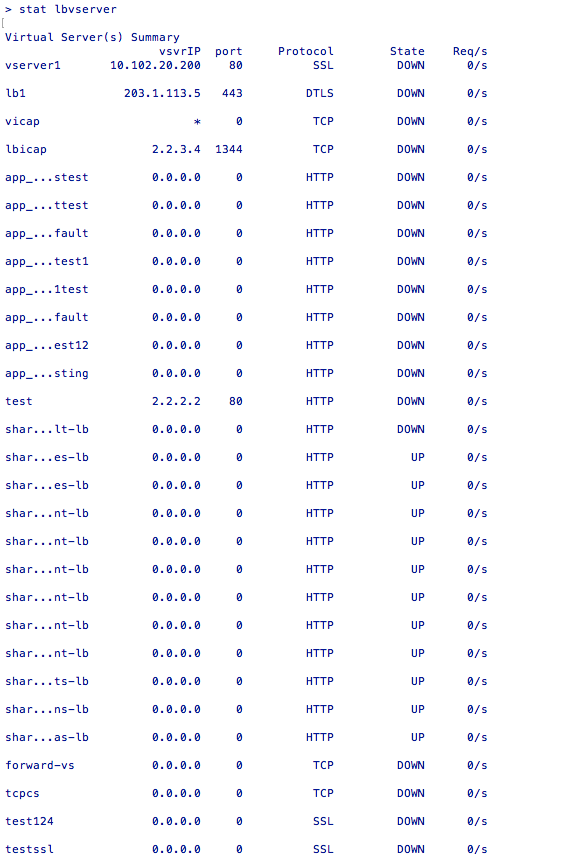
To evaluate the performance of virtual servers or to troubleshoot problems, you can display details of the virtual servers configured on NetScaler. You can display a summary of statistics for all the virtual servers, or you can specify the name of a virtual server to display the statistics only for that virtual server. You can display the following details:
-
Name
-
IP address
-
Port
-
Protocol
-
State of the virtual server
-
Rate of requests received
-
Rate of hits
To display virtual server statistics by using the CLI
To display a summary of the statistics for all the virtual servers currently configured on the appliance, or for a single virtual server, at the command prompt, type:
stat lb vserver [`<name>`]
Example:
stat lb vserver server-1
The following figure displays a sample statistic.
To display virtual server statistics by using the GUI
-
Navigate to Traffic Management > Load Balancing > Virtual Servers.
-
If you want to display the statistics for only one virtual server, in the details pane, select the virtual server whose statistics you want to display.
-
In the details pane, click Statistics.
View the statistics of a service
You can view the rate of requests, responses, request bytes, response bytes, current client connections, requests in the surge queue, current server connections, and so forth using the service statistics.
To view the statistics of a service by using the CLI
At the command prompt, type:
stat service <name>
Example:
stat service Service-HTTP-1
To view the statistics of a service by using the GUI
-
Navigate to Traffic Management > Load Balancing > Services.
-
In the details pane, select the service whose statistics you want to view (for example, Service-HTTP-1).
-
Click Statistics. The statistics appear in a new window.