
Gradually step up the load on a new service with virtual server–level slow start
You can configure the NetScaler appliance to gradually increase the load on a service (the number of requests that the service receives per second) immediately after the service is either added to a load balancing configuration or has a state change from DOWN to UP (in this document, the term “new service” is used for both situations). You can either increase the load manually with load values and intervals of your choice (manual slow start) or configure the appliance to increase the load at a specified interval (automated slow start) until the service is receiving as many requests as the other services in the configuration. During the ramp-up period for the new service, the appliance uses the configured load balancing method.
This functionality is not available globally. It has to be configured for each virtual server. The functionality is available only for virtual servers that use one of the following load balancing methods:
-
Round robin
-
Least connection
-
Least response time
-
Least bandwidth
-
Least packets
-
LRTM (Least Response Time Method)
-
Custom load
For this functionality, you need to set the following parameters:
-
The new service request rate, which is the amount by which to increase the number or percentage of requests sent to a new service each time the rate is incremented. That is, you specify the size of the increment in terms of either the number of requests per second or the percentage of the load being borne, at the time, by the existing services. If this value is set to 0 (zero), slow start is not performed on new services.Note: In an automated slow start mode, the final increment is smaller than the specified value if the specified value would place a heavier load on the new service than on the other services.
-
The increment interval, in seconds. If this value is set to 0 (zero), the load is not incremented automatically. You have to increment it manually.
With an automated slow start, a service is taken out of the slow start phase when one of the following conditions applies:
-
The actual request rate is less than the new service request rate.
-
The service does not receive traffic for three successive increment intervals.
-
The request rate has been incremented 200 times.
-
The percentage of traffic that the new service must receive is greater than or equal to 100.
With manual slow start, the service remains in the slow start phase until you take it out of that phase.
Related information
Manual slow start
If you want to manually increase the load on a new service, do not specify an increment interval for the load balancing virtual server. Specify only the new service request rate and the units. With no interval specified, the appliance does not increment the load periodically. It maintains the load on the new service at the value specified by the combination of the new service request rate and units until you manually modify either parameter. For example, if you set the new service request rate and unit parameters to 25 and “per second,” respectively, the appliance maintains the load on the new service at 25 requests per second until you change either parameter. When you want the new service to exit the slow start mode and receive as many requests as the existing services, set the new service request rate parameter to 0.
As an example, assume that you are using a virtual server to load balance 2 services, Service1 and Service2, in round robin mode. Further assume that the virtual server is receiving 240 requests per second, and that it is distributing the load evenly across the services. When a new service, Service3, is added to the configuration, you might want to increase the load on it manually through values of 10, 20, and 40 requests per second before sending it its full share of the load. The following table shows the values to which you set the three parameters.
Table 1. Parameter Values
| Parameter | Value |
|---|---|
| Interval in seconds | 0 |
| New service request rate | 10, 20, 40, and 0, at intervals that you choose |
| Units for the new service request rate | Requests per second |
When you set the new service request rate parameter to 0, Service3 is no longer considered a new service, and receives its full share of the load.
Assume that you add another service, Service4, during the ramp-up period for Service3. In this example, Service4 is added when the new service request rate parameter is set to 40. Therefore, Service4 begins receiving 40 requests per second.
The following table shows the load distribution on the services during the period described in this example.
Table 2. Load Distribution on Services when Manually Stepping Up the Load
| new service request rate = 10 req/sec (Service3added) | new service request rate = 20 req/sec | new service request rate = 40 req/sec (Service4added) | new service request rate = 0 req/sec (new services exit slow start mode) | |
|---|---|---|---|---|
| Service1 | 115 | 110 | 80 | 60 |
| Service2 | 115 | 110 | 80 | 60 |
| Service3 | 10 | 20 | 40 | 60 |
| Service4 | - | - | 40 | 60 |
| Total req/sec (load on the virtual server) | 240 | 240 | 240 | 240 |
Automated slow start
If you want the appliance to increase the load on a new service automatically at specified intervals until the service can be considered capable of handling its full share of the load, set the new service request rate parameter, the units parameter, and the increment interval. When all the parameters are set to values other than 0, the appliance increments the load on a new service by the value of the new service request rate, at the specified interval, until the service is receiving its full share of the load.
As an example, assume that four services, Service1, Service2, Service3, and Service4, are bound to a load balancing virtual server, vserver1. Further assume that vserver1 receives 100 requests per second, and that it distributes the load evenly across the services (25 requests per second per service). When you add a fifth service, Service5, to the configuration, you might want the appliance to send the new service 4 requests per second for the first 10 seconds, 8 requests per second for the next 10 seconds, and so on, until it is receiving 20 requests per second. For this requirement, the following table shows the values to which you set the three parameters:
Table 3. Parameter Values
| Parameter | Value |
|---|---|
| Interval in seconds | 10 |
| Increment value | 4 |
| Units for the new service request rate | Requests per second |
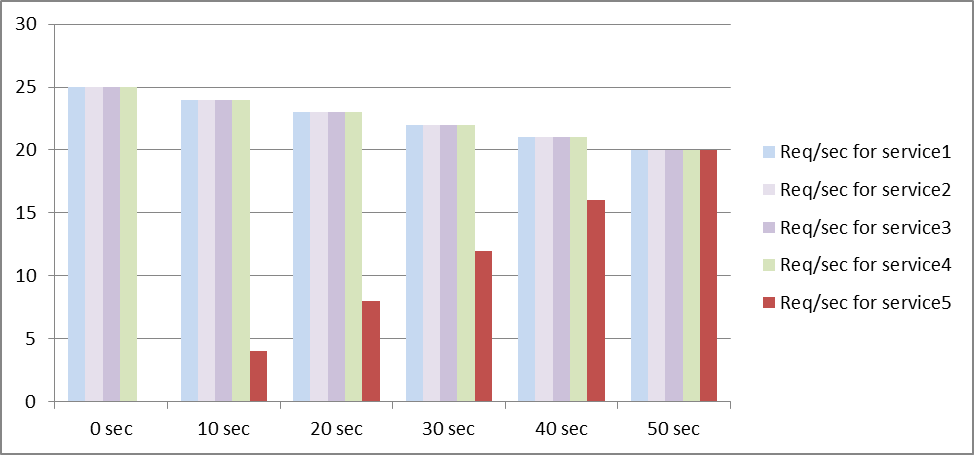
With this configuration, the new service begins receiving as many requests as the existing services 50 seconds after it is added or its state has changed from DOWN to UP. During each interval in this period, the appliance distributes to the existing servers the excess of requests that would have been sent to the new service in the absence of stepwise increments. For example, in the absence of stepwise increments, each service, including Service5, would have received 20 requests each per second. With stepwise increments, during the first 10 seconds, when Service5 receives only 4 requests per second, the appliance distributes the excess of 16 requests per second to the existing services, resulting in the distribution pattern shown in the following table and figure over the 50-second period. After the 50-second period, Service5 is no longer considered a new service, and it receives its normal share of traffic.
Table 4. Load Distribution Pattern on All Services for the 50-second Period Immediately after Service5 is Added
| 0 sec | 10 sec | 20 sec | 30 sec | 40 sec | 50 sec | |
|---|---|---|---|---|---|---|
| Req/sec forService1 | 25 | 24 | 23 | 22 | 21 | 20 |
| Req/sec forService2 | 25 | 24 | 23 | 22 | 21 | 20 |
| Req/sec forService3 | 25 | 24 | 23 | 22 | 21 | 20 |
| Req/sec forService4 | 25 | 24 | 23 | 22 | 21 | 20 |
| Req/sec forService5 | 0 | 4 | 8 | 12 | 16 | 20 |
| Total req/sec (load on the virtual server) | 100 | 100 | 100 | 100 | 100 | 100 |
Figure 1. A Graph of the Load Distribution Pattern on All Services for the 50-second Period Immediately after Service5 is Added
An alternative requirement might be for the appliance to send Service5 25% of the load on the existing services in the first 5 seconds, 50% in the next 5 seconds, and so on, until it is receiving 20 requests per second. For this requirement, the following table shows the values to which you set the three parameters.
Table 5. Parameter Values
| Parameter | Value |
|---|---|
| Interval in seconds | 5 |
| Increment value | 25 |
| Units for the new service request rate | Percent |
With this configuration, the service begins receiving as many requests as the existing services 20 seconds after it is added or its state has changed from DOWN to UP. The traffic distribution during the ramp-up period for the new service is identical to the one described earlier, where the unit for the step increments was “requests per second.”
Set the slow start parameters
You set the slow start parameters by using either the
set lb vserver or the add lb vserver command. The following command is for setting slow start parameters when adding a virtual server.
To configure stepwise load increments for a new service by using the command line interface
At the command prompt, type the following commands to configure stepwise increments in the load for a service and verify the configuration:
add lb vserver <name> <serviceType> <IPAddress> <port> [-newServiceRequest <positive_integer>] [<newServiceRequestUnit>] [-newServiceRequestIncrementInterval <positive_integer>]

 show lb vserver <name>
Example
set lb vserver BR_LB -newServiceRequest 5 PER_SECOND -newServiceRequestIncrementInterval 10
 Done

 show lb vserver BR_LB
 BR_LB (192.0.2.33:80) - HTTP Type: ADDRESS
 State: UP
 ...
 ...
 New Service Startup Request Rate: 5 PER_SECOND, Increment Interval: 10
 ...
 ...
 Done
To configure stepwise load increments for a new service by using the configuration utility
-
Navigate to Traffic Management > Load Balancing > Virtual Servers, and open a virtual server.
-
In Advanced Settings, select Method, and set the following slow start parameters:
-
New Service Startup Request Rate.
-
New Service Request Unit.
-
Increment Interval.
-