
Telco subscriber management
The number of subscribers in a telco network is increasing at an unprecedented rate, and managing them is becoming a challenge for service providers. Newer, faster, and smarter devices are placing high demand on the network and the subscriber management systems. It is no longer feasible to provide each subscriber the same standard of service, and the need for traffic processing on a per-subscriber basis is imperative.
The NetScaler appliance provides the intelligence to profile subscribers based on their information stored in the Policy and Charging Rules Function (PCRF). When a mobile subscriber connects to the Internet, the packet gateway associates an IP address with the subscriber and forwards the data packet to the appliance. The appliance receives the subscriber information dynamically, or you can configure static subscribers. This information enables the appliance to apply its rich traffic management capabilities, such as content switching, integrated caching, rewrite, and responder, on a per-subscriber basis to manage the traffic.
Before you configure the NetScaler appliance to manage subscribers, you must allocate memory to the module that stores subscriber sessions. For dynamic subscribers, you must configure an interface through which the appliance receives session information. Static subscribers must be assigned IDs, and you can associate them with policies.
You can also do the following:
-
Subscriber policy enforcement and management.
-
Configure the appliance to uniquely identify a subscriber by using only the IPv6 prefix instead of the complete IPv6 address.
-
Use policies to optimize TCP traffic for both dynamic and static subscribers. These policies associate different TCP profiles with different types of users.
-
Manage idle sessions on a NetScaler appliance.
-
Enable logging to a log server.
-
Remove LSN sessions for deleted subscriber sessions.
Allocating memory for the subscriber session store module
Each subscriber session entry consumes 1 KB of memory. Storing 500,000 subscriber sessions at any point in time requires 500 MB of memory. This value must be added to the minimum memory requirement, which is shown as part of the output of the “show extendedmemoryparam” command. In the following example, the output is for a NetScaler VPX instance with 3 packet engines and 8 GB memory.
To store 500,000 subscriber sessions on this appliance, the configured memory must be 2058+500 MB (500,000 x 1 KB = 500 MB.)
Note
The configured memory must be in multiples of 2 MB and must not exceed the maximum memory usage limit. The appliance must be restarted for the changes to take effect.
Example
show extendedmemoryparam
        Extended Memory Global Configuration. This memory is utilized by LSN and Subscriber Session Store Modules:
         Active Memory Usage: 0 MBytes
         Configured Memory Limit: 0 MBytes
         Minimum Memory Required: 2058 MBytes
         Maximum Memory Usage Limit: 2606 MBytes
     Done
     set extendedmemoryparam -memLimit 2558
     Done
     show extendedmemoryparam
             Extended Memory Global Configuration. This memory is utilized by LSN and Subscriber Session Store Modules:

             Active Memory Usage: 2558 MBytes
             Configured Memory Limit: 2558 MBytes
             Minimum Memory Required: 2058 MBytes
             Maximum Memory Usage Limit: 2606 MBytes
     Done
Configure an interface for dynamic subscribers
The NetScaler appliance dynamically receives the subscriber information through any of the following types of interface:
Note
-
Starting with NetScaler release 12.0 build 57.19, Gx interface is supported for a cluster deployment. For more information see Gx interface in a cluster topology.
-
In an HA setup, the subscriber sessions are continually synchronized on the secondary node. In the event of a failover, the subscriber information is still available on the secondary node.
Gx interface
A Gx interface (as specified in 3GPP 29.212) is a standard interface based on the Diameter protocol that allows exchange of policy control and charging rules between a PCRF and a Policy and Charging Enforcement Function (PCEF) entity in a Telco network.
When an IP-CAN session is established, the packet gateway forwards the subscriber ID, such as the MSISDN, and Framed-IP address information about the subscriber to the PCRF as a Diameter message. When the data packet arrives at the appliance from packet gateway (PGW), the appliance uses the subscriber IP address to query the PCRF to get the subscriber information. This is also known as secondary PCEF functionality.
The Policy and Charging Control (PCC) rules received by the appliance over the Gx interface are stored on the appliance during the subscriber session, that is, until the PCRF sends a Re-Auth-Request (RAR) message with a Session-Release-Cause AVP or the subscriber session is terminated from the CLI or the configuration utility. If there are any updates to an existing subscriber, the PCRF sends the updates in an RAR message. A subscriber session is initiated when a subscriber logs on to the network, and terminated when the subscriber logs off.
Note: If the PCRF server is down, the NetScaler appliance creates negative sessions for the pending or incoming Gx subscriber requests. When the PCRF server is back up again, the NetScaler appliance prevents a storm of requests by waiting for the negative sessions to expire before performing the specific subscriber requests.
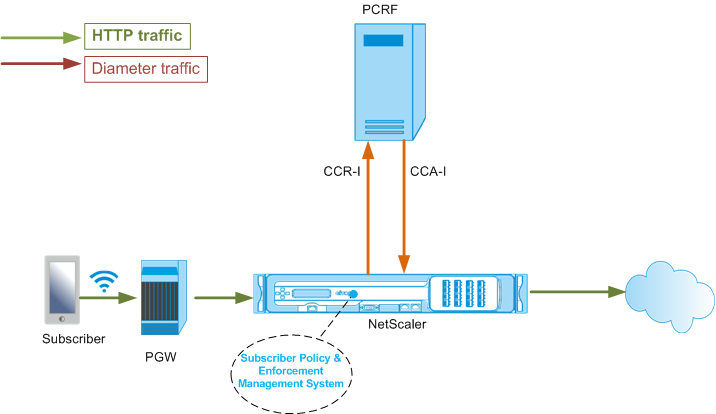
The following illustration shows the high-level traffic flow. It assumes that the data plane traffic is HTTP. The appliance sends a Credit Control Request (CCR) over a Gx interface to the PCRF server and, in the credit control answer (CCA), receives the PCC rules and, optionally, other information, such as the Radio Access Technology (RAT) type, that applies to the particular subscriber. PCC rules include one or more policy (rule) names and other parameters. The appliance uses this information to retrieve the predefined rules stored on the appliance, and to direct the flow of traffic. It also stores this information in the subscriber policy and enforcement management system during the subscriber session. After a subscriber session is terminated, the appliance discards all the information about the subscriber.
The following example shows the commands for configuring a Gx interface. The commands are in boldface.
To set up a Gx interface, perform the following tasks
Add a DIAMETER service for each Gx interface. For example:
add service pcrf-svc1 203.0.113.1 DIAMETER 3868

 add service pcrf-svc2 203.0.113.2 DIAMETER 3868
Add a non-addressable DIAMETER load balancing virtual server and bind the services created in step 1 to this virtual server. For more than one service, specify a persistenceType and the persistAVPno so that specific sessions are handled by the same PCRF server. For example:
add lb vserver vdiam DIAMETER 0.0.0.0 0 -persistenceType DIAMETER -persistAVPno 263

 bind lb vserver vdiam pcrf-svc1

 bind lb vserver vdiam pcrf-svc2
Configure NetScaler diameter identity and realm. Identity and realm are used as Origin-Host and Origin-Realm AVPs in diameter messages sent by the Gx client. For example:
set ns diameter –identity netscaler.com –realm com
Configure the Gx interface to use the virtual server created in step 2 as the PCRF virtual server. Specify the PCRF realm to use as Destination-Realm AVP in diameters messages sent by the Gx client. For example:
set subscriber gxInterface -vServer vdiam -pcrfRealm pcrf.com
Set the subscriber interface type to GxOnly. For example:
set subscriber param -interfaceType GxOnly
To see the Gx interface configuration and status, type:
show subscriber gxinterface
Example
show subscriber gxinterface
     Gx Interface parameters:
         PCRF Vserver: vdiam (DOWN)
         Gx Client Identity...:  netscaler1.com
         Gx Client Realm ..........:  com
         PCRF Realm: epc.mnc030.mcc234.3gppnetwork.org
         Hold Packets On Subscriber Absence: YES
         CCR Request Timeout: 4 Seconds
         CCR Request Retry Attempts: 1
         Gx HealthCheck enabled: NO
         Gx HealthCheck TTL : 30 Seconds
         CER Request Timeout: 10 Seconds
         RevalidationTimeout: 30 Seconds
         NegativeTTL: 60 Seconds
         NegativeTTL Limited Success: NO
         Purge SDB on Gx Failure: YES
         ServicePath AVP code: 262099    ServicePath AVP VendorID: 3845
         PCRF Connection State: PCRF is not ready
     Done
ARGUMENTS
vServer
Name of the load balancing or content switching virtual server to which the Gx connections are established. The service type of the virtual server must be DIAMETER or SSL_DIAMETER. This parameter is mutually exclusive with the service parameter. Therefore, you cannot set both service and the virtual server in the Gx interface.
Service
Name of DIAMETER or SSL_DIAMETER service corresponding to PCRF to which the Gx connection is established. This parameter is mutually exclusive with the vserver parameter. Therefore, you cannot set both service and the virtual server in the Gx Interface.
pcrfRealm
The realm of PCRF to which the message is to be routed. This is the realm used in Destination-Realm AVP by NetScaler Gx client (as a Diameter node).
holdOnSubscriberAbsence
Set to Yes to hold packets until the subscriber session information is fetched from the PCRF server. If set to No, the default subscriber profile is applied until the subscriber session information is fetched from the PCRF server. If a default subscriber profile is not configured, an UNDEF is raised for expressions that use subscriber attributes.
requestTimeout
Time, in seconds, within which the Gx CCR request must complete. If the request does not complete within this time, the request is retransmitted for the number of times specified in the requestRetryAttempts parameter. If request is not complete even after retransmitting, then the default subscriber profile is applied to this subscriber. If a default subscriber profile is not configured, an UNDEF is raised for expressions that use subscriber attributes. Zero disables the timeout. Default value: 10
requestRetryAttempts
Specify the number of times a request must be retransmitted if the request does not complete within the value specified in the requestTimeout parameter. Default value: 3.
healthCheck
Set to Yes to enable inline health check of Gx peer. When enabled, NetScaler sends DWR packets to the PCRF server. When the Gx session is idle, the healthCheck timer expires and DWR packets are initiated to check if the PCRF server is active. Default value: No. Note: This parameter is supported in NetScaler 12.1 build 51.xx and later.
healthCheckTTL
Time in seconds defined for watchdog supervision. After the health check TTL time expires, DWR is sent to check the status of the PCRF server. Any CCR, CCA, RAR, or RAA message resets the timer. Minimum value: 6 seconds. Default value: 30 seconds. Note: This parameter is supported in NetScaler 12.1 build 51.xx and later.
cerRequestTimeout
Time in seconds defined for retransmission of the capabilities exchange request. NetScaler initiates a new CER message if it does not receive a CEA from the PCRF within this configured time. If no response is received from the PCRF server, the appliance tries to send the CER message 5 times. If there is no response even after 5 CER messages, the appliance closes the TCP connection and reports a failure. If the timeout value is set to 0, the application health check feature is disabled. Minimum value: 0 seconds. Default value: 0 seconds. Note: This parameter is supported in NetScaler 12.1 build 51.xx and later.
revalidationTimeout
Time, in seconds, after which the Gx CCR-U request is sent after any PCRF activity on a session. Any RAR or CCA message resets the timer. Zero value disables the idle timeout.
negativeTTL
Time, in seconds, after which the Gx CCR-I request is resent for sessions that have not been resolved by PCRF because the server is down or there is no response or a failed response is received. Instead of polling the PCRF server constantly, a negative-TTL makes the appliance hold on to an unresolved session. For negative sessions, the appliance inherits the attributes from the default subscriber profile, if one is configured and from the RADIUS accounting message, if one is received. Zero value disables the negative sessions. The appliance does not install negative sessions even if a subscriber session could not be fetched. Default value: 600
negativeTTLLimitedSuccess
Set to Yes to create negative session for partial success response code (2002). If set to No, regular session is created. Default value: No.
This parameter is supported in NetScaler 12.1 build 49.xx and later.
purgeSDBonGxFailure
Set to Yes to flush subscriber database when the Gx interface fails. Gx interface failure includes both DWR monitoring (if enabled) and network healthCheck (if enabled). When set to Yes, all subscriber sessions are cleared. Default value: No. Note: This parameter is supported in NetScaler 12.1 build 51.xx and later.
servicePathAVP
The AVP code in which PCRF sends the service path applicable to a subscriber.
servicePathVendorid
The vendor id of the AVP in which PCRF sends the service path applicable to a subscriber.
To configure Gx interface by using the GUI
-
Navigate to Traffic Management > Subscriber > Parameters.
-
Click Configure Subscriber Parameters.
-
In Interface Type, select GxOnly.
-
Specify the values for the all required parameters.
-
Click OK.
Detect transport failures over established Gx connections
Note: This feature is supported in NetScaler 12.1 build 51.xx and later.
A NetScaler appliance can be configured to detect transport failures over established Gx connections by using device watchdog request (DWR) and device watchdog answer (DWA) messages.
After a Gx session is established, a predefined timer is triggered to detect if a session is idle. A DWR message is sent after the idle time timer expires. The idle time timer is reset each time the NetScaler appliance receives a message over an established Gx session. The peer’s availability is confirmed based on the DWA message after a DWR message is sent.
-
If the DWA is received, a peer’s availability is confirmed and the watchdog timer is reset.
-
If the DWA is not received and the watchdog timer expires twice consecutively, the session is considered as down and peer unavailable. The appliance closes the session and tries to establish a new session with the Gx peer.
When the watchdog timer expires twice without a response, the NetScaler appliance considers the Gx connection as faulty and initiates a connection closure. Once the connection is closed, no other watchdog request is sent towards the Gx peer. NetScaler appliance uses the next available Gx session for any PCRF requests.
To detect transport failures over established Gx connections by using the CLI
At the command prompt, type:
set subscriber gxInterface [-vServer <string>] [-service <string>] [-healthCheck ( YES | NO )] [-healthCheckTTL<positive_integer>][-cerRequestTimeout <positive_integer>] [-purgeSDBonGxFailure ( YES | NO )]
Example:
set subscriber gxInterface set subscriber gxInterface -vServer vdiam -healthCheck YES -healthCheckTTL 31 -cerRequestTimeout 15 purgeSDBonGxFailure YES
To detect transport failures over established Gx connections by using the GUI
-
Navigate to Traffic Management > Subscriber > Parameters.
-
Click Configure Subscriber Parameters.
-
In Interface Type, select GxOnly.
-
Specify the values for all required parameters.
-
Select Health Check and specify values for Health Check TTL and CER Request Timeout.
-
Click OK.
Gx interface in a cluster topology
The NetScaler appliance supports Gx interface in a cluster topology.
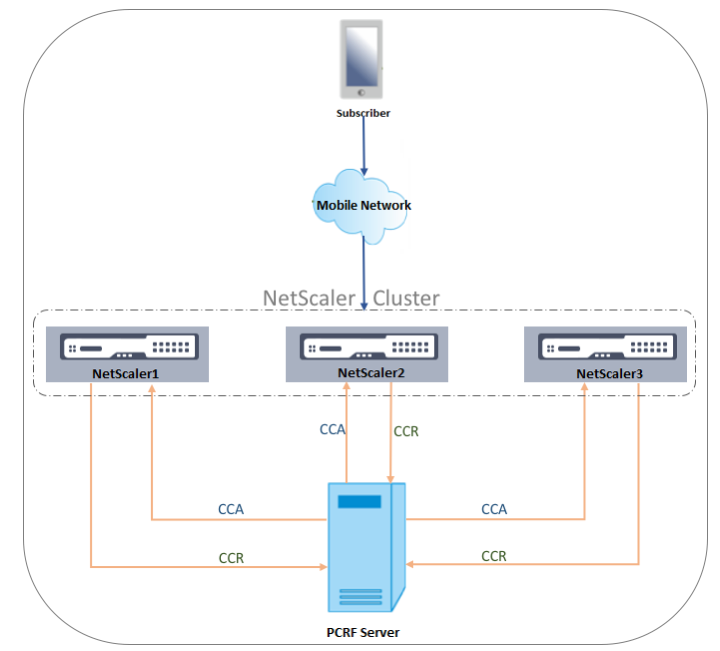
The NetScaler nodes in the cluster communicate with an external PCRF server through the Gx interface. When a node receives client traffic, the appliance performs the following:
-
Sends a CCR-I request to the PCRF server to fetch subscriber information.
-
The PCRF server responds with a CCR-A.
-
The NetScaler node then stores the received subscriber information in its subscriber store and applies the rules to the client traffic.
Each node maintains an independent subscriber store and subscriber sessions are not synchronized to other nodes.
As per the Diameter Base Protocol RFC 6733, each peer must be configured with a unique diameter identity to communicate with other peers over the diameter protocol. Hence, in a cluster deployment, configuration of diameter identity is spotted. The diameter parameters (identity, realm, server close propagation) for each node can be configured individually by using the GUI or the CLI.
When a node is added to a cluster, it assumes the default diameter parameters (identity=netscaler.com, realm=com, serverClosePropogation=NO). After the nodes are added, the diameter parameters for each node must be configured.
To configure the diameter parameters by using the GUI
-
Navigate to System > Settings.
-
In the details pane, click Change Diameter Parameters.
-
In the Diameter Parameters page, select the NetScaler node for which you want to configure the diameter parameters and then click Configure.
-
In the Configure Diameter Parameters page, configure the diameter Identity, diameter Realm, and server Close Propagation for the selected node.
-
Click OK.
To configure the diameter parameters by using the CLI
At the command prompt, type:
set ns diameter [-identity <string>] [-ownerNode <positive_integer>]
ARGUMENTS
Identity
Diameter Identity is used to identify a Diameter node uniquely. Before setting up diameter configuration, the NetScaler appliance (as a Diameter node) must be assigned a unique diameter identity.
For example, set ns diameter -identity netscaler.com -ownerNode 1. So, whenever NetScaler system needs to use identity in diameter messages, it uses 'netscaler.com' as Origin-Host AVP as defined in RFC3588.
Maximum Length: 255
OwnerNode
OwnerNode represents the ID of the cluster node for which the diameter ID is set. OwnerNode can be configured only through CLIP.
Minimum value: 0
Maximum value: 31
Example:
set ns diameter -identity netscaler1.com -ownerNode 1
Note:
The OwnerNode option is also added to the show ns diameter command.
Example:
show diameter -ownerNode <0-31>
When the show ns diameter command is executed, it displays the diameter parameters for a given node.
To configure a Gx interface for cluster deployment
To set up a Gx interface, perform the following tasks:
Add a DIAMETER service for each Gx interface.
Example:
add service pcrf-svc1 203.0.113.1 DIAMETER 3868
 add service pcrf-svc2 203.0.113.2 DIAMETER 3868
Add a DIAMETER load balancing virtual server and bind the services created in step 1 to this virtual server.
Example:
add lb vserver vdiam DIAMETER 0.0.0.0 0 -persistenceType DIAMETER -persistAVPno 263

 bind lb vserver vdiam pcrf-svc1

 bind lb vserver vdiam pcrf-svc2
Configure NetScaler diameter identity and realm on all the cluster nodes. Identity and realm are used as Origin-Host and Origin-Realm AVPs in diameter messages sent by the Gx client.
Example:
set ns diameter -identity node0.netscaler.com -realm netscaler.com -ownerNode 0

 set ns diameter -identity node1.netscaler.com -realm netscaler.com -ownerNode 1
Configure the Gx interface to use the virtual server created in step 2 as the PCRF virtual server and set the PCRF realm as well.
Example:
set subscriber gxInterface -vServer vdiam -pcrfRealm pcrf.com

 Set the subscriber interface type to GxOnly.
Example:
set subscriber param -interfaceType GxOnly
To see the Gx interface configuration and status, type:
show subscriber gxinterface
RADIUS interface
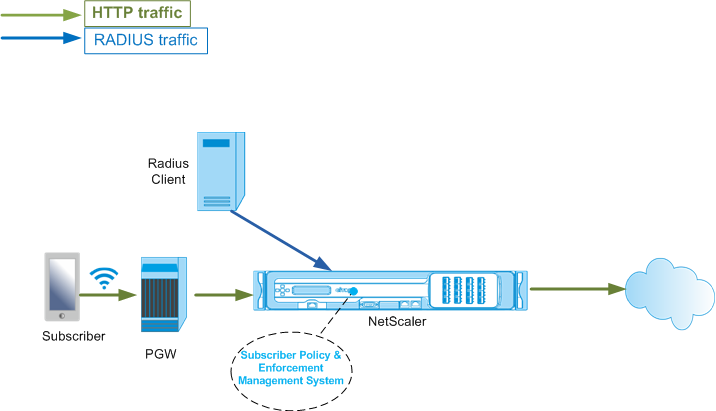
With a RADIUS interface, the packet gateway forwards the subscriber information in a RADIUS Accounting Start message to the appliance through the RADIUS interface when an IP-CAN session is established. A service of type RADIUSListener processes RADIUS Accounting messages. Add a shared secret for the RADIUS client. If a shared secret is not configured, the RADIUS message is silently dropped. The following example shows the commands for configuring a RADIUS interface. The commands are in boldface.
To set up a RADIUS interface, perform the following tasks:
Create a RADIUS listener service at the SNIP address where the RADIUS messages are received. For example:
add service srad1 192.0.0.206 RADIUSLISTENER 1813
Configure the subscriber RADIUS interface to use this service. For example:
set subscriber radiusInterface -listeningService srad1
Set the subscriber interface type to RadiusOnly. For example:
set subscriber param -interfaceType RadiusOnly
Add a RADIUS client specifying a subnet and shared secret. For example:
add radius client 192.0.2.0/24 -radkey client123
A subnet of 0.0.0.0/0 implies that it is the default shared secret for all clients. To see the RADIUS interface configuration and status, type:
show subscriber radiusInterface
RADIUS Interface parameters:
Radius Listener Service: srad1(UP)
Done
Example:
add service pcrf-svc1 203.0.113.1 DIAMETER 3868

 add service pcrf-svc2 203.0.113.2 DIAMETER 3868
ARGUMENTS
ListeningService
Name of the RADIUS listening service that processes the RADIUS accounting requests.
svrState
The state of the RADIUS listening service.
The following illustration shows the high-level traffic flow.
To configure RadiusOnly interface by using the GUI
-
Navigate to Traffic Management > Subscriber > Parameters.
-
Click Configure Subscriber Parameters.
-
In Interface Type, select RadiusOnly.
-
Specify the values for the all required parameters.
-
Click OK.
RADIUS and Gx interface
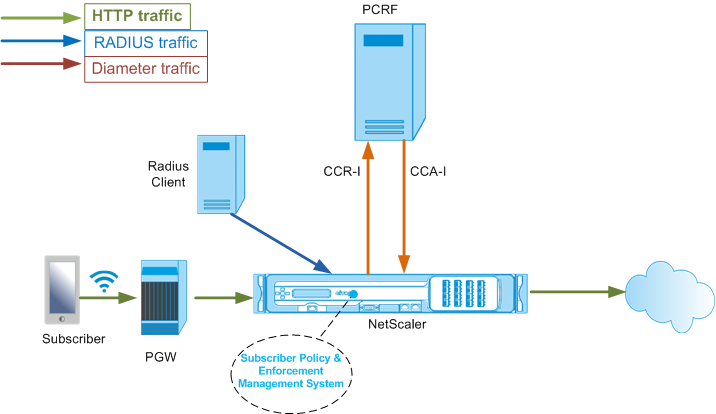
With a RADIUS and Gx interface, when an IP-CAN session is established, the packet gateway forwards the subscriber ID, such as the MSISDN, and Framed-IP address information about the subscriber to the appliance through the RADIUS interface. The appliance uses this subscriber ID to query the PCRF on the Gx interface to get the subscriber information. This is known as primary PCEF functionality. The following example shows the commands for configuring a RADIUS and Gx interface.
set subscriber param -interfaceType RadiusandGx
 add service pcrf-svc 203.0.113.1 DIAMETER 3868
 add lb vserver vdiam DIAMETER 0.0.0.0 0 -persistenceType DIAMETER -persistAVPno 263
 bind lb vserver vdiam pcrf-svc
 set subscriber gxInterface -vServer vdiam -pcrfRealm testrealm1.net -holdOnSubscriberAbsence YES -revalidationTimeout 60 -negativeTTL 120
 add service srad1 192.0.0.206 RADIUSLISTENER 1813    set subscriber radiusInterface -listeningService srad1
The following illustration shows the high-level traffic flow.
To configure RadiusAndGx interface by using the GUI
-
Navigate to Traffic Management > Subscriber > Parameters.
-
Click Configure Subscriber Parameters.
-
In Interface Type, select RadiusAndGx.
-
Specify the values for the all required parameters.
-
Click OK.
Configure static subscribers
You can configure the subscribers manually on the NetScaler appliance by using the command line or the configuration utility. You create static subscribers by assigning a unique subscriber ID and optionally associating a policy with each subscriber. The following examples show the commands for configuring a static subscriber.
In the following examples, subscriptionIdvalue specifies the international telephone number, and subscriptionIdType (E164 in this example) specifies the general format for international telephone numbers.
add subscriber profile 203.0.113.6 -subscriberRules policy1 policy2 -subscriptionIdType E164 -subscriptionIdvalue 98767543211
 add subscriber profile 2002::a66:e8d3/64 -subscriberRules policy1 policy3 -subscriptionIdtype E164 -subscriptionIdvalue 98767543212
 add subscriber profile 203.0.24.2 10 -subscriberRules policy2 policy3 -subscriptionIdtype E164 -subscriptionIdvalue 98767543213
To view the configured subscriber profiles, type:
show subscriber profile
    > show subscriber profile

     1)  Subscriber IP: 203.0.24.2 VLAN:10
         Profile Attributes:
                 Active Rules: policy2, policy3
                 Subscriber Id Type: E164
                 Subscriber Id Value: 98767543213
     2)  Subscriber IP: 2002::/64
         Profile Attributes:
                 Active Rules: policy1, policy3
                 Subscriber Id Type: E164
                 Subscriber Id Value: 98767543212
     3)  Subscriber IP: 203.0.113.6
         Profile Attributes:
                 Active Rules: policy1, policy2
                 Subscriber Id Type: E164
                 Subscriber Id Value: 98767543211

      Done
Default subscriber profile
A default subscriber profile is used if the subscriber IP address is not found in the subscriber session store on the appliance. In the following example, a default subscriber profile is added with the subscriber rule policy1.
> add subscriber profile * -subscriberRules policy1
View and clear subscriber sessions
Use the following command to display all the static and dynamic subscriber sessions.
show subscriber sessions
    > show subscriber sessions
     1)  Subscriber IP: 2002::/64
         Session Attributes:
                 Active Rules: policy1, policy3
                 Subscriber Id Type: E164
                 Subscriber Id Value: 98767543212
     2)  Subscriber IP: *
         Session Attributes:
                 Active Rules: policy1
     3)  Subscriber IP: 203.0.24.2 VLAN:10
         Session Attributes:
                 Active Rules: policy2, policy3
                 Subscriber Id Type: E164
                 Subscriber Id Value: 98767543213
     4)  Subscriber IP: 203.0.113.6
         Session Attributes:
                 Active Rules: policy1, policy2
                 Subscriber Id Type: E164
                 Subscriber Id Value: 98767543211
     5)  Subscriber IP: 192.168.0.11
         Session Attributes:
                 Idle TTL remaining: 361 Seconds
                 Active Rules: policy1
                 Subscriber Id Type: E164
                 Subscriber Id Value: 1234567811
                 Service Path: policy1
                 AVP(44): 34 44 32 42 42 38 41 43  2D 30 30 30 30 30 30 31 31
                 AVP(257): 00 01 C0 A8 0A 02
                 PCRF-Host: host.pcrf.com
                 AVP(280): 74 65 73 74 2E 63 6F 6D

     Done
Use the following command to clear a single session or the complete session store. If you do not specify an IP address, the complete subscriber session store is cleared.
clear subscriber sessions <ip>
Subscriber policy enforcement & management system
The NetScaler appliance uses the subscriber's IP address as the key to the subscriber policy enforcement and management system.
You can add subscriber expressions to read the subscriber information available in the Subscriber Policy Enforcement & Management System. These expressions can be used with policy rules and actions that are configured for NetScaler features, such as integrated caching, rewrite, responder, and content switching.
The following commands are an example of adding a subscriber-based responder action and policy. The policy evaluates to true if the subscriber rule value is“pol1.”
add responder action error_msg respondwith '"HTTP/1.1 403 OKrnrn" + " You are  not authorized to access Internet"'
 add responder policy no_internet_access "SUBSCRIBER.RULE_ACTIVE("pol1")" error_msg
The following example shows the commands to add a subscriber-based rewrite action and policy. The action inserts an HTTP header “X-Nokia-MSISDN” by using the value of AVP(45) in the subscriber session.
> add rewrite action AddHDR-act insert_http_header X-Nokia-MSISDN "SUBSCRIBER.AVP(45).VALUE"
 > add rewrite policy AddHDR-pol "HTTP.REQ.HOSTNAME.APPEND(HTTP.REQ.URL).EQUALS_ANY("patset-test")" AddHDR-act
In the following example, two policies are configured on the appliance. When the appliance checks the subscriber information and the subscriber rule is cache_enable, it performs caching. If the subscriber rule is cache_disable, the appliance does not perform caching.
> add cache policy nocachepol -rule "SUBSCRIBER.RULE_ACTIVE("cache_disable")" - action NOCACHE
 > add cache policy cachepol -rule "SUBSCRIBER.RULE_ACTIVE("cache_enable")" - action CACHE -storeInGroup cg1
For a complete list of expressions starting with “SUBSCRIBER.” see the Policy Configuration Guide.
Important
NetScaler software release 12.1 supports IPANDVLAN key lookup method when the subscriber interface is set to GxOnly. For details, see IP address and VLAN ID key lookup method.
IPv6 prefix based subscriber sessions
A telco user is identified by the IPv6 prefix rather than the complete IPv6 address. The NetScaler appliance now uses the prefix instead of the complete IPv6 address (/128) to identify a subscriber in the database (subscriber store). For communicating with the PCRF server (for example, in a CCR-I message), the appliance now uses the framed-IPv6-Prefix AVP instead of the complete IPv6 address. The default prefix length is /64, but you can configure the appliance to use a different value.
To configure the IPv6 prefix by using the command line
set subscriber param [-ipv6PrefixLookupList <positive_integer> ...]
The first example command below sets a single prefix and the second example command sets multiple prefixes.
set subscriber param -ipv6PrefixLookupList 64
 set subscriber param -ipv6PrefixLookupList 64 72 96
To configure the IPv6 prefix by using the configuration utility
-
Navigate to Traffic Management > Subscriber > Parameters.
-
In the details pane, under Settings, click Configure Subscriber Parameters and in IPv6 Prefix Lookup List, specify one or more prefixes.
IP address and VLAN ID key lookup method
The NetScaler appliance uses the subscriber's IP address as the key lookup method to the subscriber policy enforcement and management system. This method is not effective if the IP addresses are overlapping. In such cases, you can use the VLAN ID as an additional subscriber lookup type. IPANDVLAN key lookup method is supported only when the subscriber interface is set to GxOnly. When IPANDVLAN is configured as the lookup method, the NetScaler appliance performs the following:
-
Includes the originating VLAN ID in the Gx query for IPv4 subscribers.
-
Includes the Gx VLAN AVP in all Gx responses. However, if there is a VLAN ID mismatch, the appliance ignores the responses.
For example, if the appliance sends a CCR-I with GxSessionId-a:IPv4-b:VLAN-c and the response contains GxSessionId-a:IPv4-b:VLAN-d, the response is dropped and a default subscriber entry is created.
Note
-
Interface type RadiusAndGx and RadiusOnly cannot be configured together with key type IPANDVLAN.
-
If the traffic is from an IPv6 address, the NetScaler appliance uses the IP lookup method.
To configure IP or IPANDVLAN as the key lookup method by using the CLI
At the command prompt, type:
set subscriber param [-keytype ( IP | IPANDVLAN )] [-interfaceType <interfaceType>]
Example:
set subscriber param -keytype IPANDVLAN -interfaceType GxOnly

 set subscriber param -keytype IP -interfaceType GxOnly
Note
Changing the keytype parameter from IP to IPANDVLAN and conversely clears all subscriber data.
VLAN parameter
The VLAN parameter is also added for the following commands.
add subscriber profile <ip>@ [-vlan]

 set subscriber profile <ip>@ [-vlan] [-subscriptionIdType  <subscriptionIdType>]

 show subscriber profile [<ip>@] [-vlan]

 rm subscriber profile <ip>@ [-vlan <positive_integer>]
Arguments
ip
Represents the subscriber IP address. This is a mandatory argument and cannot be changed after the subscriber profile is added.
vlan
Represents the VLAN number on which the subscriber is located. The VLAN number cannot be changed after the subscriber profile is added.
Minimum value: 1
Maximum value: 4096
 add subscriber profile 192.0.2.23 10

 set subscriber profile 192.0.2.23 10 -subscriptionIdtype E164

 show subscriber profile 192.0.2.23 10

 rm subscriber profile 192.0.2.23 10
To configure IP or IPANDVLAN as the key lookup method by using the GUI
-
Navigate to Traffic Management > Subscriber > Parameters.
-
Click Configure Subscriber Parameters.
-
In Key Type, select IP or IPANDVLAN as per your requirement.
-
Complete the configuration and click OK.
Idle session management of subscriber sessions in a Telco network
Subscriber session cleanup on a NetScaler appliance is based on control plane events, such as a RADIUS Accounting Stop message, a Diameter RAR (session release) message, or a "clear subscriber session" command. In some deployments, the messages from a RADIUS client or a PCRF server might not reach the appliance. Also, during heavy traffic, the messages might be lost. A subscriber session that is idle for a long time continues to consume memory and IP resources on the NetScaler appliance. The idle session management feature provides configurable timers to identify idle sessions, and cleans up these sessions based on the specified action.
A session is considered idle if no traffic from this subscriber is received on the data plane or the control plane. You can specify an update, terminate (inform PCRF and then delete the session), or delete (without informing PCRF) action. The action is taken only after the session is idle for the time specified in the idle timeout parameter.
To configure the idle session timeout and the associated action by using the command line
set subscriber param [-idleTTL <positive_integer>] [-idleAction <idleAction>]
Examples:
set subscriber param -idleTTL 3600 -idleAction ccrTerminate

 set subscriber param -idleTTL 3600 -idleAction ccrUpdate

 set subscriber param -idleTTL 3600 -idleAction delete
To disable the idle session timeout, set the idle timeout to zero.
set subscriber param –idleTTL 0
To configure the idle session timeout and the associated action by using the configuration utility
-
Navigate to Traffic Management > Subscriber > Parameters.
-
In the details pane, under Settings, click Configure Subscriber Parameters and specify an Idle Time and Idle Action.
Subscriber session event logging
If you enable subscriber logging, you can track the RADIUS and Gx control plane messages specific to a subscriber, and use the historical data to analyze subscriber activities. Some of the key attributes are MSISDN and time stamp. The following attributes are also logged:
-
Session Event (Install, Update, Delete, Error)
-
Gx Message Type (CCR-I, CCR-U, CCR-T, RAR)
-
Radius Message Type (Start, Stop)
-
Subscriber IP
-
SubscriberID Type (MSISDN(E164), IMSI)
-
SubscriberID value
By using these logs, you can track users by IP address and, if available, MSISDN.
You can enable subscriber session logging to a local or remote syslog or nslog server. The following example shows how to enable subscriber logging to a remote syslog server.
> add syslogAction sysact1 192.0.2.0 -loglevel EMERGENCY ALERT CRITICAL ERROR WARNING NOTICE INFORMATIONAL -subscriberlog enabled
From these logs, you can learn about any activity related to a user, such as the time when a session was updated, deleted, or created (installed). Additionally, error messages are also logged.
Examples:
-
The following log entries are examples of RADIUSandGx session creation, session update, and session deletion.09/30/2015:16:29:18 GMT Informational 0-PPE-0 : default SUBSCRIBER SESSION_EVENT 147 0 : Session Install, GX MsgType: CCR-I, RADIUS MsgType: Start, IP: 100.10.1.1, ID: E164 - 3000000000109/30/2015:16:30:18 GMT Informational 0-PPE-0 : default SUBSCRIBER SESSION_EVENT 148 0 : Session Update, GX MsgType: CCR-U, IP: 100.10.1.1, ID: E164 - 3000000000109/30/2015:17:27:56 GMT Informational 0-PPE-0 : default SUBSCRIBER SESSION_EVENT 185 0 : Session Delete, GX MsgType: CCR-T, RADIUS MsgType: Stop, IP: 100.10.1.1, ID: E164 - 30000000001
-
The following log entries are examples of failure messages, such as when a subscriber is not found on the PCRF server and when the appliance cannot connect to the PCRF server.09/30/2015:16:44:15 GMT Error 0-PPE-0 : default SUBSCRIBER SESSION_FAILURE 169 0 : Failure Reason: PCRF failure response, GX MsgType: CCR-I, IP: 100.10.1.1Sep 30 13:03:01 09/30/2015:16:49:08 GMT 0-PPE-0 : default SUBSCRIBER SESSION_FAILURE 176 0 : Failure Reason: Unable to connect to PCRF, GX MsgType: CCR-I, RADIUS MsgType: Start, IP: 100.10.1.1, ID: E164 - 30000000001#000#000#000#000#000#000#000#000#000#000#000#000#000#000#000#000
Subscriber aware LSN session termination
In earlier releases, if a subscriber session is deleted when a RADIUS Accounting STOP or a PCRF-RAR message is received, or as a result of any other event, such as TTL expiry or flush, the corresponding LSN sessions of the subscriber are removed only after the configured LSN timeout period. LSN sessions that are kept open until this timeout expires continue to consume resources on the appliance.
From release 11.1, a new parameter (subscrSessionRemoval) is added. If this parameter is enabled, and the subscriber information is deleted from the subscriber database, LSN sessions corresponding to that subscriber are also removed. If this parameter is disabled, the subscriber sessions are timed out as specified by the LSN timeout settings.
To configure subscriber aware LSN session termination by using the CLI
At the command prompt, type:
set lsn parameter -subscrSessionRemoval ( ENABLED | DISABLED )
    > set lsn parameter -subscrSessionRemoval ENABLED
     Done
     > sh lsn parameter
                 LSN Global Configuration:

                 Active Memory Usage: 0 MBytes
                 Configured Memory Limit: 0 MBytes
                 Maximum Memory Usage Limit: 912 MBytes
                 Session synchronization: ENABLED
                 Subscriber aware session removal: ENABLED
To configure subscriber aware LSN session termination by using the GUI
-
Navigate to System > Large Scale NAT.
-
In Getting started, click Set LSN Parameter.
-
Set the Subscriber Aware Session Removal parameter.
Troubleshooting
If your deployment is not working as expected, use the following commands to troubleshoot:
-
show subscriber gxinterface This command's output can include the following error messages (shown here with suggested responses):
-
Gx Interface Not Configured-Use set subscriber param command to configure the correct interface type.
-
PCRF not configured-Configure a Diameter vServer or Service on GxInterface-Use the set subscriber gx interface command to assign a Diameter virtual server or service to this interface.
-
PCRF is not ready-Check corresponding vserver/service for more details-Use the show LB vserver or show service command to check the state of the service.
-
NetScaler is waiting for CEA from PCRF-Capability negotiation between the PCRF and NetScaler might be failing. This could be an intermittent state. If it persists, check the DIAMETER settings on your PCRF server.
-
Memory is not configured to store subscriber sessions. Please use 'set extendedmemoryparam -memlimit <>'-Use the set extendedmemoryparam command to configure extended memory.
-
-
show subscriber radiusinterface If "Not Configured" is the output of this command, use the set subscriber radiusinterface command to specify a RADIUSListener service.
If subscriber logging is enabled, you can get more detailed information from the log files.