
Pre-upgrade validation checks for NetScaler
Note:
This feature is available in NetScaler release 14.1 build 66.x and later.
Pre-upgrade validation checks are built into the upgrade workflow to ensure safer system upgrades and confirm that the system is ready for the upgradation process. The following are the prechecks added to the upgrade workflow.
| Pre-check | Description | Status | Default behavior and override | Additional comments |
|---|---|---|---|---|
| EOL of file-based licensing | Checks whether the license mechanism in use from April 15, 2026 onwards is file-based licensing or LAS-based licensing. For more information, see EOL of file-based licensing. |
|
How to override | Older licensing mechanism (that is, file-based licensing) reaches end-of-life from April 15, 2026 and LAS-based licensing is required. |
| License expiry check | Verifies both contract and runtime license validity. |
|
Not applicable | Expired licenses might block data path or feature availability. |
| License server connectivity (Pooled licensing) | Ensures that NetScaler can reach the license server. Required for pooled licensing environments. |
|
|
Connectivity issues might result in temporary degraded licensing behavior, but the upgrade is not blocked. |
| License server compatibility (Pooled licensing) | Validates that the license server version is compatible with the upgrade. |
|
Not applicable | Run only if the connectivity check passes. Incompatible license servers (NetScaler Console) must be upgraded first. |
| Non-existent symbol used in nsapi_mgr calls in startup files | Ensures that startup scripts reference valid symbols to avoid boot time failures. |
|
|
Missing symbols might break data path initialization or custom workflows. |
| New build compatibility with the NetScaler platform | Checks whether the hardware or the virtual platform supports the new build. |
|
Not applicable | Ensures major hardware and software compatibility. |
| Custom HTTPD and SSHD configuration files | Checks for symlink based overrides of HTTPD or SSHD configurations. |
|
Not applicable | Admins must verify custom configurations for post upgrade compatibility. For more information, see Upgrade considerations. |
| VPX resource requirements | Validates minimum memory requirements for VPX instances. |
|
Not applicable | Insufficient memory might cause upgrade failures or unstable operations. |
Disk space on /flash and /var |
Validates the minimum disk space for upgrade package unpacking and operations. |
|
Not applicable | Low disk space might corrupt the upgrade or prevent the installation. |
| Conditions for upgrade to 14.1-66.x and later releases (direct upgrade from version 13.0 to 14.1 is blocked) | Validates that the current firmware is eligible for upgrade. |
|
Not applicable | Step upgrade enforced. For example, a direct upgrade from 13.0 to 14.1-66.x is blocked. |
| Platform check: FIPS to NON-FIPS | Checks if platform restrictions block upgrade to a FIPS build. |
|
Not applicable | FIPS compliance prevents installing FIPS builds on non-FIPS platforms. |
| Check for unsaved configuration | Detects unsaved running configuration. |
|
|
Unsaved configuration might result in a loss of configuration after rebooting. |
| HA sync check | Checks if the configuration is in sync between the HA nodes. |
|
|
Required to avoid split-brain or post-upgrade failover issues. |
| Perpetual license subscription advantage (SA) expiry (Flexera) | Checks if SA is valid for perpetual licenses. |
|
Not applicable | SA expiry blocks the upgrade due to license entitlement enforcement. |
| SSL certificate file integrity | Verifies SSL certificate file integrity using digest checks. |
|
|
Corrupt or missing certificates might disable SSL features. |
Related information
EOL of file-based licensing
Note:
These checks come into effect from April 15, 2026.
File-based licensing will be EOL from April 15, 2026. All NetScaler (ADC, SVM) instances must be upgraded to LAS-compliant versions and transitioned to use LAS-based licensing before this date.
The minimum required NetScaler versions that are LAS compatible are:
-
NetScaler ADCs: 14.1-51.x, 13.1-60.x, 13.1-37.246 (FIPS)
-
NetScaler SVM: 14.1-51.x, 13.1-60.x
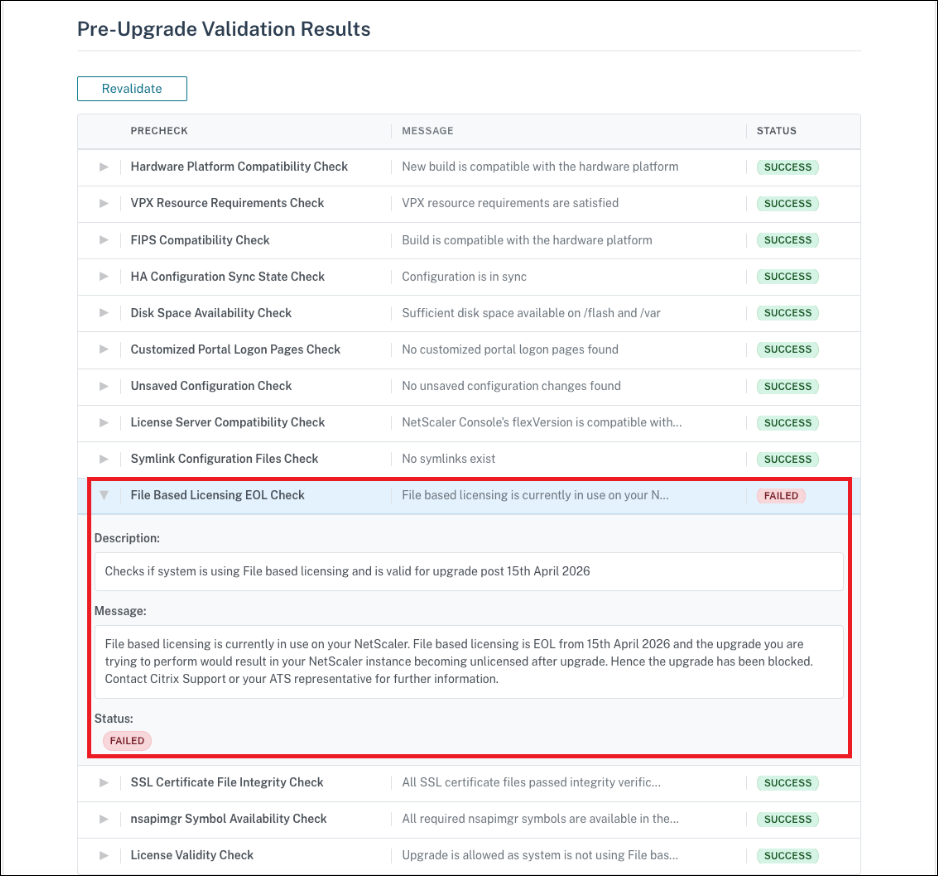
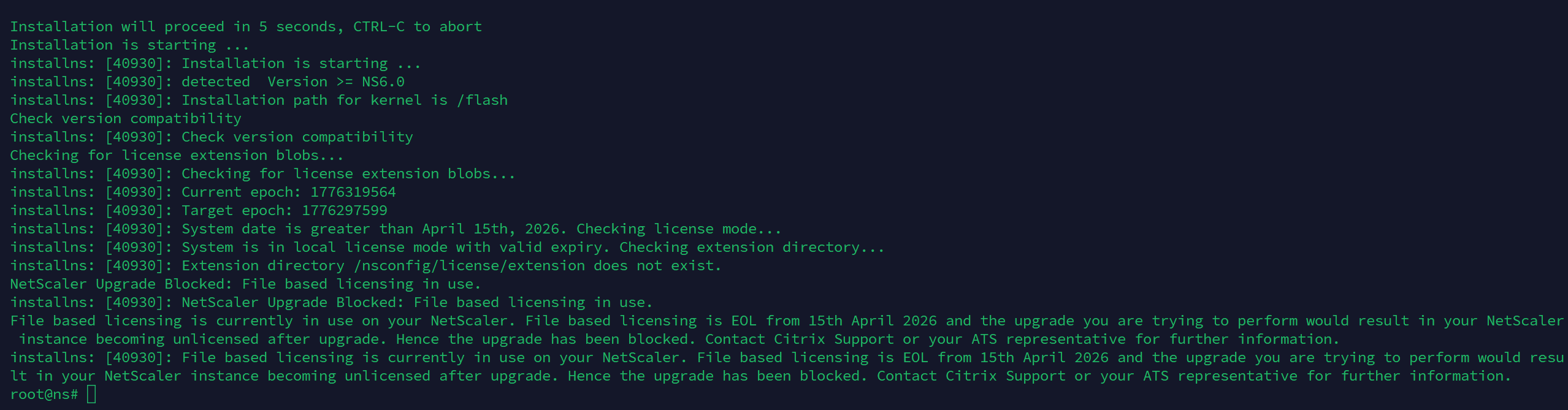
After April 15, 2026, in NetScaler ADC and SVM release 14.1-66.x and later, an upgrade related check will be triggered before NetScaler upgrade. This check validates if your NetScaler (ADC, SVM) is still using file-based licensing, and if true, the upgrade would be blocked with an error "NetScaler Upgrade Blocked: File based licensing in use". This precaution avoids your NetScaler instances from proceeding with the upgrade and becoming unlicensed after April 15, 2026.
Contact Citrix Support or your ATS representative to understand how you can unblock the upgrade and the risks involved with it.
The following screenshot shows the message in the NetScaler GUI.
The following screenshot shows the message in the NetScaler CLI.
The following screenshots show the messages in NetScaler Console.
-
When file-based licensing is in use, and the contract date has expired.

-
When file-based licensing is in use, which has reached EOL on April 15, 2026.

-
When file-based licensing is in use, and the SA date has expired.

The following message appears in the NetScaler API response.
File based licensing is currently in use on your NetScaler. File based licensing is EOL from 15th April 2026 and the upgrade you are trying to perform would result in your NetScaler instance becoming unlicensed after the upgrade. Hence the upgrade has been blocked. Contact Citrix Support or your ATS representative for further information.
Resolve file-based licensing upgrade blocks
Effective April 15, 2026, all ADC and SVM instances must upgrade to LAS-compliant versions. You must migrate to LAS-based licensing before this date. If your upgrade is blocked with a File-based licensing in use error, resolve this issue either by procuring a new LAS-based license or temporarily overriding the licensing check.
Procure and apply a LAS-based license (recommended)
-
Procure a LAS-based license. Ensure that this license is sufficient for your deployment. Contact your ATS or Citrix Customer Support to obtain the license.Important:Take a system backup before you attempt the upgrade.
-
After the LAS licensing is in place, continue with the upgrade through the standard upgrade workflow.
Override or bypass the licensing check during upgrade
Note:
This option is available, but we do not recommend it.
This option allows you to bypass the file-based licensing validation and continue with the upgrade. Use this approach only as a last resort, typically for emergency or short-term recovery scenarios where an immediate upgrade is required and where migration to LAS-based licensing cannot be completed on time.
Important:
This method might result in an unlicensed state after the upgrade and cause a loss of configuration.
Before attempting the upgrade, ensure that you take a system backup.
To override or bypass the licensing by using the CLI
-
At the command prompt, type
shell. -
Switch to the directory where the install package is untarred (for example,
cd /var/nsinstall/). -
Run the following command.
./installns --skip_lic_exp_chk
To override or bypass the licensing by using the Automation or GUI (APIs or NetScaler GUI or NetScaler Console or any automation tool)
-
At the command prompt, type
shell. -
Create an empty file in /var/tmp.
touch /var/tmp/skip_las_checks -
Proceed with the normal upgrade workflow using the API or NetScaler GUI or NetScaler Console
To override or bypass the licensing for an SDX upgrade
-
Log in to the SVM and run the
shellcommand. -
Create a file named skip_las_prechecks in the
/mpsdirectorytouch /mps/skip_las_prechecks -
Proceed with the single bundle upgrade.