
gRPC bridging
When a client sends a request over HTTP/1.1 protocol, the NetScaler appliance supports bridging of the gRPC requests over HTTP/1.1 protocol which is in compliance with the gRPC server over HTTP/2 protocol. Similarly, in reverse bridging, the appliance receives the client gRPC request over the HTTP/2 protocol and performs reverse bridging for the gRPC requests in compliance with the gRPC server of the HTTP/1.1 protocol.
Related information
How gRPC bridging works
In this scenario, the NetScaler appliance seamlessly bridges gRPC content received on an HTTP/1.1 connection and forwards it to the back-end gRPC server over HTTP/2.
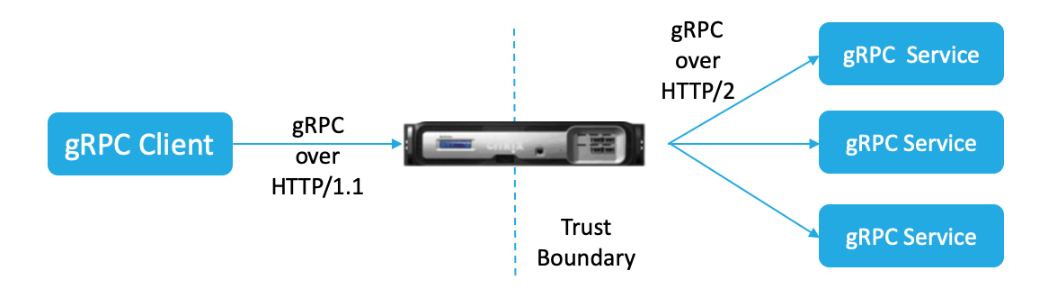
The following diagram shows how components interact with each other in a gRPC bridging configuration.
-
When a gRPC request is sent, the NetScaler appliance checks if the connection is HTTP/1.1 and the content type is application/grpc. The HTTP/1.1 requests translate to the following pseudo headers.
-
On receiving a gRPC request on HTTP/1.1. connection as indicated by the Content-Type header, the ADC appliance transforms the request into gRPC over HTTP/2 as given below:
:method: Method-name in HTTP/1.1 request
 :path: Path is HTTP/1.1 request
 content-type: application/grpc
-
Based on policy evaluation, the load balancing virtual server (with the gRPC service bound to it) terminates the request or forwards it over HTTP/2 frames to the back-end gRPC server.
-
On receiving the response on a HTTP/2 connection from the gRPC server, the appliance buffers until it receives the HTTP/2 trailer and then checks for the gRPC-status code. If it is non-zero gRPC error status, the appliance looks for the mapping HTTP Status code and send a suitable HTTP/1.1 error response.
Configure gRPC bridging by using the CLI
To configure gRPC bridging, you must complete the following steps:
-
Add HTTP profile with HTTP/2 and HTTP/2 direct enabled
-
Enable global back-end HTTP/2 support in the HTTP parameter
-
Add load balancing virtual server of type SSL/HTTP and set the HTTP profile
-
Add Service for gRPC endpoint and set the HTTP profile
-
Bind gRPC end point service to load balancing virtual server
-
Map gRPC status code to the HTTP response for non-zero gRPC status
-
Configure gRPC buffering by time and/or size
Add HTTP profile with the HTTP/2 and HTTP/2 direct enabled
To begin the configuration, you must enable the HTTP/2 feature in the HTTP profile. If the client sends the HTTP 1.1 requests, the appliance bridges the request and forward it to the back-end server.
At the command prompt, type:
add ns httpProfile <name> - http2 ( ENABLED | DISABLED ) [-http2Direct ( ENABLED | DISABLED )]
Example:
add ns httpProfile http2gRPC -http2Direct ENABLED -http2 ENABLED
Enable global back end HTTP/2 support in the HTTP parameter
To enable the HTTP/2 support globally on the server side by using the NetScaler command line.
At the command prompt, type:
set ns httpParam -http2ServerSide( ON | OFF )
Example:
set ns httpParam -http2ServerSide ON
Add load balancing virtual server of type SSL/HTTP and set the HTTP profile
To add a load balancing virtual server by using the NetScaler command interface
At the command prompt, type:
add lb vserver <name> <service type> [(<IP address>@ <port>)] [-httpProfileName <string>]
Example:
add lb vserver lb-grpc HTTP 10.10.10.10 80 -httpProfileName http2gRPC
Note:
If you are using a load balancing virtual server of type SSL, then you must bind the server certificate. See Bind server certificate topic for more information.
Add Service for gRPC endpoint and set the HTTP profile
To add a gRPC service with the HTTP profile by using the NetScaler command interface.
At the command prompt, type:
add service <name> (<IP> | <serverName> ) <serviceType> <port> [-httpProfileName <string>]
Example:
add service svc-grpc 10.10.10.10 HTTP 80 -httpProfileName http2gRPC
Bind gRPC end point service to load balancing virtual server
To bind a gRPC end point service to the load balancing virtual server by using the CLI.
At the command interface, type:
bind lb vserver <name> <serviceName>
Example:
bind lb vserver lb-grpc svc-grpc
Map gRPC status code to HTTP status-code in the HTTP/1.1 response
In gRPC bridging scenario, the gRPC service responds to the request with a gRPC status-code. The appliance maps the gRPC status code to a corresponding HTTP response code and reason phrase. The mapping is done based on the table provided below. The NetScaler appliance when sending the HTTP/1.1 response to the client sends the HTTP status code and the reason phrase.
| gRPC status-code | HTTP response status-code | HTTP response reason-phrase |
|---|---|---|
| OK = 0 | 200 | OK |
| CANCELLED = 1 | 499 | * |
| UNKNOWN = 2 | 500 | Internal Server Error |
| INVALID_ARGUMENT = 3 | 400 | Bad Request |
| DEADLINE_EXCEEDED = 4 | 504 | Gateway Timeout |
| NOT_FOUND = 5 | 404 | * |
| ALREADY_EXISTS = 6 | 409 | Conflict |
| PERMISSION_DENIED = 7 | 403 | Forbidden |
| UNAUTHENTICATED = 16 | 401 | Unauthorized |
| RESOURCE_EXHAUSTED = 8 | 429 | * |
| FAILED_PRECONDITION = 9 | 400 | Bad Request |
| ABORTED = 10 | 409 | Conflict |
| OUT_OF_RANGE = 11 | 400 | Bad Request |
| UNIMPLEMENTED = 12 | 501 | Not Implemented |
| INTERNAL = 13 | 500 | Internal Server Error |
| UNAVAILABLE = 14 | 503 | Service Unavailable |
| DATA_LOSS = 15 | 500 | Internal Server Error |
Configure gRPC buffering by time and/or size
The NetScaler appliance buffers the gRPC response from the back-end server until the response trailer is received. This breaks bi-directional gRPC calls. Also, if the gRPC response is huge, it consumes a significant amount of memory to buffer the response completely. To resolve the issue, the gRPC bridging configuration is enhanced to limit buffering by time and/or size. If the buffer size or time limit exceeds threshold, the appliance stops buffering and forwards the response to the client even when any one of the limitations triggers (either the trailer is not received within the configured buffer size or if the configured timeout occurs). As a result, the configured policies and its expressions (based on grpc-status code) do not work as expected.
To limit gRPC buffering by time and/or size by the CLI, you can configure when you add a new HTTP profile or configure when you modify an existing profile.
At the command prompt, type:
add ns httpProfile http2gRPC [-grpcHoldLimit <positive_integer>] [-grpcHoldTimeout <positive_integer>]
Or
set ns httpProfile http2gRPC [-grpcHoldLimit <positive_integer>] [-grpcHoldTimeout <positive_integer>]
Where,
grpcholdlimit. Maximum size in bytes allowed to buffer gRPC packets until trailer is received. You can configure both the parameters and any one.
Default value: 131072 Minimum value: 0 Maximum value: 33554432
grpcholdtimeout. Maximum time in milliseconds allowed to buffer gRPC packets until trailer is received. The value should be in multiples of 100. Default value: 1000 Minimum value: 0 Maximum value: 180000
Example:
add httpprofile http2gRPC -grpcholdlimit 1048576 -grpcholdtimeout 5000 set httpprofile http2gRPC -grpcholdlimit 1048576 -grpcholdtimeout 5000
Configure gRPC bridging by using the GUI
Complete the following steps to configure gRPC bridging by using the NetScaler GUI.
Add HTTP profile with HTTP/2 and HTTP/2 direct enabled
-
Navigate to System > Profiles and click HTTP Profiles.
-
Select HTTP/2 in the HTTP profile.
Enable global back-end HTTP/2 support in the HTTP parameter
-
Navigate to System > Settings > HTTP Parameters.
-
In the Configure HTTP Parameter page, select HTTP/2 on Server Side option.
-
Click OK.
Add load balancing virtual server of type SSL/HTTP and set HTTP profile
-
Navigate to Traffic Management > Load Balancing > Virtual Servers.
-
Click Add to create a load balancing virtual server for gRPC traffic.
-
In Load Balancing Virtual Server page, click Profiles.
-
In the Profiles section, select the profile type as HTTP.
-
Click OK and then Done.
Add Service for gRPC endpoint and set HTTP profile
-
Navigate to Traffic Management > Load Balancing > Services.
-
Click Add to create an application server for gRPC traffic.
-
In Load Balancing Service page, go to Profile section.
-
Under Profiles, add HTTP profile for gRPC endpoint.
-
Click OK and then Done.
Bind Service for gRPC endpoint to load balancing virtual server
-
Navigate to Traffic Management > Load Balancing > Virtual Servers.
-
Click Add to create a load balancing virtual server for gRPC traffic.
-
In Load Balancing Virtual Server page, click Service and Service Groups section.
-
In the Load Balancing Virtual Server Service Binding page, select the gRPC service to bind.
-
Click Close and then Done.
Configure gRPC buffering by time and size by using the GUI
-
Navigate to System > Profiles and click HTTP Profiles.
-
Select HTTP/2 in the HTTP profile.
-
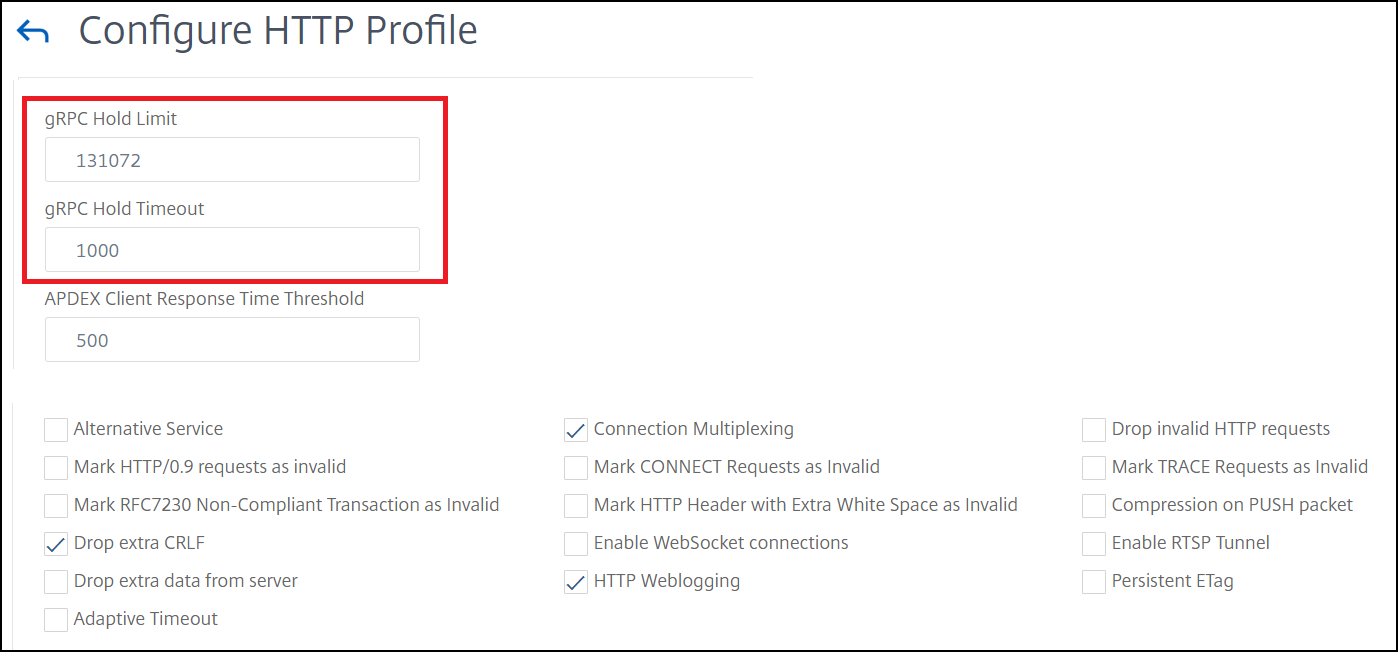
In the Configure HTTP Profile page, set the following parameters:
-
grpcHoldTimeout. Enter the time in milliseconds to buffer gRPC packets until the trailer is received.
-
grpcHoldLimit. Enter the maximum size in bytes to buffer gRPC packets until the trailer is received.
-
-
Click OK and Close.
For detail GUI procedures for binding service and load balancing virtual servers, see Load Balancing topic.