
Troubleshooting Guidelines
Related information
Technical Support
All troubleshooting and escalation queries require a recent NetScaler techsupport bundle, which captures current configuration, firmware version installed, log files, outstanding cores, and others.
Example:
show techsupport

 showtechsupport data collector tool - $Revision: #5 $!
 ...
All the data will be collected under
...
 Archiving all the data into "/var/tmp/support/collector_P_192.168.121.117_18Jun2015_09_53.tar.gz" ....
 Created a symbolic link for the archive with /var/tmp/support/support.tgz
 /var/tmp/support/support.tgz  ---- points to ---> /var/tmp/support/collector_P_192.168.121.117_18Jun2015_09_53.tar.gz
After a techsupport bundle has been generated, it might be copied using SCP.
Traces
NetScaler TCP optimization issues normally require NetScaler traces to troubleshoot properly. Note that one should try to capture traces under similar conditions, i.e. on the same cell, during the same time of day, using the same user equipment and application, and others.
The start nstrace and stop nstrace commands might be used to capture traces:
-
It’s strongly recommended that the appropriate filter is used to avoid capturing extraneous, unnecessary packets on the trace. For instance use start nstrace -filter 'IP == 10.20.30.40' to only capture packets being sent to or received from IP address 10.20.30.40, which is the user equipment IP address.
-
Do not use the -tcpdump option, since it strips the nstrace headers which are required for debugging.
Trace Analysis
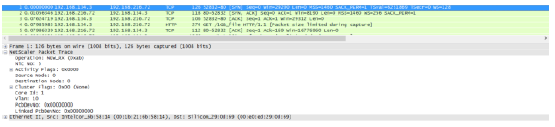
After a NetScaler trace has been captured, it might be viewed with Wireshark 1.12 or later. Verify that the captured traces include the appropriate NetScaler Packet Trace headers, as shown in the screen capture below:
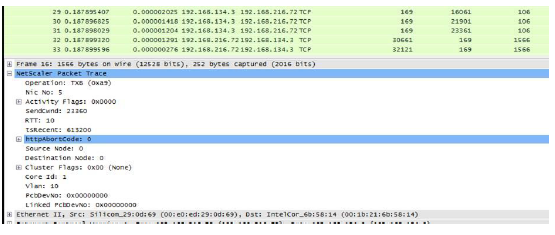
The additional debug headers are also visible per the illustration below:
Connection Table
When the issue is related to TCP optimization and it can be reproduced or it's on-going, it is best to get also the connection table when the issue occurs from the primary T1 node.
To get the table you shall need to switch to the BSD shell and run the following command:
shell
 ...

 nscli -U 127.0.0.1:nsroot:nsroot show connectiontable -detail full link > /var/tmp/contable.log
Note
The command might be executed for a longer time and management CPU might be stressed at that time (depends on the number of connection table entries), but it’s not service affecting.