
Configure the NetScaler as an end resolver
A resolver is a procedure that is invoked by an application program that translates a domain/host name to its resource record. The resolver interacts with the LDNS, which looks up the domain name to obtain its IP address. The NetScaler can provide end-to-end resolution for DNS queries.
In recursive resolution, the NetScaler appliance queries different name servers recursively to access the IP address of a domain. When the NetScaler receives a DNS request, it checks its cache for the DNS record. If the record is not present in the cache, it queries the root servers configured in the ns.conf file. The root name server reports back with the address of a DNS server that has detailed information about the second-level domain. The process is repeated until the required record is found.
When you start the NetScaler appliance for the first time, 13 root name servers are added to the ns.conf file. The NS and Address records for the 13 root servers are also added. You can modify the ns.conf file, but the NetScaler does not allow you to delete all 13 records. At least one name server entry is required for the appliance to perform name resolution. The following diagram illustrates the process of name resolution.
Figure 1. Recursive resolution
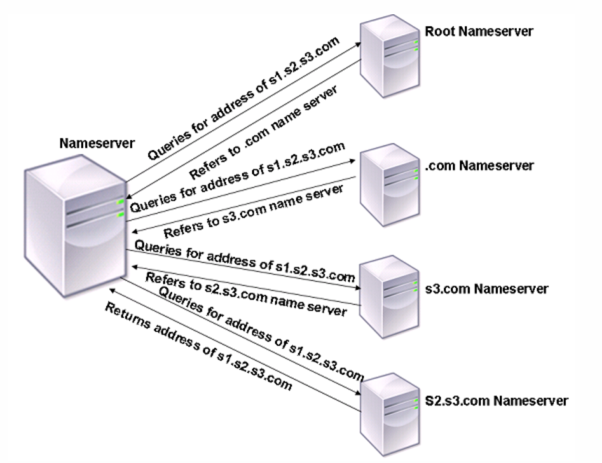
In the process shown in the diagram, when the name server receives a query for the address of s1.s2.s3.com, it first checks the root name servers for s1.s2.s3.com. A root name server reports back with the address of the .com name server. If the address of s1.s2.s3.com is found in the name server, it responds with a suitable IP address. Otherwise, it queries other name servers for s3.com, then for s2.s3.com to retrieve the address of s1.s2.s3.com. In this way, resolution always starts from the root name servers and ends with the domain’s authoritative name server.
Notes:
-
For recursive resolution functionality, caching must be enabled.
-
Jumbo frames are not supported in resolver mode.
Related information
Enable recursive resolution
Starting from release 14.1 build 47.x, NetScaler has enhanced its DNS resolution capabilities by adding support for DNS over TCP, which handles large responses, and EDNS(0) integration, which optimizes UDP communication. These updates collectively boost scalability and reliability, while also providing a strong foundation for future security standards.
You can adjust the DNS recursive resolver's behavior using the following parameters. Configure them by using the
set dns parameter command.
-
resolverMaxActiveResolutions: Controls the maximum number of active concurrent DNS resolutions allowed per packet engine.
-
resolverMaxTcpConnections: Sets the maximum number of DNS-TCP connections that can be opened for recursive resolution per packet engine.
-
resolverMaxTcpTimeout: Defines the maximum time (in seconds) to wait for a response on a DNS-TCP connection during recursive resolution.
-
retries - Defines the number of attempts NetScaler® makes to receive a response from a server for a DNS query. The default value is 5.
Notes:
-
We do not recommend enabling recursive DNS resolution by using the
-localand-recursionoptions. -
To enable the recursive resolution feature, we recommend creating a custom DNS profile and associating it with a specific DNS entity, such as an ADNS service or CS virtual server, rather than enabling it on the global default DNS profile.
Prerequisite
Ensure your NetScaler has internet connectivity to reach all public domain DNS servers.
Enable recursive resolution by using the CLI
At the command prompt, type:
-
Create or modify a DNS profile for recursive resolution.
-
To create a DNS profile with recursion enabled.
add dns profile <new_profile_name> -recursiveResolution ENABLED -
To update an existing DNS profile to enable recursion.
set dns profile <existing_profile_name> -recursiveResolution ENABLED
-
-
Attach the DNS profile to the target entity (if not already attached).
-
For an existing ADNS or ADNS_TCP service.
set service <service_name> -dnsProfileName <dns_profile_name> -
For an existing content switching virtual server.
set cs vserver <vserver_name> -dnsProfileName <dns_profile_name> -
For a new ADNS or ADNS_TCP service.
add service <service_name> <ip> <type> <port> -dnsProfileName <dns_profile_name> -
For a new content switching virtual server.
add cs vserver <vserver_name> <ip> <type> <port> -dnsProfileName <dns_profile_name>
-
Notes:
-
Use policy-based recursion to enable the recursive resolution feature for targeted clients or requests. This capability applies to ADNS, content switching , and load balancing virtual servers, with the specific client defined using DNS-based policy expressions.
-
Directly attaching a DNS profile with
recursiveResolution ENABLEDto the load balancing virtual server does not provide recursive resolution for any request.
Enable DNS recursive resolution by using the GUI
-
Navigate to System > Profiles > DNS Profile.
-
Click Add.
Note:
You can also edit an existing profile.
-
Select Recursive Resolution.
-
Click OK.
-
Navigate to Traffic Management > Load Balancing > Virtual Servers.
-
Click Add.
Note: You can also edit an existing profile.
-
Under Advance Settings, click Profiles.
-
Select DNS Profile.
Note:
Update the DNS profile for both the content switching virtual server and the ADNS virtual server using the same process.
Enable recursive resolution in specific deployment use cases
-
GSLB deployment with ADNS service: To enable recursion for a GSLB setup, attach a DNS profile with
recursiveResolutionenabled to your ADNS services (both type 'ADNS' for UDP and 'ADNS_TCP' for TCP). This configuration ensures that:-
Queries for GSLB domains or locally configured records on the NetScaler are answered directly.
-
All other domain queries are resolved recursively using root hints over UDP or TCP.
-
-
Conditional forwarding with recursion: To implement conditional forwarding, directing queries for specific zones to local authoritative DNS servers while resolving all other queries externally:
-
Enable recursion on a DNS profile.
-
Attach the DNS profile to a content switching virtual server.
-
Avoid binding a default load balancing virtual server to this content switching virtual server. By using this configuration, only DNS traffic explicitly routed through content switching policies reaches local authoritative servers. All other queries are forwarded to the external DNS infrastructure through the attached DNS profile's recursive resolver.
-
-
Policy-based recursion (for DNS proxy with load balancing): To enable recursion conditionally based on DNS query characteristics, especially in a DNS proxy setup with a load balancing virtual server front-end authoritative DNS servers:
-
Configure a DNS action that applies a DNS profile with recursion enabled. For example:
add dns action dnsrecursion noop -dnsprofileName recursive-
Create a DNS policy to trigger this action under specific conditions (For example, when the queried domain is not authoritative for the back-end servers).
add dns policy doRootResolution 'dns.req.question.domain.contains("abc.com").not' dnsrecursion-
Bind the created DNS policy globally with a priority.
bind dns global doRootResolution 1 -
This policy-based approach allows you to selectively enable recursion for queries that cannot be answered by your back-end authoritative servers.
The following procedure was previously used to enable recursive resolution.
To configure the NetScaler appliance to function as an end resolver, you must enable recursive resolution on the appliance. You must also add a DNS name server with the local option for the feature to work.
Enable recursive resolution by using the CLI: At the command prompt, type the following commands to enable recursive resolution and verify the configuration:
-  set dns parameter -recursion ENABLED
 -  show dns parameter
Example:
> set dns parameter -recursion ENABLED
  Done
 > show dns parameter
         DNS parameters:
             .
             .
             .
         Recursive Resolution : ENABLED
             .
             .
             .
  Done
Enable recursive resolution by using the GUI:
-
Navigate to Traffic Management > DNS.
-
In the details pane, under Settings, click Change DNS settings.
-
In the Configure DNS Parameters dialog box, select the Enable recursion checkbox, and then click OK.
Add a name server (when the NetScaler appliance acts as a resolver) by using the CLI:
At the command prompt, type:
add dns nameServer ((<IP> [-local]) | <dnsVserverName>)
Example:
add dns nameServer 10.102.9.19 -local
 show dns nameServer
 1)  10.102.9.19 LOCAL -  State: UP  Protocol: UDP
 Done
Local - Mark the IP address as one that belongs to a local recursive DNS server on the NetScaler appliance. The appliance recursively resolves queries received on an IP address that is marked as being local. For recursive resolution to work, the global DNS parameter,
recursion, must also be set. If no name server is marked as being local, the appliance functions as a stub resolver and load balances the name servers.
Add a name server by using the GUI:
Navigate to Traffic Management > DNS > Name Servers and create a name server.