
Use case 12: Configure Citrix Virtual Desktops™ for load balancing
For an improved performance in the delivery of virtual desktop applications, you can integrate the NetScaler appliance with Citrix Virtual Desktops and use the NetScaler load balancing feature to distribute the load across the Desktop Delivery Controller (DDC) servers.
Generally, you use Citrix Virtual Desktops in situations where applications are not compatible with running on a terminal server or virtual apps, or if each virtual desktop has unique requirements. In such cases, you need one desktop host for each user that connects. However, the hosts can be pooled so that you need only one host for each currently connected user.
The core application service deployed for Citrix Virtual Desktops is the Desktop Delivery Controller™ (DDC). The DDC is installed on a server, and its main function is to register desktop hosts and broker client connections to them.
The DDC also authenticates users and manages the assembly of the users' virtual desktop environments by controlling the state of the desktops, and starting and stopping the desktops.
Generally, multiple DDCs are installed to enhance availability.
The following figure shows the topology of a NetScaler appliance working with Citrix Virtual Desktops.
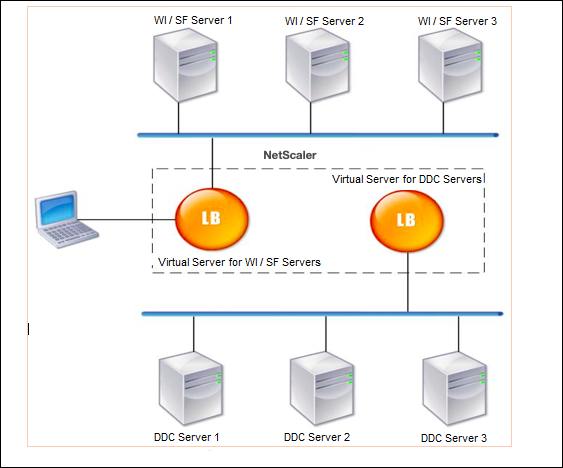
Note:
Although you can use the HTTP protocol, we recommend that you use SSL for communication between the client and the NetScaler appliance. You can use the HTTP protocol for communication between the NetScaler and the DDC servers even though you use the SSL protocol for communication with the client.
Related information
To configure load balancing for Citrix Virtual Desktops by using the GUI
-
Create a service.
-
Navigate to Configuration > Traffic Management > Load Balancing > Services and click Add.
-
Create a service by specifying a name, an IP address, a port, and a protocol type and then click OK.
-
-
Create a load balancing virtual server.
-
Navigate to Configuration > Traffic Management > Load Balancing > Virtual Servers and click Add.
-
Create a virtual server by specifying a name, an IP address, a port, and a protocol type and then click OK.
-
-
Bind the service to the load balancing virtual server.
-
Navigate to Configuration > Traffic Management > Load Balancing > Virtual Servers and select a server.
-
Click Edit.
-
In the Services and Service Groups, click > and click Add Binding.
-
Select the service that you want to bind and enter the weight value.
-
Click Bind.
-
To configure load balancing for Citrix Virtual Desktops by using the command line interface
-
To create a service, at the command prompt, type:
add service <name> <serverName> <serviceType> <port>
Example:
add service Service-HTTP-1 192.0.2.5 HTTP 80
-
To create a virtual server, at the command prompt, type:
add lb vserver <name> <serviceType> <ip> <port>
Example:
add lb vserver Vserver-LB-1 HTTP 10.102.29.60 80
-
To bind a service to a load balancing virtual server, at the command prompt, type:
bind lb vserver <name> <serviceName>
Example:
bind lb vserver Vserver-LB-1 Service-HTTP-1