
View GSLB synchronization status and summary
After the GSLB configuration is synchronized across the GSLB sites, you can view the detailed status and the summary of the last GSLB sync operation. This is applicable to both manual and real-time GSLB synchronization.
Related information
To view the GSLB synchronization status or summary by using the CLI
At the command prompt, type:
show gslb sync status
or
show gslb syncStatus -summary
Sample configuration output for GSLB manual synchronization
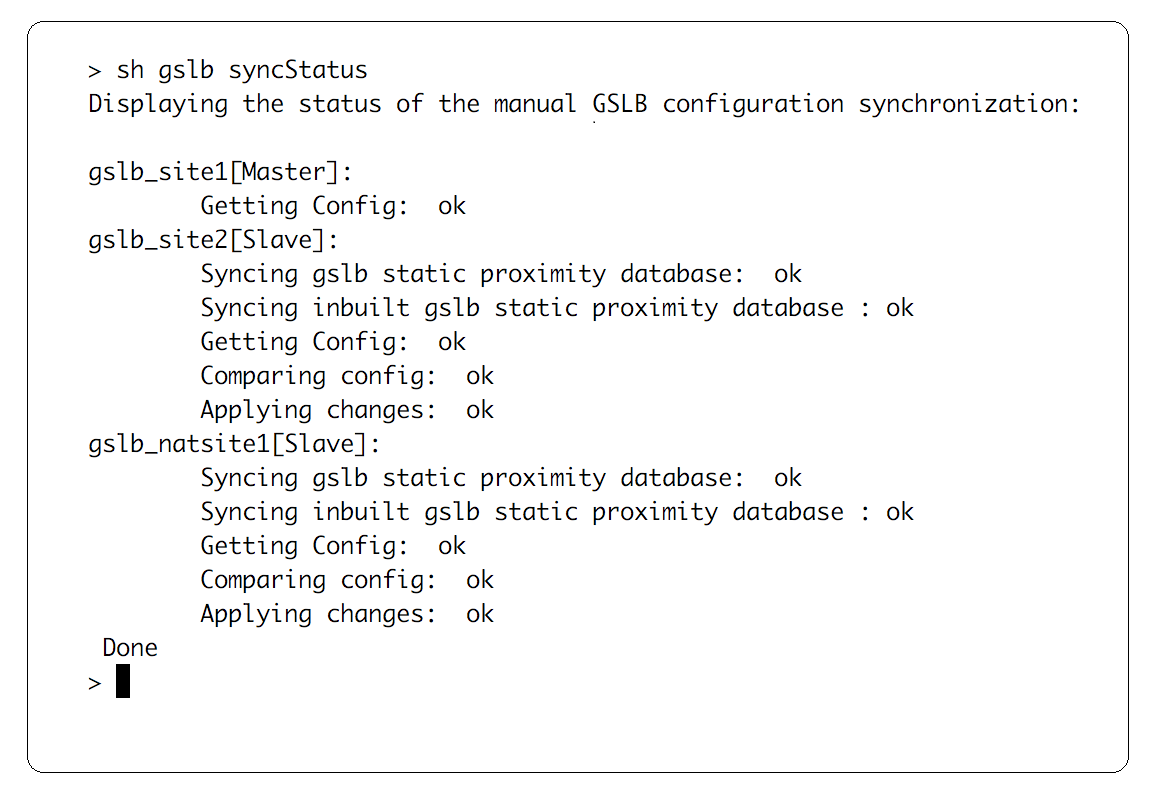
The following output displays the status of the manual GSLB configuration synchronization.
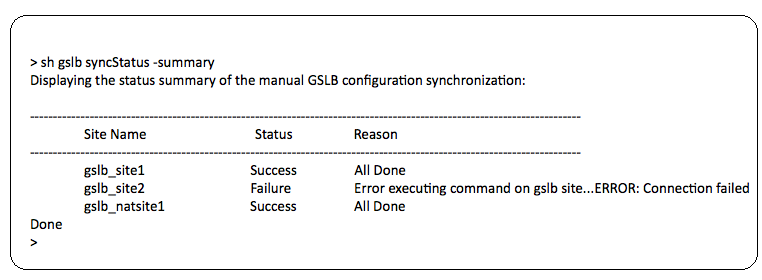
The following output displays the status summary of the manual GSLB configuration synchronization.
Sample configuration output for GSLB real-time synchronization
The following output displays the status of the real-time GSLB configuration synchronization for the master site:
> sh gslb syncStatus
 Displaying the status of the real time GSLB configuration synchronization as master node:

 site2[Master]:
                 New GSLB configuration detected at Fri Jan 23 20:54:24 2020
                 Fetching current configuration: Done
                 Updating default.conf file: Done
 site1[Slave]:
                 Syncing gslb static proximity database to node site1: Done
                 Syncing inbuilt GSLB static proximity database to node site1: Done
                 Syncing ssl certificates, keys and CRLS to node site1: Done
                 Syncing current configuration to site1: Done
                 Pulling status files from site1: Status file not available yet(Sync in progress)
                 Pulling status files from site1: Done
                 site1 received new configuration from 10.102.217.205 in file 2JNSzClRHK5+pdek6szQ3g-default-10.102.217.210.conf
                 Firing set gslb parameter -startConfigSync ENABLED command: Done
                 Fetching running GSLB Config: Done
                 Comparing config: Done
                 Applying changes: Done
                 Firing set gslb parameter -startConfigSync DISABLED command: Done
                 Updating default.conf file: Done
 Done
The following output displays the status of the real-time GSLB configuration synchronization for the slave site:
> sh gslb syncStatus
 Displaying the status of the real time GSLB configuration synchronization as slave node:

                 site1 received new configuration from 10.102.217.205 in file 2JNSzClRHK5+pdek6szQ3g-default-10.102.217.210.conf
                 Firing set gslb parameter -startConfigSync ENABLED command: Done
                 Fetching running GSLB Config: Done
                 Comparing config: Done
                 Applying changes: Done
                 Firing set gslb parameter -startConfigSync DISABLED command: Done
                 Updating default.conf file: Done
 Done
The following output displays the status summary of the real-time GSLB configuration synchronization for the master site:
> sh gslb syncStatus -summary
 Displaying the status summary of the real time GSLB configuration synchronization as master node:

 -------------------------------------------------------------------------------------------------------
                 Site Name                                Status             Reason
 -------------------------------------------------------------------------------------------------------
                 site2                                    Success            All Done
                 site1                                    Success            All Done

 Done
The following output displays the status summary of the real-time GSLB configuration synchronization for slave site:
> sh gslb syncStatus –summary
 Displaying the status summary of the real time GSLB configuration synchronization as slave node:

 ----------------------------------------------------------------------------------------------------------
                 Site Name                                Status             Reason
 ----------------------------------------------------------------------------------------------------------
                 site1                                    Success            All Done

 Done
To view the GSLB synchronization status or summary by using the GUI
-
Navigate to Configuration > Traffic Management > GSLB > Dashboard.
-
Click View Synchronization Summary or View Synchronization Status, as required.