
Set thresholds for surge protection
To set the rate at which the NetScaler appliance opens connections to the server, you must configure the threshold and throttle values for surge protection.
Note
Threshold values are configured globally but they are enforced per individual load balanced server or per service.
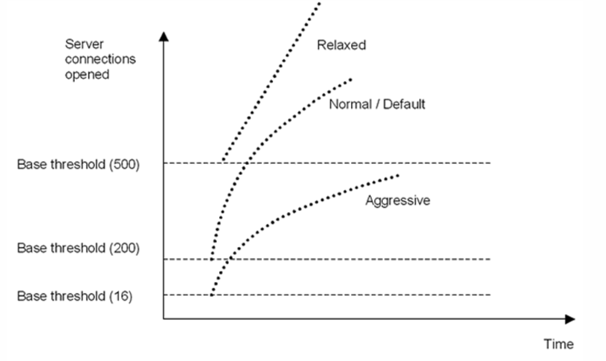
The following figure shows the surge protection curves that result from setting the throttle rate to relaxed, normal, or aggressive. Depending on the configuration of the server capacity, you can set base threshold values to generate appropriate surge protection curves.
Figure 1. Surge Protection Curves
Your configuration settings affect the behavior of surge protection in the following manner:
-
If you do not specify a throttle rate, it is set to normal (the default value), and the base threshold is set to 200, as shown in the preceding figure.
-
If you specify a throttle rate (aggressive, normal, or relaxed) without specifying a base threshold, the curve reflects the default values of the base threshold for that throttle rate. For example, if you set the throttle rate to relaxed, the resulting curve will have the base threshold value of 500.
-
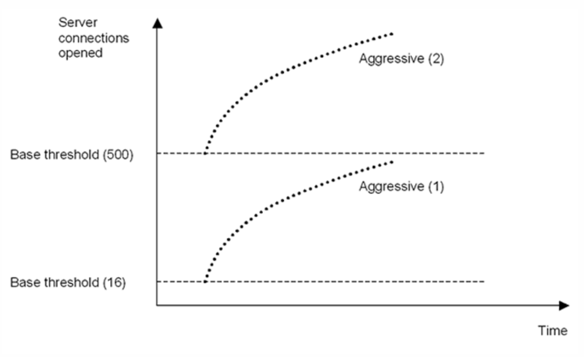
If you specify only the base threshold, the entire surge protection curve shifts up or down, depending on the value you specify, as shown in the figure that follows.
-
If you specify both a base threshold and a throttle rate, the resulting surge protection curve is based on the set throttle rate and adjusted according to the value set for the base threshold.
In the following figure, the lower curve (Aggressive 1) results when the throttle rate is set to aggressive but the base threshold is not set. The upper curve (Aggressive 2) results when the base threshold is set to 500, but the throttle rate is not set. The second upper curve (Aggressive 2) also results when the base threshold is set to 500, and the throttle rate is set to aggressive.
Figure 2. Aggressive Rate with the Default or a Set Base Threshold
Related information
Set the threshold for surge protection by using the GUI
-
In the navigation pane, expand System, and then select Settings.
-
In the details pane, click Global System Settings.
-
If you want to set a base threshold different from the default for the throttle rate, in the Configure Global Settings dialog box, Base Threshold text box, enter the maximum number of concurrent server connections allowed before surge protection is triggered. The base threshold is the maximum number of server connections that can be open before surge protection is activated. The maximum value for this setting is 32,767 server connections. The default setting for this value is controlled by the throttle rate you choose in the next step.Note: If you do not set an explicit value here, the default value will be used.
-
In the Throttle drop-down list, select a throttle rate. The throttle is the rate at which the NetScaler appliance allows connections to the server to be opened. The throttle can be set to the following values:
-
Aggressive: Choose this option when the connection-handling and surge-handling capacity of the server is low and the connection needs to be managed carefully. When you set the throttle to aggressive, the base threshold is set to a default value of 16, which means that surge protection is triggered whenever there are 17 or more concurrent connections to the server.
-
Normal: Choose this option when there is no external load balancer behind the NetScaler appliance or downstream. The base threshold is set to a value of 200, which means that surge protection is triggered whenever there are 201 or more concurrent connections to the server. Normal is the default throttle option.
-
Relaxed: Choose this option when the NetScaler appliance is performing load balancing between a large number of Web servers, and can therefore handle a high number of concurrent connections. The base threshold is set to a value of 500, which means that surge protection is triggered only when there are 501 or more concurrent connections to the server.
-
-
Click OK. A message appears in the status bar, stating that the global settings are configured.