String maps
You can use string maps to perform pattern matching in all NetScaler features that use the default policy syntax. A string map is a NetScaler entity that consists of key-value pairs. The keys and values are strings in either ASCII or UTF-8 format. String comparison uses two new functions,
MAP_STRING(<string_map_name>) and IS_STRINGMAP_KEY(<string_map_name>).
A policy configuration that uses string maps performs better than one that does string matching through policy expressions, and you need fewer policies to perform string matching with a large number of key-value pairs. String maps are also intuitive, simple to configure, and result in a smaller configuration.
Related information
How String Maps Work
String maps are similar in structure to pattern sets (a pattern set defines a mapping of index values to strings; a string map defines a mapping of strings to strings) and the configuration commands for string maps (commands such as add, bind, unbind, remove, and show) are syntactically similar to configuration commands for pattern sets. Also, as with index values in a pattern set, each key in a string map must be unique across the map. The following table illustrates a string map called url_string_map, which contains URLs as keys and values.
| Key | Value |
|---|---|
| /url_1.html | http://www.redirect_url_1.com/url_1.html |
| /url_2.html | http://www.redirect_url_2.com/url_2.html |
| /url_3.html | http://www.redirect_url_1.com/url_1.html |
Table 1. String Map "url_string_map"
The following table describes the two functions that have been introduced to enable string matching with keys in a string map. String matching is always performed with the keys. Additionally, the following functions perform a comparison between the keys in the string map and the complete string that is returned by the expression prefix. The examples in the descriptions refer to the preceding example.
For completed information about the two functions introduced for enabling string matching with keys in a string map, see String Map Function table pdf.
Configuring a String Map
You first create a string map and then bind key-value pairs to it. You can create a string map from the command line interface (CLI) or the configuration utility.
To configure a string map by using the command line interface
At the command prompt, do the following:
-
Create a string map.
add policy stringmap <name> -comment <string>
-
Bind a key-value pair to the string map.
bind policy stringmap <name> <key> <value> [-comment <string>]
Example:
bind policy stringmap url_string_map1 "/url_1.html" "http://www.redirect_url_1.com/url_1.html"
To configure a string map by using the NetScaler GUI
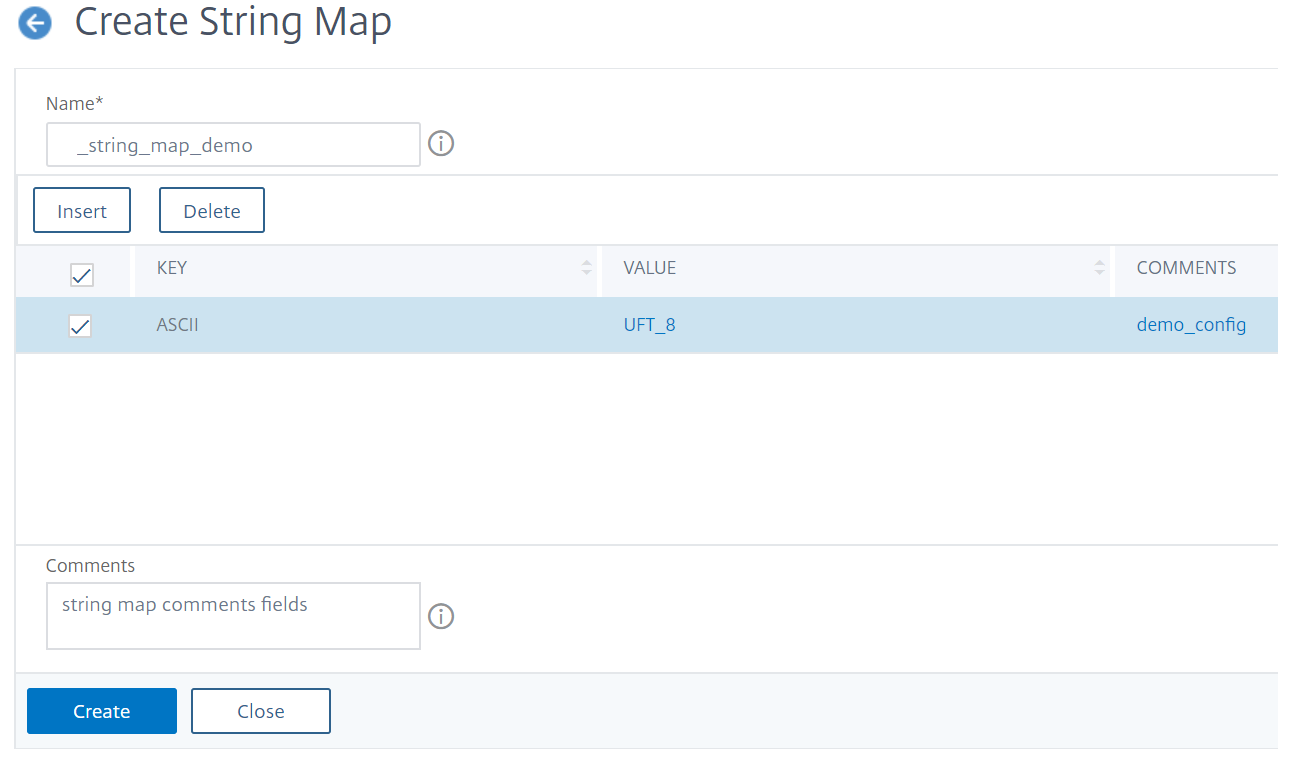
Navigate to AppExpert > String Maps, click Add and specify the relevant details.
Example: responder policy with a redirect action
The following use case involves a responder policy with a redirect action. In the example below, the first four commands create the string map url_string_map and bind the three key-value pairs used in the earlier example. After creating the map and binding the key-value pairs, you create a responder action (act_url_redirects) that redirects the client to the corresponding URL in the string map or to www.default.com. You also configure a responder policy (pol_url_redirects) that checks whether requested URLs match any of the keys in url_string_map and then performs the configured action. Finally, you bind the responder policy to the content switching virtual server that receives the client requests that are to be evaluated.
add stringmap url_string_map
bind stringmap url_string_map /url_1.html http://www.redirect_url_1.com/url_1.html
bind stringmap url_string_map /url_2.html http://www.redirect_url_2.com/url_2.html
bind stringmap url_string_map /url_3.html http://www.redirect_url_1.com/url_1.html
`add responder action act_url_redirects redirect 'HTTP.REQ.URL.MAP_STRING("url_string_map") ALT "www.default.com"'
add responder policy pol_url_redirects TRUE act_url_redirects
bind cs vserver csw_redirect -policyname pol_url_redirects -priority 1 -type request
To configure a string map by using the NetScaler GUI
Follow the procedure given below to configure a string map.
-
On the navigation pane, expand AppExpert and click String Maps.
-
On the details pane, click Add.
-
In the Create String Map page, set the following parameters:
-
Name. Name of the string map.
-
Configure key value. ASCII based key value entry bound to the string map
-
Comments. A short description about the key values bound to the string map.
-
-
Click Create and Close.