
Insert cookie attributes to ADC generated cookies
The web administrators can insert other cookie attributes to the cookies generated by the NetScaler appliance. These additional cookie attributes help in enforcing the required policies for the ADC generated cookies based on the application access pattern.
The following features use the ADC generated cookies to achieve persistency.
-
Load balancing cookie persistence
-
Load balancing group cookie persistence
-
GSLB site persistence
-
Content switching cookie persistence
You can insert other cookie attributes to the ADC generated cookies using the following parameters:
-
LiteralADCCookieAttribute: Append other cookie attributes to the ADC generated cookie, as a string.
-
ComputedADCCookieAttribute: Use an ADC ns variable to conditionally append cookie attributes to the ADC generated cookie, based on the client or server attributes, for example, user agent version.
Note
You cannot configure both Literal ADC Cookie Attribute and Computed ADC Cookie Attribute, simultaneously on the load balancing parameter or in a single load balancing profile.
Related information
Use case: Configure SameSite cookie attribute
Every cookie has a domain associated with it. When a cookie’s domain matches the website domain in the user’s address bar, this is considered a same-site (or first party) context. If the domain associated with a cookie matches an external service and not the website in the user’s address bar, this is considered a cross-site (or third party) context.
The SameSite attribute indicates the browser whether the cookie can be used for cross-site context or only for same-site context. Also, if an application intends to be accessed in the cross-site context then it can do so only via the HTTPS connection. For details, see RFC6265.
Until Feb 2020, the SameSite property was not explicitly set in NetScaler. The browser took the default value as None, and did not impact the NetScaler deployments.
However with certain browsers upgrade, such as Google Chrome 80, there is a change in the default cross-domain behavior of cookies. The SameSite attribute can be set to one of the following values. Default value for Google Chrome is set to Lax.
-
None: Indicates the browser to use a cookie in cross-site context only on secure connections.
-
Lax: Indicates the browser to use a cookie for requests in the same-site context. In the cross-site context, only safe HTTP methods like GET request can use the cookie.
-
Strict: Use the cookie only in the same-site context.
If there is no SameSite attribute in the cookie, the Google Chrome assumes the functionality of SameSite=Lax.
Note
For certain version of other browsers, the default value for the SameSite attribute might be set to None. In some browser versions, “SameSite = none” can be treated differently. For example, the following browsers reject a cookie with “SameSite = none”:
-
Versions of Chrome from Chrome 51 to Chrome 66 (inclusive on both ends)
-
Versions of UC browser on Android earlier to version 12.13.2
Configure ADC generated cookies
To configure ADC generated cookie attributes, you must perform the following:
-
Create a load balancing virtual server
-
Set the ADC Cookie attributes for the load balancing virtual server, either through LB parameters or LB profile.
-
If you use an LB profile, set the LB profile to a load balancing virtual server.
-
If you choose to use the Computed ADC Cookie Attribute, configure the related rewrite policy.
Note
If an LB profile is bound to an LB virtual server, then the profile parameter configuration is considered instead of the global LB parameter configuration.
You can set the ADC generated cookie attributes by the following methods:
-
Setting the ADC cookie attributes in load balancing parameters
-
Setting the ADC cookie attributes in the load balancing profile
Setting the ADC cookie attributes in the load balancing parameters by using the CLI
To apply a policy uniformly to ADC generated cookies of all applications configured on the NetScaler appliance, you can set the ADC cookie attribute in the global LB parameters.
The Literal ADC Cookie Attribute setting allows you to unconditionally insert the cookie attributes to the ADC generated cookie.
At the command prompt, type:
set lb parameter -LiteralADCCookieAttribute <string>
Example:
set lb parameter -LiteralADCCookieAttribute SameSite=None
The Computed ADC Cookie Attribute setting allows you to conditionally insert the cookie attributes, based on the client or server attributes, to the ADC generated cookie.
At the command prompt, type:
set lb parameter -ComputedADCCookieAttribute <ns variable>
Example:
add ns variable cookieattribute_var -type "text(100)" -scope transaction
 set lb parameter -ComputedADCCookieAttributE "$cookieattribute_var"
 add ns assignment samesiteassign -variable "$cookieattribute_var" -set "\"SameSite=None\""

 add policy expression pol_iphone "(HTTP.REQ.HEADER(\"User-Agent\").CONTAINS(\"iP\") && (HTTP.REQ.HEADER(\"User-Agent\").REGEX_SELECT(re/OS \\d+\\_/).REGEX_SELECT(re/\\d+/).TYPECAST_NUM_T(DECIMAL).EQ(12).typecast_text_t ALT \"false\").eq(\"true\"))"
 add policy expression pol_chrome "(HTTP.REQ.HEADER(\"User-Agent\").CONTAINS(\"Chrom\") && (HTTP.REQ.HEADER(\"User-Agent\").REGEX_SELECT(re/Chrom.*\\d+./).REGEX_SELECT(re/\\d+/).TYPECAST_NUM_T(DECIMAL).BETWEEN(51,66).typecast_text_t ALT \"false\").eq(\"true\"))"
 add rewrite policy exception_samesite_attribute "pol_iphone || pol_chrome " NOREWRITE
 add rewrite policy append_samesite_attribute true samesiteassign

 bind rewrite global exception_samesite_attribute 90 110 -type RES_OVERRIDE
 bind rewrite global append_samesite_attribute 100 110 -type RES_OVERRIDE
Configure variables by using the GUI
-
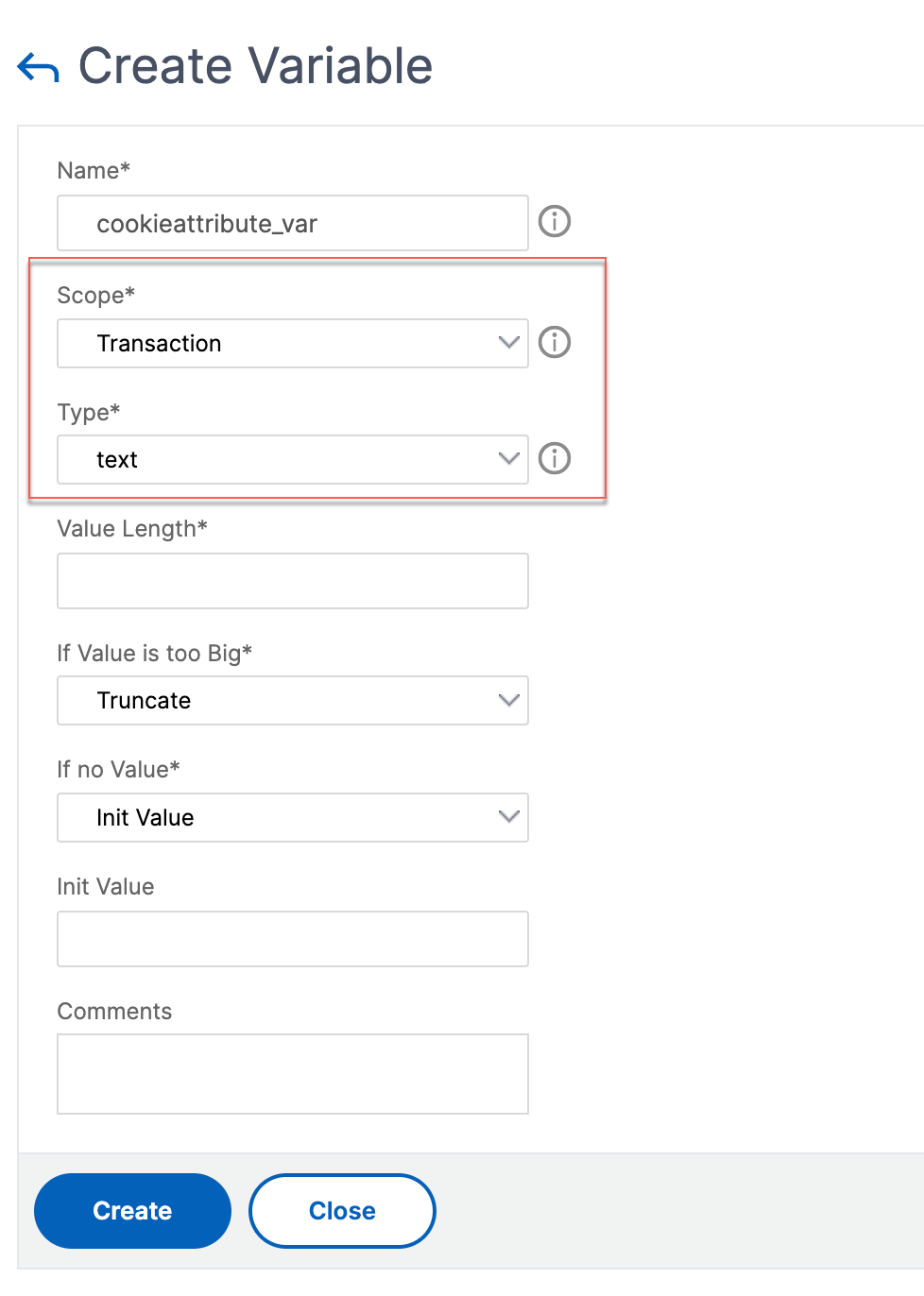
Navigate to AppExpert > Variables, and click Add.
-
In the Create Variable page, select Scope as Transaction and Type as text from the drop-down menu.
-
Enter other details, and click Create.
Create an assignment by using the GUI
After configuring a variable, you can assign a value or specify the operation to be performed on the variable by creating an assignment.
-
Navigate to AppExpert > Assignments, and click Add.
-
In the Create Assignment page, enter the details, and click Create.
Setting the ADC cookie attributes in load balancing parameters by using the GUI
-
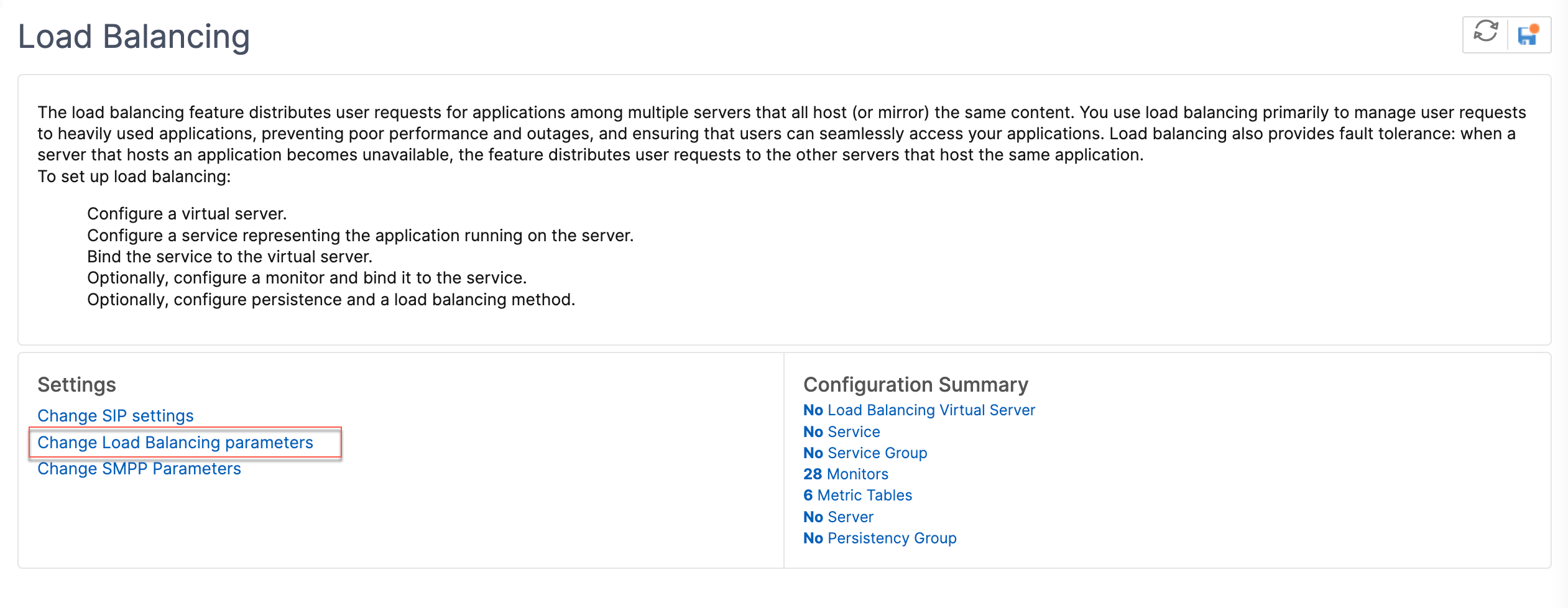
Navigate to Traffic Management > Load Balancing > Change Load Balancing parameters.
-
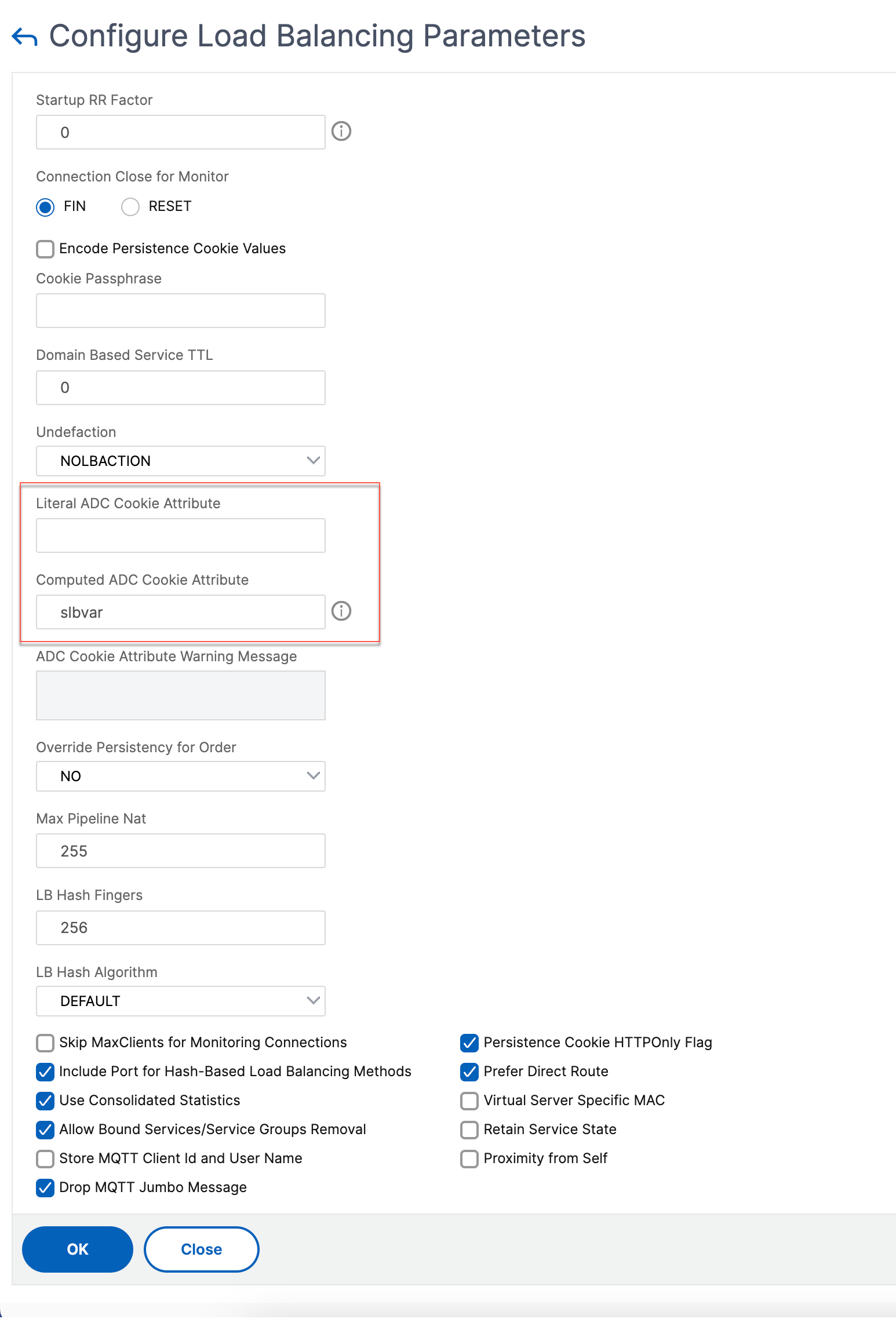
In the Configure Load Balancing Parameters pane, enter appropriate values for either one of the fields based on your requirement:
-
Literal ADC Cookie Attribute
-
Computed ADC Cookie Attribute
-
-
Click OK.
Setting the ADC cookie attributes in the load balancing profile by using the CLI
To apply a policy for a specific application that is configured on the NetScaler appliance, you can set the cookie attribute parameters in the LB profile bound to the application-specific LB virtual server.
The Literal ADC Cookie Attribute setting in the LB profile allows you to unconditionally insert the cookie attributes to the ADC generated cookie that is specific to a virtual server.
At the command prompt, type:
add lb profile <profile name> -LiteralADCCookieAttribute <string>
Example:
add lb profile LB-Vserver-Profile-1 -LiteralADCCookieAttribute SameSite=None
 add lb vserver LB-VServer-1 SSL 10.102.148.37 443 -persistenceType COOKIEINSERT -lbprofilename LB-Vserver-Profile-1
The Computed ADC Cookie Attribute setting in the LB profile allows you to conditionally insert the cookie attributes based on the client or server attributes, to the ADC generated cookie. Then, set this LB profile to an LB virtual server.
At the command prompt, type:
add lb profile <profile name> -ComputedADCCookieAttribute <ns variable>
Example:
add ns variable cookieattribute_var -type "text(100)" -scope transaction
 add ns assignment samesiteassign -variable "$cookieattribute_var" -set "\"SameSite=None\""
 add lb profile LB-Vserver-Profile-1 -ComputedADCCookieAttributE "$cookieattribute_var"

 add policy expression pol_iphone "(HTTP.REQ.HEADER(\"User-Agent\").CONTAINS(\"iP\") && (HTTP.REQ.HEADER(\"User-Agent\").REGEX_SELECT(re/OS \\d+\\_/).REGEX_SELECT(re/\\d+/).TYPECAST_NUM_T(DECIMAL).EQ(12).typecast_text_t ALT \"false\").eq(\"true\"))"
 add policy expression pol_chrome "(HTTP.REQ.HEADER(\"User-Agent\").CONTAINS(\"Chrom\") && (HTTP.REQ.HEADER(\"User-Agent\").REGEX_SELECT(re/Chrom.*\\d+./).REGEX_SELECT(re/\\d+/).TYPECAST_NUM_T(DECIMAL).BETWEEN(51,66).typecast_text_t ALT \"false\").eq(\"true\"))"
 add rewrite policy exception_samesite_attribute "pol_iphone || pol_chrome " NOREWRITE
 add rewrite policy append_samesite_attribute true samesiteassign

 add lb vserver LB-VServer-1 SSL 10.102.148.37 443 -persistenceType COOKIEINSERT -lbprofilename LB-Vserver-Profile-1
 bind lb vserver LB-VServer-1 -policyName exception_samesite_attribute -priority 90 -gotoPriorityExpression 110 -type RESPONSE
 bind lb vserver LB-VServer-1 -policyName append_samesite_attribute -priority 100 -gotoPriorityExpression 110 -type RESPONSE
Setting the ADC Cookie attributes in the load balancing profile by using the GUI
-
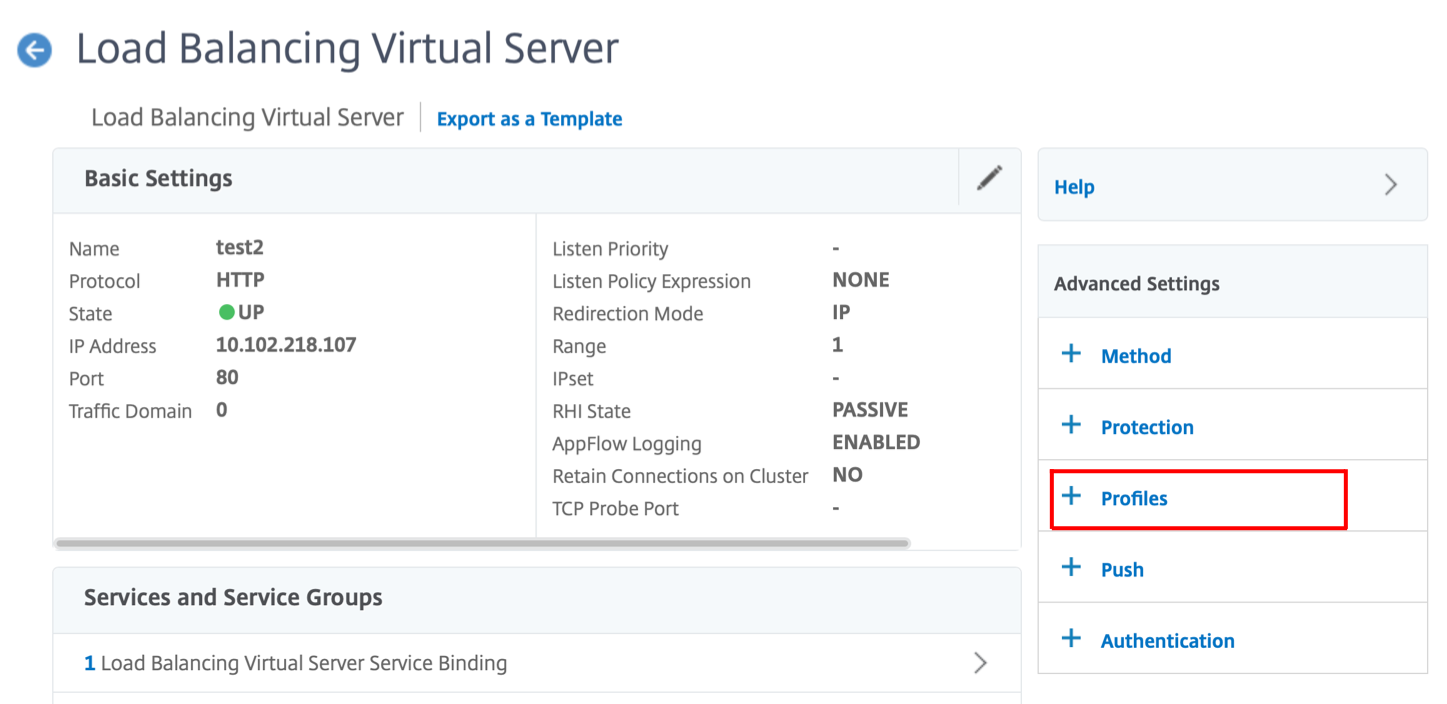
Navigate to Traffic Management > Load Balancing > Virtual servers.
-
Select a virtual server and click Edit.
-
Under Advanced Settings section, click Add profiles.
-
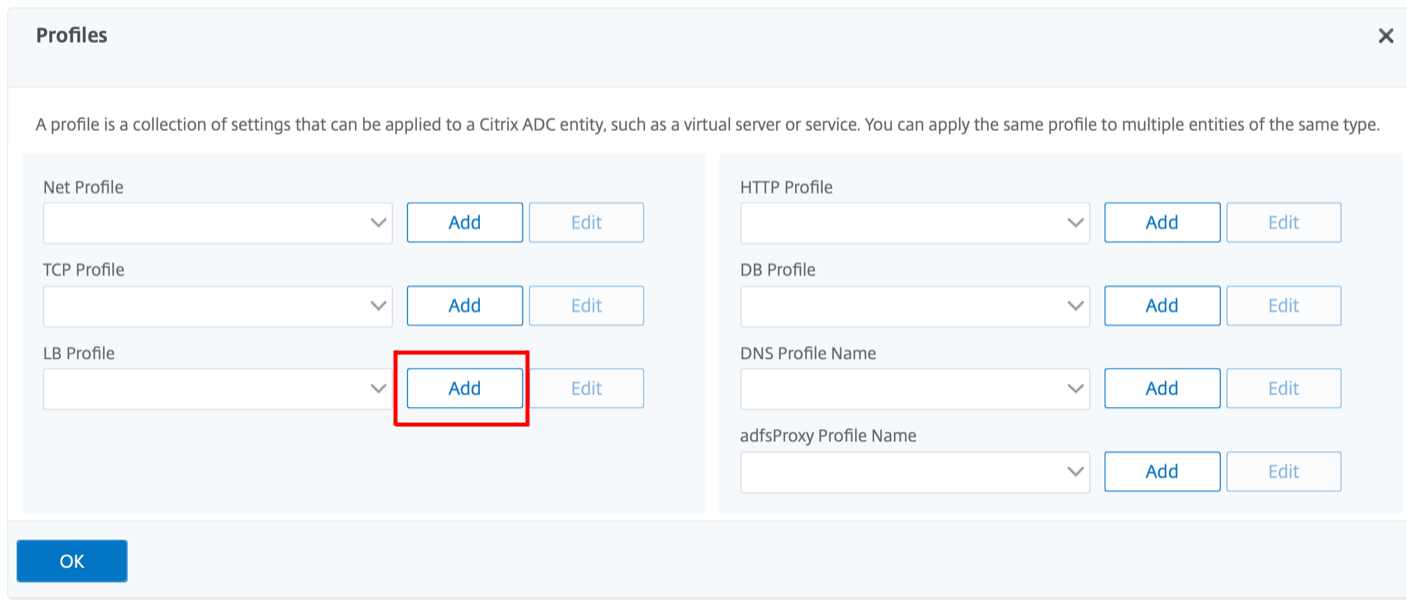
In the Profiles section, click Add to create an LB Profile.If you have already created a profile, choose it from the LB Profile drop-down menu.
-
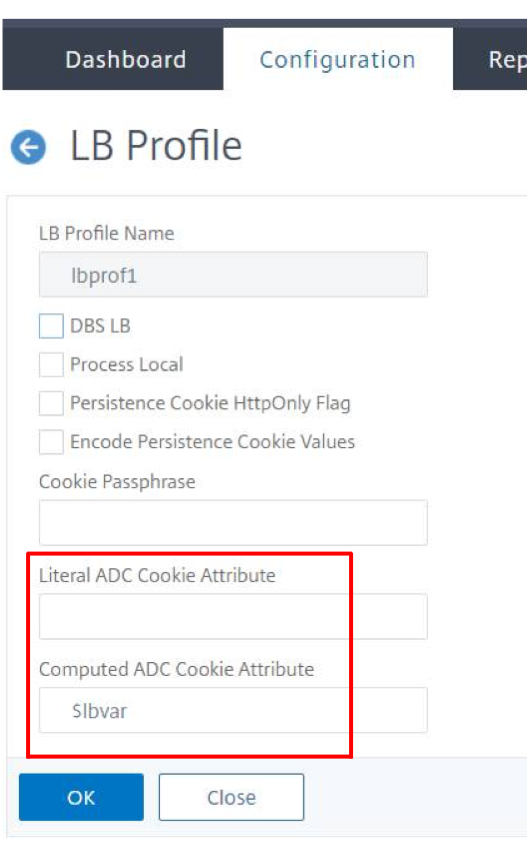
In the LB Profile pane, enter appropriate values for either one of the fields based on your requirement:
-
Literal ADC Cookie Attribute
-
Computed ADC Cookie Attribute
-
Click OK.
-
Set the created LB profile to the LB virtual server created in Step 1.
Verify ns variable configuration
To verify that the ADC ns variable is configured appropriately in LB parameters or LB profile, use the show lb parameter or show lb profile commands.
The following table lists the various warning messages and its cause, when the ns variable is not correctly configured.
| Warning message | Reasons |
|---|---|
| NS Variable is not configured. Configure it with type text() and scope transaction for variable | NS variable is not yet configured. |
| Scope of configured NS variable is not transaction. | Variable is configured but scope is not set to “transaction.” |
| Type of variable is not Text(). | Variable is configured but type is not set to “Text”. |
| Configured value-max-size for the NS Variable is greater than 255. | The value configured for the NS variable is greater than 255 characters. Note: A maximum length of 255 characters can be appended to an ADC generated cookie. The characters that exceed the maximum length are truncated. |
Sample output
In the following example, the warning message is displayed when the ns variable is not configured.
set lb parameter -ComputedADCCookieAttribute "$lbvar"

 Warning: NS Variable is not configured. Please configure it with type text() and scope transaction
 Done
The warning message is displayed in the following output of the
show lb parameter command.
show lb parameter

 Global LB parameters:
 Persistence Cookie HttpOnly Flag: ENABLED
 Use Encrypted Persistence Cookie: DISABLED
 Use Port For Hash LB: YES
 Prefer direct route: YES
 Retain Service State: OFF
 Start RR Factor: 0
 Skip Maxclient for Monitoring: DISABLED
 Monitor Connection Close: FIN
 Use consolidated stats for LeastConnection: YES
 Allow mac mode based vserver to pick thereturn traffic from services: DISABLED
 Allow bound service removal: ENABLED
 TTL for Domain Based Server: 0 secs

 NetScaler Cookie Variable Name: $lbvar(NS Variable is not configured. Please configure it with type text() and scope transaction)

 Done
Sample configuration for inserting cookie attributes in GSLB deployment
The following sample configuration applies to site persistence configured on GSLB services corresponding to an LB virtual server. To append some additional cookie attributes to the GSLB cookies, perform the following configuration.
-
Set the ADC cookie attributes in the LB profile (LB-Vserver-Profile-1).
-
Set the Literal ADC Cookie Attribute value, for example “SameSite=None", in the LB profile.
-
Set the LB profile to the load balancing virtual server (LB-VServer-1), which represents the GSLB service.
add gslb vserver GSLB-VServer-1 SSL -backupLBMethod ROUNDROBIN -tolerance 0 -appflowLog DISABLED
 add gslb site site1 10.102.148.4 -publicIP 10.102.148.4
 add gslb service site1_gsvc1 10.102.148.35 SSL 443 -publicIP 10.102.148.35 -publicPort 443 -maxClient 0 -siteName site1 -sitePersistence HTTPRedirect -sitePrefix ss1 -cltTimeout 180 -svrTimeout 360 -downStateFlush ENABLED

 bind gslb vserver GSLB-VServer-1 -serviceName site1_gsvc1
 bind gslb vserver GSLB-VServer-1 -domainName www.gslb.com -TTL 5

 add service service-1 10.102.84.140 SSL 443

 add lb profile LB-Vserver-Profile-1 -LiteralADCCookieAttribute SameSite=None
 add lb vserver LB-VServer-1 SSL 10.102.148.37 443 -persistenceType COOKIEINSERT -lbprofilename LB-Vserver-Profile-1

 bind lb vserver LB-VServer-1 service-1
Note
You can also conditionally insert the cookie attributes using the Computed ADC Cookie Attribute.
Sample configuration for inserting cookie attribute in content switching deployment
The following sample configuration applies when multiple applications are hosted behind a content switching virtual server. To apply the same policy to all the applications, bind the rewrite policies to content switching virtual server instead of LB virtual server, as follows:
-
Set the ADC cookie attributes in the LB parameters.Note:You can set the ADC cookie attributes in the LB profile as well.
-
Configure the ns variable (cookieattribute_var) of Type set to Text and Scope set to Transaction.
-
Set the Computed ADC Cookie Attribute in the global LB parameters using the ns variable.
-
Set the rewrite policies (exception_samesite_attribute and append_samesite_attribute) to the content switching virtual servers for inserting the cookie attributes.
add ns variable cookieattribute_var -type "text(100)" -scope transaction
 set lb parameter -ComputedADCCookieAttributE "$cookieattribute_var"
 add ns assignment samesiteassign -variable "$cookieattribute_var" -set "\"SameSite=None\""

 add policy expression pol_iphone "(HTTP.REQ.HEADER(\"User-Agent\").CONTAINS(\"iP\") && (HTTP.REQ.HEADER(\"User-Agent\").REGEX_SELECT(re/OS \\d+\\_/).REGEX_SELECT(re/\\d+/).TYPECAST_NUM_T(DECIMAL).EQ(12).typecast_text_t ALT \"false\").eq(\"true\"))"
 add policy expression pol_chrome "(HTTP.REQ.HEADER(\"User-Agent\").CONTAINS(\"Chrom\") && (HTTP.REQ.HEADER(\"User-Agent\").REGEX_SELECT(re/Chrom.*\\d+./).REGEX_SELECT(re/\\d+/).TYPECAST_NUM_T(DECIMAL).BETWEEN(51,66).typecast_text_t ALT \"false\").eq(\"true\"))"
 add rewrite policy exception_samesite_attribute "pol_iphone || pol_chrome " NOREWRITE
 add rewrite policy append_samesite_attribute true samesiteassign

 add lb vserver LB-VServer-1 SSL 10.102.148.35 443
 add lb vserver LB-VServer-2 SSL 10.102.148.36 443

 add cs vserver CS-VServer-1 SSL 10.102.148.42 443 -persistenceType COOKIEINSERT

 add cs action act1 -targetLBVserver v1
 add cs action act2 -targetLBVserver v2
 add cs policy CS-policy-1 -rule "HTTP.REQ.URL.CONTAINS(\"file1.html\")" -action act1
 add cs policy CS-policy-2 -rule "HTTP.REQ.URL.CONTAINS(\"file2.html\")" -action act2

 bind cs vserver CS-VServer-1 -policyName CS-policy-1 -priority 1
 bind cs vserver CS-VServer-1 -policyName CS-policy-2 -priority 2

 bind cs vserver -policyname exception_samesite_attribute 90 110 -type RES_OVERRIDE
 bind cs vserver -policyname append_samesite_attribute 100 110 -type RES_OVERRIDE