TACACS authentication
TACACS authentication policy authenticates to an external Terminal Access Controller Access-Control System (TACACS) authentication server. After a user authenticates to a TACACS server, the NetScaler connects to the same TACACS server for all subsequent authorizations. When a primary TACACS server is unavailable, this feature prevents any delay while NetScaler waits for the first TACACS server to time out. It happens before resending the authorization request to the second TACACS server.
Note:
TACACS authorization server does not support commands whose string length exceeds 255 characters.
Workaround: Use local authorization instead of a TACACS authorization server.
When authenticating through a TACACS server, authentication, authorization, and auditing traffic management logs only successfully runs TACACS commands. It prevents the logs from displaying TACACS commands entered by unauthorized users.
Starting from NetScaler 12.0 Build 57.x, the Terminal Access Controller Access-Control System (TACACS) is not blocking the authentication, authorization, and auditing daemon while sending the TACACS request. This change allows LDAP and RADIUS authentication to proceed with the request. The TACACS authentication request resumes once the TACACS server acknowledges the TACACS request.
Important:
-
Citrix® recommends that you do not modify any TACACS-related configurations when you run a “clear ns config” command.
-
TACACS related configuration related to advanced policies is cleared and reapplied when the “RBAconfig” parameter is set to NO in the “clear ns config” command for advanced policy.
Related information
Name-value attribute support for TACACS authentication
You can now configure TACACS authentication attributes with a unique name along with values. The names are configured in the TACACS action parameter and the values are obtained by querying for the names. By specifying the name attribute value, admins can easily search for the attribute value associated with the attribute name. Also, admins no longer have to remember the attribute by its value alone.
Important
-
In the tacacsAction command, you can configure a maximum of 64 attributes separated by comma with a total size less than 2048 bytes.
To configure the name-value attributes by using the CLI
At the command prompt, type:
add authentication tacacsAction <name> [-Attributes <string>]
Example:
add authentication tacacsAction tacacsAct1 -attributes “mail,sn,userprincipalName”
To add an authentication action by using the CLI
If you do not use LOCAL authentication, you need to add an explicit authentication action. At the command prompt, type the following command:
add authentication tacacsAction <name> -serverip <IP> [-serverPort <port>][-authTimeout <positive_integer>][ ... ]
Example
add authentication tacacsaction Authn-Act-1 -serverip 10.218.24.65 -serverport 1812 -authtimeout 15 -tacacsSecret "minotaur" -authorization OFF -accounting ON -auditFailedCmds OFF -defaultAuthenticationGroup "users"
To configure an authentication action by using the CLI
To configure an existing authentication action, at the command prompt, type the following command:
set authentication tacacsAction <name> -serverip <IP> [-serverPort <port>][-authTimeout <positive_integer>][ ... ]
Example
> set authentication tacacsaction Authn-Act-1 -serverip 10.218.24.65 -serverport 1812 -authtimeout 15 -tacacsSecret "minotaur" -authorization OFF -accounting ON -auditFailedCmds OFF -defaultAuthenticationGroup "users" Done
To remove an authentication action by using the CLI
To remove an existing RADIUS action, at the command prompt, type the following command:
rm authentication radiusAction <name>
Example
rm authentication tacacsaction Authn-Act-1
To configure a TACACS server by using the GUI
Note
In the GUI, the term server is used instead of action, but refers to the same task.
-
Navigate to Security > AAA - Application Traffic > Policies > Authentication > Advanced Policies > Actions > TACACS.
-
Click Add to create a TACACS server. To modify an existing TACACS server, select the server, and then click Edit.
-
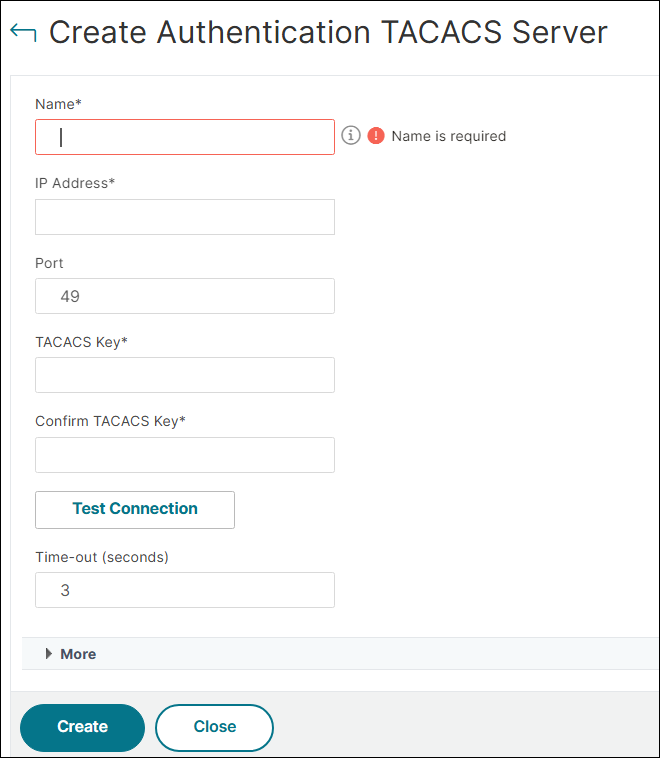
In the Create Authentication TACACS Server page, type or select values for the following parameters.
-
Name: Name of the TACACS profile. The maximum length is 127 characters.
-
IP Address: IP address assigned to the TACACS server.
-
Port: Port number on which the TACACS server listens for connections. The default value is 49.
-
TACACS Key: Key shared between the TACACS server and NetScaler. The TACACS key is required for allowing NetScaler to communicate with the TACACS server. The maximum length is 63 characters.
-
Confirm TACACS Key: Type the TACACS key a second time.
-
Time-out (seconds): Number of seconds NetScaler waits for a response from the TACACS server. The default value is 3 and the minimum value is 1.
-
Authorization: Select ON to use streaming authorization on the TACACS server.
-
Accounting: Select ON to enable the TACACS server to accept the accounting messages.
-
Default Authentication Group: Default group that is chosen when the authentication succeeds in addition to extracted groups.
-
Group Attribute Name: TACACS group attribute name used for group extraction on the TACACS server.
-
Attributes: List of attribute names separated by a comma, which must be fetched from TACACS server. The attribute name can be 127 bytes and the total length of this string must not be more than 2047 bytes. These attributes are stored as key-value pair in authentication, authorization, and auditing session.
-
-
Click Create or OK.