
Configuring CloudBridge® Connector between datacenter and AWS cloud
You can configure a CloudBridge Connector tunnel between a datacenter and AWS cloud to leverage the infrastructure and computing capabilities of the data center and the AWS cloud. With AWS, you can extend your network without initial capital investment or the cost of maintaining the extended network infrastructure. You can scale your infrastructure up or down, as required. For example, you can lease more server capabilities when the demand increases.
To connect a datacenter to AWS cloud, you set up a CloudBridge Connector tunnel between a NetScaler appliance that resides in the datacenter and a NetScaler virtual appliance (VPX) that resides in AWS cloud.
As an illustration of a CloudBridge Connector tunnel between a datacenter and Amazon AWS cloud, consider an example in which a CloudBridge Connector tunnel is set up between NetScaler appliance NS_Appliance-DC, in datacenter DC, and NetScaler virtual appliance (VPX) NS_VPX_Appliance-AWS.
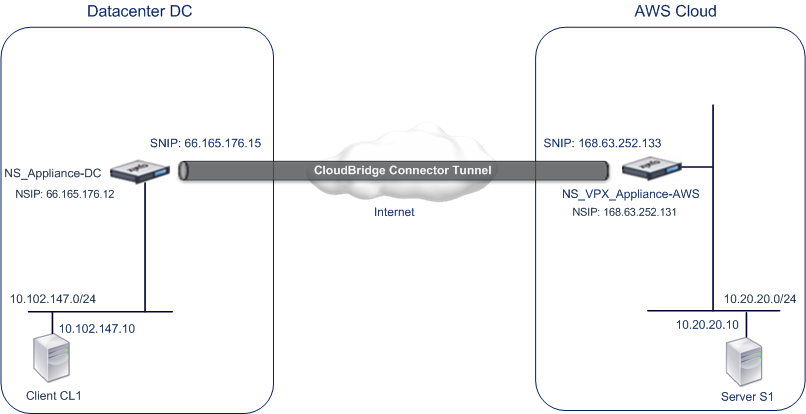
Both NS_Appliance-DC and NS_VPX_Appliance-AWS function in L3 mode. They enable communication between private networks in datacenter DC and the AWS cloud. NS_Appliance-DC and NS_VPX_Appliance-AWS enable communication between client CL1 in datacenter DC and server S1 in the AWS cloud through the CloudBridge Connector tunnel. Client CL1 and server S1 are on different private networks.
Note:
AWS does not support L2 mode, hence it is necessary to have only L3 mode enabled on both the endpoints.
For proper communication between CL1 and S1, L3 mode is enabled on NS_Appliance-DC and NS_VPX_Appliance-AWS and routes are updated as such:
-
CL1 have a route to NS_Appliance-DC for reaching S1.
-
NS_Appliance-DC have a route to NS_VPX_Appliance-AWS for reaching S1.
-
S1 should have a route to NS_VPX_Appliance-AWS for reaching CL1.
-
NS_VPX_Appliance-AWS have a route to NS_Appliance-DC for reaching CL1.
The following table lists the settings on NetScaler appliance NS_Appliance-DC in datacenter DC.
| Entity | Name | Details |
|---|---|---|
| The NSIP address | 66.165.176.12 | |
| SNIP address | 66.165.176.15 | |
| CloudBridge Connector tunnel | CC_Tunnel_DC-AWS | Local endpoint IP address of the CloudBridge Connector tunnel: 66.165.176.15, Remote endpoint IP address of the CloudBridge Connector tunnel: 168.63.252.133, GRE Tunnel Details - Name= CC_Tunnel_DC-AWS |
The following table lists the settings on NetScaler VPX NS_VPX_Appliance-AWS on AWS cloud.
| Entity | Name | Details |
|---|---|---|
| NSIP address | 10.102.25.30 | |
| Public EIP address mapped to the NSIP address | 168.63.252.131 | |
| SNIP address | 10.102.29.30 | |
| Public EIP address mapped to the SNIP address | 168.63.252.133 | |
| CloudBridge Connector tunnel | CC_Tunnel_DC-AWS | Local endpoint IP address of the CloudBridge Connector tunnel:168.63.252.133, Remote endpoint IP address of the CloudBridge Connector tunnel: 66.165.176.15; GRE Tunnel Details Name= CC_Tunnel_DC-AWS, IPSec Profile Details, Name= CC_Tunnel_DC-AWS, Encryption algorithm= AES, Hash algorithm= HMAC SHA1 |
Related information
Prerequisites
Before setting up a CloudBridge Connector tunnel, verify that the following tasks have been completed:
-
Install, configure, and launch an instance of NetScaler Virtual appliance (VPX) on AWS cloud. For instructions on installing NetScaler VPX on AWS, see Deploy a NetScaler VPX instance on AWS.
-
Deploy and configure a NetScaler physical appliance, or provisioning and configuring a NetScaler virtual appliance (VPX) on a virtualization platform in the datacenter.
-
Make sure that the CloudBridge Connector tunnel end-point IP addresses are accessible to each other.
NetScaler VPX license
After the initial instance launch, NetScaler VPX for AWS requires a license. If you are bringing your own license (BYOL), see the VPX Licensing Guide at: http://support.citrix.com/article/CTX122426.
You have to:
-
Use the licensing portal within Citrix® website to generate a valid license.
-
Upload the license to the instance.
If this is a paid marketplace instance, then you do not need to install a license. The correct feature set and performance will activate automatically.
Configuration steps
To set up a CloudBridge Connector tunnel between a NetScaler appliance that resides in a datacenter and a NetScaler virtual appliance (VPX) that resides on the AWS cloud, use the GUI of the NetScaler appliance.
When you use the GUI, the CloudBridge Connector tunnel configuration created on the NetScaler appliance, is automatically pushed to the other endpoint or peer (the NetScaler VPX on AWS) of the CloudBridge Connector tunnel. Therefore, you do not have to access the GUI (GUI) of the NetScaler VPX on AWS to create the corresponding CloudBridge Connector tunnel configuration on it.
The CloudBridge Connector tunnel configuration on both peers (the NetScaler appliance that resides in the datacenter and the NetScaler virtual appliance (VPX) that resides on the AWS cloud) consists of the following entities:
-
IPSec profile—An IPSec profile entity specifies the IPSec protocol parameters, such as IKE version, encryption algorithm, hash algorithm, and PSK, to be used by the IPSec protocol in both the peers of the CloudBridge Connector tunnel.
-
GRE tunnel—An IP tunnel specifies a local IP address (a public SNIP address configured on the local peer), remote IP address (a public SNIP address configured on the remote peer), protocol (GRE) used to set up the CloudBridge Connector tunnel, and an IPSec profile entity.
-
Create a PBR rule and associate the IP tunnel with it—A PBR entity specifies a set of conditions and an IP tunnel entity. The source IP address range and the destination IP range are the conditions for the PBR entity. You must set the source IP address range and the destination IP address range to specify the subnet whose traffic is to traverse the CloudBridge Connector tunnel. For example, consider a request packet that originates from a client on the subnet in the datacenter and is destined to a server on the subnet in the AWS cloud. If this packet matches the source and destination IP address range of the PBR entity on the NetScaler appliance in the datacenter, it is sent across the CloudBridge Connector tunnel associated with the PBR entity.
To create an IPSEC profile by using the command line interface
At the command prompt, type:
-
add ipsec profile <name> [-**ikeVersion** ( V1 | V2 )] [-**encAlgo** ( AES | 3DES ) ...] [-**hashAlgo** <hashAlgo> ...] [-**lifetime** <positive_integer>] (-**psk** | (-**publickey** <string> -**privatekey** <string> -**peerPublicKey** <string>)) [-**livenessCheckInterval** <positive_integer>] [-**replayWindowSize** <positive_integer>] [-**ikeRetryInterval** <positive_integer>] [-**retransmissiontime** <positive_integer>] -
**show ipsec profile** <name>
To create an IP tunnel and bind the IPSEC profile to it by using the command line interface
At the command prompt, type:
-
add ipTunnel <name> <remote><remoteSubnetMask> <local> [-protocol <protocol>] [-ipsecProfileName <string>] -
show ipTunnel <name>
To create a PBR rule and bind the IPSEC tunnel to it by using the command line interface
At the command prompt, type:
-
add ns pbr <pbr_name> ALLOW -srcIP = <local_subnet_range> -destIP = <remote_subnet_range> -ipTunnel <tunnel_name> -
apply ns pbrs -
show ns pbr <pbr_name>
Example
    > add ipsec profile CC_Tunnel_DC-AWS -encAlgo AES -hashAlgo HMAC_SHA1

     Done
     > add ipTunnel CC_Tunnel_DC-AWS 168.63.252.133 255.255.255.0 66.165.176.15 –protocol GRE -ipsecProfileName CC_Tunnel_DC-AWS

     Done
     > add ns pbr PBR-DC-AWS ALLOW –srcIP 66.165.176.15 –destIP 168.63.252.133 ipTunnel CC_Tunnel_DC-AWS

     Done
     > apply ns pbrs

     Done
To configure a CloudBridge Connector tunnel in a NetScaler appliance by using the GUI
-
Type the NSIP address of a NetScaler appliance in the address line of a web browser.
-
Log on to the GUI of the NetScaler appliance by using your account credentials for the appliance.
-
Navigate to System > CloudBridge Connector.
-
In the right pane, under Getting Started, click Create/Monitor CloudBridge.
-
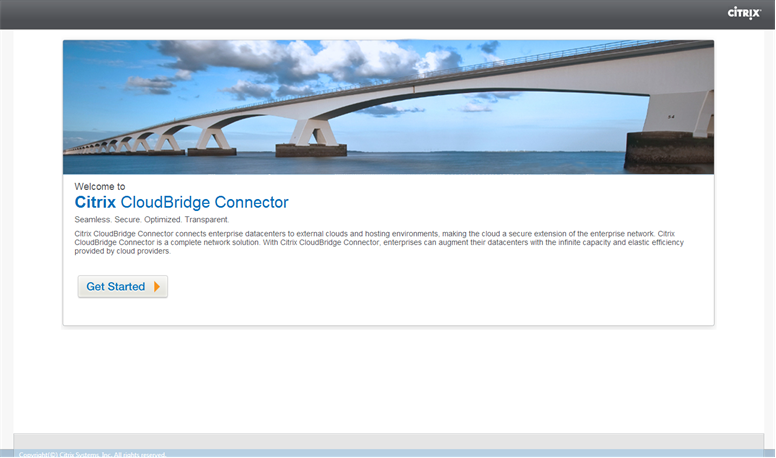
The first time you configure a CloudBridge Connector tunnel on the appliance, a Welcome screen appears.
-
On the Welcome screen click Get Started.
Note:
If you already have a CloudBridge Connector tunnel configured on the NetScaler appliance, the Welcome screen does not appear, so you do not click Get Started.
-
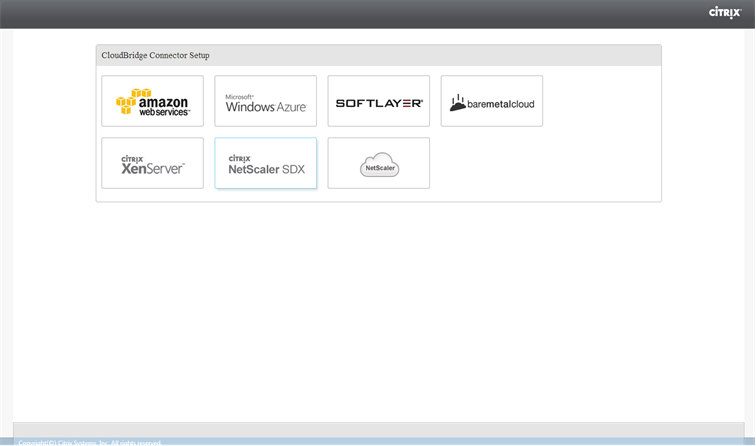
In the CloudBridge Connector Setup pane, click amazon web services
-
In the Amazon pane, provide your AWS account credentials: AWS Access Key ID and AWS Secret Access Key. You can obtain these access keys from the AWS GUI console. Click Continue.
Note
Earlier, the Setup wizard always connects to the same AWS region even when another region is selected. As a result, configuring CloudBridge Connector tunnel to a NetScaler VPX running on the selected AWS region used to fail. This issue has been fixed now.
-
In the NetScaler pane, select the NSIP address of the NetScaler virtual appliance running on AWS. Then, provide your account credentials for the NetScaler virtual appliance. Click Continue.
-
In the CloudBridge Connector Setting pane, set the following parameter:
-
CloudBridge Connector Name—Name for the CloudBridge Connector configuration on the local appliance. Must begin with an ASCII alphabetic or underscore (_) character, and must contain only ASCII alphanumeric, underscore, hash (#), period (.), space, colon (:), at (@), equals (=), and hyphen (-) characters. Cannot be changed after the CloudBridge Connector configuration is created.
-
-
Under Local Setting, set the following parameter:
-
Subnet IP—IP address of the local endpoint of the CloudBridge Connector tunnel. Must be a public IP address of type SNIP.
-
-
Under Remote Setting, set the following parameter:
-
Subnet IP—IP address of the CloudBridge Connector tunnel end point on the AWS side. Must be an IP address of type SNIP on the NetScaler VPX instance on AWS.
-
NAT—Public IP address (EIP) in AWS that is mapped to the SNIP configured on the NetScaler VPX instance on AWS.
-
-
Under PBR Setting, set the following parameters:
-
Operation—Either the equals (=) or does not equal (\!=) logical operator.
-
Source IP Low—Lowest source IP address to match against the source IP address of an outgoing IPv4 packet.
-
Source IP High—Highest source IP address to match against the source IP address of an outgoing IPv4 packet.
-
Operation—Either the equals (=) or does not equal (\!=) logical operator.
-
Destination IP Low—Lowest destination IP address to match against the destination IP address of an outgoing IPv4 packet.
-
Destination IP High—Highest destination IP address to match against the destination IP address of an outgoing IPv4 packet.
-
-
(Optional) Under Security Settings, set the following IPSec protocol parameters for the CloudBridge Connector tunnel:
-
Encryption Algorithm—Encryption algorithm to be used by the IPSec protocol in the CloudBridge tunnel.
-
Hash Algorithm—Hash algorithm to be used by the IPSec protocol in the CloudBridge tunnel.
-
Key— Select one of the following IPSec authentication methods to be used by the two peers to mutually authenticate.
-
Auto Generate Key— Authentication based on a text string, called a pre-shared key (PSK), generated automatically by the local appliance. The PSKs keys of the peers are matched against each other for authentication.
-
Specific Key—Authentication based on a manually entered PSK. The PSKs of the peers are matched against each other for authentication.
-
Pre Shared Security Key—The text string entered for pre-shared key based authentication.
-
-
Upload Certificates—Authentication based on digital certificates.
-
Public Key—A local digital certificate to be used to authenticate the local peer to the remote peer before establishing IPSec security associations. The same certificate should be present and set for the Peer Public Key parameter in the peer.
-
Private Key—Private key of the local digital certificate.
-
Peer Public Key—Digital certificate of the peer. Used to authenticate the peer to the local end point before establishing IPSec security associations. The same certificate should be present and set for the Public key parameter in the peer.
-
-
-
-
Click Done.
The new CloudBridge Connector tunnel configuration on the NetScaler appliance in the datacenter appears on the Home tab of the GUI. The corresponding new CloudBridge Connector tunnel configuration on the NetScaler VPX appliance in the AWS cloud appears on the GUI. The current status of the CloudBridge connector tunnel is indicated in the Configured CloudBridge pane. A green dot indicates that the tunnel is up. A red dot indicates that the tunnel is down.
Monitoring the CloudBridge Connector tunnel
You can monitor the performance of CloudBridge Connector tunnels on a NetScaler appliance by using CloudBridge Connector tunnel statistical counters. For more information about displaying CloudBridge Connector tunnel statistics on a NetScaler appliance, see Monitoring CloudBridge Connector Tunnels.