
JSON Denial-of-Service protection check
The JSON denial-of-service (DoS) check examines an incoming JSON request and validates if there is any data that matches the characteristics of a DoS attack. If the request had JSON violations, the appliance blocks the request, logs the data, sends an SNMP alert, and also displays a JSON error page. The purpose of the JSON DoS check is to prevent an attacker from sending JSON request to launch DoS attacks on your JSON applications or website.
When a client sends a request to a NetScaler appliance, the JSON parser parses the request payload and if a violation is observed, the appliance enforces constraints on the JSON structure. The constraint enforces a size limit on the JSON request. As a result, if any JSON violation was observed, the appliance applies an action and responds with the JSON error page.
Related information
JSON DoS rules
When the appliance receives a JSON request, The JSON DOS protection enforces size limit on the following DoS parameters in the request payload.
-
maximum depth: Maximum nesting (depth) of JSON document. This check protects against documents that have excessive depth of hierarchy.
-
maximum document length: Maximum document length of JSON document.
-
maximum array length: Maximum array length in the any of JSON object. This check protects against arrays having large lengths.
-
maximum string length: Maximum string length in the JSON. This check protects against strings that have large length.
-
maximum object key count: Maximum key count in the any of JSON object. This check protects against objects that have large number of keys.
-
maximum object key length: Maximum key length in the any of JSON object. This check protects against objects that have large keys.
Following is a list of JSON DoS rules validated during JSON parsing.
-
JSONMaxContainerDepth. This check can be enabled by configuring the JSONMaxContainerDepth check and by default the option is OFF.
-
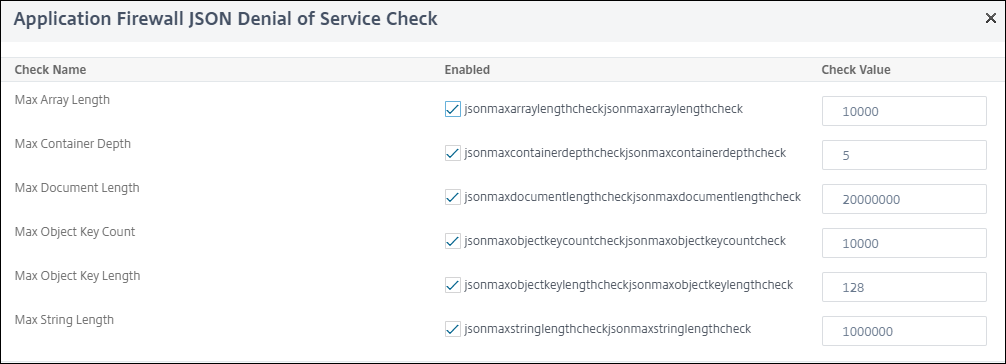
JSONMaxContainerDepth. This check can be enabled/disabled by configurable option JSONMaxContainerDepthCheck and default value can be changed by option JSONMaxContainerDepth. However, you can vary the maximum levels to a value ranging from 1 to 127. Default value: 5, Minimum value: 1, Maximum value: 127
-
JSONMaxDocumentLength. This check can be enabled by configuring the JSONMaxDocumentLength check and the default option is OFF.
-
JSONMaxDocumentLength. This check can be enabled by configuring the JSONMaxDocumentLength check and the default length is set to 20000000 bytes. Minimum value: 1, Maximum value: 2147483647
-
JSONMaxObjectKeyCount. The rule validates if the JSON maximum object key count check is turned on or off. Possible values: ON, OFF, Default value: OFF
-
JSONMaxObjectKeyCount. This check can be enabled by configuring the JSONMaxObjectKeyCount check. The check protects against objects that have large number of keys and the default value is set to 1000 bytes. Minimum value: 0, Maximum value: 2147483647
-
JSONMaxObjectKeyLength. This check can be enabled by configuring the JSONMaxObjectKeyLength check. The rule validates if the JSON maximum object key length check is turned on or off. By default it is turned OFF.
-
JSONMaxObjectKeyLength. The check protects against objects that have large key length. Default value: 128. Minimum value: 1, Maximum value: 2147483647
-
JSONMaxArrayLength. The rule validates if the JSON maximum array length check is ON or OFF. By default it is turned off.
-
JSONMaxArrayLength. The check protects against arrays that has large lengths. By default, the value is set to 10000. Minimum value: 1, Maximum value: 2147483647
-
JSONMaxStringLength. This check can be enabled by configuring the JSONMaxStringLength check. The check validates if the JSON maximum string length is ON or OFF. By default it is turned off.
-
JSONMaxStringLength. The check protects against strings that has large length. By default, it is set to 1000000. Minimum value: 1, Maximum value: 2147483647
Configure JSON DoS protection check
For configure JSON DoS protection, you must complete the following steps:
-
Add application firewall profile for JSON.
-
Set application firewall profile for JSON DoS settings.
-
Configure JSON DoS variables by binding the application firewall profile.
Add application firewall profile for JSON DoS protection
You must first create a profile that specifies how the application firewall must protect your JSON web content from JSON DoS attack. At the command prompt, type:
add appfw profile <name> -type (HTML | XML | JSON)
Note:
When you set the profile type as JSON, other checks such as HTML or XML will not applicable.
Example
add appfw profile profile1 –type JSON
Set application firewall profile for JSON DoS protection
You must configure the profile for one or more JSON DoS actions and JSON DoS error object to be set on the application firewall profile. At the command prompt, type:
set appfw profile <name> -JSONDoSAction [block] | [log] | [stats] | [none]
Block - Block connections that violate this security check. Log - Log violations of this security check. Stats - Generate statistics for this security check. None - Disable all actions for this security check.
Note:
To enable one or more actions, type "set appfw profile -JSONDoSAction" followed by the actions to be enabled.
Example
set appfw profile profile1 -JSONDoSAction block log stat
Configure DoS variables by binding application firewall profile
To provide JSON DoS protection, you must bind the application firewall profile with JSON DoS settings. At the command prompt, type:
bind appfw profile <name> -JSONDoSURL <expression> [-JSONMaxContainerDepthCheck ( ON | OFF ) [-JSONMaxContainerDepth <positive_integer>]] [-JSONMaxDocumentLengthCheck ( ON | OFF ) [-JSONMaxDocumentLength <positive_integer>]] [-JSONMaxObjectKeyCountCheck ( ON | OFF ) [-SONMaxObjectKeyCount <positive_integer>]] [-JSONMaxObjectKeyLengthCheck ( ON | OFF ) [-JSONMaxObjectKeyLength <positive_integer>]] [-JSONMaxArrayLengthCheck ( ON | OFF ) [-JSONMaxArrayLength <positive_integer>]] [-JSONMaxStringLengthCheck ( ON | OFF ) [-JSONMaxStringLength <positive_integer>]]
Example
bind appfw profile profile1 -JSONDoSURL “.*” -JSONMaxContainerDepthCheck ON
Note:
The JSON DoS checks will be applicable only if the profile type is selected as JSON. Also, the SQL, cross-site scripting, Field format and Form field signatures are applied on Query parameters in cases of JSON profile.
Import JSON errorpage
If an incoming request had a DoS attack and when you block the request, the appliance displays an error message. For doing this, you must import the JSON error page. At the command prompt, type:
import appfw jsonerrorpage <src> <name> [-comment <string>] [-overwrite]
Where,
src. URL (protocol, host, path, and name) for the location at which to store the imported JSON error object.
Note:
The import fails if the object to be imported is on an HTTPS server that requires client certificate authentication for access. This is a mandatory argument. Maximum Length: 2047.
Name. Name to assign to the JSON error object on the NetScaler. This is a mandatory argument. Maximum Length: 31 Comment. Any comments to preserve information about the JSON error object. Maximum Length: 255 Overwrite. Overwrite any existing JSON error object of the same name.
Sample configuration
Add appfw prof profjson –type JSON
 Bind appfw prof profjson –JSONDoSURL “.*” -JSONMaxDocumentLengthCheck ON  -JSONMaxDocumentLength 30 -JSONMaxContainerDepthCheck ON  -JSONMaxContainerDepth  3 JSONMaxObjectKeyCountCheck ON  -JSONMaxObjectKeyCount  4 -JSONMaxObjectKeyLengthCheck  ON   -JSONMaxObjectKeyLength  10 -JSONMaxArrayLengthCheck ON  -JSONMaxArrayLength  5 -JSONMaxStringLengthCheck ON -JSONMaxStringLength 30
Sample Payloads, Log Messages and Counters:
JSONMaxDocumentLength Violation
JSONMaxDocumentLength: 30 Payload: {“a”:”A”,”b”:”B”,”c”:”C”,”d”:”D”,”e”:”E”}
Log Message:
Document Length exceeds 20000000 May 29 20:23:32 <local0.info> 10.217.31.243 05/29/2019:20:23:32 GMT 0-PPE-0 : default APPFW APPFW_JSON_DOS_MAX_DOCUMENT_LENGTH 136 0 : 10.217.32.134 114-PPE0 - profjson http://10.217.30.120/forms/login.html Document exceeds maximum document length (30). cn1=30467 cn2=115 cs1=profjson cs2=PPE0 cs4=ALERT cs5=2019 act=blocked
Counters:
1 0 6 as_viol_json_dos
 2 0 3 as_viol_json_dos_max_document_length
 3 0 6 as_log_json_dos
 4 0 3 as_log_json_dos_max_document_length
 5 0 6 as_viol_json_dos_profile appfw__(profile1)
 6 0 3 as_viol_json_dos_max_document_length_profile appfw__(profile1)
 7 0 6 as_log_json_dos_profile appfw__(profile1)
 8 0 3 as_log_json_dos_max_document_length_profile appfw__(profile1)
JSONMaxContainerDepth Violation
JSONMaxContainerDepth: 3 Payload: {“a”: {”b”: {“c”: {“d”: { ”e” : “f” }}}}}
Log Message:
May 29 19:33:59 <local0.info> 10.217.31.243 05/29/2019:19:33:59 GMT 0-PPE-1 : default APPFW APPFW_JSON_DOS_MAX_CONTAINER_DEPTH 4626 0 : 10.217.31.247 22-PPE1 – profjson http://10.217.30.120/forms/login.html Document at offset (15) exceeds maximum container depth (3). cn1=30466 cn2=113 cs1=profjson cs2=PPE0 cs4=ALERT cs5=2019 act=blocked
Counters:
36 20999 7 1 0 as_viol_json_dos
 37 0 6 1 0 as_viol_json_dos_max_container_depth
 38 0 7 1 0 as_log_json_dos
 39 0 6 1 0 as_log_json_dos_max_container_depth
 40 0 7 1 0 as_viol_json_dos_profile appfw__(profile1)
 41 0 6 1 0 as_viol_json_dos_max_container_depth_profile appfw__(profile1)
 42 0 7 1 0 as_log_json_dos_profile appfw__(profile1)
 43 0 6 1 0 as_log_json_dos_max_container_depth_profile appfw__(profile1)
JSONMaxObjectKeyCount Violation
JSONMaxObjectKeyCount: 4
Payload: {“a”: ”A”, “b”: “B”, “c”:“C”, “d” :“D”, ”e” : “E” }
Log Message:
May 30 19:42:41 <local0.info> 10.217.31.243 05/30/2019:19:42:41 GMT 0-PPE-1 : default APPFW APPFW_JSON_DOS_MAX_OBJECT_KEY_COUNT 457 0 : 10.217.32.134 219-PPE1 - profjson http://10.217.30.120/forms/login.html Object at offset (41) that exceeds maximum key count (4). cn1=30468 cn2=118 cs1=profjson cs2=PPE0 cs4=ALERT cs5=2019 act=blocked
Counters:
94 119105 15 1 0 as_viol_json_dos
 95 0 4 1 0 as_viol_json_dos_max_object_key_count
 96 0 15 1 0 as_log_json_dos
 97 0 4 1 0 as_log_json_dos_max_object_key_count
 98 0 15 1 0 as_viol_json_dos_profile appfw__(profile1)
 99 0 4 1 0 as_viol_json_dos_max_object_key_count_profile appfw__(profile1)
 100 0 15 1 0 as_log_json_dos_profile appfw__(profile1)
 101 0 4 1 0 as_log_json_dos_max_object_key_count_profile appfw__(profile1)
JSONMaxObjectKeyLength Violation
JSONMaxObjectKeyLength: 10 Payload: {“a”: ”A”, “b1234567890”: “B”, “c”:“C”, “d” :“D”, ”e” : “E” }
Log Message:
May 31 20:26:10 <local0.info> 10.217.31.243 05/31/2019:20:26:10 GMT 0-PPE-1 : default APPFW APPFW_JSON_DOS_MAX_OBJECT_KEY_LENGTH 102 0 : 10.217.32.134 89-PPE1 - profjson http://10.217.30.120/forms/login.html Object key(b1234567890) at offset (12) exceeds maximum key length (10). cn1=30469 cn2=118 cs1=profjson cs2=PPE0 cs4=ALERT cs5=2019 act=blocked
Counters:
242172 6 1 0 as_viol_json_dos
 0 1 1 0 as_viol_json_dos_max_object_key_length
 10 0 5 1 0 as_log_json_dos
 11 0 1 1 0 as_log_json_dos_max_object_key_length
 12 0 6 1 0 as_viol_json_dos_profile appfw__(profile1)
 13 0 1 1 0 as_viol_json_dos_max_object_key_length_profile appfw__(profile1)
 14 0 5 1 0 as_log_json_dos_profile appfw__(profile1)
 15 0 1 1 0 as_log_json_dos_max_object_key_length_profile appfw__(profile1)
JSONMaxArrayLength Violation
Log Message:
May 29 20:58:39 <local0.info> 10.217.31.243 05/29/2019:20:58:39 GMT 0-PPE-1 : default APPFW APPFW_JSON_DOS_MAX_ARRAY_LENGTH 4650 0 : 10.217.32.134 153-PPE1 -profjson http://10.217.30.120/forms/login.html Array at offset (37) that exceeds maximum array length (5). cn1=30469 cn2=120 cs1=profjson cs2=PPE0 cs4=ALERT cs5=2019 act=blocked
Counters:
36 182293 10 1 0 as_viol_json_dos
 37 0 1 1 0 as_viol_json_dos_max_array_length
 38 0 10 1 0 as_log_json_dos 39 0 1 1 0 as_log_json_dos_max_array_length
 40 0 10 1 0 as_viol_json_dos_profile appfw__(profile1)
 41 0 1 1 0 as_viol_json_dos_max_array_length_profile appfw__(profile1)
 42 0 10 1 0 as_log_json_dos_profile appfw__(profile1)
 43 0 1 1 0 as_log_json_dos_max_array_length_profile appfw__(profile1))
JSONMaxStringLength Violation
JSONMaxStringLength: 10
Log Message:
May 29 20:05:02 <local0.info> 10.217.31.243 05/29/2019:20:05:02 GMT 0-PPE-0 : default APPFW APPFW_JSON_DOS_MAX_STRING_LENGTH 134 0 : 10.217.32.134 80-PPE0 - profjson http://10.217.30.120/forms/login.html String(CcCcCcCcCcCcCc) at offset (27) that exceeds maximum string length (10). n1=30470 cn2=122 cs1=profjson cs2=PPE0 cs4=ALERT cs5=2019 act=blocked
Counters:
44 91079 3 1 0 as_viol_json_dos
 45 0 1 1 0 as_viol_json_dos_max_string_length
 46 0 3 1 0 as_log_json_dos
 47 0 1 1 0 as_log_json_dos_max_string_length
 48 0 3 1 0 as_viol_json_dos_profile appfw__(profile1)
 49 0 1 1 0 as_viol_json_dos_max_string_length_profile appfw__(profile1)
 50 0 3 1 0 as_log_json_dos_profile appfw__(profile1)
 51 0 1 1 0 as_log_json_dos_max_string_length_profile appfw__(profile1
Configure JSON DoS protection by using GUI
Follow the procedure below to set the JSON DoS protection settings.
-
On the navigation pane, navigate to Security > Profiles.
-
In the Profiles page, click Add.
-
In the NetScaler Web App Firewall Profile page, click Security Checks under Advanced Settings.
-
In the Security Checks section, go to JSON Denial of Service settings.
-
Click the executable icon near the checkbox.
-
Click Action Settings to access the JSON Denial of Service Settings page.
-
Select the JSON DoS action.
-
Click OK.
-
In the NetScaler Web App Firewall Profile page, click Relaxation Rules under Advanced Settings.
-
In Relaxation Rules section, select JSON Denial of Service settings and click Edit.
-
In the Application Firewall JSON Denial of Service Check set the JSON DoS validation values.
-
Click OK.
-
In the NetScaler Web App Firewall Profile page, click Profile Settings under Advanced Settings.
-
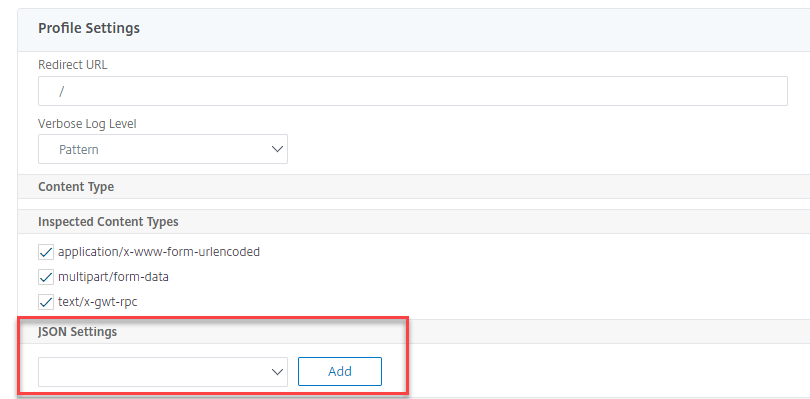
In the Profile Settings section, go to JSON Error Settings sub section to set JSON DoS error page.
-
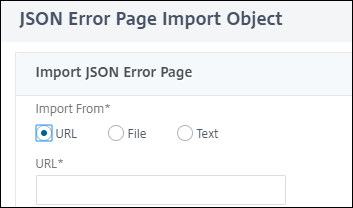
In the JSON Error Page Import Object page, set the following parameters:
-
Import from. Import the error page as text, file or URL.
-
URL. URL to redirect the user to the error page. 1 File. Select a file to be imported as JSON DoS error file.
-
Text. Enter the JSON file contents.
-
Click Continue.
-
File. Enter the file name.
-
File Content. Add the error file content.
-
Click OK.
-
-
Click OK.
-
Click Done.