
JSON サービス拒否保護チェック
JSON サービス拒否 (DoS) チェックは、受信 JSON リクエストを調べ、DoS 攻撃の特性と一致するデータがあるかどうかを検証します。リクエストに JSON 違反がある場合、アプライアンスはリクエストをブロックし、データをログに記録し、SNMP アラートを送信し、JSON エラーページも表示します。JSON DoS チェックの目的は、攻撃者が JSON リクエストを送信して JSON アプリケーションまたは Web サイトに DoS 攻撃を開始するのを防ぐことです。
クライアントがNetScalerアプライアンスに要求を送信すると、JSONパーサーは要求ペイロードを解析し、違反が検出された場合、アプライアンスはJSON構造に制約を適用します。この制約により、JSON リクエストにサイズ制限が適用されます。その結果、JSON 違反が検出されると、アプライアンスはアクションを適用し、JSON エラーページで応答します。
Related information
JSON DoSルール
アプライアンスが JSON リクエストを受信すると、JSON DOS 保護により、リクエストペイロード内の次の DoS パラメータにサイズ制限が適用されます。
-
最大深度:JSON ドキュメントの最大ネスト (深さ)。このチェックは、階層の深さが過度に深いドキュメントから保護します。
-
最大ドキュメント長:JSON ドキュメントの最大ドキュメント長。
-
配列の最大長:JSON オブジェクトの配列の最大長。このチェックは、長い配列に対して保護します。
-
文字列の最大長:JSON 内の文字列の最大長。このチェックは、長さの長い文字列から保護します。
-
最大オブジェクトキーカウント:JSON オブジェクトの最大キー数。このチェックにより、大量のキーを持つオブジェクトから保護されます。
-
オブジェクトキーの最大長:JSON オブジェクトのキーの最大長。このチェックは、大きなキーを持つオブジェクトから保護します。
JSON の解析中に検証される JSON DoS ルールのリストを次に示します。
-
JSONmaxコンテナの深さ。このチェックは jsonMaxContainerDepth チェックを設定することで有効にできます。デフォルトでは、このオプションは OFF です。
-
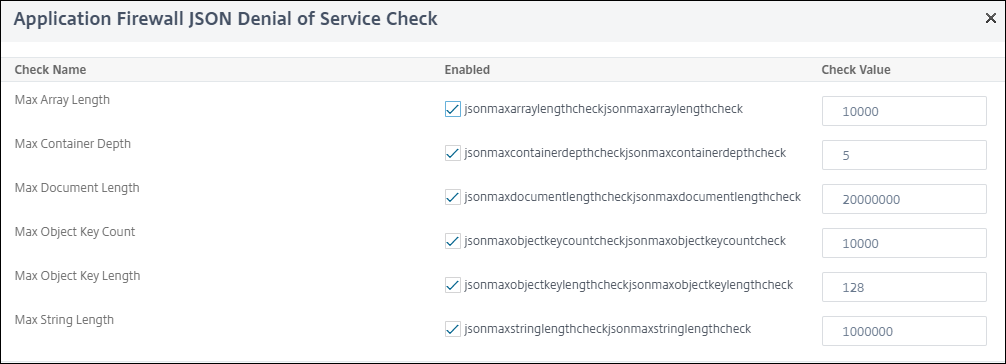
JSONmaxコンテナの深さ。このチェックは、設定可能なオプション jsonMaxContainerDepthCheck によって有効または無効にでき、デフォルト値は jsonMaxContainerDepth オプションで変更できます。ただし、最大レベルは 1 ~ 127 の範囲の値に変更できます。デフォルト値:5、最小値:1、最大値:127
-
jsonMaxDocumentLength。このチェックは、jsonMaxDocumentLength チェックを設定することで有効にできます。デフォルトのオプションは OFF です。
-
jsonMaxDocumentLength。このチェックは、jsonMaxDocumentLength チェックを設定することで有効にできます。デフォルトの長さは 20000000 バイトに設定されています。最小値:1, 最大値:2147483647
-
jsonMaxObjectKeyCount。このルールは、JSON の最大オブジェクトキー数チェックがオンかオフかを検証します。可能な値:オン、オフ、デフォルト値:OFF
-
jsonMaxObjectKeyCount。このチェックは、jsonMaxObjectKeyCount チェックを設定することで有効にできます。 このチェックでは、多数のキーを持つオブジェクトから保護され、デフォルト値は 1000 バイトに設定されています。最小値:0、最大値:2147483647
-
jsonMaxObjectKeyLength。このチェックは、jsonMaxObjectKeyLength チェックを設定することで有効にできます。このルールは、JSON オブジェクトキーの最大長チェックがオンかオフかを検証します。デフォルトではオフになっています。
-
jsonMaxObjectKeyLength。このチェックは、キーの長さが長いオブジェクトから保護します。デフォルト値は 128 です。最小値:1, 最大値:2147483647
-
jsonMaxArrayLength。このルールは、JSON 配列の最大長チェックが ON か OFF かを検証します。デフォルトではオフになっています。
-
jsonMaxArrayLength。このチェックは、長さが長いアレイから保護します。デフォルトでは、この値は 10000 に設定されています。最小値:1, 最大値:2147483647
-
JSONMaxStringLength。このチェックは、jsonMaxStringLength チェックを設定することで有効にできます。このチェックでは、JSON の最大文字列長が ON か OFF かを検証します。デフォルトではオフになっています。
-
JSONMaxStringLength。このチェックは、長さの長い文字列から保護します。デフォルトでは 1000000 に設定されています。最小値:1, 最大値:2147483647
JSON DoS 保護チェック
JSON DoS 保護を設定するには、次の手順を完了する必要があります。
-
JSON 用のアプリケーションファイアウォールプロファイルを追加します。
-
JSON DoS 設定のアプリケーションファイアウォールプロファイルを設定します。
-
アプリケーションファイアウォールプロファイルをバインドして JSON DoS 変数を設定します。
JSON DoS 保護用のアプリケーションファイアウォールプロファイルの追加
最初に、アプリケーションファイアウォールが JSON Web コンテンツを JSON DoS 攻撃から保護する方法を指定するプロファイルを作成する必要があります。 コマンドプロンプトで入力します:
add appfw profile <name> -type (HTML | XML | JSON)
注記:
プロファイルタイプを JSON に設定すると、HTML や XML などの他のチェックは適用されません。
例
add appfw profile profile1 –type JSON
JSON DoS 保護用のアプリケーションファイアウォールプロファイルの設定
アプリケーションファイアウォールプロファイルに設定される 1 つ以上の JSON DoS アクションと JSON DoS エラーオブジェクトのプロファイルを設定する必要があります。 コマンドプロンプトで入力します:
set appfw profile <name> -JSONDoSAction [block] | [log] | [stats] | [none]
Block-このセキュリティー検査に違反する接続をブロックします。 Log - このセキュリティチェックの違反を記録します。 Stats-このセキュリティー検査の統計を生成します。 -このセキュリティー検査に対するすべてのアクションを無効にします。
注記:
1 つ以上のアクションを有効にするには、「set appfw profile-jsonDosAction」に続けて有効にするアクションを入力します。
例
set appfw profile profile1 -JSONDoSAction block log stat
アプリケーションファイアウォールプロファイルをバインドして DoS 変数を構成する
JSON DoS 保護を提供するには、アプリケーションファイアウォールプロファイルを JSON DoS 設定にバインドする必要があります。 コマンドプロンプトで入力します:
bind appfw profile <name> -JSONDoSURL <expression> [-JSONMaxContainerDepthCheck ( ON | OFF ) [-JSONMaxContainerDepth <positive_integer>]] [-JSONMaxDocumentLengthCheck ( ON | OFF ) [-JSONMaxDocumentLength <positive_integer>]] [-JSONMaxObjectKeyCountCheck ( ON | OFF ) [-SONMaxObjectKeyCount <positive_integer>]] [-JSONMaxObjectKeyLengthCheck ( ON | OFF ) [-JSONMaxObjectKeyLength <positive_integer>]] [-JSONMaxArrayLengthCheck ( ON | OFF ) [-JSONMaxArrayLength <positive_integer>]] [-JSONMaxStringLengthCheck ( ON | OFF ) [-JSONMaxStringLength <positive_integer>]]
例
bind appfw profile profile1 -JSONDoSURL “.*” -JSONMaxContainerDepthCheck ON
注記:
JSON DoS チェックは、プロファイルタイプが JSON として選択された場合にのみ適用されます。また、JSON プロファイルの場合は、SQL、クロスサイトスクリプティング、フィールド形式、およびフォームフィールドシグネチャが Query パラメータに適用されます。
JSON エラーページのインポート
着信要求に DoS 攻撃があった場合、その要求をブロックすると、アプライアンスはエラーメッセージを表示します。そのためには、JSON エラーページをインポートする必要があります。 コマンドプロンプトで入力します:
import appfw jsonerrorpage <src> <name> [-comment <string>] [-overwrite]
各項目の意味は次のとおりです。
src。 インポートされた JSON エラーオブジェクトを格納する場所の URL (プロトコル、ホスト、パス、名前)。
注記:
インポートするオブジェクトが、アクセスにクライアント証明書認証を必要とする HTTPS サーバ上にある場合、インポートは失敗します。これは必須の議論です。 最大長:2047
名前。 NetScaler上のJSONエラーオブジェクトに割り当てる名前。 これは必須の議論です。 最大長:31 コメント. JSON エラーオブジェクトに関する情報を保持するコメント。 最大長:255 上書き。 同じ名前の既存の JSON エラーオブジェクトを上書きします。
設定例
Add appfw prof profjson –type JSON
 Bind appfw prof profjson –JSONDoSURL “.*” -JSONMaxDocumentLengthCheck ON  -JSONMaxDocumentLength 30 -JSONMaxContainerDepthCheck ON  -JSONMaxContainerDepth  3 JSONMaxObjectKeyCountCheck ON  -JSONMaxObjectKeyCount  4 -JSONMaxObjectKeyLengthCheck  ON   -JSONMaxObjectKeyLength  10 -JSONMaxArrayLengthCheck ON  -JSONMaxArrayLength  5 -JSONMaxStringLengthCheck ON -JSONMaxStringLength 30
ペイロード、ログメッセージ、カウンタの例:
JSONmaxDocumentLength 違反
JSONMaxDocumentLength: 30 Payload: {“a”:”A”,”b”:”B”,”c”:”C”,”d”:”D”,”e”:”E”}
ログメッセージ:
Document Length exceeds 20000000 May 29 20:23:32 <local0.info> 10.217.31.243 05/29/2019:20:23:32 GMT 0-PPE-0 : default APPFW APPFW_JSON_DOS_MAX_DOCUMENT_LENGTH 136 0 : 10.217.32.134 114-PPE0 - profjson http://10.217.30.120/forms/login.html Document exceeds maximum document length (30). cn1=30467 cn2=115 cs1=profjson cs2=PPE0 cs4=ALERT cs5=2019 act=blocked
カウンター:
1 0 6 as_viol_json_dos
 2 0 3 as_viol_json_dos_max_document_length
 3 0 6 as_log_json_dos
 4 0 3 as_log_json_dos_max_document_length
 5 0 6 as_viol_json_dos_profile appfw__(profile1)
 6 0 3 as_viol_json_dos_max_document_length_profile appfw__(profile1)
 7 0 6 as_log_json_dos_profile appfw__(profile1)
 8 0 3 as_log_json_dos_max_document_length_profile appfw__(profile1)
jsonMaxContainerDepth 違反
JSONMaxContainerDepth: 3 Payload: {“a”: {”b”: {“c”: {“d”: { ”e” : “f” }}}}}
ログメッセージ:
May 29 19:33:59 <local0.info> 10.217.31.243 05/29/2019:19:33:59 GMT 0-PPE-1 : default APPFW APPFW_JSON_DOS_MAX_CONTAINER_DEPTH 4626 0 : 10.217.31.247 22-PPE1 – profjson http://10.217.30.120/forms/login.html Document at offset (15) exceeds maximum container depth (3). cn1=30466 cn2=113 cs1=profjson cs2=PPE0 cs4=ALERT cs5=2019 act=blocked
カウンター:
36 20999 7 1 0 as_viol_json_dos
 37 0 6 1 0 as_viol_json_dos_max_container_depth
 38 0 7 1 0 as_log_json_dos
 39 0 6 1 0 as_log_json_dos_max_container_depth
 40 0 7 1 0 as_viol_json_dos_profile appfw__(profile1)
 41 0 6 1 0 as_viol_json_dos_max_container_depth_profile appfw__(profile1)
 42 0 7 1 0 as_log_json_dos_profile appfw__(profile1)
 43 0 6 1 0 as_log_json_dos_max_container_depth_profile appfw__(profile1)
jsonMaxObjectKeycount 違反
jsonMaxObjectKeycount: 4
Payload: {“a”: ”A”, “b”: “B”, “c”:“C”, “d” :“D”, ”e” : “E” }
ログメッセージ:
May 30 19:42:41 <local0.info> 10.217.31.243 05/30/2019:19:42:41 GMT 0-PPE-1 : default APPFW APPFW_JSON_DOS_MAX_OBJECT_KEY_COUNT 457 0 : 10.217.32.134 219-PPE1 - profjson http://10.217.30.120/forms/login.html Object at offset (41) that exceeds maximum key count (4). cn1=30468 cn2=118 cs1=profjson cs2=PPE0 cs4=ALERT cs5=2019 act=blocked
カウンター:
94 119105 15 1 0 as_viol_json_dos
 95 0 4 1 0 as_viol_json_dos_max_object_key_count
 96 0 15 1 0 as_log_json_dos
 97 0 4 1 0 as_log_json_dos_max_object_key_count
 98 0 15 1 0 as_viol_json_dos_profile appfw__(profile1)
 99 0 4 1 0 as_viol_json_dos_max_object_key_count_profile appfw__(profile1)
 100 0 15 1 0 as_log_json_dos_profile appfw__(profile1)
 101 0 4 1 0 as_log_json_dos_max_object_key_count_profile appfw__(profile1)
jsonMaxObjectKeyLength 違反
JSONMaxObjectKeyLength: 10 Payload: {“a”: ”A”, “b1234567890”: “B”, “c”:“C”, “d” :“D”, ”e” : “E” }
ログメッセージ:
May 31 20:26:10 <local0.info> 10.217.31.243 05/31/2019:20:26:10 GMT 0-PPE-1 : default APPFW APPFW_JSON_DOS_MAX_OBJECT_KEY_LENGTH 102 0 : 10.217.32.134 89-PPE1 - profjson http://10.217.30.120/forms/login.html Object key(b1234567890) at offset (12) exceeds maximum key length (10). cn1=30469 cn2=118 cs1=profjson cs2=PPE0 cs4=ALERT cs5=2019 act=blocked
カウンター:
242172 6 1 0 as_viol_json_dos
 0 1 1 0 as_viol_json_dos_max_object_key_length
 10 0 5 1 0 as_log_json_dos
 11 0 1 1 0 as_log_json_dos_max_object_key_length
 12 0 6 1 0 as_viol_json_dos_profile appfw__(profile1)
 13 0 1 1 0 as_viol_json_dos_max_object_key_length_profile appfw__(profile1)
 14 0 5 1 0 as_log_json_dos_profile appfw__(profile1)
 15 0 1 1 0 as_log_json_dos_max_object_key_length_profile appfw__(profile1)
JSONMaxArrayLength Violation
ログメッセージ:
May 29 20:58:39 <local0.info> 10.217.31.243 05/29/2019:20:58:39 GMT 0-PPE-1 : default APPFW APPFW_JSON_DOS_MAX_ARRAY_LENGTH 4650 0 : 10.217.32.134 153-PPE1 -profjson http://10.217.30.120/forms/login.html Array at offset (37) that exceeds maximum array length (5). cn1=30469 cn2=120 cs1=profjson cs2=PPE0 cs4=ALERT cs5=2019 act=blocked
カウンター:
36 182293 10 1 0 as_viol_json_dos
 37 0 1 1 0 as_viol_json_dos_max_array_length
 38 0 10 1 0 as_log_json_dos 39 0 1 1 0 as_log_json_dos_max_array_length
 40 0 10 1 0 as_viol_json_dos_profile appfw__(profile1)
 41 0 1 1 0 as_viol_json_dos_max_array_length_profile appfw__(profile1)
 42 0 10 1 0 as_log_json_dos_profile appfw__(profile1)
 43 0 1 1 0 as_log_json_dos_max_array_length_profile appfw__(profile1))
JSONmaxStringLength 違反
JSON 最大文字列長:10
ログメッセージ:
May 29 20:05:02 <local0.info> 10.217.31.243 05/29/2019:20:05:02 GMT 0-PPE-0 : default APPFW APPFW_JSON_DOS_MAX_STRING_LENGTH 134 0 : 10.217.32.134 80-PPE0 - profjson http://10.217.30.120/forms/login.html String(CcCcCcCcCcCcCc) at offset (27) that exceeds maximum string length (10). n1=30470 cn2=122 cs1=profjson cs2=PPE0 cs4=ALERT cs5=2019 act=blocked
カウンター:
44 91079 3 1 0 as_viol_json_dos
 45 0 1 1 0 as_viol_json_dos_max_string_length
 46 0 3 1 0 as_log_json_dos
 47 0 1 1 0 as_log_json_dos_max_string_length
 48 0 3 1 0 as_viol_json_dos_profile appfw__(profile1)
 49 0 1 1 0 as_viol_json_dos_max_string_length_profile appfw__(profile1)
 50 0 3 1 0 as_log_json_dos_profile appfw__(profile1)
 51 0 1 1 0 as_log_json_dos_max_string_length_profile appfw__(profile1
GUI を使用して JSON DoS プロテクションを設定する
JSON DoS 保護設定を設定するには、次の手順に従います。
-
「 プロファイル 」ページで、「 追加」をクリックします。
-
NetScaler Web App Firewall プロファイルページで 、[ 詳細設定]の[セキュリティチェック]をクリックします。
-
チェックボックスの近くにある実行可能アイコンをクリックします。
-
JSON DoS アクションを選択します。
-
[OK] をクリックします。
-
[NetScaler Web App Firewall プロファイル ]ページで、[ 詳細設定 ]の[ 緩和ルール]をクリックします。
-
アプリケーションファイアウォール JSON サービス拒否チェックで 、JSON DoS 検証値を設定します。
-
[OK] をクリックします。
-
NetScaler Web App Firewall[プロファイル ]ページで、[ 詳細設定]の[プロファイル設定**]**をクリックします。
-
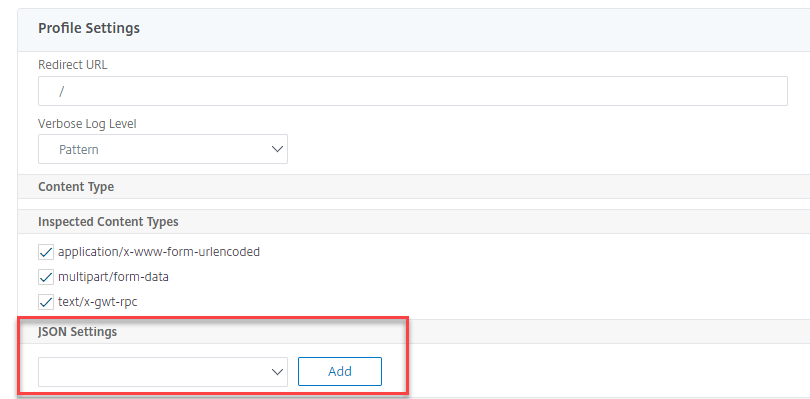
-
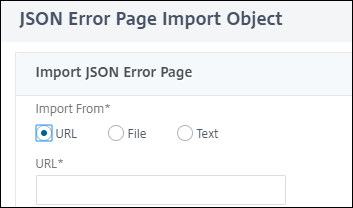
JSON エラーページの「オブジェクトのインポート 」ページで、次のパラメータを設定します。
-
からインポートします。エラーページをテキスト、ファイル、または URL としてインポートします。
-
URL。ユーザーをエラーページにリダイレクトする URL。 1 ファイル。JSON DoS エラーファイルとしてインポートするファイルを選択します。
-
テキスト。JSON ファイルの内容を入力します。
-
[続行] をクリックします。
-
ファイル。ファイル名を入力します。
-
ファイルコンテンツ。エラーファイルの内容を追加します。
-
[OK] をクリックします。
-
-
[OK] をクリックします。
-
[完了] をクリックします。