
Application Layer Gateway for SIP Protocol
Using Large Scale NAT (LSN) with Session Initiation Protocol (SIP) is complicated, because SIP messages contain IP addresses in the SIP headers as well as in the SIP body. When LSN is used with SIP, the SIP headers contain information about the caller and the receiver, and the device translates this information to hide it from the outside network. The SIP body contains the Session Description Protocol (SDP) information, which includes IP addresses and port numbers for transmission of the media.
SIP ALG adheres to the following RFCs:
-
RFC 3261
-
RFC 3581
-
RFC 4566
-
RFC 4475
Note
SIP ALG is supported in a NetScaler standalone appliance, in a NetScaler high availability setup, as well as in a NetScaler cluster setup.
Related information
How SIP ALG Works
How IP address translation is performed depends on the type and direction of the message. A message can be any of the following:
-
Inbound request
-
Outbound response
-
Outbound request
-
Inbound response
For an outgoing message, the private IP address and port number of the SIP client are replaced with the NetScaler owned public IP address and port number, called the LSN pool IP address and port number, specified during LSN configuration. For an incoming message, the LSN pool IP address and the port number are replaced with the private address of the client. If the message contains any public IP addresses, the NetScaler SIP ALG retains them. Also, a pinhole is created on the:
-
LSN pool IP address and port on behalf of the private client, so that the messages that arrive at this IP address and port from the public network are treated as SIP messages.
-
Public IP address and port on behalf of the public clients, so that the messages that arrive at this IP address and port from the private network are treated as SIP messages.
When a SIP message is sent out across the network, the SIP Application Layer Gateway (ALG) collects information from the message and translates the IP addresses in the following headers into LSN pool IP addresses:
-
Via
-
Contact
-
Route
-
Record-Route
In the following sample SIP request message, LSN replaces the IP addresses in the header fields to hide them from the outside network.
INVITE adam@10.102.185.156 SIP/2.0 Via: SIP/2.0/UDP 192.170.1.161:62914 From: eve@10.120.210.3 To: adam@10.102.185.156 Call-ID: a12abcde@10.120.210.3 Contact: adam@10.102.185.156 Route: <sip:netscreen@10.150.20.3:5060> Record-Route: <sip:netscreen@10.150.20.3:5060>
When a message containing SDP information arrives, the SIP ALG collects information from the message and translates the IP addresses in the following fields into LSN pool IP addresses and port numbers:
-
c= (connection information)This field can appear at the session or media level. It appears in the following format:c=
<network-type><address-type><connection-address>If the destination IP address is a unicast IP address, the SIP ALG creates pinholes by using the IP address and port numbers specified in the m= field. -
m= (media announcement)This field appears at the media level and contains the description of the media. It appears in the following format:m=
<media><port><transport><fmt list> -
a=
(information about the media field)This field can appear at the session or media level, in the following format:a=<attribute>a=<attribute>:<value>
The following excerpt from a sample SDP section shows the fields that are translated for resource allocation.
o=user 2344234 55234434 IN IP4 10.150.20.3
c=IN IP4 10.150.20.3
m=audio 43249 RTP/AVP 0
The following table shows how SIP payload is translated.
| Inbound Request (from public to private) | To | None |
| From | None | |
| Call-ID | None | |
| Via | None | |
| Request-URI | Replace LSN pool IP address with private IP address | |
| Contact | None | |
| Record-Route | None | |
| Route | None | |
| Outbound Response (from private to public) | To | None |
| From | None | |
| Call-ID | None | |
| Via | None | |
| Request-URI | Replace private IP address with LSN pool IP address | |
| Contact | Replace private IP address with LSN pool IP address | |
| Record-Route | None | |
| Route | None | |
| Outbound Request (from private to public) | To | None |
| From | None | |
| Call-ID | None | |
| Via | Replace private IP address with LSN pool IP address | |
| Request-URI | None | |
| Contact | Replace private IP address with LSN pool IP address | |
| Record-Route | None | |
| Route | None | |
| Inbound Response (from public to private) | To | None |
| From | None | |
| Call-ID | None | |
| Via | Replace LSN pool IP address with private IP address | |
| Request-URI | None | |
| Contact | Retain public IP address, if present | |
| Record-Route | None | |
| Route | None |
Limitations of SIP ALG
A SIP ALG has the following limitations:
-
Only SDP payload is supported.
-
The following are not supported:
-
Multicast IP addresses
-
Encrypted SDP
-
SIP TLS
-
FQDN translation
-
SIP layer authentication
-
TD/partitioning
-
Multipart body
-
SIP messages over IPv6 network
-
Line folding
-
Tested SIP Clients and Proxy Servers
The following SIP clients and proxy server have been tested with SIP ALG:
-
SIP Clients: X-Lite, Zoiper, Ekiga. Avaya
-
Proxy Server: openSIPS
LSN SIP Scenario: SIP Proxy Outside the Private Network (Public Network)
SIP Client Registration
For a typical SIP call, SIP client must register with the SIP registrar by composing a REGISTER request and sending it to the SIP registrar. The NetScaler appliance’s SIP ALG intercepts the request, replaces the IP address and port number in the request with the LSN pool IP address and port number provided in the LSN configuration, and forwards the request to the SIP registrar. The SIP ALG then opens a pinhole in the NetScaler configuration to allow further SIP communication between the SIP client and the SIP registrar. The SIP registrar sends a 200 OK response to the SIP client over the LSN pool IP address and port number. The NetScaler appliance captures this response in the pinhole, and the SIP ALG replaces the SIP header, putting the original Contact, Via, Route, and Record-Route SIP fields back into the message. The SIP ALG then forwards the message to the SIP client. The following figure shows how SIP ALG uses LSN in a SIP call registration flow.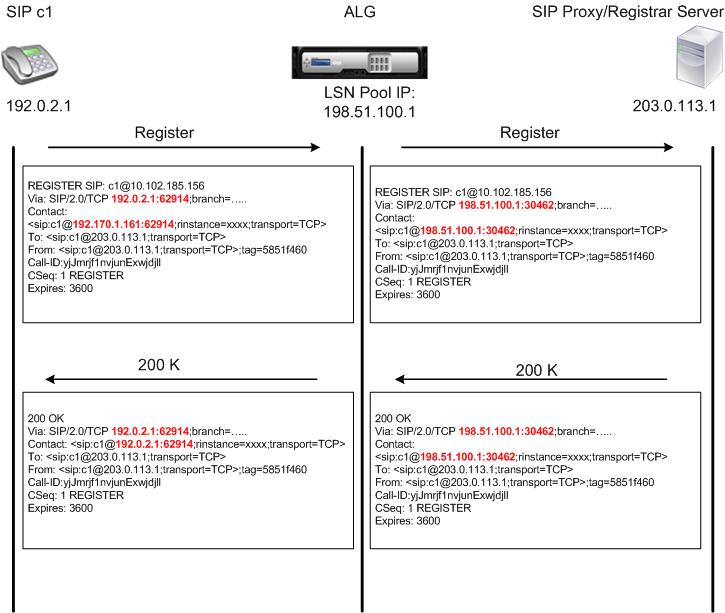
Outgoing Calls
A SIP call is initiated with a SIP INVITE message sent from the internal to the external network. The SIP ALG performs NAT on the IP addresses and port numbers in the Via, Contact, Route, and Record-Route SIP header fields, replacing them with the LSN pool IP address and port number. LSN stores these mappings for subsequent SIP messages in the SIP call. The SIP ALG then opens separate pinholes in the NetScaler configuration to allow SIP and media through the NetScaler appliance on the dynamically assigned ports specified in the SDP and SIP headers. When a 200 OK message arrives at the NetScaler, it is captured by one of the created pinholes. The SIP ALG replaces the SIP header, restoring the original Contact, Via, Route, and Record-Route SIP fields, and then forwards the message to the internal SIP client.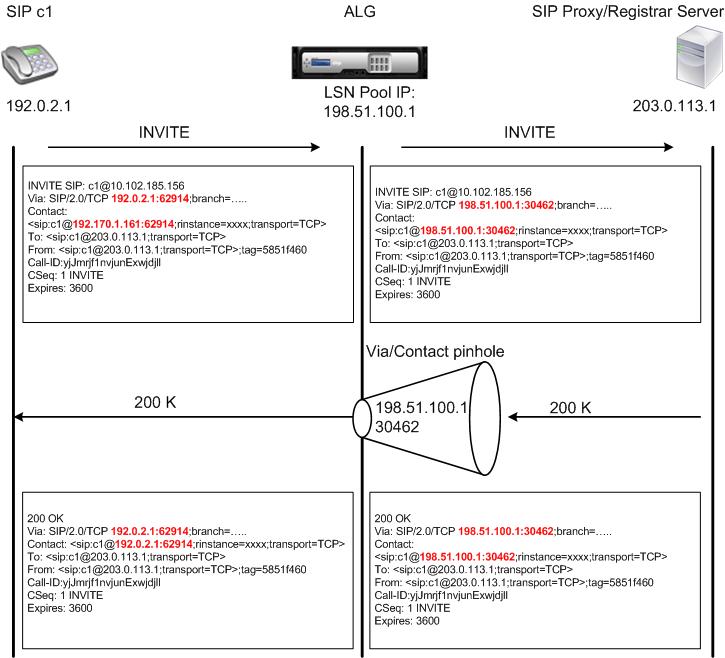
Incoming Calls
A SIP incoming call is initiated with a SIP INVITE message from the external client to the internal network. The SIP registrar forwards the INVITE message to the SIP client in the internal network, using the pinhole that was created when the Internal SIP client registered with the SIP registrar.
The SIP ALG performs NAT on the LSN IP addresses and port numbers in the Via, Contact, Route, and Record-Route SIP header fields, translating them to the IP address and port number of the internal SIP client, and forwards the request to the SIP client. When the 200 OK response message sent by the internal SIP client arrives at the NetScaler appliance, the SIP ALG performs NAT on the IP addresses and port numbers in the Via, Contact, Route, and Record-Route SIP header fields, translating them to the LSN pool IP address and port number, forwards the response message to the SIP registrar, and then opens a pinhole in the outbound direction for further SIP communication.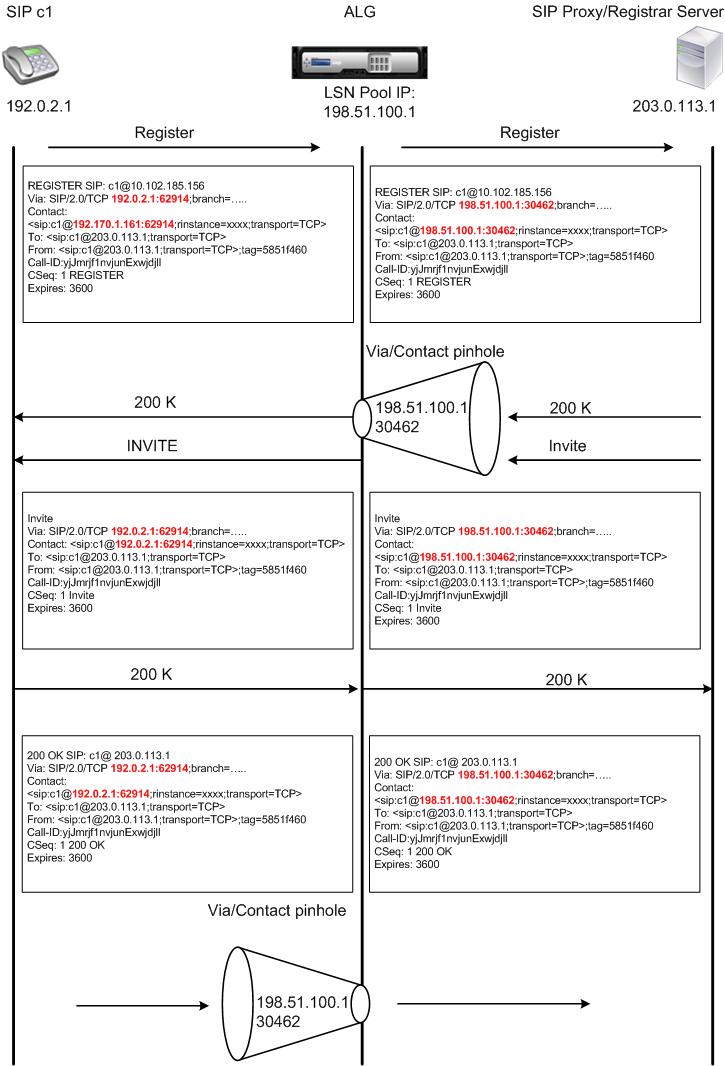
Call Termination
The BYE message terminates a call. When the device receives a BYE message, it translates the header fields in the message just as it does for any other message. But because a BYE message must be acknowledged by the receiver with a 200 OK, the ALG delays call teardown for 15 seconds to allow time for transmission of the 200 OK.
Call Between Clients in the Same Network
When both client A and client B in the same network initiate a call, the SIP messages are routed through the SIP proxy in the outside network. The SIP ALG processes the INVITE from client A as a normal outgoing call. Since client B is in the same network, the SIP proxy sends the INIVITE back to the NetScaler appliance. The SIP ALG examines the INIVITE message, determines that it contains the NAT IP address of client A, and replaces that address with the private IP address of client A before sending the message to client B. Once the call is established between the clients, the NetScaler is not involved in the media transmission between the clients.
More LSN SIP Scenarios: SIP Proxy Inside the Private Network
If you want to host the SIP Proxy server inside the private network, Citrix® recommends that you do one of the following:
-
Configure a static LSN Mapping for the private SIP proxy. For more information, see Configuring Static LSN Maps. Make sure that the NAT port is the same as the port configured in the SIP ALG profile.
-
Configure the SIP Proxy server inside a demilitarized zone (DMZ).
Figure 1. SIP Call Registration
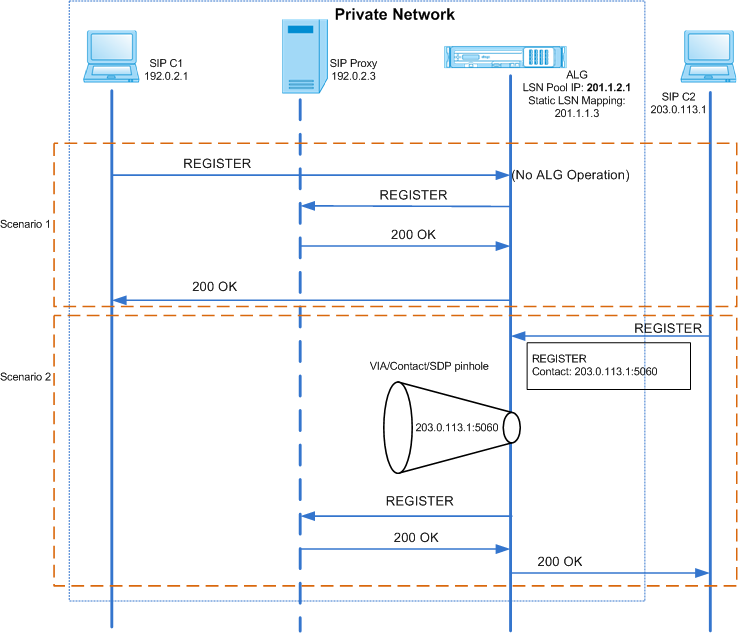
Figure 2. SIP Incoming Call Flow
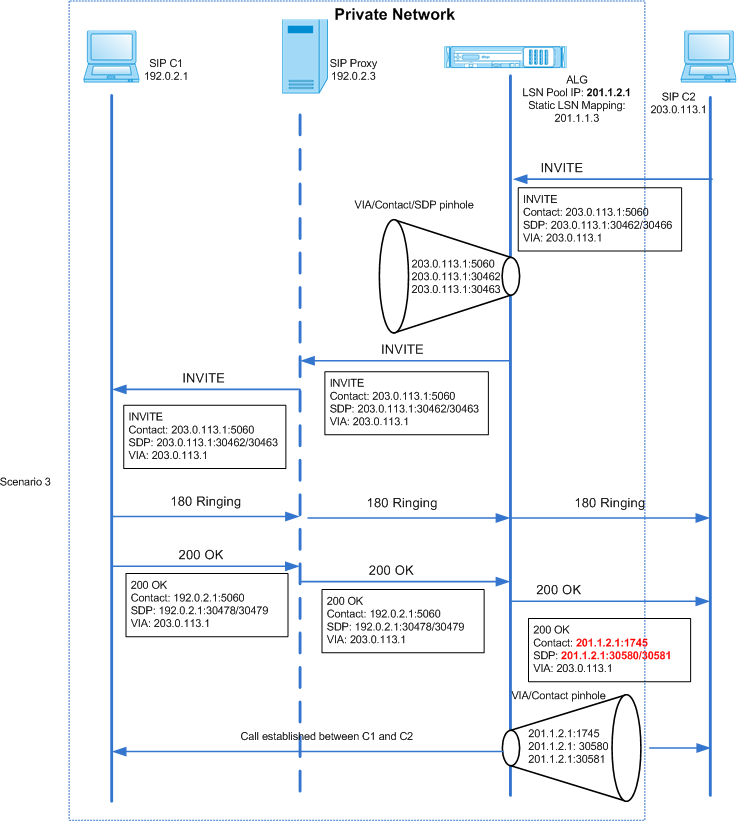
Figures 1 and 2 show the following scenarios:
-
Scenario 1—SIP client in the private network registers with the SIP proxy server in the same network. ALG operations are not performed, because the SIP client and SIP proxy server are in the same network.
-
Scenario 2—SIP client in the public network registers with the SIP proxy server in the private network. The REGISTER message from the public SIP client is sent to the NetScaler appliance by using the static LSN mapping configured on the appliance, and the appliance creates a pinhole for further SIP operations.
-
Scenario 3— SIP Incoming call flow. A SIP incoming call is initiated with a SIP INVITE message from the external to the internal network. The NetScaler appliance receives the INVITE message from SIP client C2, which is in the external network, through the static LSN maps configured on the NetScaler appliance.The appliance creates a pinhole and forwards the INVITE message to the SIP proxy. The SIP proxy then forwards the INVITE message to SIP client C1 in the internal network. SIP client C1 then sends 180 and 200 OK messages to the SIP proxy, which in turn forwards the message to SIP client C2 through the NetScaler appliance. When the 200 OK response message sent by internal SIP client C1 arrives at the NetScaler, the SIP ALG performs NAT on the IP addresses and port numbers in the Via, Contact, Route, and Record-Route SIP header fields, and in the SDP fields, replacing them with the LSN pool IP address and port number. The SIP ALG then forwards the response message to SIP client C2 and opens a pinhole in the outbound direction for further SIP communication.
Support for Audit Logs
You can log ALG information as part of LSN logging by enabling ALG in the LSN audit logging configuration. For more information on LSN logging, see Logging and Monitoring LSN. A log message for an ALG entry in the LSN log consists of the following information:
-
Time stamp
-
Type of SIP message (for example, SIP request)
-
Source IP address and port of the SIP client
-
Destination IP address and port of the SIP proxy
-
NAT IP address and port
-
SIP method
-
Sequence number
-
Whether or not the SIP client is registered
-
Caller’s user name and domain
-
Receiver’s user name and domain
Sample audit log:
Request:
07/19/2013:09:49:19 GMT Informational 0-PPE-0 : default ALG ALG_SIP_INFO_PACKET_EVENT 169 0 : Infomsg: "SIP request" - Group: g2 - Call_ID: NTY0YjYwMTJmYjNhNDU5ZjlhMmQxOTM5ZTE3Zjc3NjM. - Transport: TCP - Source_IP: 192.169.1.165 - Source_port: 57952 - Destination_IP: 10.102.185.156 - Destination_port: 5060 - Natted_IP: 10.102.185.191 - Natted_port: 10313 - Method: REGISTER - Sequence_Number: 3060 - Register: YES - Content_Type: - Caller_user_name: 156_pvt_1 - Callee_user_name: 156_pvt_1 - Caller_domain_name: - Callee_domain_name: -
Response:
07/19/2013:09:49:19 GMT Informational 0-PPE-0 : default ALG ALG_SIP_INFO_PACKET_EVENT 170 0 : Infomsg: "SIP response" - Group: g2 - Call_ID: NTY0YjYwMTJmYjNhNDU5ZjlhMmQxOTM5ZTE3Zjc3NjM. - Transport: TCP - Response_code 200 - Source_IP: 10.102.185.156 - Source_port: 5060 - Destination_IP: 192.169.1.165 - Destination_port: 57952 - Natted_IP: 10.102.185.191 - Natted_port: 10313 - Sequence_Number: 3060 - Content_Type: - Caller_user_name: 156_pvt_1 - Callee_user_name: 156_pvt_1 - Caller_domain_name: - Callee_domain_name: -
Configuring SIP ALG
You need to configure the SIP ALG as part of the LSN configuration. For instructions on configuring LSN, see Configuration Steps for LSN. While configuring LSN, make sure that you:
-
Set the following parameters while adding the LSN application profile:
-
IP Pooling = PAIRED
-
Address and Port Mapping = ENDPOINT-INDEPENDENT
-
Filtering = ENDPOINT-INDEPENDENT
-
Important: For the SIP ALG to work, a full cone NAT configuration is mandatory.
Example:
add lsn appsprofile app_tcp TCP -ippooling PAIRED -mapping ENDPOINT-INDEPENDENT -filtering ENDPOINT-INDEPENDENT
-
Create a SIP ALG profile and make sure that you define either the source port range or destination port range.
Example:
add lsn sipalgprofile sipalgprofile_tcp -sipsrcportrange 1-65535 -sipdstportrange 5060 -openViaPinhole ENABLED -openRecordRoutePinhole ENABLED –sipTransportProtocol TCP
-
Set SIP ALG = ENABLED, while creating the LSN group.
Example:
add lsn group g1 -clientname c1 -sipalg ENABLED
-
Bind the SIP ALG profile to the LSN group.
Sample SIP ALG Configuration:
The following sample configuration shows how to create a simple LSN configuration with a single subscriber network, single LSN NAT IP address, SIP ALG specific setting, and configure SIP ALG:
add lsn pool p1

 Done

 bind lsn pool p1 10.102.185.190

 Done

 add lsn client c1

 Done

 bind lsn client c1 -network 192.170.1.0 -netmask 255.255.255.0

 Done

 add lsn appsprofile app_tcp TCP -ippooling PAIRED -mapping ENDPOINT-INDEPENDENT -filtering ENDPOINT-INDEPENDENT

 Done

 add lsn appsprofile app_udp UDP -ippooling PAIRED -mapping ENDPOINT-INDEPENDENT -filtering ENDPOINT-INDEPENDENT

 Done

 bind lsn appsprofile app_tcp 1-65535

 Done

 bind lsn appsprofile app_udp 1-65535

 Done

 add lsn sipalgprofile sipalgprofile_tcp -sipdstportrange 5060 -openViaPinhole ENABLED -openRecordRoutePinhole ENABLED –sipTransportProtocol TCP

 Done

 add lsn sipalgprofile sipalgprofile_udp -sipdstportrange 5060 -openViaPinhole ENABLED -openRecordRoutePinhole ENABLED -sipTransportProtocol UDP

 Done

 add lsn group g1 -clientname c1 -sipalg ENABLED

 Done

 bind lsn group g1 -poolname p1

 Done

 bind lsn group g1 -appsprofilename app_tcp

 Done

 bind lsn group g1 -appsprofilename app_udp

 Done

 bind lsn group g1 -sipalgprofilename sipalgprofile_tcp

 Done

 bind lsn group g1 -sipalgprofilename sipalgprofile_udp

 Done