Protected user authentication
The “Protected Users” security group in Active Directory enforces strict security policies for the members of this group. These policies are designed to protect privileged accounts (for example, domain admins) by enforcing stricter authentication methods.
Starting with NetScaler release 14.1 build 47.x, you can configure user authentication for LDAP users belonging to the “Protected Users" group in the Active Directory. For sample configuration of protected user authentication, see Configure protected user as an authentication factor in NetScaler nFactor authentication.
Important:
Disable the Do not require Kerberos preauthentication setting from account properties for Protected Users in Active Directory. NetScaler uses Kerberos authentication to authenticate Protected Users.
Related information
To configure protected user authentication by using the CLI
At the command prompt, type:
add authentication protectedUserAction protectedUser -realmStr <AAA.LOCAL> -maxConcurrentUsers <8>
In the preceding command:
-
realmStr: Specifies the domain to which the user belongs. This parameter is mandatory. -
maxConcurrentUsers: Limits the number of concurrent authentication requests to prevent DDoS attacks. This parameter is optional. Default value: 8.
Example:
If the protected user belongs to realm
aaa.local1, then that realm must be mentioned as part of realmStr parameter as follows:
add authentication protectedUserAction <name> -realmStr aaa.local1
To configure protected user authentication by using the GUI
-
Configure the LDAP group extraction to extract the users in the “Protected Users” group. For more information, see Create an LDAP Authentication Action using the GUI.
-
Navigate to Security > AAA - Application Traffic > Policies > Authentication > Advanced Policies > Actions > PROTECTED USER and click Add.
-
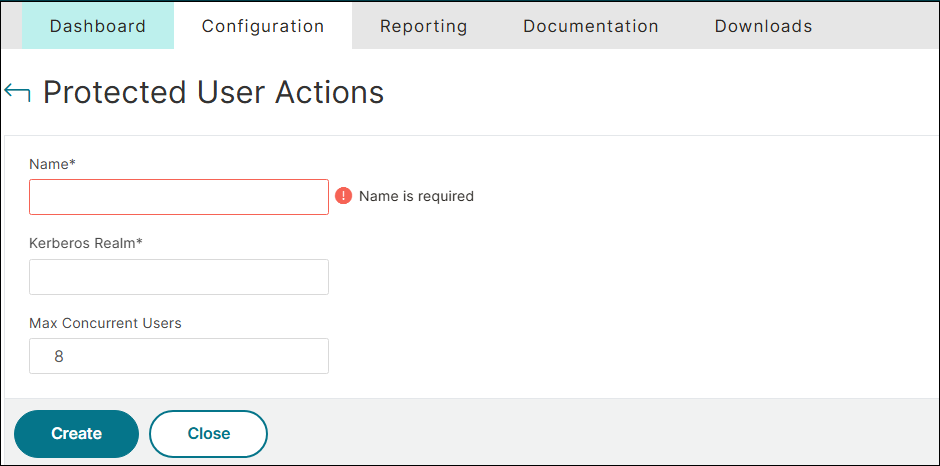
In the Protected User Actions page, enter values for the following parameters:
-
Name: Name for the protected user authentication. This parameter is mandatory.
-
Kerberos Realm: Domain to which the user belongs. This parameter is mandatory.
-
Max Concurrent Users: Limits the number of concurrent authentication requests to prevent DDoS attacks. This parameter is optional. Default value: 8.
-
-
Click Create.