
SSL certificate management
Any organization or individual website that requires handling confidential or sensitive information must have an SSL certificate. SSL certificate on a web server helps guarantee the authenticity of the web server to the connecting client. It not only authenticates a website’s identity but also helps in generating the session key, which is used later for encryption of the entire session.
A Secure Socket Layer (SSL) certificate, which is a part of any SSL transaction, is a digital data form (X509) that identifies a company (domain) or an individual. The certificate has a public key component that is visible to any client that wants to initiate a secure transaction with the server. The corresponding private key, which resides securely on the Citrix NetScaler appliance, is used to complete asymmetric key (or public key) encryption and decryption.
NetScaler Console provides you a unified console to automate the installation, updating, deletion, linking, and download of SSL certificates. It helps in retaining the reputation of the website and customer trust. NetScaler Console now streamlines every aspect of certificate management for you. Through a unified console, you can configure automated policies to ensure the recommended issuer, key strength, protocol, and algorithms as per organization IT policies. By doing so, you can keep close watch on certificates that are unused or about to expire.
You can obtain an SSL certificate and key in either of the following ways:
-
From an authorized certificate authority (CA), such as Verisign
-
By generating a new SSL certificate and key on the NetScaler appliance
Related information
Infrastructure
Automated certificate renewal by using the ACME protocolZero-touch certificate managementUse the SSL DashboardSet up notifications for SSL certificate expiryUpdate an installed certificateInstall SSL certificates on a NetScaler instanceCreate a Certificate Signing Request (CSR)Link and unlink SSL certificatesConfigure an enterprise policyPoll SSL certificates from NetScaler instancesUse the NetScaler Console certificate store to manage SSL certificatesManage database custom certificates and ciphers in a high-availability deployment
Enterprise SSL policy settings
Every enterprise has its own SSL policy and defines the requirements that all SSL Certificates must adhere to. Security has always been among the top priorities across all enterprise users and hence SSL settings play an important role.
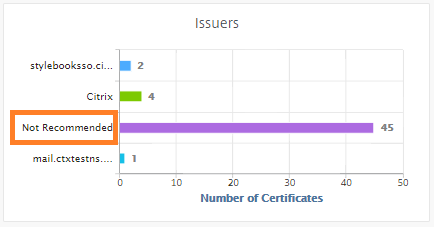
For example, an ABC Company mandates that all certificates must have minimum key strengths of 2,048 bits and above. The certificates must be authorized by trusted CA or issuers. Administrators must check all such SSL parameters to ensure that the certificates abide by the company policy. It is a tedious job to verify each certificate manually. To overcome this scenario, the NetScaler Console helps you to configure enterprise SSL policy settings, and shows any non-compliance certificate with the "Not Recommended" tag.
You can view the summary of the non-compliance (Not Recommended) certificates on the SSL Dashboard.
Note
The “Not Recommended” certificates are categorized based on different parameters, and you can view them in relevant components.
How the NetScaler Console certificate works
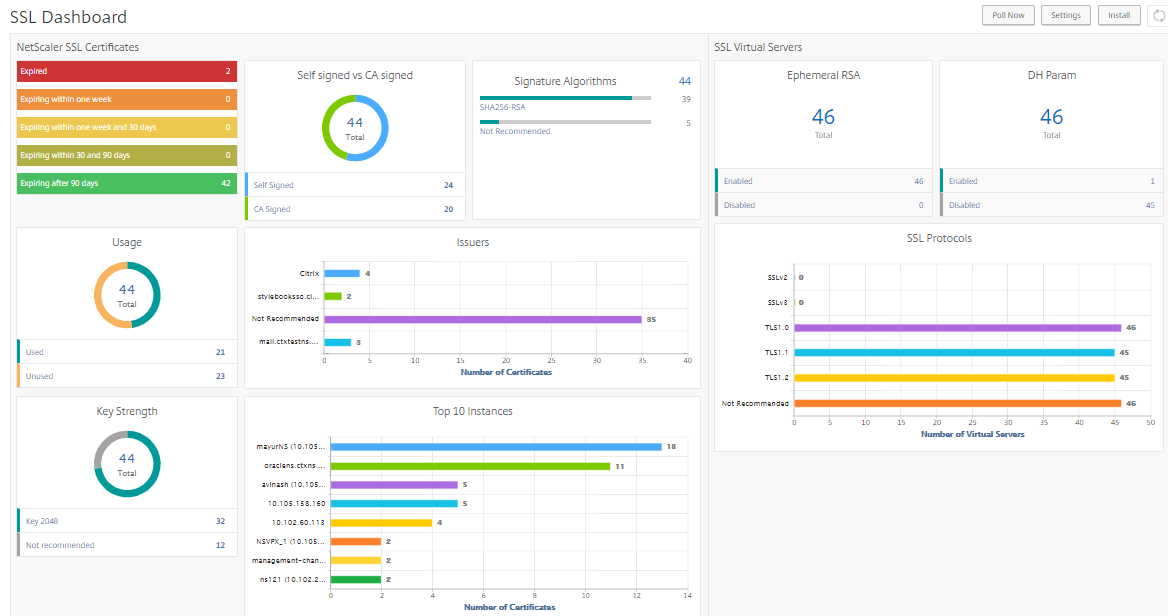
SSL Dashboard provides you a visual presentation of all the SSL certificates that are installed on different NetScaler instances. SSL dashboard includes the following information for each certificate installed on NetScaler instances. It is categorized based on the following:
-
Self-signed vs CA signed. The self-signed vs CA signed section helps you to segregate the certificates into Self-signed certificates and, CA signed certificates.
-
Signature Algorithms. This section segregates the SSL certificates based on signature algorithms being used for encryption.
-
Usage. This section segregates your SSL certificates based on used and unused certificates. Unused certificates demand special attention as they might have been missed to be bound to the virtual servers.
-
Issuers. This section segregates the SSL certificates based on the issuer of the certificates.
-
Key Strength. This section segregates the SSL certificates based on the key strength of a private key.
-
Top 10 Instances. This section provides the details of the top 10 NetScaler instances based on the number of SSL certificates installed.
SSL certificate management use cases
The following use cases describe how you can use the SSL certificate to manage and monitor the certificates across multiple NetScaler instances.
Install SSL certificates
Imagine, you have a fleet of NetScaler instances across, on which you have to deploy the required SSL certificates. NetScaler Console provides you a unified console to deploy the SSL certificates across multiple NetScaler instances in one attempt.
For example, you might want to install some SSL certificates on one or more NetScaler instances. With this approach, you can minimize the manual intervention of installing the SSL certificate on each NetScaler instance. You can do a bulk installation of SSL certificates across one or more NetScaler instances.
To obtain a summary of the SSL certificates, log on to NetScaler Console, and then navigate to Infrastructure > SSL Dashboard.
Notification settings for certificate expiry
In this use case, you might have many certificates across multiple NetScaler instances, and it becomes an overhead to track the expiry of each certificate. It is a tedious job for you to track each certificate manually and update it before it expires. To avoid such scenarios, you can configure NetScaler Console to send the notifications or alerts to the configured email, pager, Slack, or ServiceNow profiles. This way you can stay abreast of the certificates expiry dates and renew the certificates well before the expiry dates.
For example, you might forget to track the certificate that is nearing expiry. And the certificate expires causing service outage, which might affect numerous applications to the users. With NetScaler Console certificate expiry notification settings, you can avoid such unforeseen scenarios.
You can view the summary and track the certificates that are nearing expiry on the SSL Dashboard.
To view the report of certificates expiring in any duration, you can click the tile to get the details of all such certificates expiring in that window.

Renewal of certificates
You can now renew the certificates from NetScaler Console. You can either renew the existing certificates or create the certificates based on the following:
Update the existing certificate
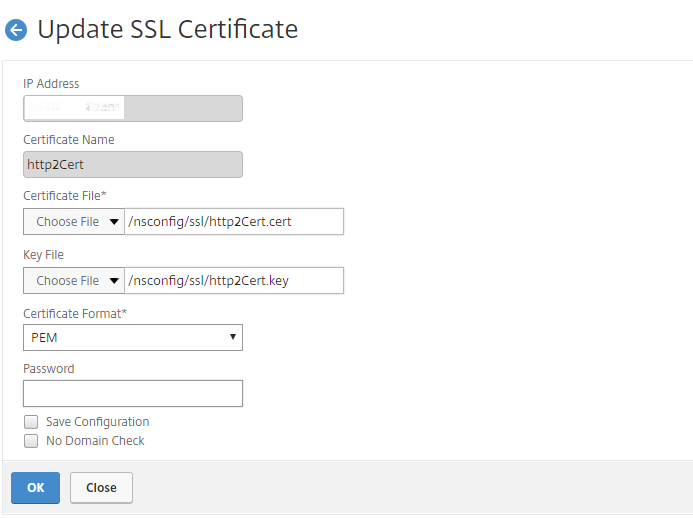
In this use case, you have to update an existing certificate once you receive a renewed certificate from the certificate authority (CA). You can now update the existing certificates from NetScaler Console without logging into NetScaler instances.
For example, there might be some changes or modifications to the existing certificates. The CA issues renewed certificates. Instead of going to the NetScaler appliance, you can now update the SSL certificate from NetScaler Console.
To update any certificate, log on to NetScaler Console, then navigate to Infrastructure > SSL Dashboard.
Select the certificate you want to update, and click Update.
You have an option to update the relevant fields of the selected certificate from NetScaler Console.
Create certificate signing request
Imagine a use case where one of the SSL certificates does not comply with the organization policies. You want to get a new certificate from the certification authority. You can now generate a certificate signing request (CSR) from NetScaler Console. A CSR and a public key can be sent to a CA to obtain the SSL certificate.
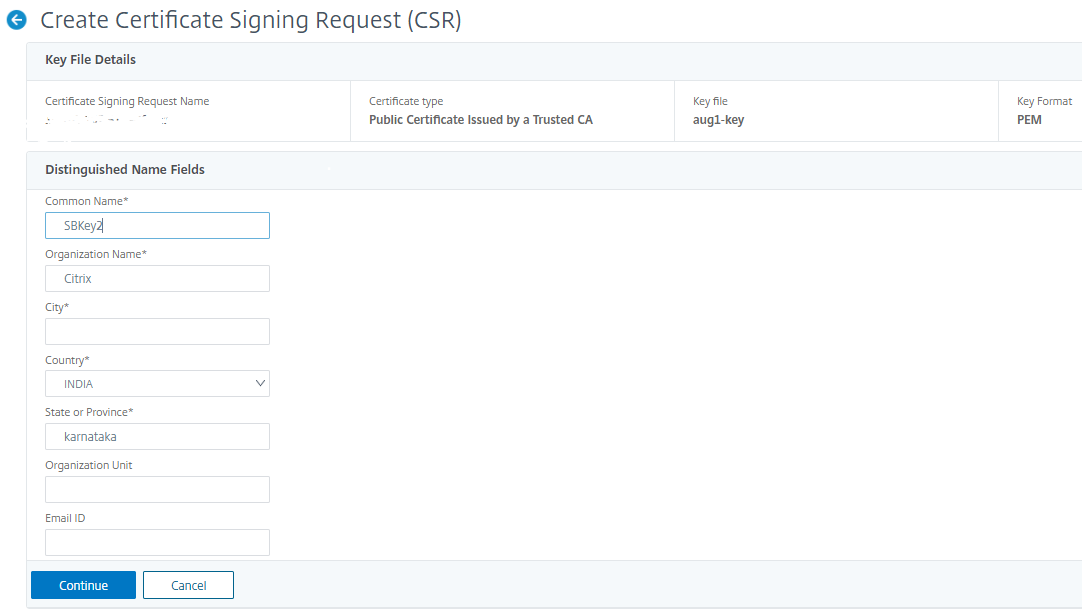
To determine and create CSR, select the desired certificate and click Create CSR.
You need to have a public or private key value pair. To upload a key, click Choose File and select from the list. To create a key, select I do not have a Key option and specify the relevant parameters.
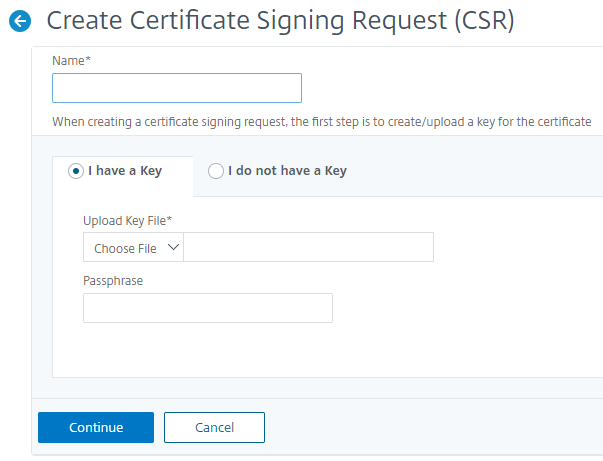
To give more details of the selected key like Common Name, Org Name, City, Country, State, Org Unit, and Email ID to create the CSR.
Link and unlink SSL certificates
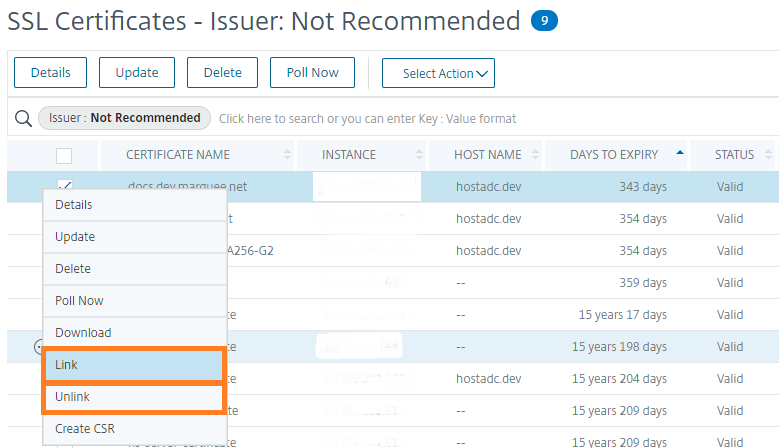
You can bind multiple SSL certificates to each other to create a certificate bundle. To link a certificate to another certificate, the issuer of the first certificate must match the domain of the second certificate.
Audit logs
Audit Logs is a collection of text log files generated by the NetScaler Console. It shows a history of SSL certificates that are added, modified, and changed by using NetScaler Console to the specific NetScaler appliance. The Audit Logs also shows the IP Address of the NetScaler appliance, Status, Start Time, and End Time of the particular operation.
In this example, you might want to verify the change that has taken place over a period to the particular certificate. And you have an option to view the history of changes to the certificate over the Device Log and Command Log.
To determine the information of SSL certificates, on the SSL Dashboard, click Audit Log. The application summary includes the SSL certificates status with Start Time and End Time.

To determine the information of the NetScaler appliance of a particular SSL certificate, choose the relevant certificate check box of your choice. Click Device Log.

To view the information of command type, and message, click Command Log.
