
Application Security Dashboard
The App Security dashboard provides you the overview of security metrics for the discovered/licensed applications. This dashboard displays the security attack information for the discovered/licensed applications, such as sync attacks, small window attacks, DNS flood attacks, and so on.
To view the security metrics on app security dashboard:
-
Navigate to Security > Security Dashboard.
-
Select the instance IP address from the Instance list.The reports include the following information for each application:
-
Threat index. A single-digit rating system that indicates the criticality of attacks on the application. The more critical the attacks on an application, the higher the threat index for that application. The values range from 1 through 7.The threat index is based on attack information. The attack-related information, such as violation type, attack category, location, and client details, gives an insight into the attacks on the application. Violation information is sent to NetScaler Console only when a violation or attack occurs. A large number of breaches and vulnerabilities lead to a high threat index value.
-
Safety index. A single-digit rating system that indicates how securely you have configured the NetScaler instances to protect applications from external threats and vulnerabilities. The lower the security risks for an application, the higher the safety index. The values range from 1 through 7.The safety index considers both the application firewall configuration and the NetScaler system security configuration. For a high safety index value, both configurations must be strong. For example, if rigorous application firewall checks are in place, but NetScaler system security measures, such as a strong password for the
nsrootuser is not provided, then applications are assigned a low safety index value.
-
You can view the discrepancies reported on the App Security Investigator.
Related information
Threat index details
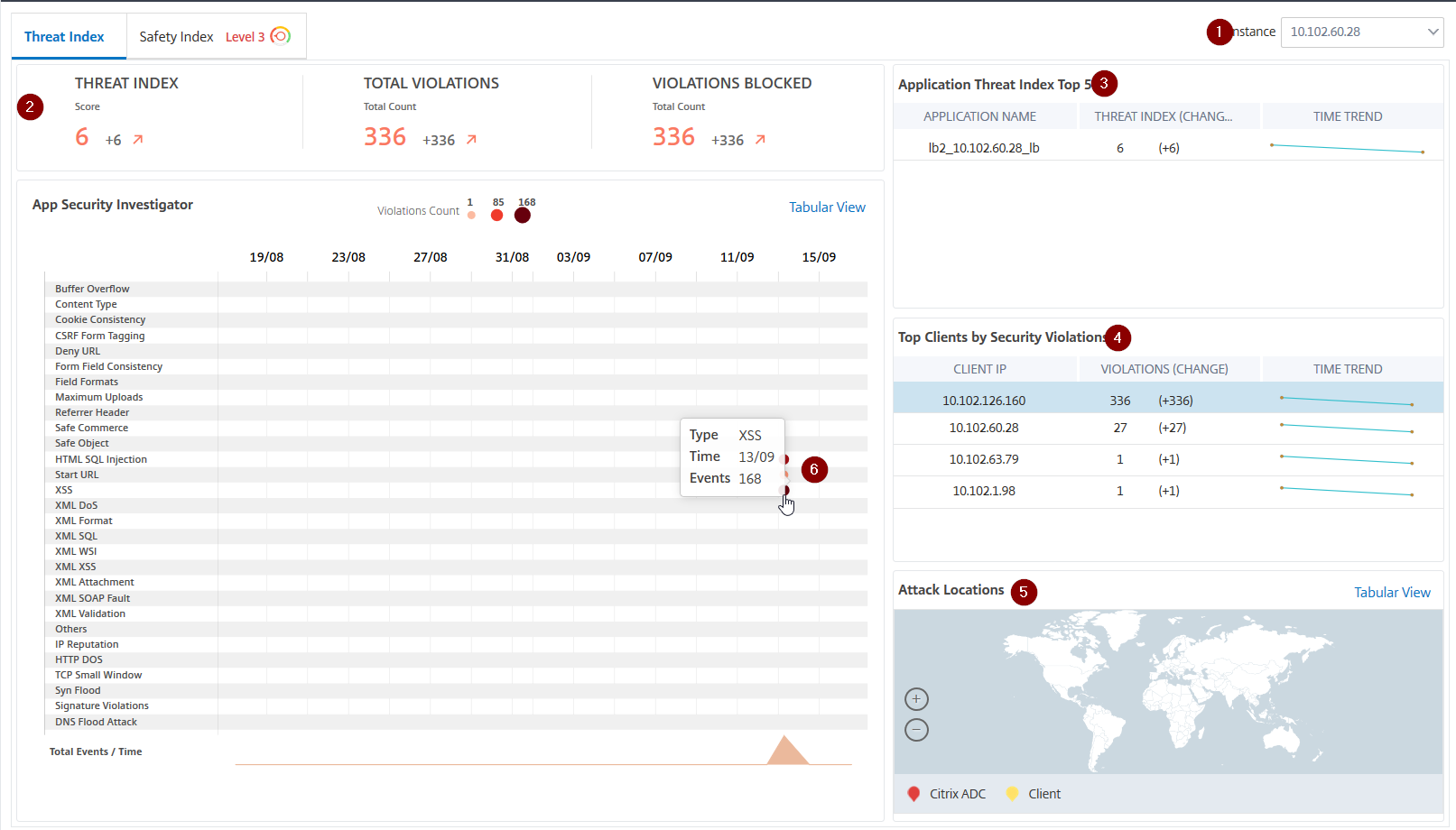
1 - Displays the NetScaler instance IP address for which you can view details.
2 - Displays details such as threat index score, total violations occurred, and total violations blocked.
3 - Displays the virtual server of the selected instance.
4 - Displays the security violations based on clients. The App Security Investigator graph is displayed for each client. You can click each client IP to view the results.
5 - Displays the violations in map view and tabular view.
6 - Displays the violation details. When you hover the mouse pointer on the graph, the details such as violation type, time of the attack, and total events are displayed.
When you click a bubble graph, the details are displayed in the App Security Violation Details page. For example, if you want to further view details for cross-site scripting (cross-site script) violation, click the graph populated for XSS in App Security Investigator.
The App Security Violation Details is displayed with violation details such as attack time, attack category, severity, URL, and so on.
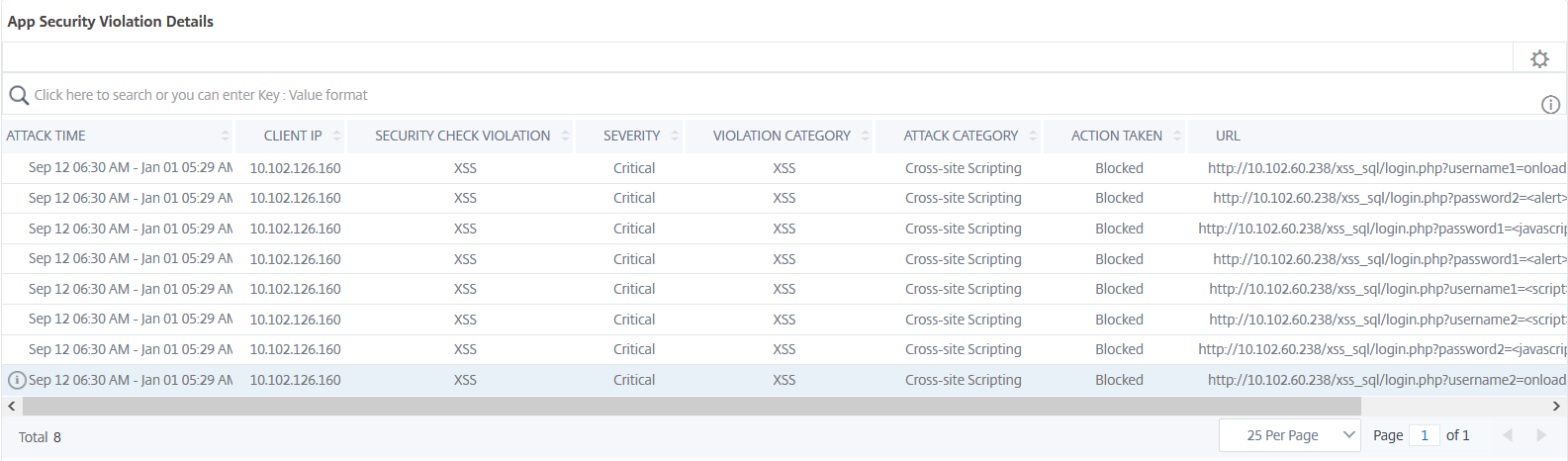
You can also click the Settings option to select the options that you want to get it displayed.
Safety index details
After reviewing the threat exposure of an application, you want to determine what application security configurations are in place and what configurations are missing for that application. You can obtain this information by drilling down into the application safety index summary.
The safety index summary gives you information about the effectiveness of the following security configurations:
-
Application Firewall Configuration. Shows how many signature and security entities are not configured.
-
NetScaler Console System Security. Shows how many system security settings are not configured.
To view the Safety Index details, select a virtual server/application and click the Safety Index tab.

The details are displayed.
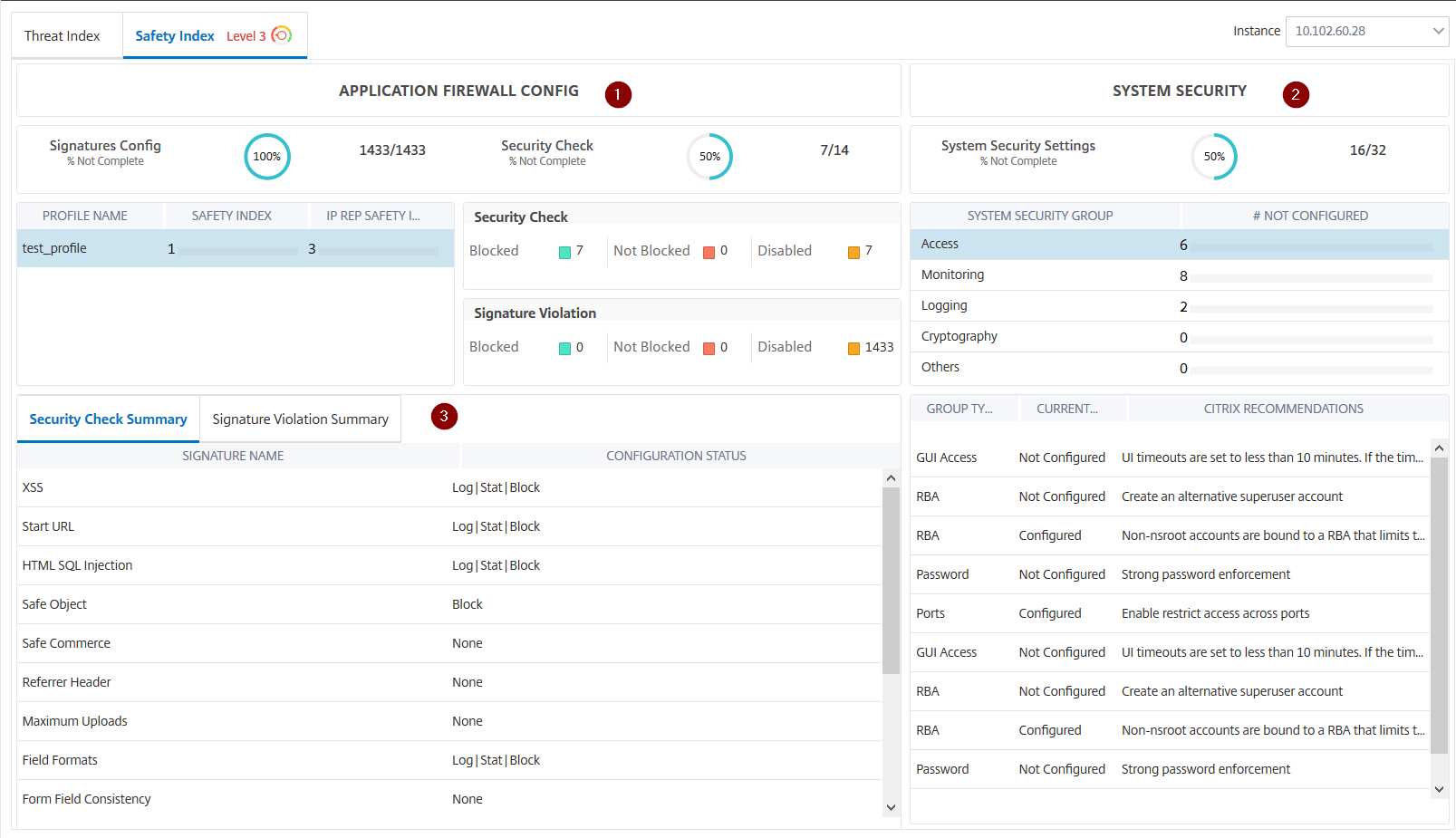
1 - Displays the detailed information for Application Firewall configurations.
2 - Displays the detailed information for System Security. Click each security group to get details on current status and Citrix recommendations.
3 - Displays the summary for Security Check and Signature Violation.
You can also view summary of the threat environment by enabling the WAF Security Violations for virtual servers and then navigating to Security > Security Violations.