
Configure a cipher group
A cipher group is a set of cipher suites that you bind to an SSL virtual server, service, or service group on the Citrix NetScaler instance. A cipher suite comprises a protocol, a key exchange (
Kx) algorithm, an authentication (Au) algorithm, an encryption (Enc) algorithm, and a message authentication code (Mac) algorithm.
To add a cipher group on NetScaler Console:
-
Navigate to Settings > Administration
-
Under SSL Settings, click Cipher Groups
-
Click Add
-
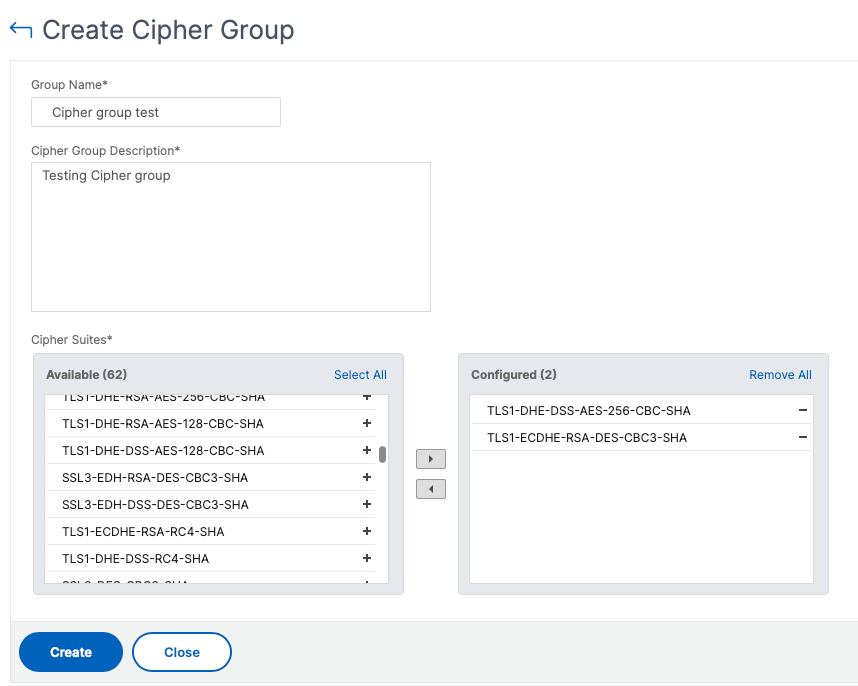
On the Create Cipher Group page, enter the following details:
-
Group Name - Name for the cipher group.
-
Cipher Group Description – Provide a description for your cipher group.
-
Cipher Suites – Click Add to select cipher suites from the Available list, and then move the selected (or all) cipher suites to the Configured list.
-
-
Click Create.
Related information