
Security Advisory
A safe, secure, and resilient infrastructure is the lifeline of any organization. Organizations must track new Common Vulnerabilities and Exposures (CVEs), and assess the impact of CVEs on their infrastructure. They must also understand and plan the remediation to resolve the vulnerabilities.
The Security Advisory feature in NetScaler Console enables you to:
-
Analyze your NetScaler configuration settings to identify any misconfigurations, weak points, or deviations from best practices that might expose your system to attacks.
-
Track any new Common Vulnerabilities and Exposures (CVEs), assess the impact of CVEs, understand the remediation, and resolve the vulnerabilities.
-
Examine the integrity of your NetScaler build files.
Related information
Infrastructure
Secure configuration recommendationsCVE DetectionFile integrity monitoringIndicators of Compromise detection in NetScaler ConsoleSupported CVEs through Security AdvisoryIdentify and remediate vulnerabilities for CVE-2026-19490Identify and remediate vulnerabilities for CVE-2026-19489Remediate vulnerabilities for CVE-2026-13474Identify and remediate vulnerabilities for CVE-2026-10817Identify and remediate vulnerabilities for CVE-2026-10816Identify and remediate vulnerabilities for CVE-2026-8655Identify and remediate vulnerabilities for CVE-2026-8452Identify and remediate vulnerabilities for CVE-2026-8451Identify and remediate vulnerabilities for CVE-2026-4368Identify and remediate vulnerabilities for CVE-2026-3055Identify and remediate vulnerabilities for CVE-2025-12101Identify and remediate vulnerabilities for CVE-2025-8424Identify and remediate vulnerabilities for CVE-2025-7776Identify and remediate vulnerabilities for CVE-2025-7775Identify and remediate vulnerabilities for CVE-2025-6543Identify and remediate vulnerabilities for CVE-2025-5349Remediate vulnerabilities for CVE-2025-5777Remediate vulnerabilities for CVE-2024-8535Remediate vulnerabilities for CVE-2020-8300Remediate vulnerabilities for CVE-2021-22927 and CVE-2021-22920Identify and remediate vulnerabilities for CVE-2021-22956Identify and remediate vulnerabilities for CVE-2022-27509Unsupported CVEs in Security Advisory
Security advisory landing page
The Security Advisory landing page offers a comprehensive bird's-eye view of your NetScaler deployment's security posture. The interface is enhanced and designed to provide administrators and security professionals with immediate insights into the overall health and vulnerability status of their NetScaler infrastructure.
NetScaler Console provides three types of security advisories:
-
Secure Configuration Recommendations - Enables you to configure NetScaler instances according to best practices.
-
Common Vulnerabilities and Exposures (CVEs) Detection - Enables you to identify the CVEs putting your NetScaler instances at risk and recommends remediations.
-
File Integrity Monitoring - Enables you to identify if any changes or additions have been made to your NetScaler build files.
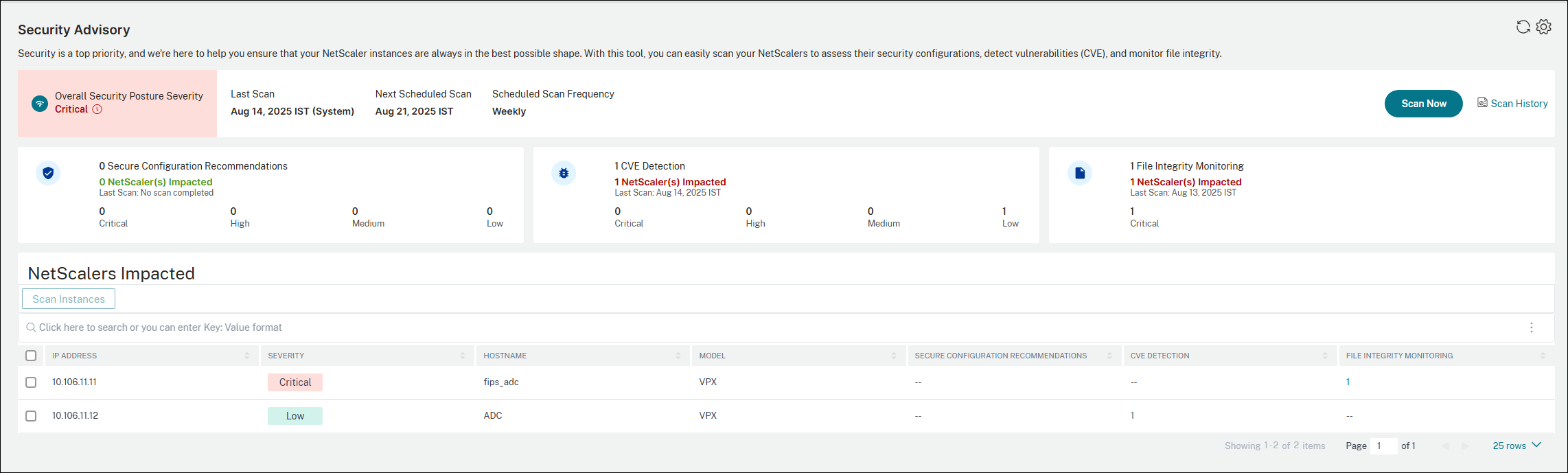
NetScaler Console security advisory dashboard also includes the following:
-
Overall Security Posture Severity - Represents the status of security posture and is calculated based on the maximum severity of the three types of advisories. The status can be one of the following:
-
Critical: Several critical severity observations are detected that must be addressed with the highest urgency.
-
High: Critical vulnerabilities or misconfigurations are detected that must be fixed immediately. While not as urgent as critical findings, these issues pose a significant risk to the security and stability.
-
Medium: Important security observations that must be addressed in a timely manner. These issues don't pose an immediate, critical threat, but they might potentially be exploited or lead to more severe problems if left unaddressed.
-
Low: Minor security issues or best practice violations that don't pose a significant security risk. While they are not an immediate threat, it's still a good idea to fix these issues to improve the overall security posture.
-
-
Last Scan - The date of the last scan. The data provided in the dashboard is based on the results of the last scan.
-
Next Scheduled Scan - The date of the next scheduled system scan.
-
Scheduled Scan Frequency - The frequency at which the system scans are run.
-
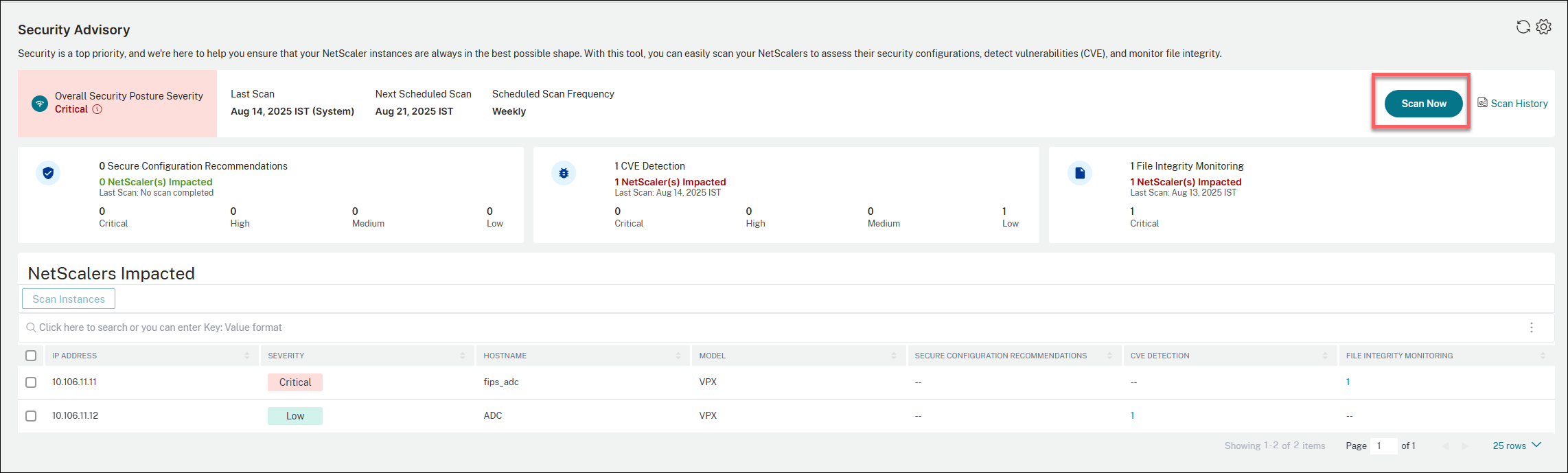
Scan Now - Allows on-demand scan that enables you to scan the instances anytime, according to your need, outside the system scan schedule.
-
Scan history - Provides a historical view of all the scans that have been run on your NetScaler instances.
-
NetScalers impacted - Lists the NetScaler instances that are impacted.
-
Settings - Allows you configure system scan settings and set notification for events as per your need.
With the information available on the dashboard, you can quickly identify critical vulnerabilities, secure configuration recommendations including mitigation steps, and links to relevant documentation.
The landing page allows you to filter issues by criticality and NetScaler IP address. When a specific criticality level is selected, only NetScaler instances at that severity level are shown.
Important:
In the Security Advisory GUI or report, all CVEs might not appear, and you might only see one CVE. As a workaround, click Scan Now and select CVE to run an on-demand scan. After the scan is complete, all the CVEs in scope (approximately 15) appear in the UI or report.-->
Secure Configuration Recommendations
The Secure Configuration Recommendations tab provides an in-depth, instance-level analysis of configuration observations, designed to empower users with actionable insights. For more information, see Secure configuration recommendations.
CVE Detection
CVE detection primarily focuses on identifying and mitigating security vulnerabilities. For more information, see CVE Detection.
File Integrity Monitoring
File integrity monitoring checks for unauthorized or malicious changes to the core files of a NetScaler instance. It's a key part of the security advisory. For more information, see File Integrity Monitoring.
Scan Now
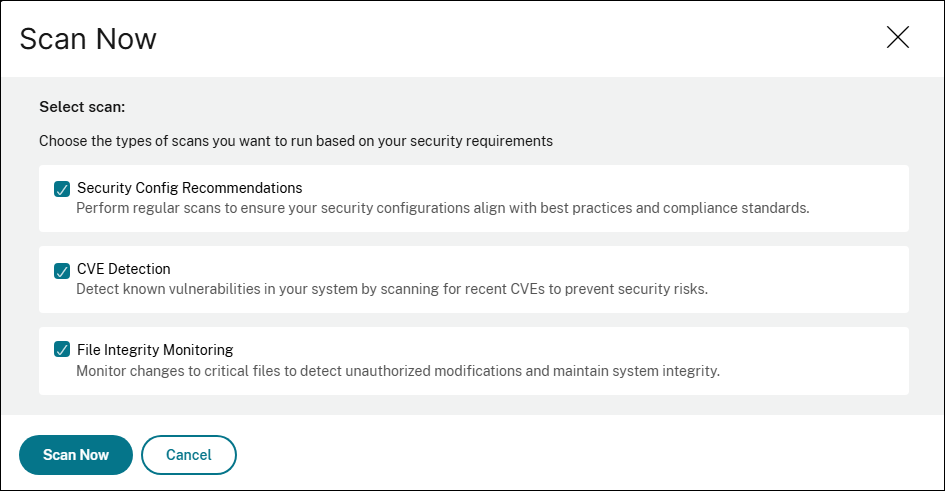
You can scan the instances anytime, according to your need and also choose the types of scans you want to run based on your security requirements.
Perform the following steps to run the scan:
-
Click Scan Now.
-
Select the types of scans that you want to run.
-
Security Config Recommendations
-
CVE Detection
-
File Integrity Monitoring
-
-
Click Scan Now. Once the scanning is completed, the revised security details appear in the security advisory dashboard.
Scan History
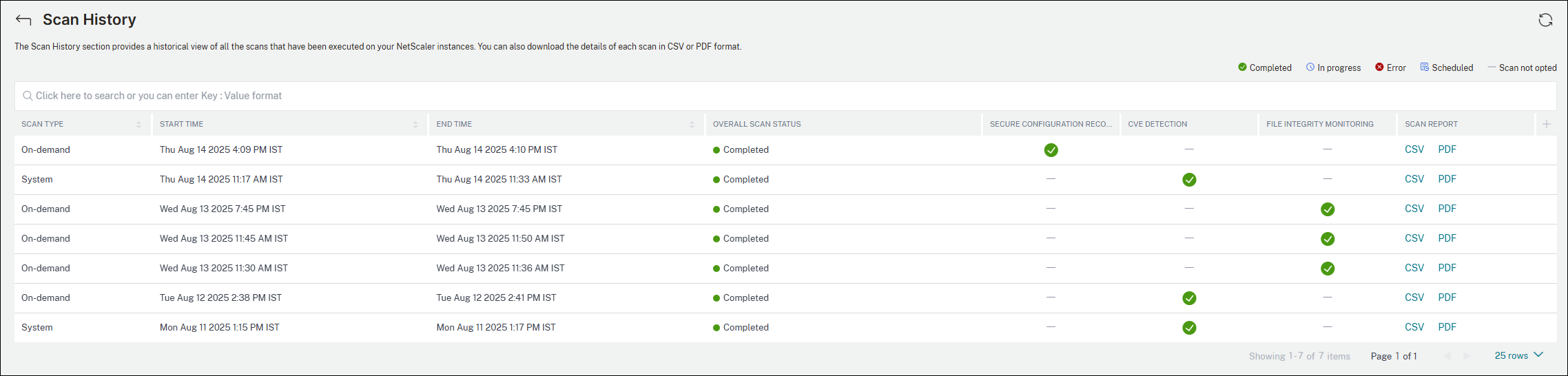
Click Scan History to view all the historical scans that have been run on your NetScaler instances.
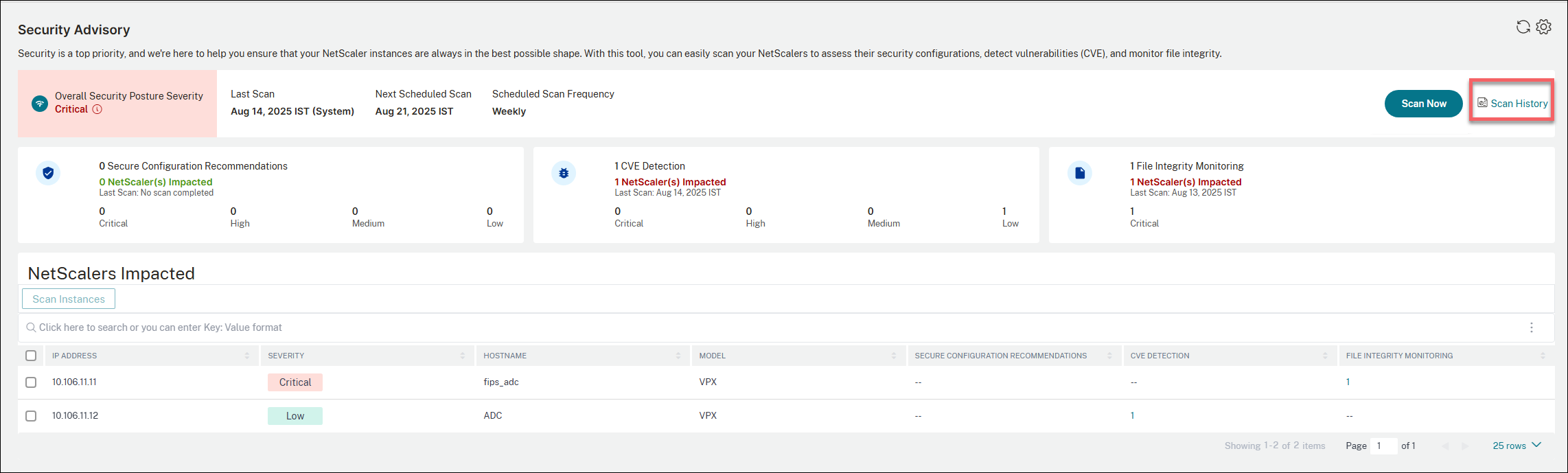
You can view the scan type (On demand scan or system scan), start and end time of the scan, overall scan status, and also download the details of each scan in CSV or PDF format.
NetScalers impacted
The NetScalers Impacted section lists all the NetScaler instances that are impacted by the security configurations, CVEs, and monitor file integrity checks.
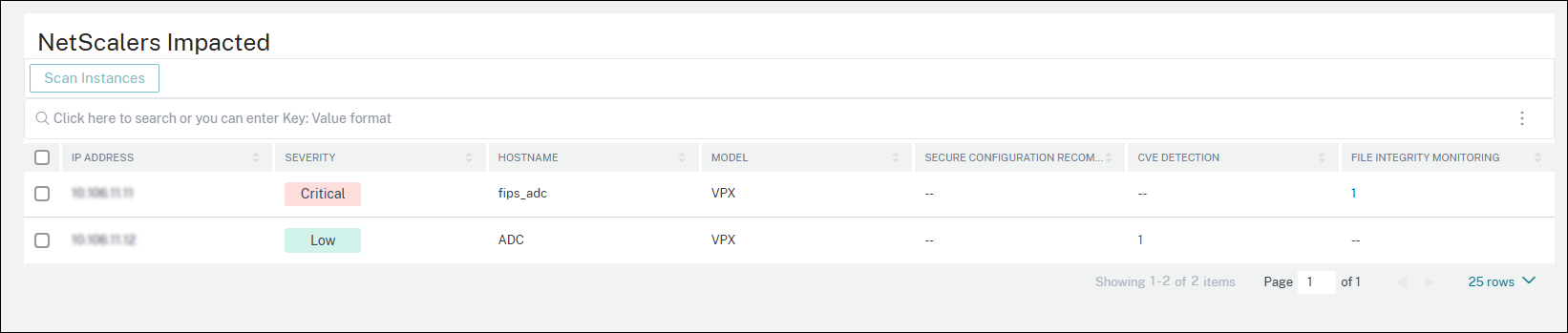
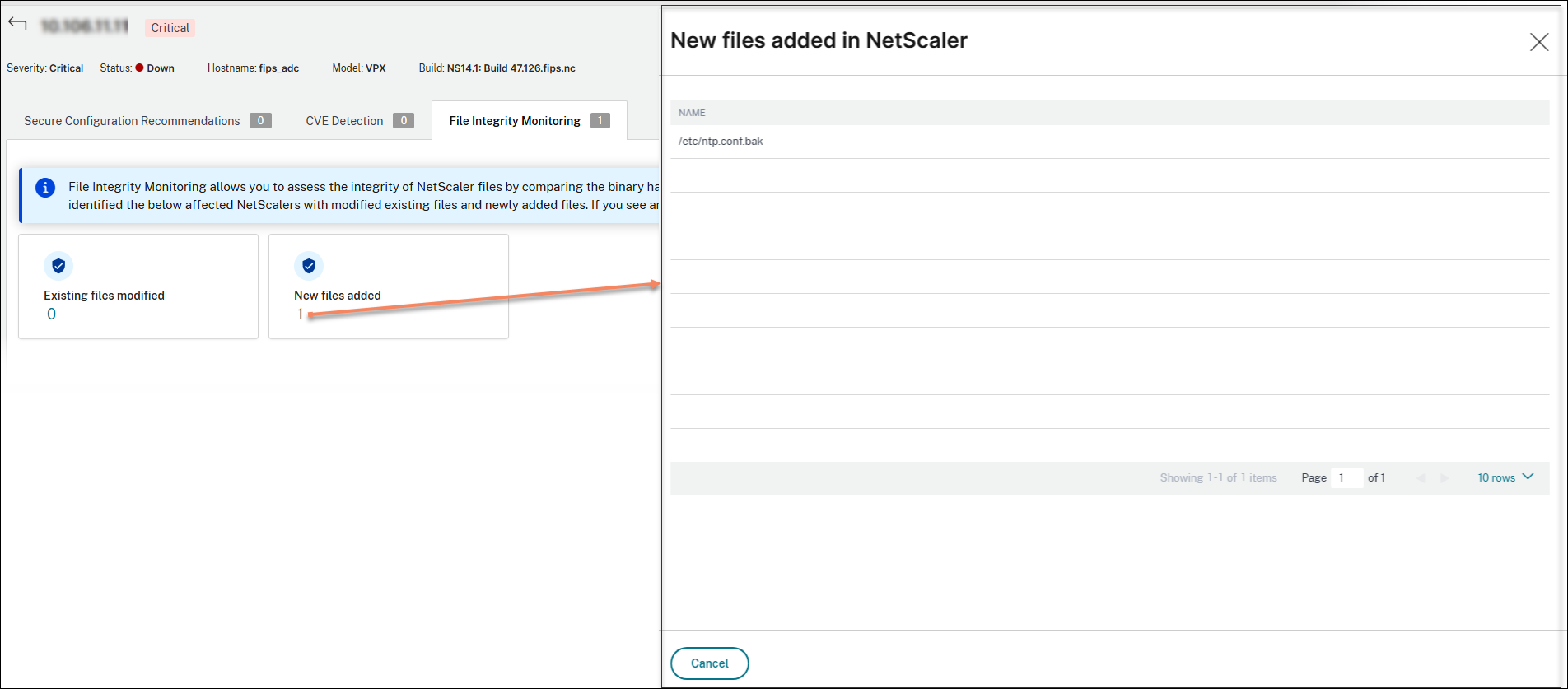
You can also click the number under the SECURE RECOMMENDATION CONFIGURATION, CVE DETECTION, or FILE INTEGRITY MONITORING to view further details. The following is a sample image for your reference.
Settings
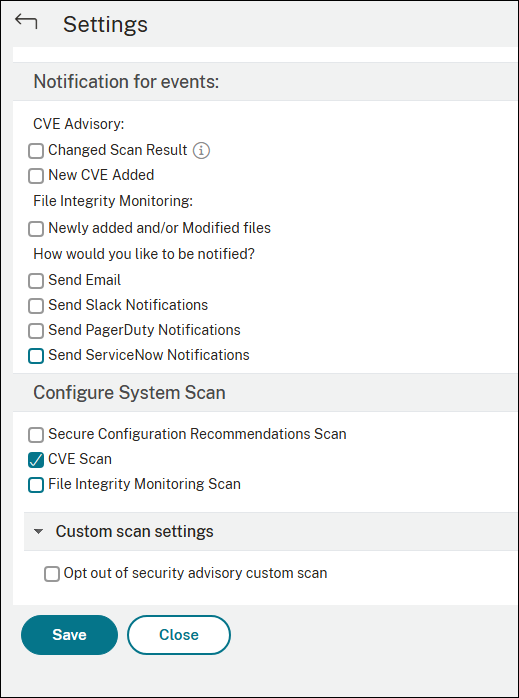
As an admin, you can receive Citrix Cloud notifications, which tell how many NetScaler instances are vulnerable with CVEs. To configure when and how you want to receive notifications, click the settings icon on the upper-right corner of the security advisory page.
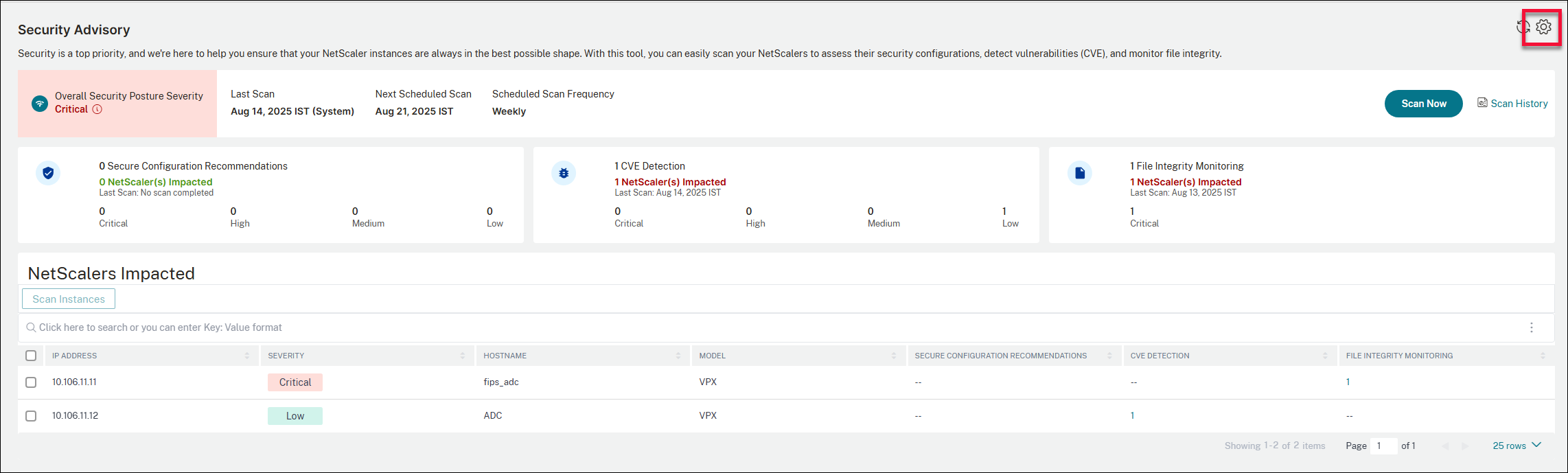
You can perform the following actions:
-
Select the type of events for which you must receive the notification.
-
Select how you want to be notified. For example, through email, Slack, PagerDuty.
-
Select the type of scan that must be included in system scans. By default, only CVE scan is enabled for system scan.
-
Opt out of security advisory custom scan.
You can also configure the type of scans that must be included in the system scans.
Disclaimer:
Please note that NetScaler File Integrity Monitoring (“the Feature”) is not capable of detecting all techniques, tactics, or procedures (TTPs) threat actors may use when targeting relevant environments. Threat actors change TTPs and infrastructure frequently, and therefore the Feature may be of limited to no forensic value as to certain threats. You are strongly advised to retain the services of experienced forensic investigators to assess your environment in connection with any possible threat.
This document and the information contained in it is provided as-is. Cloud Software Group, Inc. makes no warranties or representations, whether express or implied, regarding the document or its contents, including, without limitation, that this document or the information contained in it, is error-free or meets any conditions of merchantability or fitness for a particular purpose.