OpenStack: Integrating NetScaler instances
The Cloud Orchestration feature of NetScaler Console enables integration of NetScaler products with OpenStack platform. By using this feature with OpenStack platform, the OpenStack users are able to avail the load balancing feature (LBaaS) of the NetScaler. After this, the OpenStack users can deploy their load balancer configurations from OpenStack in NetScaler instance.
The following sections provide a brief description of the features in NetScaler Console and OpenStack integration workflow.
Related information
Orchestration
OpenStack: Integrating NetScaler instancesPrerequisitesPre-configuration tasks in NetScaler Console and OpenStackConfigure LBaaS V1 using HorizonConfigure LBaaS V2 using command lineConfigure layer 7 content switchingManual provisioning of NetScaler VPX instance on OpenStackProvisioning of NetScaler VPX instance on OpenStack using StyleBookVPX check-in and check-out license and pooled license support for OpenStack environmentShared VLAN support for admin partitionsTrial licensing workflowIntegrate with OpenStack Heat servicesService package isolation policiesFlexible policy-based device allotment
NetScaler Driver for OpenStack Neutron LBaaS
OpenStack Neutron LBaaS plug-in includes a NetScaler driver that enables OpenStack to communicate with the NetScaler Console. OpenStack uses this driver to forward any load balancing configuration done through LBaaS APIs, to the NetScaler Console, which creates the load balancer configuration on the desired NetScaler instances. OpenStack also uses the driver to call NetScaler Console at regular intervals to retrieve the status of different entities (such as VIPs and Pools) of all load balancing configurations from the NetScalers. NetScaler driver software for OpenStack platform is bundled along with the NetScaler Console. To download and install the drivers, you have to first install NetScaler Console and launch the application.
Registering NetScaler Console and OpenStack with each other
You have to first register OpenStack information on the NetScaler Console. Specify the OpenStack controller IP address and cloud administrative user credentials, and also the OpenStack NetScaler driver user credentials. You can later specify the same login credentials in the NetScaler_driver section of the Neutron configuration file (neutron.conf ) so that NetScaler driver in OpenStack can connect to NetScaler Console during LB configurations.
After OpenStack and NetScaler Console are registered with each other, both can talk to each other. Also, OpenStack users can use their existing credentials in OpenStack to log on to the NetScaler Console user interface to check how their LB configurations are performing in NetScalers.
Tenants in OpenStack
In OpenStack a tenant is also called a project. A tenant is a group of users; a tenant or a project can also be defined as a set of resources (compute, network, storage, and so on) assigned to an isolated group of users.
Placement policies
Placement policies provide the flexibility to decide on the NetScaler instance that is used in each load balancer configuration created by users. Alternatively, the NetScaler Console also provides an option to assign a NetScaler instance based on OpenStack tenants.
Service packages
Service packages are bundles that tie together policies/SLAs, devices or auto-provision configuration specifications, and tenants/placement-policies. A service package is usually defined in terms of the isolation policies that are provided to the tenant.
The following are some points related to service packages:
-
A tenant cannot be part of more than one service package.
-
Multiple tenants can be associated with the same service package.
-
In a service package that is set for auto-provisioning, virtual NetScaler instances can be created from only one platform type (on SDX platform or on OpenStack Compute platform).
Features Supported on LBaaS V1 and LBaaS V2
While LBaaS V1 driver in OpenStack supports operations from OpenStack Horizon user interface, LBaaS V2 driver supports only command line operations.
The following list shows the features supported on both LBaaS V1 and LBaaS V2 on OpenStack:
-
LBaaS V1
-
Load Balancing
-
-
LBaaS V2
-
Load Balancing
-
SSL Offload with certificates managed by Barbican, the Key Manager in OpenStack
-
Certificate Bundles (includes intermediary Certification Authorities)
-
SNI support
-
This document provides information about:
Use Case Scenario
The following use-case scenario explains the workflow of integrating NetScaler Console with the OpenStack platform:
An enterprise, Example-Cloud-Provider, has used OpenStack components to set up a cloud to provide infrastructure to its tenants. Steve is the administrator of this cloud provider, while Tom is a tenant of the Example-Cloud-Provider's cloud infrastructure. Tom's organization, Example-SportsOnline.com, requires two servers S1 and S1, and Tom also requires a dedicated NetScaler device to load balance the traffic between servers S1 and S2 on OpenStack platform.
To meet this requirement, Steve has to install and configure both OpenStack and NetScaler Console, and prepare them to compatible with each other. Steve has to create a tenant account named Example-SportsOnline in OpenStack, and then allocate resources to the tenant account. Steve also has to create different log-on credentials (users) for Example-SportsOnline for managing its resources and configuration. Tom can now create the two servers S1 and S2 on OpenStack to manage the traffic in his organization.
Steve has to register OpenStack details with NetScaler Console, and configure the NetScaler LBaaS driver in OpenStack networking component, Neutron. After the registration is complete, NetScaler Console displays the details of all tenants from the OpenStack. Steve can select Example-SportsOnline from the list who wants the NetScaler LBaaS features and configure Tom to get a dedicated NetScaler allotted for his load balancer configurations in NetScaler Console.
For this, Steve can either provision a NetScaler VPX instance on the computing layer (Nova) of OpenStack using NetScaler Console user interface or enable MAS to auto-provision a NetScaler VPX instance on demand, when Tom does his LB configuration in OpenStack. In either case, NetScaler Console manages the VPX instance. For achieving this, Steve creates a service package in NetScaler Console, and defines the conditions in the service package that were agreed in the SLA with Tom. For example, Steve selects the 'dedicated' isolation policy to provide a dedicated instance for providing load balancer configurations to Tom. That is, Steve selects a non-shared instance for Tom in the service package. He then assigns many NetScaler VPX instances to the service package, and associates Example-SportsOnline, along with other tenants, who require a dedicated NetScaler with the service package. As a result, when Tom performs his first load balancer configuration, NetScaler Console allots one of the NetScaler VPX instances in the service package to Example-SportsOnline and also deploys his configuration in that NetScaler.
Tom can now create load balancing configurations, by creating pools, virtual IPs (VIP), and health monitors using OpenStack LBaaS/UI. Pools and the VIPs in OpenStack get deployed as service groups and virtual servers on the NetScaler instance. Tom can also create health monitors to monitor the servers, and send application traffic to only those servers which are UP at any point of time and reachable from NetScaler.
The load balancing configuration created in OpenStack is now implemented on the NetScaler instance. Once fully configured, the NetScaler VPX instance then takes over the load balancing functionality and starts accepting application traffic and load balances the traffic between the servers S1 and S2 created by Tom.
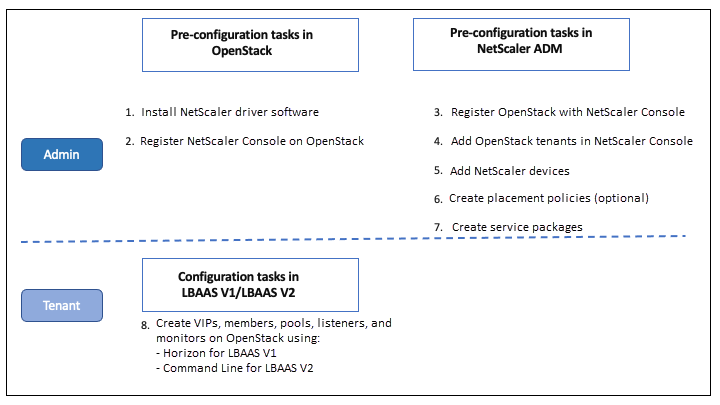
NetScaler Console Integration with OpenStack Workflow
The following flowchart depicts the workflow that you need to follow when you are configuring LBaaS V1 and LBaaS V2.