
Polling overview
Polling is a process, where NetScaler Console collects certain information from NetScaler instances. You might have configured multiple NetScaler instances for your organization, across the world. To monitor your instances through NetScaler Console, NetScaler Console has to collect certain information such as CPU usage, memory usage, SSL certificates, licensed features, license types, and so on from all managed NetScaler instances. The following are the different types of polling that occur between NetScaler Console and the managed instances:
-
Instance polling
-
Inventory polling
-
Performance data collection
-
Instance backup polling
-
Configuration audit polling
-
SSL certificate polling
-
Entity polling
NetScaler Console uses protocols such as NITRO call, Secure Shell (SSH), and Secure Copy (SCP) to poll information from NetScaler instances.
Related information
How NetScaler Console polls managed instances and entities
NetScaler Console automatically polls at regular intervals by default. NetScaler Console also enables you to configure polling intervals for a few polling types and allows you to poll manually when required.
The following table describes the details of types of polling, polling interval, protocol used, and so on:
| Polling type | Polling interval | Polled information | Protocol used | Polling interval configuration |
|---|---|---|---|---|
| Instance polling | Every 1 minute (by default) | Statistical information such as state, HTTP requests per second, CPU usage, memory usage, and throughput. | NITRO call. | No |
| Inventory polling | Every 60 minutes (by default) | Inventory details such as build version, system information, licensed features, and modes. | NITRO calls and SSH | No |
| Performance data collection | Every 5 minutes (by default) | Network reporting information | NITRO call | No |
| Instance backup polling | Every 12 hours (by default) | Backup file of the current state of the managed NetScaler instances | NITRO calls, SSH, and SCP. | Yes. Navigate to Infrastructure > Instances > NetScaler. Select the instance and from the Select Action list, click Backup/Restore. |
| Configuration audit polling | Every 10 hours (by default) | Configuration changes that occur on NetScaler instances (for example, running vs. saved configuration) | SSH, SCP, and NITRO call | Yes. Navigate to Infrastructure > Configuration Audit. On the Configuration Audit page, click Settings and configure the polling interval for Configuration Audit Polling. |
| You can poll configuration audits manually and add all configuration audits of the instances immediately to NetScaler Console. To do so, navigate to Infrastructure > Configuration Audit and click Poll Now. The Poll Now page lets you to poll all or selected instances in the network. | ||||
| SSL certificates polling | Every 24 hours (by default) | SSL certificates that are installed on NetScaler instances. | NITRO calls and SCP | Yes. Navigate to Infrastructure > SSL Dashboard. On the SSL Dashboard page, click Settings to configure the polling interval |
| You can poll SSL certificates manually and add all certificates of the instances immediately to NetScaler Console. To do so, navigate to Infrastructure > SSL Dashboard and click Poll Now. The Poll Now page lets you to poll all or selected instances in the network. | ||||
| Entity polling | ||||
| All instances | Every 720 minutes (by default) | All entities that are configured on the instances. An entity is either a policy, virtual server, service, or action attached to a NetScaler instance. To enable entity polling, see Enable or disable NetScaler Console features. | NITRO call | Yes. It can be set between 30 minutes and 1440 minutes. To configure, navigate to Infrastructure > Network Functions. On the Networks Function page, click Settings to configure the polling interval. |
| You can poll entities manually and add all entities of the instances immediately to NetScaler Console. To do so, navigate to Infrastructure > Network Functions and click Poll Now. The Poll Now page lets you poll all or selected instances in the network | ||||
| Selected NetScaler instances | Every 15 minutes (by default) | Poll only those NetScaler instances where changes are made before the default polling cycle is triggered. | NITRO call | Yes. It can be set between 5 minutes and 60 minutes. Navigate to Infrastructure > Network Functions, click Settings, and specify the time in the Delay time for Network Functions text box. |
Note
In addition to polling, events generated by managed NetScaler instances are received by NetScaler Console through SNMP traps sent to the instances. For example, an event is generated when there is a system failure or change in configuration.
During instance backup, SSL files, CA certificate files, NetScaler templates, database information, and so on are downloaded to NetScaler Console. During a configuration audit, ns.conf files are downloaded and stored in the file system. All information collected from managed NetScaler instances are stored internally within the database.
Different ways of polling instances
The following are the different ways of polling that NetScaler Console performs on the managed instances:
-
Global polling of instances
-
Manual polling of instances
-
Manual polling of entities
Global polling of instances
NetScaler Console automatically polls all the managed instances in the network depending on the interval configured by you. Though the default polling interval is 30 minutes, you can set the interval depending on your requirements by navigating to Infrastructure > Network Functions > Settings.
Manual polling of instances
When NetScaler Console is managing many entities, the polling cycle takes a longer time to generate the report that might result in a blank screen or the system might still display earlier data.
In NetScaler Console, there is a minimum polling interval period when automatic polling does not happen. If you add a new NetScaler instance, or if an entity is updated, NetScaler Console does not recognize the new instance or the updates made to an entity until the next polling happens. And, there is no way to immediately get a list of virtual IP addresses for further operations. You must wait for the minimum polling interval period to elapse. Though you can do a manual poll to discover newly added instances, this leads to the entire NetScaler network to be polled, which creates a heavy load on the network. Instead of polling the entire network, NetScaler Console now allows you to poll only selected instances and entities at any given time.
NetScaler Console automatically polls managed instances to collect information at set times in a day. Selected polling reduces the refresh time that NetScaler Console requires to display the most recent status of the entities bound to these selected instances.
To poll specific instances in NetScaler Console:
-
In NetScaler Console, navigate to Infrastructure > Network Functions.
-
On Network Functions page, at the top right-hand corner, click Poll Now.
-
The pop-up page Poll Now provides you an option to poll all NetScaler instances in the network or poll the selected instances.
-
All Instances tab - click Start Polling to poll all the instances.
-
Select Instances tab - select the instances from the list
-
-
Click Start Polling.
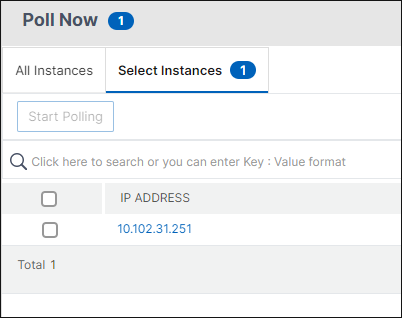
NetScaler Console initiates manual polling and adds all the entities.
Manual polling of entities
NetScaler Console also allows you to poll only a few selected entities that are bound to a particular instance. For example, you can use this option to know the latest status of a particular entity in an instance. In such a case, you need not poll the instance as a whole to know the status of one updated entity. When you select and poll an entity, NetScaler Console polls only that entity and updates the status in the NetScaler Console GUI.
Consider an example of a virtual server being DOWN. The state of that virtual server might have changed to UP before the next automatic polling happens. To view the changed status of the virtual server, you might want to poll only that virtual server so that the correct state is displayed on the GUI immediately.
You can now poll the following entities for any update in their status: services, service groups, load balancing virtual servers, cache reduction virtual servers, content switching virtual servers, authentication virtual servers, VPN virtual servers, GSLB virtual servers, and application servers.
Note
If you poll a virtual server, only that virtual server is polled. The associated entities such as services, service groups, and servers are not polled. If you need to poll all associated entities, you must manually poll the entities or you must poll the instance.
To poll specific entities in NetScaler Console:
As an example, this task assists you to poll load balancing virtual servers. Similarly, you can poll other network function entities too.
-
In NetScaler Console, navigate to Infrasturcture > Network Functions > Load Balancing > Virtual Servers.
-
Select the virtual server that shows the state as DOWN, and click Poll Now. The status of the virtual server now changes to UP.