
NetScaler Console as an API proxy server
In addition to being able to receive NITRO REST API requests for its own management and analytics functionality, NetScaler Application Delivery Management (NetScaler Console) can function as a REST API proxy server for its managed instances. Instead of sending API requests directly to the managed instances, REST API clients can send the API requests to NetScaler Console. NetScaler Console can differentiate between the API requests to which it must respond and the API requests that it must forward unchanged to a managed instance.
As an API proxy server, NetScaler Console provides you with the following benefits:
-
Validation of API requests. NetScaler Console validates all API requests against configured security and role-based access control (RBAC) policies. NetScaler Console is also tenant-aware and ensures that API activity does not cross tenant boundaries.
-
Centralized auditing. NetScaler Console maintains an audit log of all API activity related to its managed instances.
-
Session management. NetScaler Console frees API clients from the task of having to maintain sessions with managed instances.
As an API proxy server, NetScaler Console supports admin partition.
How NetScaler Console Works as an API Proxy Server
When you want NetScaler Console to forward a request to a managed instance, you configure the API client to include any one of the following HTTP headers in the API request:
| Header values | Description |
|---|---|
| MPS-API-PROXY-MANAGED-INSTANCE-NAME | Name of the managed instance. |
| MPS-API-PROXY-MANAGED-INSTANCE-IP | IP address of the managed instance. |
| MPS-API-PROXY-MANAGED-INSTANCE-ID | ID of the managed instance. |
| MPS-API-PROXY-TIMEOUT | Timeout value for a NITRO API request. Set the timeout value in seconds. When you set a proxy timeout, NetScaler Console waits for the specified duration before it times out the request. |
| MPS-API-PROXY-MANAGED-INSTANCE-USERNAME | User name to access the managed NetScaler instance. |
| MPS-API-PROXY-MANAGED-INSTANCE-PASSWORD | Password to access the managed NetScaler instance. |
| MPS-API-PROXY-MANAGED-INSTANCE-SESSID | Session ID to access the managed instance. |
Note
In Settings > Administration > System Configurations > Basic Settings, if you select Prompt Credentials for Instance Login, ensure to configure user name and password of a managed instance. Alternatively, you can also specify the instance session ID.
The presence of any of these HTTP headers helps NetScaler Console identify an API request as one that it must forward to a managed instance. The value of the header helps NetScaler Console identify the managed instance to which it must forward the request.
This flow is depicted in the following figure:
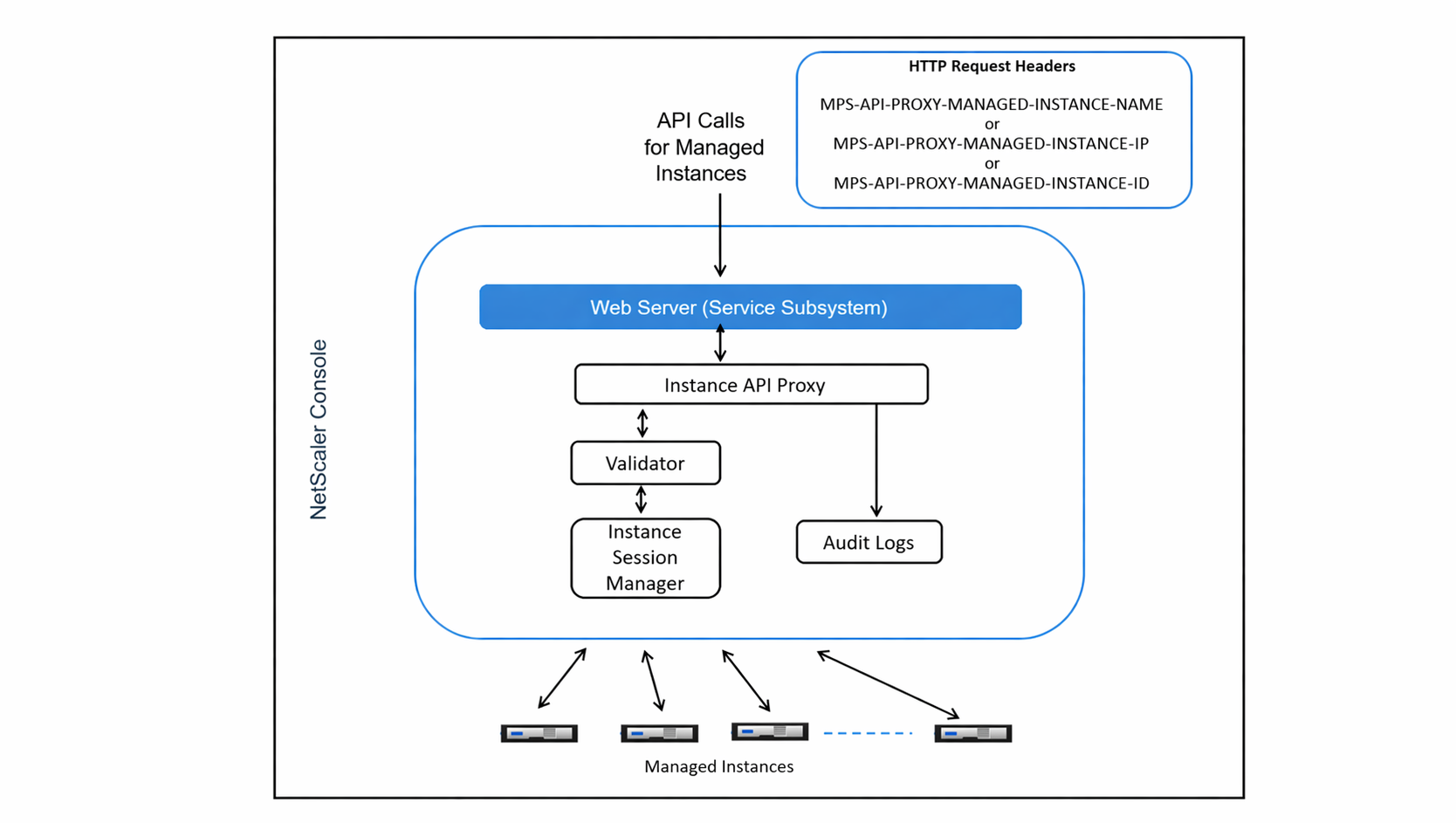
As shown in the above figure, when one of these HTTP headers appears in a request, NetScaler Console processes the request as follows:
-
Without modifying the request, NetScaler Console forwards the request to the instance API proxy engine.
-
The instance API proxy engine forwards the API request to a validator and logs the details of the API request in the audit log.
-
The validator ensures that the request does not violate configured security policies, RBAC policies, tenancy boundaries, and so on. It performs extra checks, such as a check to determine whether the managed instance is available.
If the API request is valid and can be forwarded to the managed instance, NetScaler Console identifies a session that is maintained by the instance Session Manager and then sends the request to the managed instance.
Note
Ensure the Prompt Credentials for Instance Login option is disabled. To do so:
-
Navigate to Settings > Administration.
-
In System Configurations, select System, Time zone, Allowed URLs and Message of the day.
How to use NetScaler Console as an API proxy server
The following examples show REST API requests that an API client sends to a NetScaler Console server that has an IP address of 192.0.2.5. NetScaler Console is required to forward the requests, unchanged, to a managed instance with IP address 192.0.2.10. All examples use the MPS-API-PROXY-MANAGED-INSTANCE-IP header.
Before sending NetScaler Console the API requests, the API client must:
-
Log in to NetScaler Console
-
Obtain a session ID
-
Include the session ID in subsequent API requests.
The logon API request is of the following form:
    POST /nitro/v1/config/login
     Content-Type: application/json

     {
         "login": {
             "username":"nsroot",
             "password":"nsroot"
          }
     }
NetScaler Console responds to the logon request with a response that includes the session ID. The following sample response body shows a session ID:
{

   "errorcode": 0,

   "message": "Done",

   "operation": "add",

   "resourceType": "login",

   "username": "***********",

   "tenant_name": "Owner",

   "resourceName": "nsroot",

   "login": [

     {

       "tenant_name": "Owner",

       "permission": "superuser",

       "session_timeout": "36000",

       "challenge_token": "",

       "username": "",

       "login_type": "",

       "challenge": "",

       "client_ip": "",

       "client_port": "-1",

       "cert_verified": "false",

       "sessionid": "##D2BF9C5F40E5B2E884A9C45C89F0ADE24DA8A8169BE6358D39F5D471B73D",

       "token": "b2f3f935e93db6a"
     }

   ]

 }
Example 1: Retrieve load balancing virtual server statistics
The client must send NetScaler Console an API request of the following form:
GET /nitro/v1/stat/lbvserver
 Content-type: application/json
 MPS-API-PROXY-MANAGED-INSTANCE-IP: 192.0.2.10
 SESSID: ##D2BF9C5F40E5B2E884A9C45C89F0ADE24DA8A8169BE6358D39F5D471B73D
Where the value of the Cookie Header is the Session ID returned from the login API call. And the value of the MPS-API-PROXY-MANAGED-INSTANCE-IP is the IP address of the NetScaler.
Example 2: Create a load balancing virtual server
The client must send NetScaler Console an API request of the following form:
     POST /nitro/v1/config/lbvserver/sample_lbvserver
     Content-type: application/json
     Accept-type: application/json
     MPS-API-PROXY-MANAGED-INSTANCE-IP: 192.0.2.10
     SESSID: ##D2BF9C5F40E5B2E884A9C45C89F0ADE24DA8A8169BE6358D39F5D471B73D

     {
          "lbvserver":{
              "name":"sample_lbvserver",
              "servicetype":"HTTP",
              "ipv46":"10.102.1.11",
              "port":"80"
          }
     }
Example 3: Modify a load balancing virtual server
The client must send NetScaler Console an API request of the following form:
    PUT /nitro/v1/config/lbvserver
     Content-type: application/json
     Accept-type: application/json
     MPS-API-PROXY-MANAGED-INSTANCE-IP: 192.0.2.10
     SESSID: ##D2BF9C5F40E5B2E884A9C45C89F0ADE24DA8A8169BE6358D39F5D471B73D

     {
        "lbvserver":{
             "name":"sample_lbvserver",
             "appflowlog":"DISABLED"
        }
     }
Example 4: Delete a load balancing virtual server
The client must send NetScaler Console an API request of the following form:
    DELETE /nitro/v1/config/lbvserver/sample_lbvserver
     Accept-type: application/json
     MPS-API-PROXY-MANAGED-INSTANCE-IP: 192.0.2.10
     SESSID: ##D2BF9C5F40E5B2E884A9C45C89F0ADE24DA8A8169BE6358D39F5D471B73D
Example 5: Download the CLI running config on the NetScaler
The client must send NetScaler Console an API request of the following form:
    GET /nitro/v1/config/nsrunningconfig
     Accept-type: application/json
     MPS-API-PROXY-MANAGED-INSTANCE-IP: 192.0.2.10
     SESSID: ##D2BF9C5F40E5B2E884A9C45C89F0ADE24DA8A8169BE6358D39F5D471B73D