
Enable external authentication servers and fallback options
Fallback option enables local authentication to take over if the external server authentication fails. A user configured on both NetScaler Console and external authentication server can log on to NetScaler Console, even if the configured external authentication servers are down or not reachable. To ensure fallback authentication work:
-
Non-nsroot users must be able to access NetScaler Console if external server is down or not reachable
-
You must add at least one external server
NetScaler Console also supports a unified system of authentication, authorization, and accounting (AAA) protocols (LDAP, RADIUS, and TACACS), along with local authentication. This unified support provides a common interface to authenticate and authorize all users and external AAA clients accessing the system.
NetScaler Console can authenticate users regardless of the actual protocols they to communicate with the system. Cascading external authentication servers provides a continuous non-failing process for authenticating and authorizing external users. If authentication fails on the first authentication server, NetScaler Console attempts to authenticate the user by using the second external authentication server, and so on. To enable cascade authentication, you must add the external authentication servers in NetScaler Console. You can add any type of the supported external authentication servers (RADIUS, LDAP, and TACACS).
For example, consider that you want to add four external authentication servers and configured two RADIUS servers, one LDAP server, and one TACACS server. NetScaler Console attempts to authenticate with the external servers, based on the configurations. In this example scenario, NetScaler Console attempts to:
-
Connect with the first RADIUS server
-
Connect with the second RADIUS server, if the authentication has failed with first RADIUS server
-
Connect with the LDAP server, if the authentication has failed with both RADIUS servers
-
Connect with the TACACS server, if the authentication has failed with both RADIUS servers and LDAP server.
Note
You can configure up to 32 external authentication servers in NetScaler Console.
Related information
Configure fallback and cascade external servers
-
Navigate to Settings > Authentication > Authentication Settings.
-
On the Authentication Settings page, under External server authentication, click Enable single-factor authentication.
-
On the Enable single-factor authentication page, click Select servers. Select one or multiple authentication servers and click Add.
-
Select Fallback to local authentication if external authentication fails if you want the local authentication to take over when the external authentication fails.
-
Select Record external user group information in system logs if you want to capture the external user group information in the system audit log.
-
Click Submit to close the page.The selected servers are displayed on the Authentication Settings page.
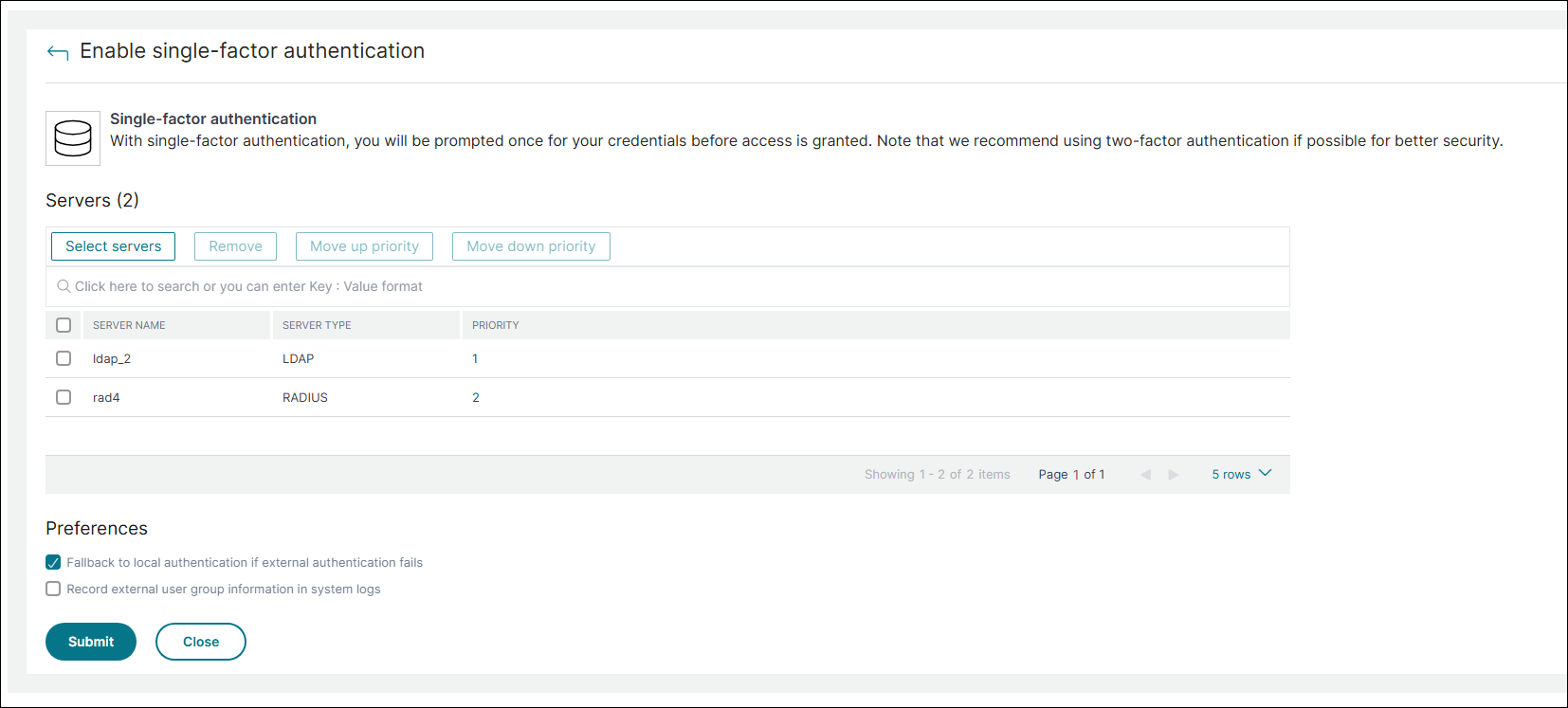
You can also specify the order of authentication by using the icon next to the server names to move servers up or down the list.