Configure SLA management
Service Level Agreement Management feature will help you to manage SLA over Server Response Time, Hits/sec, and Bandwidth usage across your Domain usage. Configuring SLA on various breaches eases you to monitor many events generated across your NetScaler infrastructure.
You can configure SLA breach for the following:
-
Server Response time
-
SLA Breach Frequency for Bandwidth
-
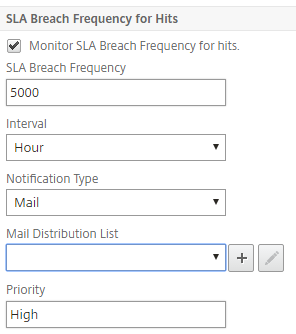
SLA Breach Frequency for Hits
-
SLA Breach Frequency for Response Time
You can configure notifications for each SLA breach whenever your appliance encounters it. You can configure the notification type as Mail, SMS, or Syslog and configure distribution lists respectively.
Related information
To configure SLA breach for a NetScaler instance
-
Navigate to System \> Analytics Settings \> SLA Management.
-
From the list displayed, select the NetScaler® IP address of an appliance on which you want to manage SLA.
-
Click Add, if you want to add a new SLA Group and add beach definitions to it. Alternatively, you can select a SLA group from the list if you already have added a SLA group.
-
In the SLA Group field, enter the name for the new SLA group.
-
Select the appropriate check boxes to enable or disable the SLA monitors.
-
Select the appropriate breach values for the selected options. For example, Maximum Server Response Time (ms)* = 22 ms.
-
Select the notification type and the interval to notify from the Notification Type and Interval lists appropriately.
-
You can select the distribution lists to send the notifications from the Mail/SMS/Syslog Distribution List menu.
-
Click Create, to create, and add a SLA group to your NetScaler appliance.