
Back up and restore a NetScaler Console configuration in an HA pair
You can back up the current configuration of a NetScaler Console. In an HA deployment of NetScaler Console, you can back up and restore the NetScaler Console configuration from either one of the servers. If you are using a load balancing virtual server IP address to take the backup, the backup file can be stored on either server and must be checked manually.
If you restore when only one node is active, or when restoring if a failover happens, the restore process fails to complete.
To back up a NetScaler Console configuration:
-
Navigate to System \> Advanced Settings \> Backup Files, and then click Back Up.
-
To encrypt the backup file, select the Password Protect file check box.
To restore a NetScaler Console configuration from a backup file:
-
Navigate to System \> Advanced Settings \> Backup Files.
-
Select the backup file that you want to restore, and then click Restore.
To configure system backup settings:
-
Navigate to System \> System Administration. Under Backup Settings, click System Backup Settings.
-
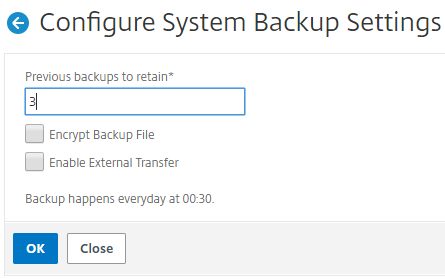
On the Configure System Backup Settings page, specify the following:
-
Number of backups to retain. You can only retain up to 10 backups.
-
Encrypt the backup file.
-
Enable external transfer. You can transfer a copy of a copy of your backup file to another system as a precautionary measure. When you want to restore the configuration, you have to first upload the file to the NetScaler Console server and then perform the restore operation. Specify the server, user name and password, port, the transfer protocol to be used, and the directory path. To learn more about external transfer, see Transfer a NetScaler Console Backup File to an External System.
-
-
Click OK.
Related information